Vector vs Keyword Search: When Each Wins (With Data) (2026)
Vector Search vs Keyword Search in RAG
Ask a developer why they chose vector search for their RAG system and you will often hear "because it is semantic" — which is true but does not tell you when semantic retrieval is actually the right call. The uncomfortable reality is that BM25 keyword search, the algorithm powering Elasticsearch and most enterprise search systems since the early 2000s, outperforms vector search on a non-trivial set of real queries.
A query like "gRPC connection refused error" contains a specific protocol name, a specific error message, and specific intent. Vector search embeds this into a semantic space where "gRPC" might be close to other RPC frameworks and "connection refused" might surface networking content generally. BM25 finds documents that literally contain "gRPC" and "connection refused." For this query, BM25 usually wins.
Understanding when each retrieval method excels — and when it fails — is what separates teams who tune their RAG systems from teams who wonder why retrieval quality is inconsistent. For broader context on RAG retrieval, see the Vector Database Guide.
Concept Overview
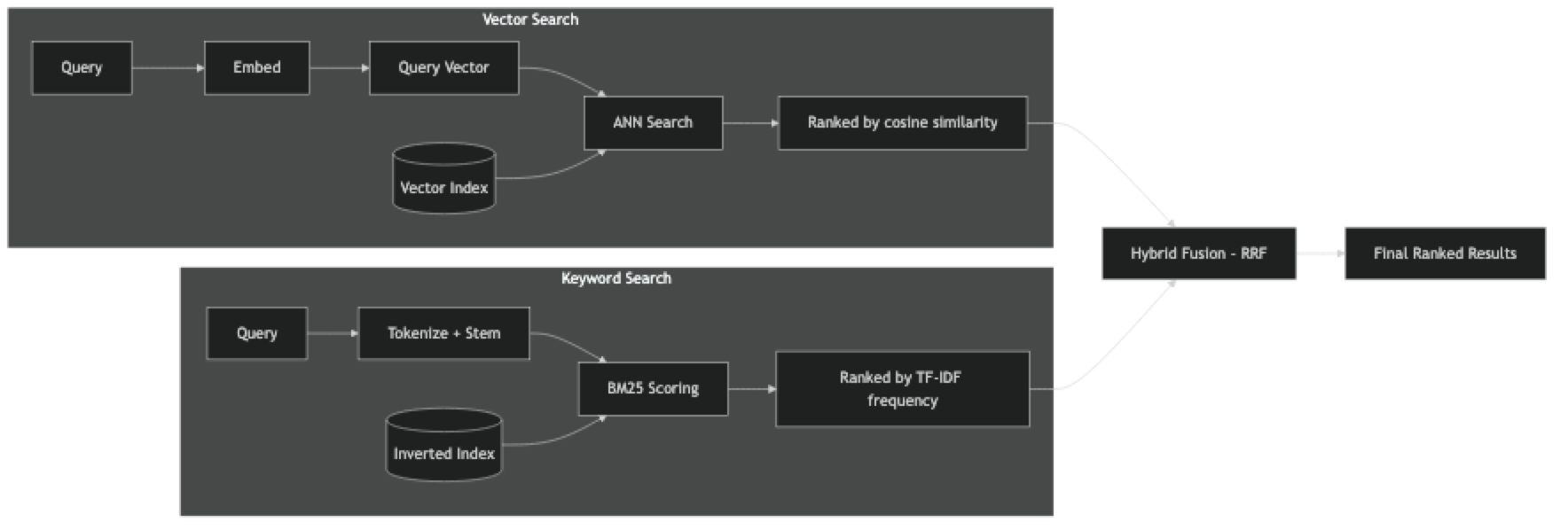
Vector search (dense retrieval) converts both documents and queries into dense embedding vectors. Retrieval is an approximate nearest neighbor (ANN) search over the embedding space, typically using cosine similarity. Documents that are semantically similar to the query rank higher, regardless of shared vocabulary.
Keyword search (sparse retrieval) uses an inverted index to match documents by term frequency. BM25 is the dominant algorithm — it scores documents based on how often query terms appear, normalized by document length and weighted by term rarity (IDF). Documents with exact query terms rank higher.
Neither is universally superior. They have complementary strengths:
| Retrieval Type | Strength | Weakness |
|---|---|---|
| Vector (semantic) | Finds synonyms, paraphrases, related concepts | Fails on rare terms, identifiers, exact strings |
| Keyword (BM25) | Finds exact terms, rare identifiers, error codes | Misses synonyms, paraphrases, concept variation |
How It Works
BM25 Score Formula
BM25 scores document d for query q as:
BM25(d, q) = Σ IDF(t) * (tf(t,d) * (k1+1)) / (tf(t,d) + k1*(1 - b + b*|d|/avgdl))Where:
tf(t,d)= term frequency of termtin documentdIDF(t)= inverse document frequency oft(rarer terms get higher weight)|d|= document length,avgdl= average document lengthk1=1.2,b=0.75are standard default parameters
In practice, you do not implement this yourself — Elasticsearch, OpenSearch, and Python's rank-bm25 library handle it.
Implementation Example
Pure Vector Search (Baseline)
# pip install langchain langchain-openai langchain-chroma chromadb

from langchain_openai import OpenAIEmbeddings
from langchain_chroma import Chroma

embeddings = OpenAIEmbeddings(model="text-embedding-3-small")
vs = Chroma(
    persist_directory="./chroma_db",
    embedding_function=embeddings,
    collection_name="docs"
)

def vector_search(query: str, k: int = 5) -> list[dict]:
    """Pure semantic vector search."""
    results = vs.similarity_search_with_score(query, k=k)
    return [
        {
            "content": doc.page_content[:200],
            "score": round(1 - score, 4),   # convert distance to similarity
            "source": doc.metadata.get("source", "?"),
            "method": "vector"
        }
        for doc, score in results
    ]

# Test
results = vector_search("how do I authenticate with the API?")
for r in results:
    print(f"[{r['score']:.4f}] {r['content'][:100]}")
Pure BM25 Keyword Search
# pip install rank-bm25

from langchain_community.retrievers import BM25Retriever
from langchain_community.document_loaders import DirectoryLoader, PyPDFLoader
from langchain.text_splitter import RecursiveCharacterTextSplitter

# Load documents (needed in memory for BM25)
loader = DirectoryLoader("./docs", glob="**/*.pdf", loader_cls=PyPDFLoader)
documents = loader.load()
splitter = RecursiveCharacterTextSplitter(chunk_size=512, chunk_overlap=64)
chunks = splitter.split_documents(documents)

# Build BM25 index (in-memory, rebuilt on each startup)
bm25_retriever = BM25Retriever.from_documents(chunks)
bm25_retriever.k = 5

def keyword_search(query: str) -> list[dict]:
    """Pure BM25 keyword search."""
    results = bm25_retriever.invoke(query)
    return [
        {
            "content": doc.page_content[:200],
            "source": doc.metadata.get("source", "?"),
            "method": "bm25"
        }
        for doc in results
    ]

results = keyword_search("gRPC connection refused error")
for r in results:
    print(f"[BM25] {r['content'][:100]}")
Hybrid Search (Recommended Default)
from langchain.retrievers import EnsembleRetriever

dense_retriever = vs.as_retriever(search_kwargs={"k": 10})
sparse_retriever = BM25Retriever.from_documents(chunks)
sparse_retriever.k = 10

hybrid_retriever = EnsembleRetriever(
    retrievers=[dense_retriever, sparse_retriever],
    weights=[0.6, 0.4]    # favor semantic slightly
)

def hybrid_search(query: str) -> list:
    return hybrid_retriever.invoke(query)

results = hybrid_search("API authentication 401 error")
print(f"Hybrid retrieved {len(results)} chunks")
Comparative Evaluation
This is the most useful code in this post — it lets you evaluate all three methods on your actual queries:
from langchain_openai import ChatOpenAI

def evaluate_retrieval_methods(
    test_queries: list[dict],   # [{"query": str, "expected_source": str}]
    k: int = 5
) -> dict:
    """
    Compare vector, BM25, and hybrid retrieval on test queries.
    Measures whether the expected source document appears in top-K results.
    """
    results = {"vector": [], "bm25": [], "hybrid": []}

    for test in test_queries:
        query = test["query"]
        expected = test["expected_source"]

        # Vector search
        v_results = vector_search(query, k=k)
        v_hit = any(expected in r["source"] for r in v_results)
        results["vector"].append(v_hit)

        # BM25 search
        b_results = keyword_search(query)
        b_hit = any(expected in r["source"] for r in b_results)
        results["bm25"].append(b_hit)

        # Hybrid search
        h_results = hybrid_search(query)
        h_hit = any(expected in d.metadata.get("source", "") for d in h_results)
        results["hybrid"].append(h_hit)

        if not h_hit:
            print(f"MISS (all methods): {query}")

    # Summary
    for method, hits in results.items():
        precision = sum(hits) / len(hits) * 100
        print(f"{method}: {precision:.1f}% precision@{k} ({sum(hits)}/{len(hits)})")

    return results


# Define test cases — use real queries from your production logs
test_queries = [
    # Natural language — vector should win
    {"query": "how do I reset my password?", "expected_source": "support-faq.pdf"},
    {"query": "what happens if I miss a payment", "expected_source": "billing-policy.pdf"},

    # Exact terms — BM25 should win
    {"query": "TypeError: 'NoneType' object is not subscriptable", "expected_source": "error-reference.pdf"},
    {"query": "CVE-2024-21413 mitigation", "expected_source": "security-bulletin.pdf"},

    # Mixed — hybrid should win
    {"query": "API rate limit 429 too many requests", "expected_source": "api-docs.pdf"},
    {"query": "OAuth2 authentication flow", "expected_source": "api-docs.pdf"},
]

evaluate_retrieval_methods(test_queries, k=5)
Elasticsearch Hybrid Search (Production Alternative)
For production systems that already use Elasticsearch:
from elasticsearch import Elasticsearch
from langchain_openai import OpenAIEmbeddings

es = Elasticsearch("http://localhost:9200")
embeddings = OpenAIEmbeddings(model="text-embedding-3-small")

# Elasticsearch 8.x supports native hybrid search via knn + text query
def es_hybrid_search(query: str, index: str, k: int = 5, alpha: float = 0.7) -> list:
    """
    Hybrid search using Elasticsearch's native knn + BM25.
    alpha: weight for vector component (0=BM25 only, 1=vector only)
    """
    query_vector = embeddings.embed_query(query)

    response = es.search(
        index=index,
        body={
            "size": k,
            "query": {
                "bool": {
                    "should": [
                        # BM25 text query
                        {
                            "match": {
                                "content": {
                                    "query": query,
                                    "boost": 1 - alpha
                                }
                            }
                        }
                    ]
                }
            },
            "knn": {
                "field": "embedding",
                "query_vector": query_vector,
                "k": k,
                "num_candidates": k * 5,
                "boost": alpha
            }
        }
    )

    return [
        {
            "content": hit["_source"]["content"],
            "score": hit["_score"],
            "source": hit["_source"].get("source", "unknown")
        }
        for hit in response["hits"]["hits"]
    ]
When to Use Each
Use vector search when:
- Queries are natural language and conversational
- Users paraphrase questions differently than documents are written
- You want to handle synonyms and related concepts automatically
- The domain does not have lots of specialized terminology
Use keyword search when:
- Queries contain specific error codes, version numbers, or identifiers
- Documents are technical with lots of proper nouns and acronyms
- Users tend to copy-paste error messages verbatim
- You need predictable, explainable retrieval behavior
Use hybrid (default recommendation) when:
- You serve diverse query types (most real applications)
- You cannot predict whether a user will write "authentication fails" or "401 error"
- You want the robustness of both approaches
In practice, start with hybrid. The cost is negligible (BM25 is near-instant) and the quality improvement is consistent for mixed query distributions.
Best Practices
Run a retrieval evaluation before production. Collect 50–100 real queries with known answer sources. Measure precision@5 for each retrieval method. Let the data guide your alpha/weight choices.
Tune BM25 k1 and b parameters for your domain. The defaults (k1=1.2, b=0.75) work well for general text. For very short documents, reduce b. For highly repetitive technical content, reduce k1. Most teams never tune these, but for specialized domains the improvement is measurable.
Log retrieval scores in production. Store the similarity scores for retrieved chunks in your logs. Track average score distributions over time — a drop in average scores often indicates document quality issues or embedding drift before it affects user-visible quality.
Normalize scores before combining in hybrid search. BM25 scores are unbounded (can exceed 10 for long documents with many term matches). Vector similarity scores are in [0,1]. Normalize both to [0,1] before weighted combination.
Common Mistakes
Choosing a retrieval method without measuring. The right choice depends on your actual query distribution. Teams that assume vector search is always better often discover BM25 wins on 30% of their real queries.
Skipping stopword removal in BM25. BM25 gives high scores to chunks containing frequent stopwords that appear in the query. Removing stopwords ("the", "is", "for", "in") from the index consistently improves BM25 quality.
Not handling rare terms in vector search. Proper nouns, product names, and technical identifiers that rarely appear in the embedding model's training data get poor embeddings. For these terms, vector search systematically underperforms BM25.
Forgetting to keep BM25 and vector indexes in sync. When you add or delete documents, you must update both the vector store and the BM25 index. BM25 is usually in-memory (LangChain's BM25Retriever), so it needs to be rebuilt from the current document set.
Key Takeaways
- BM25 keyword search outperforms vector search for exact-match queries containing error codes, identifiers, version numbers, and proper nouns
- Vector search outperforms BM25 for conversational, natural language queries where users paraphrase differently than documents are written
- Hybrid search (BM25 + vector with RRF fusion) is the correct default for production RAG systems serving diverse query types
- BM25 lookup adds under 5ms of latency for datasets up to a few hundred thousand documents — the performance cost is negligible
- Measure retrieval quality on your actual query distribution before committing to a strategy — do not assume vector is always better
- Normalize BM25 and vector scores to [0,1] before weighted combination since BM25 scores are unbounded
- Log retrieval scores in production to detect embedding drift or document quality degradation before users notice
- The
langchain_chromaimport should be used instead of the deprecatedlangchain_community.vectorstoresimport
FAQ
Is vector search always better than BM25 for RAG? No. For natural language, conversational queries, vector search usually wins. For technical documentation queries with specific identifiers and error codes, BM25 often matches or exceeds vector search. The right choice depends on your query distribution.
Does vector search work well for code search? Inconsistently. General code concepts search well semantically. Specific function names, error messages, and library APIs search better with BM25 or hybrid. For code RAG, hybrid retrieval with higher BM25 weight is usually more effective.
What is BM25's main limitation? Vocabulary mismatch. If a user asks "how do I authenticate?" and the document says "logging in with credentials," BM25 finds no match because the terms do not overlap. Vector search handles this gracefully. This is the core case for semantic retrieval.
How expensive is running BM25 alongside vector search? BM25 lookup is near-instant for collections up to a few hundred thousand documents. The index is a Python dictionary in memory. At over 1M documents, you would want a dedicated search engine (Elasticsearch). For most RAG applications, BM25 adds under 5ms of latency.
Should I index the same documents twice — once for BM25 and once for vector search? Yes, conceptually — but you can share the document loading and chunking steps. The vector index (Chroma/FAISS/Pinecone) and the BM25 index (in-memory or Elasticsearch) are separate data structures that both operate on the same chunks.
What weight should I use for BM25 vs vector in hybrid search? A 60/40 split (0.6 vector, 0.4 BM25) is a common starting point. Increase the BM25 weight for technical documentation with exact terminology; increase the vector weight for conversational or customer support use cases. Always tune on your actual query evaluation set.
How do I build hybrid search with LangChain?
Use EnsembleRetriever with a Chroma vector retriever and a BM25Retriever. The ensemble retriever handles reciprocal rank fusion automatically. Set weights as a list summing to 1.0. Retrieve a larger K from each retriever (10–20) to improve fusion quality before returning the final top 5.