RAG Chunking: Why Your Retrieval Fails and How to Fix It (2026)
Chunking Strategies for RAG Pipelines
Chunking is the most boring-sounding part of RAG and the part that matters most. Developers who struggle with retrieval quality spend weeks tuning their embedding model or retrieval parameters when the actual problem is upstream: their chunks are too large, overlap incorrectly, or split sentences at boundaries that destroy meaning.
A chunk is what gets embedded. The embedding is what gets searched. If the chunk structure is wrong, the embedding is wrong, and no retrieval optimization downstream can compensate. Getting chunking right first is one of the highest-leverage investments in a RAG pipeline.
This guide covers the main chunking strategies — when each is appropriate, how to implement them, and how to measure whether your chunking is actually working.
For the full pipeline context, see the RAG Architecture Guide.
Concept Overview
Chunking is the process of splitting source documents into smaller units that can be independently embedded, stored, and retrieved. The embedding of a chunk represents the semantic content of that chunk — so chunk structure directly determines what information is searchable and at what granularity.
The core tension in chunking:
- Too small → chunks lose context (a single sentence about "connection timeouts" without surrounding context is ambiguous)
- Too large → embeddings are averaged over too much content, diluting the search signal
- Wrong boundaries → information split across boundaries is either lost or requires high overlap
There is no universally correct chunk size. The right size depends on your document type, your typical query length, and your embedding model.
How It Works
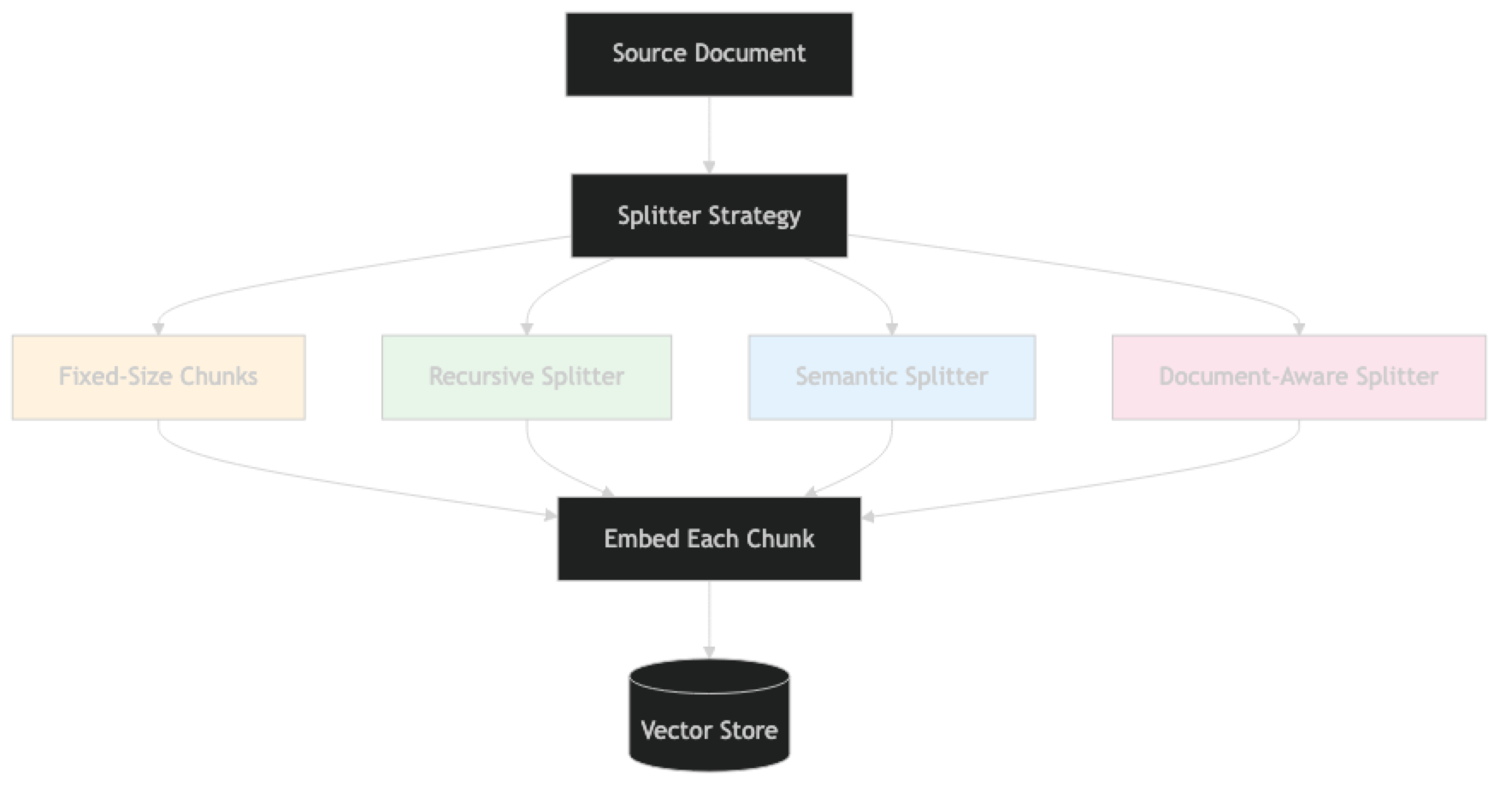
Implementation Example
Strategy 1: Recursive Character Text Splitter (Default Best Practice)
# pip install langchain langchain-openai chromadb pypdf

from langchain.text_splitter import RecursiveCharacterTextSplitter
from langchain_community.document_loaders import PyPDFLoader

loader = PyPDFLoader("./docs/handbook.pdf")
documents = loader.load()

# RecursiveCharacterTextSplitter tries separators in order:
# first paragraph breaks, then newlines, then sentence endings, then spaces
splitter = RecursiveCharacterTextSplitter(
    chunk_size=512,         # target character count
    chunk_overlap=64,       # overlap between adjacent chunks
    separators=[
        "\n\n",     # paragraph break (preferred)
        "\n",       # line break
        ". ",       # sentence end
        "! ",
        "? ",
        " ",        # word break (last resort)
        ""          # character break (only if nothing else works)
    ],
    length_function=len,
    is_separator_regex=False
)

chunks = splitter.split_documents(documents)

# Inspect chunk quality
sizes = [len(c.page_content) for c in chunks]
print(f"Chunks: {len(chunks)}")
print(f"Min: {min(sizes)}, Max: {max(sizes)}, Avg: {sum(sizes)//len(sizes)}")

# Flag problematic chunks
tiny_chunks = [c for c in chunks if len(c.page_content) < 100]
print(f"Tiny chunks (<100 chars): {len(tiny_chunks)}")
for c in tiny_chunks[:3]:
    print(f"  '{c.page_content}'")
This is the right default for most document types. It respects natural text boundaries and degrades gracefully.
Strategy 2: Token-Based Splitting
from langchain.text_splitter import TokenTextSplitter

# Split by token count rather than character count
# More accurate when you care about fitting within LLM context windows
token_splitter = TokenTextSplitter(
    chunk_size=256,          # tokens per chunk (not characters)
    chunk_overlap=32,        # token overlap
    encoding_name="cl100k_base"   # tiktoken encoding for GPT-4/GPT-3.5
)

token_chunks = token_splitter.split_documents(documents)
print(f"Token-split chunks: {len(token_chunks)}")

# Compare: RecursiveCharacterTextSplitter at 512 chars ≈ 128 tokens
# TokenTextSplitter at 256 tokens ≈ 1024 chars
# Use token splitting when you need precise control over context budget
Strategy 3: Semantic Chunking
Instead of splitting at character or token boundaries, split at semantic boundaries — places where the meaning shifts.
from langchain_experimental.text_splitter import SemanticChunker
from langchain_openai import OpenAIEmbeddings

embeddings = OpenAIEmbeddings(model="text-embedding-3-small")

# SemanticChunker computes embeddings for each sentence and
# splits where the embedding distance exceeds a threshold
semantic_splitter = SemanticChunker(
    embeddings=embeddings,
    breakpoint_threshold_type="percentile",   # split at the 95th percentile of distances
    breakpoint_threshold_amount=95
    # alternatives:
    # breakpoint_threshold_type="standard_deviation"
    # breakpoint_threshold_type="interquartile"
)

# Note: SemanticChunker calls the embedding API for each sentence
# It is significantly slower and more expensive than RecursiveCharacterTextSplitter
# Use it only for high-value documents where coherence matters more than speed
semantic_chunks = semantic_splitter.split_documents(documents[:5])  # test on first 5 pages
print(f"Semantic chunks: {len(semantic_chunks)}")
sizes = [len(c.page_content) for c in semantic_chunks]
print(f"Sizes: min={min(sizes)}, max={max(sizes)}, avg={sum(sizes)//len(sizes)}")
Semantic chunking produces more coherent chunks but at a significant embedding API cost. One thing many developers overlook: you're paying to embed documents twice — once for chunking, once for indexing.
Strategy 4: Document-Aware Splitting
Different document types need different splitters:
from langchain.text_splitter import (
    RecursiveCharacterTextSplitter,
    MarkdownHeaderTextSplitter,
    PythonCodeTextSplitter,
    HTMLHeaderTextSplitter
)

# Markdown: split on headers to keep sections intact
md_splitter = MarkdownHeaderTextSplitter(
    headers_to_split_on=[
        ("#", "h1"),
        ("##", "h2"),
        ("###", "h3")
    ],
    strip_headers=False   # keep headers in chunks for context
)

# The header splitter produces chunks with metadata: {"h1": "Section Name", "h2": "Subsection"}
md_chunks = md_splitter.split_text("""
# Getting Started
## Installation
Run pip install mypackage to install.

## Configuration
Set your API key in the environment.

# API Reference
## Endpoints
The API has three endpoints...
""")

for chunk in md_chunks:
    print(f"Headers: {chunk.metadata}")
print(f"Content: {chunk.page_content[:100]}\n")# HTML: split on headers for web scraped content
html_splitter = HTMLHeaderTextSplitter(
headers_to_split_on=[
("h1", "h1"),
("h2", "h2"),
("h3", "h3")
]
)
# Python: preserve function and class structure
code_splitter = PythonCodeTextSplitter(
chunk_size=1000,
chunk_overlap=100
)
# Then apply a secondary splitter to enforce size limits after document-aware split
secondary_splitter = RecursiveCharacterTextSplitter(
chunk_size=512,
chunk_overlap=64
)
def split_by_type(documents: list) -> list:
"""Route documents to appropriate splitter by file type."""
all_chunks = []
for doc in documents:
source = doc.metadata.get("source", "")
if source.endswith(".md"):
# Split by headers first, then by size
header_chunks = md_splitter.split_text(doc.page_content)
for hchunk in header_chunks:
sub_chunks = secondary_splitter.split_text(hchunk.page_content)
all_chunks.extend(sub_chunks)
elif source.endswith(".py"):
chunks = code_splitter.split_documents([doc])
all_chunks.extend(chunks)
else:
# Default: recursive character split
chunks = RecursiveCharacterTextSplitter(
chunk_size=512, chunk_overlap=64
).split_documents([doc])
all_chunks.extend(chunks)
return all_chunksStrategy 5: Parent-Child Chunking
Retrieve small, precise child chunks. Return large parent chunks that provide context:
from langchain.retrievers import ParentDocumentRetriever
from langchain.storage import InMemoryStore
from langchain_chroma import Chroma
from langchain_openai import OpenAIEmbeddings
from langchain.text_splitter import RecursiveCharacterTextSplitter

# Small chunks for precise embedding and retrieval
child_splitter = RecursiveCharacterTextSplitter(chunk_size=300, chunk_overlap=30)

# Large chunks that provide full context for generation
parent_splitter = RecursiveCharacterTextSplitter(chunk_size=1500, chunk_overlap=150)

vectorstore = Chroma(
    collection_name="child_chunks",
    embedding_function=OpenAIEmbeddings(model="text-embedding-3-small")
)

# InMemoryStore maps child chunk IDs to their parent chunks
# Use Redis or a database in production for persistence
docstore = InMemoryStore()

retriever = ParentDocumentRetriever(
    vectorstore=vectorstore,
    docstore=docstore,
    child_splitter=child_splitter,
    parent_splitter=parent_splitter
)

# Index: embeds child chunks, stores parent chunks
retriever.add_documents(documents)

# Retrieve: finds child chunks, returns parent chunks
parent_results = retriever.invoke("error handling best practices")
print(f"Retrieved {len(parent_results)} parent chunks")
print(f"First parent: {len(parent_results[0].page_content)} chars")
Chunk Quality Evaluation
from langchain_openai import OpenAIEmbeddings
import numpy as np

def evaluate_chunk_quality(chunks: list, embeddings: OpenAIEmbeddings) -> dict:
    """
    Measure chunk quality:
    - Size distribution (should be consistent)
    - Intra-chunk coherence (embedding distance between first and second half)
    - Inter-chunk overlap (how similar adjacent chunks are)
    """
    sizes = [len(c.page_content) for c in chunks]

    # Size statistics
    stats = {
        "count": len(chunks),
        "min_chars": min(sizes),
        "max_chars": max(sizes),
        "avg_chars": sum(sizes) // len(sizes),
        "std_chars": round(np.std(sizes), 1),
        "tiny_chunks": sum(1 for s in sizes if s < 100),
        "oversized_chunks": sum(1 for s in sizes if s > 1500)
    }

    # Flag quality issues
    issues = []
    if stats["tiny_chunks"] > len(chunks) * 0.05:
        issues.append(f"Too many tiny chunks: {stats['tiny_chunks']} ({stats['tiny_chunks']/len(chunks)*100:.1f}%)")
    if stats["std_chars"] > stats["avg_chars"] * 0.5:
        issues.append(f"High size variance (std={stats['std_chars']}): chunks may be inconsistent")
    if stats["oversized_chunks"] > 0:
        issues.append(f"Oversized chunks: {stats['oversized_chunks']} — consider smaller chunk_size")

    stats["issues"] = issues
    return stats


# Run evaluation
embeddings = OpenAIEmbeddings(model="text-embedding-3-small")
quality = evaluate_chunk_quality(chunks, embeddings)
print(f"Chunk quality report:")
for k, v in quality.items():
    print(f"  {k}: {v}")
Chunk Size Guidelines by Document Type
| Document Type | Recommended Chunk Size | Overlap | Strategy |
|---|---|---|---|
| General prose (PDFs, articles) | 400–600 chars | 10–15% | RecursiveCharacter |
| Technical documentation | 512–800 chars | 10% | RecursiveCharacter |
| Legal/policy documents | 600–1000 chars | 15% | RecursiveCharacter |
| Markdown/structured docs | By header section | 5–10% | MarkdownHeader → Recursive |
| Source code | 500–1000 chars | 10% | PythonCodeTextSplitter |
| FAQ documents | One Q&A per chunk | 0% | Custom delimiter |
| Short-form content (FAQs, snippets) | 150–300 chars | 0–5% | RecursiveCharacter |
Best Practices
Check chunk size distribution before indexing. More than 5% of chunks under 100 characters is a signal that your splitter is fragmenting sentences. More than 5% at exactly the max size means the separators aren't finding natural boundaries.
Preserve document structure in metadata. When using MarkdownHeaderTextSplitter, the headers become metadata. Store them — they enable filtering like {"h2": "Installation"} and dramatically improve retrieval for structured documents.
Use overlap of 10–15% of chunk size. For a 512-character chunk, 50–75 characters of overlap prevents information loss at boundaries. A sentence split across two chunks is recoverable if both chunks share part of that sentence.
Never split tables. Tables express relationships between values. A table split across two chunks loses the column headers in one and the data in another. Detect tables in preprocessing and keep them whole, even if they exceed your target chunk size.
Test your chunking on a representative sample. Run your splitter on 10 representative documents and read 20 random chunks. If chunks frequently start or end mid-sentence, or contain only boilerplate (headers, footers, page numbers), adjust your strategy.
Common Mistakes
Using the same chunk size for all document types. A 512-character chunk is appropriate for dense technical documentation but may be too small for legal prose where sentences are long and context-dependent.
Setting overlap to zero. Without overlap, information at chunk boundaries is effectively lost — retrieved in neither chunk or retrieved in both in its incomplete form. Always use 10% overlap minimum.
Not cleaning documents before chunking. PDFs often contain repeated headers, page numbers, table of contents entries, and OCR artifacts. These pollute chunks and degrade retrieval. Strip headers/footers before splitting.
Ignoring chunk metadata. Chunks without source, page number, and section metadata cannot be filtered, cited with precision, or updated selectively. Metadata is not optional in production.
Treating tables as text. Flattening a table row by row produces nonsensical chunks ("Product A, $99, 2 years, 1 year, 3 days"). Parse tables into structured text ("Product A costs $99, has a 2-year warranty...") before chunking.
Frequently Asked Questions
What is the best chunk size for RAG? There is no universal answer. Start with 400–512 characters and measure retrieval quality on your actual query set. Adjust based on whether retrieved chunks are consistently too specific (increase size) or too diluted (decrease size). The table in this guide provides starting points by document type.
Should I split by tokens or characters?
Characters are simpler and predictable. Tokens are more accurate if you are managing context window budgets precisely. For most use cases, character-based splitting with RecursiveCharacterTextSplitter is sufficient. Switch to token-based splitting when you need to guarantee no chunk exceeds N tokens for a specific model.
How does overlap affect retrieval quality? Overlap prevents information loss at chunk boundaries. A 10% overlap provides good protection. More overlap increases index size and retrieval cost; less increases boundary information loss. For most use cases, 10–15% is the right range. Set overlap to zero only for FAQ-style content where each entry is a self-contained unit.
Can I use different chunk sizes for different queries? Not directly in a standard pipeline — chunk size is set at index time, not query time. You can maintain multiple indexes with different chunk sizes and query both, then fuse results. In practice, most teams settle on one chunk size that works well for their query distribution rather than maintaining multiple indexes.
What is semantic chunking and when should I use it? Semantic chunking uses embedding distances between adjacent sentences to detect topic shifts and split there. It produces more coherent chunks but is slower (requires embedding every sentence) and more expensive (double the embedding API calls). Use it for high-value documents — annual reports, textbooks, research papers — where coherence matters more than indexing speed or cost.
Why does my RAG pipeline return irrelevant chunks even with a good embedding model? The problem is almost always the chunks, not the embedding model. Common causes: chunk size too large (diluted embedding signal), no overlap (boundary information lost), document not cleaned before chunking (headers and footers polluting chunks), or tables flattened to text (losing structure). Print 20 random retrieved chunks and read them — visual inspection reveals most chunking problems immediately.
How do I handle documents that mix prose, tables, and code?
Use a multi-pass approach: first extract tables and code blocks as separate chunks with type metadata, then apply RecursiveCharacterTextSplitter to the remaining prose. Store chunk_type: "table" or chunk_type: "code" in metadata so you can filter or weight these chunk types differently at retrieval time.
Key Takeaways
- Chunking is the highest-leverage optimization in a RAG pipeline — fix this before tuning prompts, switching models, or adding rerankers
- Use
RecursiveCharacterTextSplitterat 400–600 characters with 10–15% overlap as the default starting point - Use document-aware splitters (
MarkdownHeaderTextSplitter,PythonCodeTextSplitter) when structure should guide chunk boundaries - Use parent-child retrieval when you need both high precision (small child chunks for matching) and rich context (large parent chunks for the LLM)
- Always use 10–15% overlap for fixed-size splitting — zero overlap causes boundary information loss
- Check chunk size distribution before indexing: more than 5% tiny chunks signals fragmentation; more than 5% at max size means natural boundaries were not found
- Never split tables — parse them to Markdown first and store as complete chunks
- Always preserve metadata (source, page, section) in every chunk — it enables filtering and citations in production
- Visual inspection of 20 random chunks catches most chunking problems that automated metrics miss
What to Learn Next
- Full RAG pipeline → LangChain RAG Tutorial
- RAG architecture deep dive → RAG Architecture Guide
- Context window management → Context Window Optimization
- Multi-document RAG → Multi-Document Retrieval