RAG Architecture: Design Pipelines That Stay Grounded (2026)
RAG Architecture Guide for AI Developers
Your product ships a customer-facing chatbot backed by GPT-4o. A user asks a question about a policy change that went live last Tuesday. The model answers confidently — with the old policy. You've just learned the hard way that LLMs don't know what they don't know, and they're not trained on your internal data.
Fine-tuning is not the answer here. Fine-tuning teaches a model new patterns of reasoning or domain-specific language. It does not reliably inject specific facts that can be retrieved and cited on demand. Retrieval-Augmented Generation — RAG — is the pattern that solves this. At query time, relevant documents are fetched from a knowledge base and inserted into the model's context window. The model generates an answer grounded in that retrieved content, not in its training data.
This guide covers the full RAG architecture: the components, the data flow, the design decisions that matter in production, and the common failure modes that trip up teams that are building their first serious RAG system.
Concept Overview
Retrieval-Augmented Generation (RAG) is a two-phase system that combines a retrieval engine (vector database + embedding model) with a generative language model. The retrieval engine finds relevant passages; the language model synthesizes those passages into a coherent answer.
RAG was introduced in the 2020 Facebook AI Research paper "Retrieval-Augmented Generation for Knowledge-Intensive NLP Tasks." The core insight is simple: instead of memorizing all knowledge at training time, let the model look it up at inference time.
This architectural split has practical consequences:
- Updateable knowledge — add new documents without retraining
- Source attribution — you know which passages generated each answer
- Reduced hallucination — the model is constrained to cited context
- Lower cost — embedding retrieval is orders of magnitude cheaper than fine-tuning
In practice, RAG is not magic. The quality of retrieval directly determines the quality of generation. Garbage in, garbage out — except the garbage travels through a sophisticated embedding space before arriving.
How It Works
RAG has two clearly separated phases that run at different times.
Indexing phase (offline, run once per document update):
- Load raw documents (PDFs, web pages, databases, APIs)
- Clean and preprocess the text
- Split documents into chunks
- Embed each chunk using an embedding model
- Store embedding vectors + metadata in a vector database
Query phase (online, per user request):
- Receive the user's query
- Embed the query using the same embedding model
- Search the vector database for the most similar chunk vectors
- Retrieve the top-K chunks
- Format a prompt that includes query + retrieved chunks
- Call the LLM with the formatted prompt
- Return the answer (optionally with source citations)
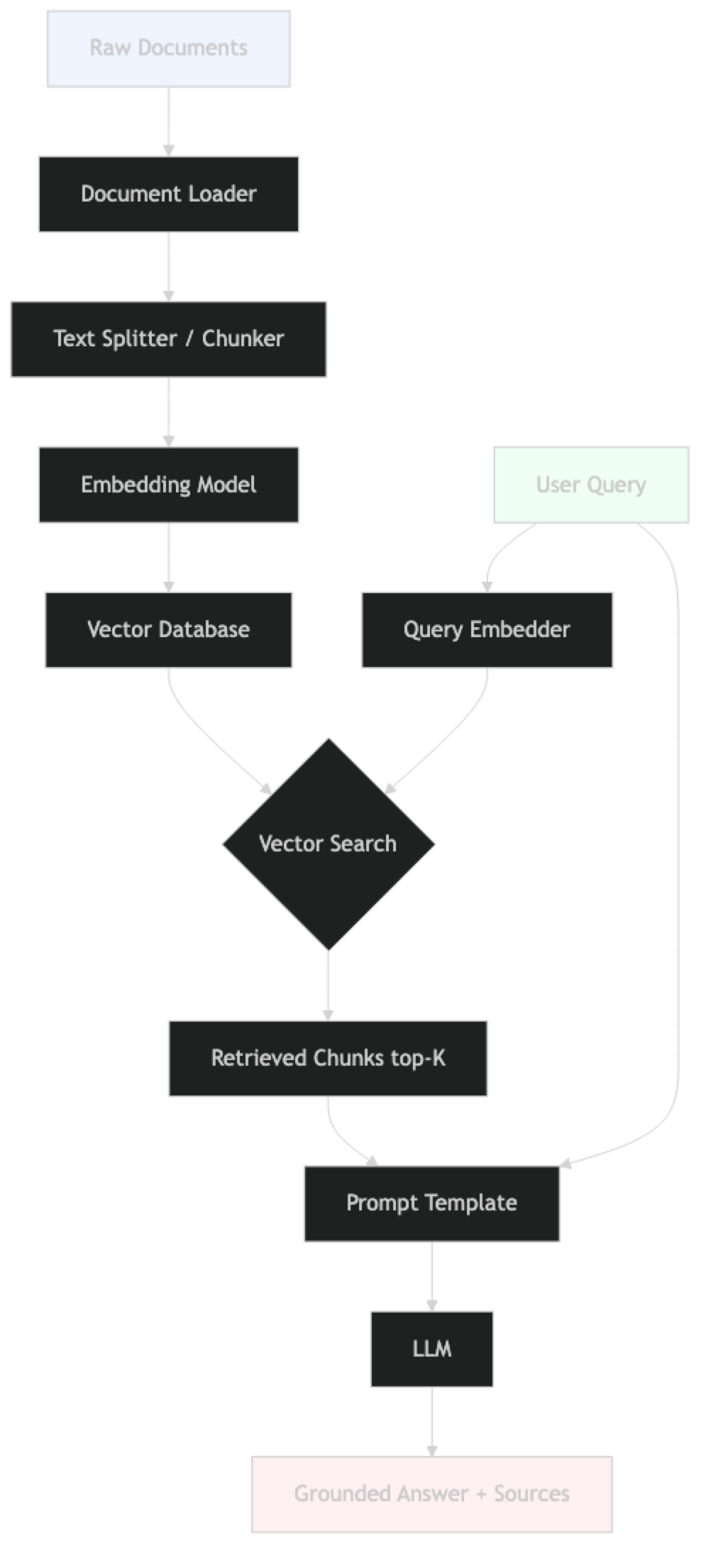
The two phases share only one component: the embedding model. If you switch embedding models, you must re-index every document. This is a common maintenance trap.
The Retrieval Step in Detail
Vector search works by computing cosine similarity between the query embedding and every stored chunk embedding. Most production vector databases (Pinecone, Weaviate, Qdrant, ChromaDB) use approximate nearest neighbor (ANN) algorithms — HNSW being the most common — to make this search fast even over millions of vectors.
One thing many developers overlook is that semantic similarity and relevance are not the same thing. A query about "reducing model costs" will surface chunks about inference optimization, but also potentially about dataset costs, fine-tuning costs, or cloud billing — all semantically similar, not all relevant to the user's actual intent.
The Generation Step in Detail
The retrieved chunks are injected into a prompt template as context. The LLM is instructed to answer based only on that context. The critical word is "only." Without explicit grounding instructions, GPT-4o will seamlessly blend retrieved content with its training-data knowledge. For factual Q&A applications, this produces confident hallucinations that are hard to detect.
Implementation Example
This is a complete RAG pipeline using LangChain, OpenAI embeddings, and ChromaDB.
# pip install langchain langchain-openai langchain-community chromadb pypdf

import os
from langchain_community.document_loaders import PyPDFLoader, DirectoryLoader
from langchain.text_splitter import RecursiveCharacterTextSplitter
from langchain_openai import OpenAIEmbeddings, ChatOpenAI
from langchain_chroma import Chroma
from langchain_core.prompts import ChatPromptTemplate
from langchain_core.output_parsers import StrOutputParser
from langchain_core.runnables import RunnablePassthrough

os.environ["OPENAI_API_KEY"] = "sk-..."

# ──────────────────────────────────────────────
# PHASE 1: INDEXING (run once, or on document update)
# ──────────────────────────────────────────────

def build_index(docs_dir: str, persist_dir: str) -> Chroma:
    """Load documents, chunk, embed, and persist to vector store."""

    # Step 1: Load documents
    loader = DirectoryLoader(
        docs_dir,
        glob="**/*.pdf",
        loader_cls=PyPDFLoader,
        show_progress=True
    )
    documents = loader.load()
    print(f"Loaded {len(documents)} document pages")

    # Step 2: Split into chunks
    # RecursiveCharacterTextSplitter tries to keep paragraphs intact
    splitter = RecursiveCharacterTextSplitter(
        chunk_size=512,
        chunk_overlap=64,            # ~12.5% overlap — reduces boundary information loss
        separators=["\n\n", "\n", ". ", " ", ""]
    )
    chunks = splitter.split_documents(documents)
    print(f"Created {len(chunks)} chunks")

    # Step 3: Embed and store
    embeddings = OpenAIEmbeddings(model="text-embedding-3-small")
    vectorstore = Chroma.from_documents(
        documents=chunks,
        embedding=embeddings,
        persist_directory=persist_dir,
        collection_name="knowledge_base"
    )
    print(f"Indexed {vectorstore._collection.count()} vectors")
    return vectorstore


# ──────────────────────────────────────────────
# PHASE 2: QUERY (per user request)
# ──────────────────────────────────────────────

GROUNDING_PROMPT = ChatPromptTemplate.from_messages([
    ("system", """You are a factual assistant. Answer questions using ONLY the context below.
If the context does not contain sufficient information, respond with:
"I do not have enough information in my knowledge base to answer that."

Do not use your training knowledge. Do not speculate.

Context:
{context}"""),
    ("human", "{question}"),
])


def build_rag_chain(vectorstore: Chroma):
    """Build a LCEL RAG chain from a loaded vector store."""
    llm = ChatOpenAI(model="gpt-4o-mini", temperature=0)

    retriever = vectorstore.as_retriever(
        search_type="mmr",            # Maximal Marginal Relevance — diversity-aware
        search_kwargs={"k": 5, "fetch_k": 20}
    )

    def format_docs(docs):
        return "\n\n---\n\n".join(d.page_content for d in docs)

    chain = (
        {"context": retriever | format_docs, "question": RunnablePassthrough()}
        | GROUNDING_PROMPT
        | llm
        | StrOutputParser()
    )
    return retriever, chain


def query_rag(retriever, chain, question: str) -> dict:
    """Ask a question and return structured output with sources."""
    answer = chain.invoke(question)
    sources = [
        {
            "file": doc.metadata.get("source", "unknown"),
            "page": doc.metadata.get("page", "?"),
            "excerpt": doc.page_content[:200]
        }
        for doc in retriever.invoke(question)
    ]
    return {"answer": answer, "sources": sources}


# ──────────────────────────────────────────────
# MAIN
# ──────────────────────────────────────────────

if __name__ == "__main__":
    # Index once
    vs = build_index("./docs", "./chroma_db")

    # Or reload from disk on subsequent runs
    # vs = Chroma(
    #     persist_directory="./chroma_db",
    #     embedding_function=OpenAIEmbeddings(model="text-embedding-3-small"),
    #     collection_name="knowledge_base"
    # )

    retriever, chain = build_rag_chain(vs)

    questions = [
        "What is the refund policy for digital products?",
        "How long does shipping take to Canada?",
        "What is the capital of France?",  # out-of-scope test
    ]

    for q in questions:
        result = query_rag(retriever, chain, q)
        print(f"\nQ: {q}")
        print(f"A: {result['answer']}")
        print(f"Sources: {[s['file'] for s in result['sources']]}")
The out-of-scope question is the most important test. If the model answers "Paris" from training data despite the grounding instruction, tighten the prompt.
RAG Architecture Variants
The basic RAG architecture described above is the right starting point. In production, you'll encounter several common variants.
Naive RAG
The simple pipeline: embed query, retrieve top-K, stuff into prompt. Works well for focused document collections with clear user questions. Breaks down when queries are ambiguous or documents are densely technical.
Advanced RAG
Adds a pre-retrieval step (query rewriting, HyDE — Hypothetical Document Embeddings) and a post-retrieval step (reranking, filtering by score threshold). Teams running internal knowledge bases typically graduate to this pattern within a few months.
Modular RAG
Treats each RAG component as a hot-swappable module: swap the embedding model, the vector store, the retriever strategy, or the reranker independently. This is the architecture pattern used by Llamaindex and the newer LangChain LCEL chains.
Hybrid RAG
Combines dense (vector) retrieval with sparse (BM25 keyword) retrieval. Particularly effective for technical documentation where exact term matching matters as much as semantic similarity. Most production search systems that serve RAG pipelines use hybrid retrieval.
Agentic RAG
The retrieval step is controlled by an LLM agent that decides when to retrieve, what to query, and whether the retrieved content is sufficient before generating. This adds latency but dramatically improves accuracy for complex multi-step questions.
Component Design Decisions
These are the decisions that determine system quality. Each one deserves deliberate attention.
Embedding Model Selection
| Model | Dimensions | Cost | Best For |
|---|---|---|---|
text-embedding-3-small |
1536 | $0.02/1M tokens | Most use cases |
text-embedding-3-large |
3072 | $0.13/1M tokens | High-precision retrieval |
BAAI/bge-m3 |
1024 | Free (self-hosted) | Multilingual, on-premise |
sentence-transformers/all-MiniLM-L6-v2 |
384 | Free (self-hosted) | Low-latency prototypes |
In practice, text-embedding-3-small hits the right quality-cost tradeoff for most production use cases. Switching to text-embedding-3-large improves retrieval precision by 5–10% but costs 6x more.
Vector Database Selection
| Database | Hosting | Filtering | Scale |
|---|---|---|---|
| ChromaDB | Self-hosted | Metadata filters | Small–medium |
| FAISS | In-memory | No native | Medium, no persistence |
| Pinecone | Managed | Metadata + namespace | Large, production |
| Qdrant | Self-hosted or cloud | Payload filters | Large, production |
| Weaviate | Self-hosted or cloud | GraphQL filters | Large, complex schemas |
For local development and prototyping, ChromaDB and FAISS cover everything. For production systems handling millions of vectors with SLA requirements, Pinecone or Qdrant are the standard choices.
Chunk Size and Overlap
This is the highest-impact parameter in RAG that receives the least attention.
- Too small (< 256 chars): Chunks lose context. A single sentence about a product feature, retrieved in isolation, is often ambiguous.
- Too large (> 1500 chars): Embeddings average over too much text. The chunk matches many queries weakly rather than one query strongly. The LLM context gets filled with less relevant content.
- Right size (400–700 chars): Covers a coherent unit of meaning — typically one or two paragraphs.
Overlap of 10–15% of chunk size prevents information loss at boundaries. A sentence split across two chunks is recoverable only if one chunk includes the tail of the previous.
Prompt Design
The grounding prompt is the system's contract. It must explicitly state:
- Answer only from the provided context
- What to say when the context is insufficient
- Whether to cite sources
A poorly written grounding prompt is the most common reason RAG systems produce hallucinations despite working retrieval.
Best Practices
Decouple indexing from serving. Run the indexing pipeline as a separate batch job, not as part of the query path. Load the persisted vector store at service startup. Mixing these paths is a reliability anti-pattern.
Log every retrieval. Record the query, the retrieved chunk IDs, the similarity scores, and the generated answer. This is your primary debugging surface. Without it, diagnosing retrieval failures is nearly impossible.
Use MMR instead of pure similarity search by default. Maximal Marginal Relevance prevents the retriever from returning five near-duplicate chunks from the same paragraph. More diverse retrieved content usually produces better answers.
Set a similarity score threshold. Reject chunks below a similarity threshold (typically 0.6–0.75 depending on your embedding model). This prevents the model from generating answers from weakly related content when no strong match exists.
Test with adversarial queries. Ask questions that are out of scope, misleading, or designed to exploit the model's training knowledge. Verify the grounding constraint holds in each case.
Version your embedding model. When you upgrade your embedding model, you must re-embed the entire document corpus. Track which model version produced each vector. Systems that don't do this silently degrade after model updates.
Preserve document metadata. Source file, page number, section heading, document date — store these in the vector database metadata fields. They enable metadata filtering and provide the information needed for source attribution.
Common Mistakes
Using the same embedding model for query and index without validation. The query and chunks must be embedded with the same model. This sounds obvious, but in practice teams upgrade their production embedding model and forget to re-index. The result is silent retrieval degradation — the math still runs, it just returns worse results.
Skipping the "I do not know" case. Every RAG system will receive queries that cannot be answered from the knowledge base. If the retrieved chunks are irrelevant and the model is instructed to answer anyway, it will hallucinate. Test this path explicitly.
Ignoring chunk metadata. Chunks without metadata cannot be filtered, cannot be cited with precision, and cannot be removed from the index when documents are updated. Metadata is not optional.
No reranking step. Vector similarity scores are a coarse signal. A cross-encoder reranker (running on the retrieved candidate set) dramatically improves precision. Teams that skip reranking often see 15–25% improvement in answer quality when they add it.
Context stuffing. Retrieving 10 chunks to "improve coverage" often degrades answer quality. The LLM context window has limited effective attention. Four to six well-chosen chunks typically outperforms ten mediocre ones.
Not handling document updates. When a source document changes, the old chunks remain in the vector database. You need an update strategy: either delete-and-reinsert by document ID, or re-index the entire collection on a schedule.
Frequently Asked Questions
What is the difference between RAG and fine-tuning? Fine-tuning updates model weights to learn new reasoning patterns or writing styles. RAG injects specific information at query time without changing model weights. For applications that need factual accuracy on specific documents that change frequently, RAG is almost always the better choice. Fine-tune when you need to change the model's behavior, tone, or domain vocabulary.
How many chunks should I retrieve (what is the right K)? Four to six chunks is the right starting point for most setups. Too few and you miss relevant content; too many and you fill the context window with noise. Use MMR retrieval to avoid redundant chunks. Measure precision@k on a validation set before tuning.
What happens when two documents contradict each other? The LLM receives both contradicting passages in context and may produce an inconsistent answer. Handling this requires deduplication at index time, post-retrieval filtering by document authority, or prompt engineering that explicitly instructs the model to surface contradictions when they are present.
Does RAG work with non-text content? Directly, no — vector search operates over embeddings of text. For images, use a vision model to generate captions. For tables, use a structured parser (pdfplumber, Unstructured) to convert to Markdown. For code, use language-aware splitters. Embed the extracted or converted text as usual.
What embedding dimensions should I use?
Use the default dimensions for your chosen model. text-embedding-3-small outputs 1536 dimensions by default. You can reduce to 256 or 512 dimensions with minimal quality loss if storage cost is a concern — this dimension reduction is a built-in feature of the OpenAI v3 embedding models.
Is RAG suitable for real-time data? RAG supports near-real-time updates as fast as you can embed and index new content. Streaming ingestion pipelines (e.g., triggered on document upload) can reduce index lag to seconds. Sub-second true real-time is harder and typically requires a purpose-built search index (like Elasticsearch) in front of the vector store.
How do I handle queries that are out of scope for my knowledge base? This is one of the most important cases to test explicitly. With a proper grounding prompt, the model should respond with "I do not have that information" rather than hallucinating from training data. Test with at least 10 out-of-scope queries before deploying. Add a similarity score threshold — if the top retrieved chunk scores below 0.65, return a "no information" response without calling the LLM.
Key Takeaways
- RAG is the primary pattern for connecting LLMs to specific, private, or up-to-date knowledge — without retraining
- The indexing phase (load → chunk → embed → store) is completely separate from the query phase — treat them as separate services
- Chunk size (400–600 chars, 10–15% overlap) has more impact on quality than model choice — fix this before tuning anything else
- Use LCEL chains (
prompt | llm | StrOutputParser()) — not deprecatedRetrievalQA.from_chain_type() - The grounding prompt's "answer ONLY from context" instruction determines whether the system stays faithful — test out-of-scope queries before launch
- Use MMR retrieval to prevent returning five near-duplicate chunks from the same paragraph
- Add a cross-encoder reranker — teams that skip this see 15–25% improvement when they add it
- Log every retrieval (query, chunk IDs, scores, answer) from day one — it is your primary debugging surface
- Version your embedding model — switching models requires re-indexing the entire document corpus
What to Learn Next
- Build a complete RAG pipeline → LangChain RAG Tutorial
- Measure faithfulness and relevancy → RAG Evaluation with RAGAS
- Add hybrid retrieval (BM25 + vector) → Hybrid Search RAG
- Optimize context window usage → Context Window RAG