Context Window & RAG: Handle Long Docs Without Losing Info (2026)
Context Window Optimization in RAG Systems
GPT-4o has a 128K token context window. Developers see this number and conclude that context window management is no longer a problem — just stuff everything in and let the model figure it out. In practice, more context is not always better. Studies from the "Lost in the Middle" paper (Liu et al., 2023) showed that LLMs systematically underperform when the relevant information is positioned in the middle of a long context. They pay more attention to the beginning and end.
Beyond the attention distribution problem, there's a cost problem. Every token in the context window is a token you pay for and a token the model must process. If you're retrieving 10 chunks of 512 characters each and passing all of them to GPT-4o, you're using ~1,300 tokens per query in context alone. At scale across thousands of daily queries, that adds up quickly.
The goal of context window optimization in RAG is not to minimize context — it's to maximize the signal-to-noise ratio within the context you allocate. Right context, right amount, right order.
For the broader RAG pipeline architecture, see the RAG Architecture Guide.
Concept Overview
Context window optimization refers to the set of techniques that improve how retrieved content is selected, compressed, ordered, and formatted before being sent to the LLM.
The problem has three dimensions:
- Selection — which chunks to include (retrieval quality, reranking)
- Compression — how to reduce the length of selected chunks while preserving relevant content
- Ordering — where to position chunks in the context for maximum LLM attention
Each dimension has practical implementation techniques. The most impactful is usually reranking — replacing the top-K vector results with a cross-encoder reranker that scores relevance more precisely.
How It Works
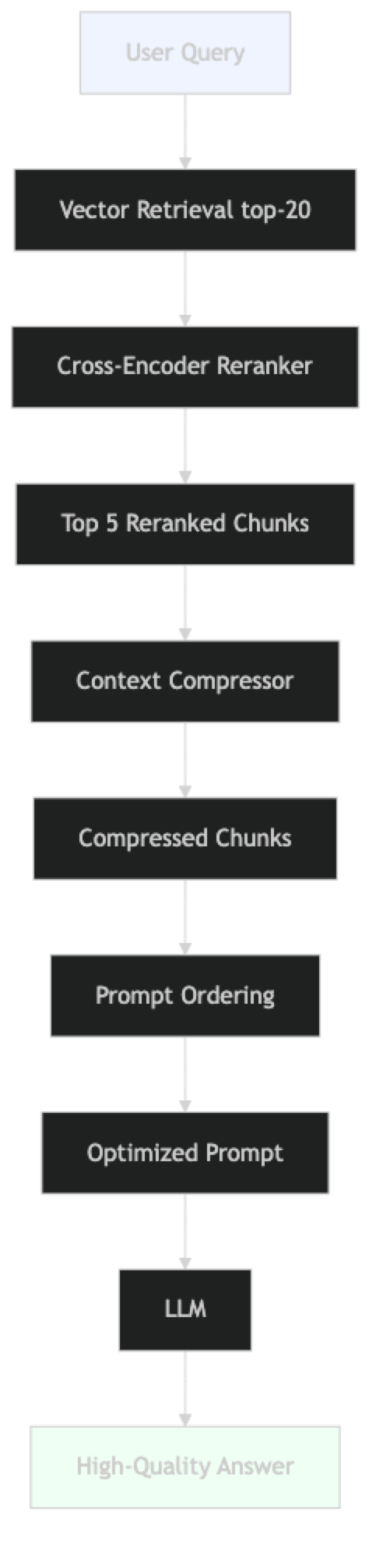
The pipeline adds three post-retrieval steps: reranking, compression, and ordering. Each is optional but each provides measurable improvement.
Implementation Example
Technique 1: Cross-Encoder Reranking
Vector similarity is a coarse signal. A cross-encoder reranker takes the query and each candidate chunk as a pair and produces a precise relevance score. It's slower than vector search but much more accurate.
# pip install sentence-transformers langchain langchain-openai chromadb

from langchain_openai import OpenAIEmbeddings, ChatOpenAI
from langchain_chroma import Chroma
from langchain.retrievers import ContextualCompressionRetriever
from langchain.retrievers.document_compressors import CrossEncoderReranker
from langchain_community.cross_encoders import HuggingFaceCrossEncoder
# Load vector store
vs = Chroma(
    persist_directory="./chroma_db",
    embedding_function=OpenAIEmbeddings(model="text-embedding-3-small")
)

# Base retriever: fetch a large candidate pool
base_retriever = vs.as_retriever(
    search_type="similarity",
    search_kwargs={"k": 20}     # retrieve 20 candidates for reranker input
)

# Cross-encoder reranker: narrows 20 → 5 with precise scoring
# ms-marco-MiniLM-L-6-v2: fast, good quality, ~80MB
reranker_model = HuggingFaceCrossEncoder(model_name="cross-encoder/ms-marco-MiniLM-L-6-v2")
reranker = CrossEncoderReranker(model=reranker_model, top_n=5)

# Wrap base retriever with reranker
reranking_retriever = ContextualCompressionRetriever(
    base_compressor=reranker,
    base_retriever=base_retriever
)

# Test reranker quality
query = "what is the penalty for late payment?"
raw_chunks = base_retriever.invoke(query)
reranked_chunks = reranking_retriever.invoke(query)

print("Top 3 raw retrieval:")
for chunk in raw_chunks[:3]:
    print(f"  {chunk.page_content[:100]}...")

print("\nTop 3 after reranking:")
for chunk in reranked_chunks[:3]:
    print(f"  {chunk.page_content[:100]}...")
Technique 2: Context Compression
Instead of returning full chunks, extract only the sentences relevant to the query:
from langchain.retrievers.document_compressors import LLMChainExtractor
from langchain_openai import ChatOpenAI

# LLMChainExtractor: uses an LLM to extract relevant passages from each chunk
# Adds one LLM call per chunk — use only when context length is critical
compressor = LLMChainExtractor.from_llm(
    ChatOpenAI(model="gpt-4o-mini", temperature=0)
)

compression_retriever = ContextualCompressionRetriever(
    base_compressor=compressor,
    base_retriever=base_retriever
)

# The compressed retriever returns only the relevant sentences from each chunk
compressed_chunks = compression_retriever.invoke(
    "what are the grounds for account termination?"
)

print("Compressed context:")
for chunk in compressed_chunks:
    print(f"  [{len(chunk.page_content)} chars] {chunk.page_content}")
In practice, LLM-based compression is expensive — it calls the LLM once per chunk. For most use cases, cross-encoder reranking provides a better quality/cost tradeoff. Use LLM compression only when the context window budget is very tight.
Technique 3: EmbeddingsFilter for Fast Compression
A faster alternative to LLM compression — filter chunks by embedding similarity to the query:
from langchain.retrievers.document_compressors import EmbeddingsFilter
from langchain_openai import OpenAIEmbeddings

# EmbeddingsFilter: fast, no LLM calls, removes low-similarity chunks
embeddings_filter = EmbeddingsFilter(
    embeddings=OpenAIEmbeddings(model="text-embedding-3-small"),
    similarity_threshold=0.76    # discard chunks below this threshold
)

fast_compression_retriever = ContextualCompressionRetriever(
    base_compressor=embeddings_filter,
    base_retriever=base_retriever
)

# Much faster than LLM compression; good first-pass filter
filtered_chunks = fast_compression_retriever.invoke("refund policy")
print(f"Kept {len(filtered_chunks)} of {len(raw_chunks)} chunks after filtering")
Technique 4: Pipeline Composition
Combine reranking and filtering in a pipeline:
from langchain.retrievers.document_compressors import DocumentCompressorPipeline
from langchain.text_splitter import CharacterTextSplitter

# Pipeline: split → filter by embedding → rerank
splitter_transformer = CharacterTextSplitter(
    chunk_size=300,
    chunk_overlap=0,
    separator=". "
)

pipeline_compressor = DocumentCompressorPipeline(
    transformers=[
        splitter_transformer,          # break large chunks into smaller units
        embeddings_filter,             # fast semantic filter
        reranker                       # precise cross-encoder reranker
    ]
)

pipeline_retriever = ContextualCompressionRetriever(
    base_compressor=pipeline_compressor,
    base_retriever=vs.as_retriever(search_kwargs={"k": 20})
)
Technique 5: Optimal Context Ordering
Based on the "Lost in the Middle" finding — put the most relevant chunks at the beginning and end of the context, not in the middle:
def order_chunks_for_attention(chunks: list, strategy: str = "sandwich") -> list:
    """
    Reorder chunks to maximize LLM attention on the most relevant content.

    strategy options:
    - "top_first": most relevant at the start (standard)
    - "sandwich": most relevant at start AND end, less relevant in middle
    - "reverse": most relevant at end (some evidence this helps)
    """
    if not chunks:
        return chunks

    if strategy == "top_first":
        return chunks  # already ordered by relevance score

    if strategy == "sandwich":
        if len(chunks) <= 2:
            return chunks
        # Most relevant at index 0, second most at index -1, rest in middle
        most_relevant = chunks[0]
        second_most = chunks[1]
        middle = chunks[2:]
        return [most_relevant] + middle + [second_most]

    if strategy == "reverse":
        return list(reversed(chunks))

    return chunks


def build_optimized_context(chunks: list, max_tokens: int = 3000) -> str:
    """
    Build a context string that fits within a token budget.
    Approximately 4 chars per token.
    """
    ordered = order_chunks_for_attention(chunks, strategy="sandwich")
    max_chars = max_tokens * 4

    context_parts = []
    used_chars = 0

    for i, chunk in enumerate(ordered):
        chunk_text = f"[Source {i+1}: {chunk.metadata.get('source', 'unknown')}]\n{chunk.page_content}"
        if used_chars + len(chunk_text) > max_chars:
            print(f"Context budget reached at chunk {i+1}/{len(ordered)}")
            break
        context_parts.append(chunk_text)
        used_chars += len(chunk_text)

    return "\n\n---\n\n".join(context_parts)
Full Optimized Pipeline
from langchain_core.prompts import ChatPromptTemplate
from langchain_core.output_parsers import StrOutputParser

OPTIMIZED_PROMPT = ChatPromptTemplate.from_messages([
    ("system", """You are a precise, factual assistant. Answer the question based ONLY on the provided context.

Important: The most relevant sources are at the beginning and end of the context.

If the context does not contain enough information to answer accurately, say:
"I do not have sufficient information in my knowledge base to answer that."

Context:
{context}"""),
    ("human", "{question}"),
])


def optimized_rag_query(
    question: str,
    retriever,
    llm: ChatOpenAI,
    max_context_tokens: int = 3000
) -> dict:
    """Full optimized RAG query with reranking, ordering, and budget management."""
    # Step 1: Retrieve and rerank
    chunks = retriever.invoke(question)

    # Step 2: Order for attention
    ordered_chunks = order_chunks_for_attention(chunks, strategy="sandwich")

    # Step 3: Build context with token budget
    context = build_optimized_context(ordered_chunks, max_tokens=max_context_tokens)

    # Step 4: Generate via LCEL chain
    chain = OPTIMIZED_PROMPT | llm | StrOutputParser()
    answer = chain.invoke({"context": context, "question": question})

    # Estimate tokens used (approx 4 chars per token)
    approx_tokens = len(context) // 4
    print(f"Approximate context tokens: {approx_tokens}")

    return {
        "answer": answer,
        "chunks_used": len(ordered_chunks),
        "context_tokens": approx_tokens,
        "sources": list({c.metadata.get("source", "?") for c in ordered_chunks})
    }


# Run it
llm = ChatOpenAI(model="gpt-4o-mini", temperature=0)
result = optimized_rag_query(
    question="What is the data retention policy for customer records?",
    retriever=reranking_retriever,
    llm=llm,
    max_context_tokens=2500
)

print(f"Answer: {result['answer']}")
print(f"Tokens used: {result['context_tokens']}")
print(f"Sources: {result['sources']}")
Best Practices
Always rerank after vector retrieval in production. Cross-encoder reranking consistently improves answer quality with modest latency overhead (~50–150ms for a 20-chunk candidate set). It's the highest-ROI optimization in the post-retrieval pipeline.
Set a context token budget explicitly. Don't let context grow unbounded. Decide on a budget (e.g., 3000 tokens), enforce it in code, and log when the budget is hit. This prevents surprising cost spikes and helps you tune the trade-off.
Use the sandwich ordering for important queries. The "Lost in the Middle" effect is real. For applications where answer quality is critical, ordering the most relevant chunks at the start and end of context measurably improves performance.
Measure the actual token count, don't estimate. Use tiktoken to count tokens precisely rather than approximating by character count:
import tiktoken

encoder = tiktoken.encoding_for_model("gpt-4o-mini")

def count_tokens(text: str, model: str = "gpt-4o-mini") -> int:
    enc = tiktoken.encoding_for_model(model)
    return len(enc.encode(text))

token_count = count_tokens(context)
Use EmbeddingsFilter for latency-sensitive paths. It's faster than cross-encoder reranking with acceptable quality. Use it as a first pass before the cross-encoder when you need to minimize latency.
Common Mistakes
Assuming more context is always better. Retrieving 10 chunks when 4 would suffice increases cost and often decreases answer quality due to attention dilution. Measure quality at different K values.
Uniform chunk sizes in context. Short chunks (100 chars) and long chunks (2000 chars) mixed in context create uneven information density. The model has trouble weighting these proportionally. Normalize chunk sizes during indexing.
Not logging context token counts. Without logging, you don't know whether your context budget is being hit, and you can't diagnose cost spikes. Add token count logging to every production RAG call.
Skipping the reranker because it "adds latency." For document Q&A applications, 100ms of reranking latency is negligible. The quality improvement is worth it for most use cases.
Frequently Asked Questions
What is the "Lost in the Middle" problem? Research by Liu et al. (2023) showed that LLMs perform worse when relevant information appears in the middle of a long context. They attend more strongly to the beginning and end. The practical fix: put your most relevant chunks at index 0 and index -1 in the context (sandwich ordering).
How much does cross-encoder reranking cost?
Cross-encoder reranking runs locally with a HuggingFace model — no API cost. The ms-marco-MiniLM-L-6-v2 model is ~80MB and runs in ~50ms on CPU for a 20-chunk candidate set. No GPU required for this scale.
What is the maximum effective context for GPT-4o-mini? The model supports 128K tokens, but effective performance degrades beyond ~16K tokens for retrieval-intensive tasks. For RAG, keeping retrieved passage context under 4K tokens (plus system prompt and question) usually provides the best quality-per-token ratio.
Should I compress chunks before or after reranking? After reranking. Reranking operates on full chunks to score them accurately. Compressing before reranking reduces the information available for scoring. The correct pipeline order is: retrieve → rerank → compress → send to LLM.
Does context ordering matter more for some models than others? Yes. Smaller models (GPT-4o-mini, Llama 3 8B) show more pronounced "Lost in the Middle" degradation than larger models. If you are using smaller models for cost reasons, context ordering optimization is more important and worth implementing explicitly.
When should I use LLM-based compression versus EmbeddingsFilter?
Use EmbeddingsFilter as the default — it adds no API cost and runs fast. Use LLMChainExtractor only when context budget is extremely tight (under 1K tokens) and you need to extract specific sentences from chunks. LLM compression adds one API call per chunk, so for 10 chunks that is 10 extra LLM calls per query.
How do I measure whether reranking actually improves my system? Build a test set of 30+ queries with labeled relevant documents. Compare precision@5 for vector-only retrieval versus vector + reranker. For most technical document corpora, reranking improves precision@5 by 15–30%. If the improvement is under 5%, your vector retrieval quality is already high and reranking may not be worth the latency.
Key Takeaways
- Context window optimization has three levers: selection (reranking), compression (budget management), and ordering (sandwich pattern)
- Cross-encoder reranking is the highest-ROI optimization — retrieve 20 candidates, rerank to 5, with ~50ms latency and no API cost
- The "Lost in the Middle" effect is real — put the most relevant chunk first and second-most-relevant last in context
- Set an explicit token budget (e.g., 3,000 tokens for retrieved context) and enforce it in code — never let context grow unbounded
- Use
EmbeddingsFilterfor latency-sensitive paths; useLLMChainExtractoronly when context budget is extremely tight - The correct pipeline order is: retrieve → rerank → compress → order → send to LLM
- More context is not always better — test at k=4, k=6, and k=8 and measure quality for each value
- Smaller models (GPT-4o-mini, Llama 8B) are more sensitive to context ordering — apply sandwich ordering especially for these
What to Learn Next
- RAG pipeline fundamentals → LangChain RAG Tutorial
- Chunking strategy affects what enters context → RAG Chunking Strategies
- Measure context optimization impact → RAG Evaluation with RAGAS
- Full architecture overview → RAG Architecture Guide