Vector Search: Why Semantic Queries Find Better Answers (2026)
A user types "cheap flights to warm places" into your travel search. Your keyword index returns zero results — because none of your listings contain all three of those exact words. They use terms like "budget airfare," "tropical destinations," and "affordable getaways." The user bounces.
This is not a data problem or a scale problem. It is a representation problem. Keyword search encodes queries and documents as bag-of-words — it can only match tokens it has seen before. Vector search encodes them as points in a high-dimensional semantic space and matches by proximity, regardless of word choice.
Understanding how that proximity is computed and how databases make it fast at scale is the difference between building a system that works in demos and one that works in production under real query distributions.
Concept Overview
Vector search has three independent components that you configure separately.
The embedding model converts raw content into a dense float vector. Models trained on large text corpora (OpenAI's text-embedding-3, BAAI's BGE family, Cohere's embed models) map semantically similar content to nearby points in embedding space. The model you choose determines the quality ceiling of your search — no amount of indexing sophistication recovers from a poor embedding model.
The distance metric defines "nearby." Cosine similarity measures the angle between two vectors; euclidean distance measures straight-line distance; dot product measures magnitude-weighted angular similarity. For normalized text embeddings, cosine similarity and dot product give identical rankings.
The ANN index makes similarity search fast at scale. Brute-force comparison against every stored vector is O(n) — fine for 10,000 documents, unusable for 10 million. Approximate nearest neighbor algorithms trade a small amount of recall for query times that stay below 10ms even at 100 million vectors.
In practice, the quality of your vector search depends more on chunking strategy and embedding model selection than on which ANN algorithm you use. Index choice is a performance concern, not a quality concern.
How It Works
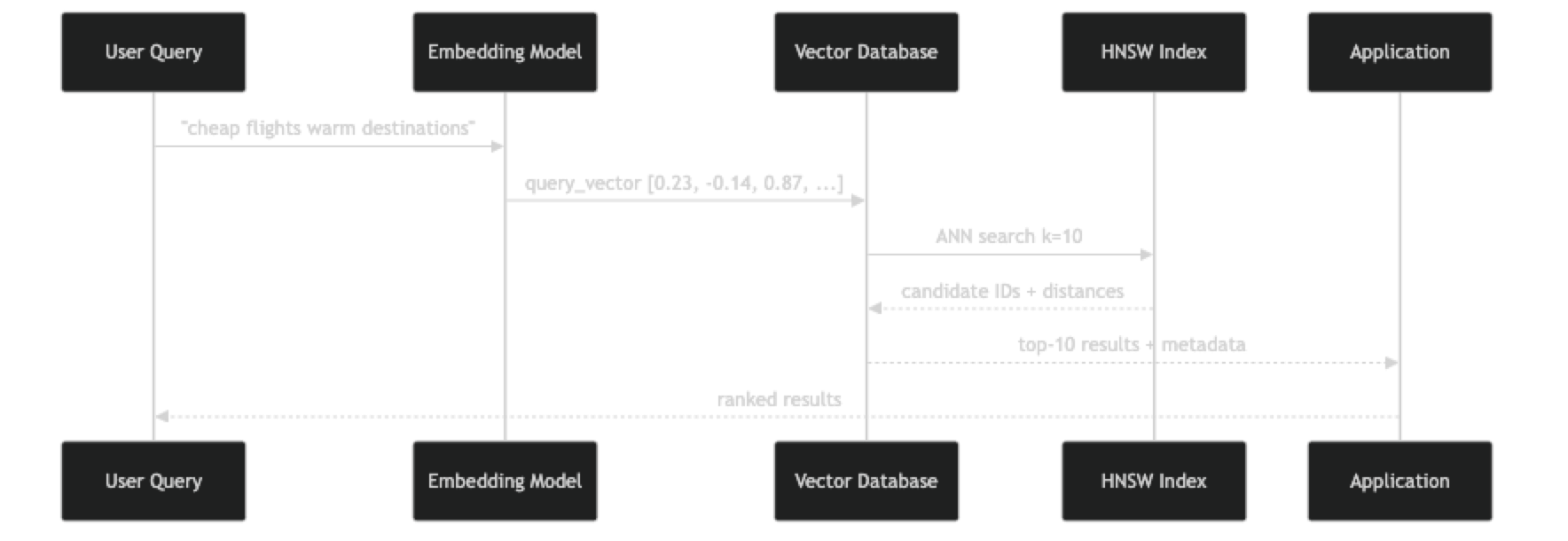
At index time, each document chunk is passed through the embedding model to produce a vector, then stored in the database. The ANN index (typically HNSW) incrementally incorporates the new vector by connecting it to its nearest neighbors in the graph.
At query time, the user's text goes through the same embedding model. The resulting vector is the starting point for graph traversal in the HNSW index. The algorithm explores progressively similar regions of the graph, collecting candidates at each layer, and returns the K most similar vectors it found — not guaranteed to be the global optimum, but statistically very close.
The recall-latency tradeoff is controlled by the ef_search parameter: higher values explore more of the graph (better recall, slower), lower values terminate sooner (lower recall, faster). You can tune this at query time without rebuilding the index.
Implementation Example
The following example builds a complete semantic search pipeline from raw documents through a queryable FAISS index, showing every step explicitly.
pip install faiss-cpu sentence-transformers numpyimport faiss
import numpy as np
from sentence_transformers import SentenceTransformer
from dataclasses import dataclass
from typing import Optional
@dataclass
class SearchResult:
doc_id: int
content: str
similarity: float
metadata: dict
class VectorSearchEngine:
def __init__(self, model_name: str = "BAAI/bge-small-en-v1.5"):
self.model = SentenceTransformer(model_name)
self.dim = self.model.get_sentence_embedding_dimension()
self.documents: list[dict] = []
self._build_index()
def _build_index(self):
"""HNSW index with cosine similarity (via L2-normalized inner product)."""
self.index = faiss.IndexHNSWFlat(self.dim, 32) # M=32
self.index.hnsw.efConstruction = 200
self.index.hnsw.efSearch = 50
def _embed(self, texts: list[str]) -> np.ndarray:
vecs = self.model.encode(texts, normalize_embeddings=True, batch_size=64)
return np.array(vecs, dtype=np.float32)
def add_documents(self, docs: list[dict]) -> None:
"""Add documents with 'content' and optional metadata fields."""
texts = [d["content"] for d in docs]
vectors = self._embed(texts)
start_id = len(self.documents)
self.documents.extend(docs)
self.index.add(vectors)
print(f"Added {len(docs)} documents. Total: {len(self.documents)}")
def search(
self,
query: str,
top_k: int = 5,
min_similarity: float = 0.0,
filter_key: Optional[str] = None,
filter_value: Optional[str] = None,
) -> list[SearchResult]:
query_vec = self._embed([query])
# Request more candidates to account for post-filtering
k = min(top_k * 3, len(self.documents)) if filter_key else top_k
similarities, indices = self.index.search(query_vec, k)
results = []
for sim, idx in zip(similarities[0], indices[0]):
if idx == -1:
continue
if sim < min_similarity:
continue
doc = self.documents[idx]
if filter_key and doc.get(filter_key) != filter_value:
continue
results.append(SearchResult(
doc_id=idx,
content=doc["content"],
similarity=float(sim),
metadata={k: v for k, v in doc.items() if k != "content"},
))
if len(results) >= top_k:
break
return results
# Example usage
engine = VectorSearchEngine()
engine.add_documents([
{"content": "HNSW builds a multi-layer proximity graph for ANN search", "category": "indexing"},
{"content": "IVF partitions vector space into Voronoi cells", "category": "indexing"},
{"content": "Cosine similarity measures the angle between two vectors", "category": "metrics"},
{"content": "Euclidean distance computes straight-line distance in vector space", "category": "metrics"},
{"content": "Product quantization compresses vectors to reduce memory usage", "category": "compression"},
{"content": "Scalar quantization maps float32 values to int8", "category": "compression"},
{"content": "Budget flights to tropical beach destinations this summer", "category": "travel"},
{"content": "Affordable getaways for warm weather and sunshine", "category": "travel"},
])
# Semantic search — finds relevant results without keyword overlap
results = engine.search("cheap flights to warm places", top_k=3)
for r in results:
print(f"[{r.similarity:.3f}] {r.content} ({r.metadata['category']})")
print()
# Filtered search — vector similarity + structured filter
results = engine.search(
"how does approximate search work?",
top_k=3,
filter_key="category",
filter_value="indexing",
)
for r in results:
print(f"[{r.similarity:.3f}] {r.content}")For a production-grade version using ChromaDB with persistence and native metadata filtering:
import chromadb
from chromadb.utils import embedding_functions

client = chromadb.PersistentClient(path="./search_db")
ef = embedding_functions.SentenceTransformerEmbeddingFunction("BAAI/bge-small-en-v1.5")

collection = client.get_or_create_collection(
    name="knowledge_base",
    embedding_function=ef,
    metadata={"hnsw:space": "cosine", "hnsw:M": 32, "hnsw:ef_construction": 200},
)

# Batch upsert — handles duplicates gracefully
collection.upsert(
    ids=["doc_001", "doc_002", "doc_003"],
    documents=[
        "Budget flights to tropical beach destinations",
        "Affordable warm weather getaways this summer",
        "HNSW graph traversal for approximate nearest neighbor search",
    ],
    metadatas=[
        {"category": "travel", "region": "caribbean"},
        {"category": "travel", "region": "southeast_asia"},
        {"category": "indexing", "region": None},
    ],
)

# Semantic search with metadata filter
results = collection.query(
    query_texts=["cheap flights to warm places"],
    n_results=2,
    where={"category": "travel"},
)

for doc, dist in zip(results["documents"][0], results["distances"][0]):
    print(f"[similarity: {1-dist:.3f}] {doc}")
Best Practices
Use the same embedding model at index time and query time. This sounds obvious, but it breaks silently when teams upgrade the embedding model without reindexing existing data. Version your embedding model name alongside your index.
Tune ef_search based on your latency SLA, not recall in isolation. For a customer-facing search at 200ms SLA, you have more budget to explore the graph than for an internal autocomplete at 30ms SLA. Benchmark both metrics together.
Prefer cosine similarity for text embeddings. It is insensitive to vector magnitude, which varies by document length. Euclidean distance conflates length with semantic distance and gives worse retrieval quality for variable-length text.
Re-rank top candidates with a cross-encoder for high-stakes queries. ANN gives you fast candidate retrieval. A cross-encoder model (slower but more accurate) can re-score the top 20 candidates and reorder them. This pattern — bi-encoder retrieval + cross-encoder re-ranking — is standard in production search systems.
Monitor the recall of your ANN index with a golden test set. Keep 100–200 query/expected-result pairs. Run them after any index rebuild or parameter change. A recall regression is easy to introduce and invisible without systematic measurement.
Common Mistakes
Not chunking documents before indexing. Embedding a 5,000-word article into a single vector averages the meaning across the entire document. A specific query about paragraph 12 can never reliably surface that article. Index chunks of 256–512 tokens with 20% overlap.
Setting efSearch too low for your recall requirements. The default value in most libraries is 16–50, tuned for speed. If your search quality seems poor but your vectors are good, try increasing efSearch by 4x and measuring recall before concluding the embedding model is the problem.
Using euclidean distance on un-normalized vectors from different-length documents. Short documents naturally have lower-magnitude embeddings. Euclidean distance penalizes them for being "closer to the origin," not for being semantically different. Always normalize or use cosine similarity for text.
Querying without setting a minimum similarity threshold. Vector search always returns K results, even when all of them are irrelevant. Set a min_similarity threshold (typically 0.70–0.75 for cosine similarity) and return no results rather than returning bad ones.
Ignoring query latency percentiles. Average latency is misleading. p99 latency — what your slowest 1% of users experience — matters more. HNSW latency spikes under concurrent load due to lock contention. Benchmark under realistic concurrency, not sequential single-thread load.
Key Takeaways
- Vector search converts the semantic similarity problem into a geometric nearest-neighbor problem in high-dimensional embedding space
- Three independent components determine vector search behavior: the embedding model (quality), the distance metric (measurement), and the ANN index (speed)
- HNSW graph traversal finds approximate nearest neighbors in O(log n) time, enabling sub-10ms queries even at 100 million vectors
- The
ef_searchparameter controls the speed/recall tradeoff at query time without requiring an index rebuild - Always use the same embedding model for both indexing and querying — mismatched models produce meaningless similarity scores
- Set a minimum similarity threshold and return "no results" rather than surfacing irrelevant results with false confidence
- Chunking at 256–512 tokens with 20% overlap is the standard preprocessing step that enables reliable per-section retrieval
- The bi-encoder retrieval + cross-encoder re-ranking pattern gives fast candidate generation plus accurate final ordering for production search
FAQ
What is the difference between vector search and semantic search? Semantic search is the goal — finding content by meaning. Vector search is the mechanism — finding content by geometric similarity in embedding space. Semantic search is typically implemented using vector search, but can also use other techniques like knowledge graphs or query expansion.
How accurate is vector search compared to brute-force exact search?
With well-tuned HNSW parameters (M=32, ef_construction=200, efSearch=100), recall@10 is typically 95–99% compared to exact search. The 1–5% of cases where ANN misses the true nearest neighbor are usually borderline results that a human judge would rate similarly anyway.
Can vector search handle multilingual queries?
Yes, with a multilingual embedding model. Models like intfloat/multilingual-e5-large or Cohere's multilingual embed model map text from 100+ languages into a shared vector space. A query in French can retrieve documents in German without translation.
How do I improve vector search recall without increasing latency?
The most effective levers: increase embedding model quality (use a larger model), improve chunking strategy (smaller, more focused chunks), and enable hybrid search to combine BM25 keyword signals with vector similarity. Increasing efSearch helps but increases latency proportionally.
What is the difference between cosine similarity and dot product for vector search? For normalized vectors (unit norm), cosine similarity and dot product are mathematically equivalent and produce identical rankings. For un-normalized vectors, dot product includes magnitude as a factor, which can cause longer documents to score higher regardless of relevance. Always normalize text embeddings before storage.
How do I choose the right value for K in vector search? Start with K=5 for RAG systems feeding an LLM context window and K=10 for user-facing search interfaces. Increase K if your recall on the golden test set is below 80%. Higher K means more context for the LLM but also more noise — tune based on your specific retrieval quality measurements.
What happens when my embedding model gets updated? If the model output changes (even a minor version update), existing indexed vectors become incompatible with new query vectors. You must reindex your entire corpus with the new model version. Treat the embedding model name and version as a deployment artifact — version it alongside your index.