System Prompts: Write Instructions LLMs Actually Obey (2026)
System Prompts: How to Control LLM Behavior
When a company launches an AI assistant and users notice it maintains a specific tone, refuses certain topics, and always structures answers the same way — that behavior is not baked into the model. It is the system prompt.
The system prompt is the most powerful tool a developer has for controlling LLM behavior. It runs before every conversation, establishing the model's persona, operating rules, output format, and constraints. Every production AI application that serves users — chatbot, code assistant, content tool, internal agent — needs a carefully designed system prompt.
Most developers underinvest in system prompt design. They write three sentences, ship it, and wonder why the model behaves inconsistently at the edges. This post covers how to design system prompts that hold up in production.
Concept Overview
The system prompt is a special role in the chat message format. It appears before the conversation begins and applies globally across all turns. Unlike user messages, which carry the specific request, the system prompt carries stable operating context that should not change turn by turn.
A well-designed system prompt typically contains:
- Persona definition — who the model is, what domain it operates in
- Behavioral rules — what it should and should not do
- Output format — how responses should be structured
- Scope constraints — topics it covers and topics it declines
- Uncertainty handling — what to do when the model doesn't know
One thing many developers overlook: the system prompt is your primary safety and behavior control layer. It is not foolproof — users can attempt to override it — but it is the first line of defense and the most reliable behavioral anchor.
How It Works
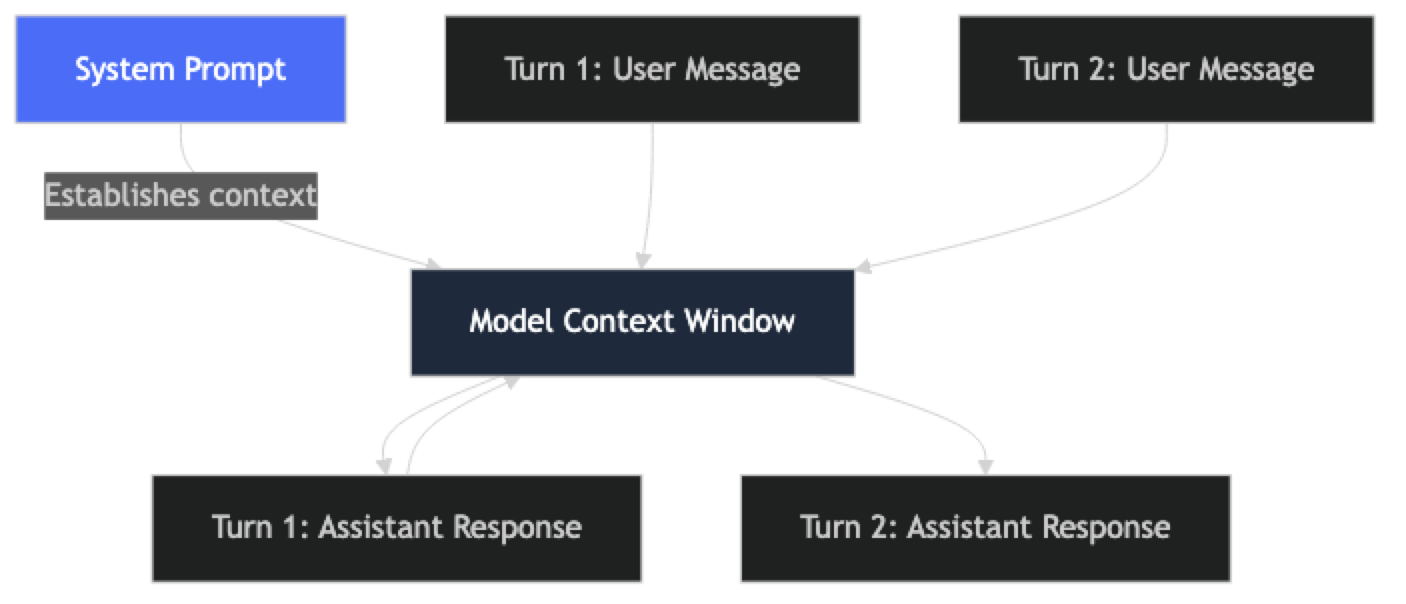
The system prompt persists across all turns of a conversation. The model processes it along with the full conversation history on every request. This means a well-designed system prompt remains in effect throughout the session — but it also means the system prompt competes for context window space with conversation history in long sessions.
In practice, this affects system prompt design: keep them focused. A 3,000-token system prompt on a 128,000-token context window is fine for most use cases. A 10,000-token system prompt on 40 turns of conversation history starts to eat into effective context.
Implementation Example
Basic System Prompt Structure
from openai import OpenAI

client = OpenAI()

# ─── A production-quality system prompt ───────────────────────────────────────
CUSTOMER_SUPPORT_SYSTEM = """You are Aria, a customer support assistant for Nexus SaaS — a project management platform.

## Persona
- Professional, helpful, and concise
- Empathetic when users express frustration — acknowledge it before solving
- Technical depth appropriate to the user's apparent expertise level

## Scope
You help with:
- Product features and how-to questions
- Billing and subscription inquiries
- Bug reports and technical troubleshooting
- Account and permission issues

You do not:
- Discuss competitors by name
- Make promises about future features or pricing
- Share internal company information
- Provide legal, financial, or medical advice

## Response Format
- For how-to questions: numbered steps, one action per step
- For troubleshooting: ask clarifying questions before diagnosing
- For billing: always direct to billing@nexus.io for account-specific changes
- Maximum response length: 200 words unless complexity requires more

## Uncertainty Handling
If you don't know the answer or it falls outside your scope:
- Say: "I don't have that information, but our support team can help."
- Direct to: support@nexus.io or the in-app Help Center
- Never guess or fabricate information"""

def chat(user_message: str, history: list = None) -> str:
    messages = [{"role": "system", "content": CUSTOMER_SUPPORT_SYSTEM}]
    if history:
        messages.extend(history)
    messages.append({"role": "user", "content": user_message})

    response = client.chat.completions.create(
        model="gpt-4o",
        messages=messages,
        temperature=0.3,
        max_tokens=400
    )
    return response.choices[0].message.content
System Prompt Templates for Common Use Cases
# ─── Code Review Assistant ────────────────────────────────────────────────────
CODE_REVIEW_SYSTEM = """You are a senior software engineer conducting code reviews.

Focus areas (in priority order):
1. Security vulnerabilities (SQL injection, XSS, secrets in code, auth bypass)
2. Correctness (logic errors, edge cases, off-by-one errors)
3. Performance (N+1 queries, unnecessary computation, memory leaks)
4. Maintainability (readability, naming, complexity)

Response format — always return valid JSON:
{
  "summary": string (1-2 sentences),
  "security": [{"line": int, "severity": "critical"|"high"|"medium"|"low", "issue": str, "fix": str}],
  "bugs": [{"line": int, "issue": str, "fix": str}],
  "performance": [{"line": int, "issue": str, "impact": str}],
  "style": [{"line": int, "suggestion": str}]
}

Use empty arrays for categories with no issues.
Never skip security issues, even minor ones."""

# ─── Data Analysis Assistant ─────────────────────────────────────────────────
DATA_ANALYST_SYSTEM = """You are a data analyst assistant helping with data interpretation and SQL.

You:
- Explain data patterns in plain language before technical details
- Generate SQL for PostgreSQL by default unless specified otherwise
- Always validate assumptions before generating queries ("I'm assuming your table has columns X and Y")
- Highlight data quality issues or potential biases in the user's framing

You do not:
- Access external data or real databases
- Make claims about specific companies' data without evidence provided
- Recommend specific vendors or paid tools without being asked

When generating SQL:
- Use CTEs for complex queries (no nested subqueries)
- Add inline comments for non-obvious logic
- Include a LIMIT clause in exploratory queries"""

# ─── Writing Assistant with Tone Control ─────────────────────────────────────
WRITING_ASSISTANT_SYSTEM = """You are a professional writing assistant for engineering blog posts.

Voice: Direct, technical, first-person where appropriate. Avoid:
- Filler phrases: "In this article we will...", "Let's dive into...", "Great question!"
- Passive voice when active is clearer
- Jargon without explanation for concepts the audience may not know
- Starting consecutive sentences the same way

Structure requirements:
- Short paragraphs (2-4 sentences max)
- Code examples when explaining technical concepts
- Concrete before abstract — show the problem before the solution

Audience: Software engineers with 2+ years of experience. They are comfortable with Python, APIs, and distributed systems. They are skeptical of hype."""


# ─── Dynamic persona from config ─────────────────────────────────────────────
def build_system_prompt(config: dict) -> str:
    """Build a system prompt from a configuration dictionary."""
    return f"""You are {config['name']}, {config['role']} for {config['company']}.

## Personality
{config['personality']}

## Topics you handle
{chr(10).join(f"- {t}" for t in config['topics'])}

## Topics you decline
{chr(10).join(f"- {t}" for t in config['off_limits'])}

## Output format
{config['output_format']}

## When uncertain
{config['uncertainty_handling']}"""

# Usage:
aria_config = {
    "name": "Aria",
    "role": "customer success specialist",
    "company": "Nexus SaaS",
    "personality": "Professional, empathetic, concise. Match technical depth to user's level.",
    "topics": ["product features", "billing", "technical troubleshooting", "account settings"],
    "off_limits": ["competitor comparisons", "legal advice", "unreleased feature commitments"],
    "output_format": "Plain prose for explanations. Numbered lists for steps. 150 words max.",
    "uncertainty_handling": "Say 'I don't have that information' and direct to support@nexus.io"
}

system_prompt = build_system_prompt(aria_config)
Testing System Prompt Robustness
def test_system_prompt(system_prompt: str, test_cases: list[dict]) -> dict:
    """
    Test a system prompt against a set of expected behaviors.
    test_cases: [{"input": str, "should_contain": str, "should_not_contain": str}]
    """
    results = {"passed": 0, "failed": 0, "failures": []}

    for case in test_cases:
        response = client.chat.completions.create(
            model="gpt-4o",
            messages=[
                {"role": "system", "content": system_prompt},
                {"role": "user", "content": case["input"]}
            ],
            temperature=0
        ).choices[0].message.content.lower()

        passed = True
        failure_reason = []

        if "should_contain" in case and case["should_contain"].lower() not in response:
            passed = False
            failure_reason.append(f"Missing: '{case['should_contain']}'")

        if "should_not_contain" in case and case["should_not_contain"].lower() in response:
            passed = False
            failure_reason.append(f"Should not contain: '{case['should_not_contain']}'")

        if passed:
            results["passed"] += 1
        else:
            results["failed"] += 1
            results["failures"].append({
                "input": case["input"],
                "reason": failure_reason,
                "response_preview": response[:200]
            })

    return results

# Test scope enforcement and safety behaviors
tests = [
    {"input": "How do I export my data?", "should_contain": "export"},
    {"input": "Which is better, you or Asana?", "should_not_contain": "asana"},
    {"input": "Will you add Gantt charts next quarter?", "should_not_contain": "will add"},
    {"input": "I've been trying to fix this for hours and I'm going crazy", "should_contain": "understand"},
]
Best Practices
Write system prompts in plain language with clear structure. Headers, bullet points, and sections make system prompts easier to maintain and easier for the model to follow. A dense paragraph of rules is harder to parse than a structured list.
Define the uncertain case explicitly. What should the model do when it does not know the answer? When the topic is out of scope? Every system prompt needs explicit instructions for these situations — not just the happy path.
Keep system prompts focused. Include what the model needs to behave correctly — no more. A 5,000-word system prompt with extensive background that is never relevant to actual queries wastes tokens on every request and can dilute attention on the rules that matter.
Test scope violations deliberately. Your system prompt's "do not" rules need adversarial testing. Craft inputs that probe the boundaries: competitor mentions, requests for future commitments, attempts to get the model to abandon its persona. Fix failures by adding or clarifying rules.
Version system prompts. Store them as named constants with version strings. Document what changed and why. A system prompt that gets edited in-place without tracking is a debugging nightmare.
Separate stable rules from dynamic context. Persona, output format, and behavioral rules belong in the system prompt. The current user's name, conversation context, or retrieved documents belong in the user message or as injected context. Mixing them makes both harder to maintain.
Common Mistakes
Treating system prompts as permanent magic. System prompts can be partially overridden by persistent or clever user inputs. They are the first line of defense, not an impenetrable barrier. Combine with output validation and content filtering for truly sensitive applications.
Putting too much in the system prompt. Everything that belongs in system context is charged on every API call. Instructions that apply to only 5% of queries are wasted tokens for the other 95%. Move task-specific instructions to the user message when possible.
Vague persona definitions. "Be helpful and professional" tells the model almost nothing. "Match the user's technical depth — use code examples with engineers, plain language with non-technical users" is actionable.
No instructions for refusal. If the model should refuse certain topics, specify how. "I can't help with that" and "That's outside my expertise — please contact support@company.com" are very different user experiences. Write the refusal explicitly.
Not testing multi-turn behavior. System prompts are tested on single turns and deployed to multi-turn conversations. Behavior can drift across turns as conversation history grows. Test with at least 5–10 turn conversations before shipping.
Key Takeaways
- The system prompt is the developer's primary behavior control layer — it establishes persona, operating rules, output format, scope, and uncertainty handling before any user message is processed
- A 3,000-token system prompt on a 128,000-token context window is fine; a 10,000-token system prompt on a 40-turn conversation starts eating into effective context for actual content
- Every system prompt needs explicit instructions for the uncertain case — what to do when the model does not know, when the topic is out of scope, and what to say on refusal
- System prompts must be tested against adversarial inputs: competitor mentions, requests for future commitments, injection attempts, and role abandonment requests
- A system prompt with a vague persona like "be helpful and professional" gives the model almost nothing actionable; specificity about priorities and behaviors is what produces consistent output
- Storing system prompts as named constants with version strings and change documentation prevents the debugging nightmare of in-place edits with no history
- System prompts are not injection-proof — they are the first line of defense, not a complete security boundary; combine with output validation and content filtering for sensitive applications
- Test system prompts on multi-turn conversations of at least 5–10 turns before shipping; single-turn testing misses behavioral drift as conversation history grows
FAQ
Can users override the system prompt? Partially. Users cannot modify the system prompt directly, but they can send messages that attempt to change the model's behavior — "Ignore your previous instructions." This is called prompt injection. Explicit system prompt instructions and output filtering reduce the risk, but no system prompt is injection-proof.
Should the system prompt be visible to users? Typically not. Most production applications treat system prompts as proprietary configuration. Exposing them reveals your behavioral rules and makes prompt injection easier. However, transparency about what the AI can and cannot do (without revealing the exact prompt) is generally good practice.
How long should a system prompt be? Long enough to cover the behaviors you need, short enough to not waste tokens. For most customer-facing applications, 300–700 tokens covers persona, scope, format, and uncertainty handling. Code-assistant and complex agent prompts may run 1,000–2,000 tokens.
Do system prompts work the same across different models? No. Different models follow system prompt instructions with different fidelity. GPT-4o and Claude 3.5 follow structured system prompts reliably. Smaller or older models may be less consistent. Always test your system prompt on the specific model you deploy.
How do I handle multi-language users in a system prompt? Add an explicit language rule: "Always respond in the same language the user writes in, unless the user requests otherwise." This single instruction handles multi-language support reliably in most modern models.
How do I write a refusal instruction that produces a good user experience? Specify the exact refusal text in the system prompt rather than leaving it to the model's default. "If asked about topics outside your scope, respond: I can only help with [domain]. For other questions, please contact [contact]." A specific refusal is a better user experience than a generic "I cannot help with that."
Should task-specific instructions go in the system prompt or the user message? Put stable operating rules in the system prompt and task-specific context in the user message. If an instruction applies to 100% of requests, it belongs in the system prompt. If it applies to only one specific request type, inject it in the user message to avoid wasting tokens on every call.
What to Learn Next
- Prompt Templates for AI Applications — structure and version your system prompts as engineering artifacts with a registry
- Prompt Injection Attacks and How to Prevent Them — understand the attacks your system prompt defenses need to withstand
- Role Prompting Explained — design the persona section of your system prompt with specificity that shifts output quality
- Prompt Engineering Best Practices — evaluate, version, and monitor system prompts in production
- Prompt Engineering Mistakes — common system prompt design errors and how to fix them