QLoRA: Fine-Tune 65B Models on a Single GPU (2026)
QLoRA Explained: Efficient LLM Fine-Tuning on Consumer Hardware
Before QLoRA, fine-tuning a 13B model required at least 100GB of GPU VRAM — two A100 80GB GPUs at minimum. That kind of hardware costs $5–10/hour on cloud providers, and fine-tuning runs typically last multiple hours. For most developers and smaller teams, 13B+ fine-tuning was economically inaccessible.
QLoRA, introduced by Tim Dettmers et al. in 2023, changed that. By combining LoRA adapters with aggressive 4-bit quantization, it reduces the VRAM required to fine-tune a 13B model to around 16GB — a single RTX 3090, A10G, or A100 40GB. A 70B model drops from ~500GB to ~48GB. The technique has remarkably low quality degradation, and it is fully available in open-source tooling.
Understanding why QLoRA works requires unpacking three distinct ideas: NF4 quantization, double quantization, and paged optimizers. Each solves a specific piece of the memory problem.
Concept Overview
QLoRA stacks three memory reduction techniques on top of standard LoRA:
NF4 (NormalFloat 4-bit) quantization compresses the frozen base model's weights from 16-bit floats to 4-bit values. A 16-bit weight takes 2 bytes; a 4-bit weight takes 0.5 bytes — a 4x compression. NF4 is specifically designed for normally distributed values, which neural network weights follow after training. This makes it more accurate than naive 4-bit integer quantization.
Double quantization applies a second round of quantization to the quantization constants themselves. Each NF4 group of 64 weights requires a 32-bit scaling constant. Double quantization compresses these constants to 8-bit, saving approximately 0.37 bits per parameter — around 400MB on a 7B model.
Paged optimizers address optimizer state memory. Adam optimizer stores momentum and variance for every trainable parameter, doubling the memory cost of the adapter. Paged optimizers use NVIDIA's unified memory to transparently page optimizer states between GPU and CPU RAM, preventing out-of-memory crashes during memory spikes.
The result of all three techniques combined:
| Model Size | Full Fine-Tuning | LoRA (fp16) | QLoRA (4-bit) |
|---|---|---|---|
| 7B | ~112 GB VRAM | ~16 GB | ~10 GB |
| 13B | ~208 GB VRAM | ~30 GB | ~16 GB |
| 33B | ~528 GB VRAM | ~75 GB | ~24 GB |
| 70B | ~1.1 TB VRAM | ~160 GB | ~48 GB |
How It Works
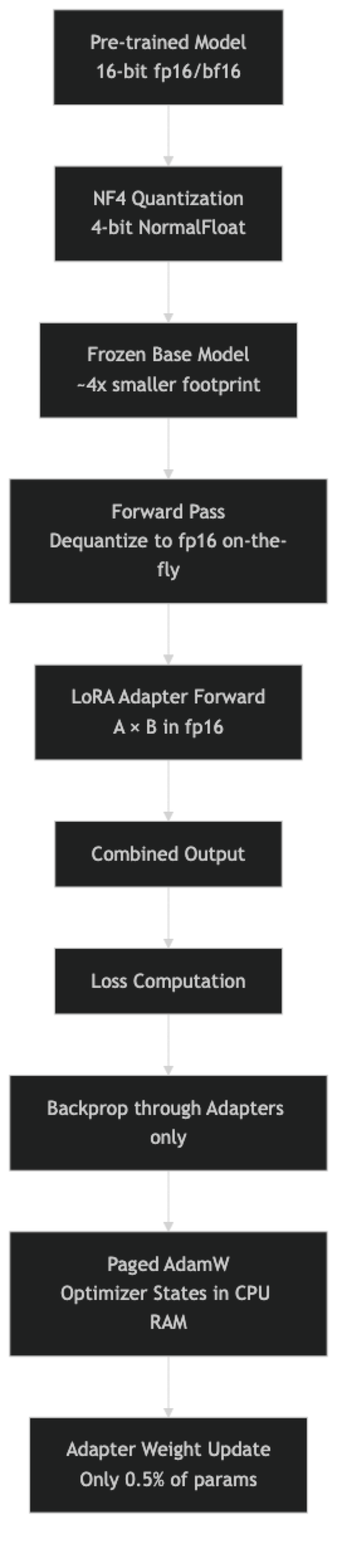
One thing many developers overlook: the base model is dequantized back to fp16 during the forward pass computation. The 4-bit weights are stored in 4-bit, but computation happens in 16-bit. This is what makes QLoRA lossless enough to be practically useful — you get 4-bit storage with 16-bit compute quality.
Implementation Example
Step 1: Install Dependencies
pip install transformers peft trl bitsandbytes accelerate datasetsBitsAndBytes provides the NF4 quantization engine. On CUDA-enabled hardware, it installs and works automatically.
Step 2: Configure 4-bit Quantization
from transformers import BitsAndBytesConfig
import torch

bnb_config = BitsAndBytesConfig(
    load_in_4bit=True,
    bnb_4bit_quant_type="nf4",              # NormalFloat4 — best for neural networks
    bnb_4bit_compute_dtype=torch.bfloat16,  # fp16 also works; bf16 preferred on Ampere+
    bnb_4bit_use_double_quant=True,         # Double quantization saves ~400MB on 7B
)
The quant_type="nf4" is important. The alternative, "fp4", is less accurate for typical neural network weight distributions. Always use NF4 unless you have a specific reason not to.
Step 3: Load the Model in 4-bit
from transformers import AutoModelForCausalLM, AutoTokenizer

model_id = "meta-llama/Meta-Llama-3.1-8B-Instruct"

tokenizer = AutoTokenizer.from_pretrained(model_id)
tokenizer.pad_token = tokenizer.eos_token  # Required for batched training

model = AutoModelForCausalLM.from_pretrained(
    model_id,
    quantization_config=bnb_config,
    device_map="auto",         # Distributes layers across available GPUs/CPU
    attn_implementation="eager",  # Flash attention has compatibility issues with some quant configs
)

memory_gb = model.get_memory_footprint() / 1e9
print(f"Model loaded. Memory footprint: {memory_gb:.2f} GB")
# Llama 3.1 8B → ~4.5 GB in NF4, vs ~16 GB in fp16
Step 4: Prepare Model for k-bit Training
from peft import prepare_model_for_kbit_training, LoraConfig, get_peft_model, TaskType

# This sets up gradient checkpointing for quantized models
# Required when using standard PEFT (not Unsloth)
model = prepare_model_for_kbit_training(
    model,
    use_gradient_checkpointing=True,
    gradient_checkpointing_kwargs={"use_reentrant": False},
)

lora_config = LoraConfig(
    task_type=TaskType.CAUSAL_LM,
    r=64,                # Higher rank for 8B+ models
    lora_alpha=64,       # Keep alpha == r for normalized scaling
    target_modules=[
        "q_proj", "k_proj", "v_proj", "o_proj",
        "gate_proj", "up_proj", "down_proj",
    ],
    lora_dropout=0.05,
    bias="none",
    inference_mode=False,
)

model = get_peft_model(model, lora_config)
model.print_trainable_parameters()
# trainable params: 167,772,160 || all params: 8,198,656,000 || trainable%: 2.05%
Step 5: Format Dataset and Train
from datasets import load_dataset
from trl import SFTTrainer, SFTConfig

dataset = load_dataset("json", data_files="train.jsonl", split="train")

def apply_chat_template(example):
    messages = [
        {"role": "system", "content": example.get("system", "You are a helpful assistant.")},
        {"role": "user",   "content": example["instruction"]},
        {"role": "assistant", "content": example["output"]},
    ]
    return {
        "text": tokenizer.apply_chat_template(
            messages, tokenize=False, add_generation_prompt=False
        )
    }

dataset = dataset.map(apply_chat_template)
split = dataset.train_test_split(test_size=0.1, seed=42)

training_config = SFTConfig(
    output_dir="./qlora-output",
    num_train_epochs=2,
    per_device_train_batch_size=2,
    gradient_accumulation_steps=8,
    # Critical for QLoRA: use paged optimizer
    optim="paged_adamw_32bit",
    learning_rate=2e-4,
    bf16=True,
    max_grad_norm=0.3,
    warmup_ratio=0.03,
    lr_scheduler_type="cosine",
    logging_steps=25,
    eval_strategy="steps",
    eval_steps=100,
    save_strategy="epoch",
    max_seq_length=2048,
    dataset_text_field="text",
    report_to="none",
)

trainer = SFTTrainer(
    model=model,
    tokenizer=tokenizer,
    train_dataset=split["train"],
    eval_dataset=split["test"],
    args=training_config,
)

trainer.train()

# Save only the adapter — small and portable
trainer.model.save_pretrained("./qlora-adapter")
tokenizer.save_pretrained("./qlora-adapter")
print("QLoRA adapter saved.")
Step 6: Merge Adapter for Production Deployment
from peft import PeftModel
from transformers import AutoModelForCausalLM, AutoTokenizer
import torch

# Load base model in full precision for a clean merge
print("Loading base model in fp16 for merging...")
base_model = AutoModelForCausalLM.from_pretrained(
    model_id,
    torch_dtype=torch.bfloat16,
    device_map="auto",
)

# Load and merge the adapter
model = PeftModel.from_pretrained(base_model, "./qlora-adapter")
print("Merging adapter weights into base model...")
merged_model = model.merge_and_unload()

# Save merged model
merged_model.save_pretrained("./merged-model", safe_serialization=True)
tokenizer.save_pretrained("./merged-model")
print("Merged model saved. Ready for vLLM, Ollama, or TGI deployment.")
Fine-Tuning a 13B Model
The process for 13B is identical to 8B — only the model name changes:
# Llama 3.1 13B with QLoRA — fits in ~16GB VRAM
model_id = "meta-llama/Meta-Llama-3.1-13B-Instruct"

# With double quantization enabled, memory footprint:
# 13B × 0.5 bytes (NF4) = ~6.5 GB base model
# + 400MB (double quant savings offset slightly by quantization constants)
# + LoRA adapter ~200MB
# + activations/gradients ~8-10 GB
# Total: ~16-18 GB → fits on RTX 3090 or A10G

# Use a smaller rank for 13B to keep adapter parameters manageable
lora_config_13b = LoraConfig(
    task_type=TaskType.CAUSAL_LM,
    r=32,
    lora_alpha=32,
    target_modules=["q_proj", "k_proj", "v_proj", "o_proj"],
    lora_dropout=0.05,
    bias="none",
)
Best Practices
Always use paged_adamw_32bit as the optimizer. Standard AdamW requires optimizer states proportional to trainable parameters. With paged AdamW, states are offloaded to CPU RAM during memory spikes. This prevents out-of-memory errors during the backward pass on long sequences without meaningful throughput loss.
Set bnb_4bit_compute_dtype=torch.bfloat16 on Ampere+ GPUs (RTX 30xx, A100). BFloat16 has better dynamic range than float16 and reduces training instability. On older GPUs (V100, T4), use torch.float16 instead.
Enable double quantization unconditionally. The quality loss from double quantization is negligible (the quantization constants represent a tiny fraction of model weights), while the memory savings are real. There is no practical reason to disable it.
Use device_map="auto" only for single-host training. When scaling to multi-GPU, explicit device assignment or FSDP is more predictable. device_map="auto" distributes layers greedily and can create bottlenecks.
Checkpoint the adapter, not the merged model, during training. Adapter checkpoints are 50–200MB. Merged model checkpoints are 15–140GB. Save adapters during training and only merge once at the end.
Common Mistakes
Forgetting
prepare_model_for_kbit_training. When using standard PEFT (not Unsloth), quantized models need this call before adding LoRA adapters. It configures gradient checkpointing correctly for quantized layers. Skipping it produces either errors or incorrect gradients.Using a standard Adam optimizer.
optim="adamw_hf"oroptim="adamw_torch"stores optimizer states in GPU VRAM. With a large quantized base model, this pushes memory usage over the limit. Always usepaged_adamw_32bitorpaged_adamw_8bitwith QLoRA.Setting
load_in_4bit=Trueand also usingtorch_dtype=torch.float16infrom_pretrained. These arguments conflict. When using BitsAndBytes quantization config, let the quantization config handle precision. Remove the explicittorch_dtypeargument.Training with
bf16=Trueon a GPU that doesn't support bfloat16. Pre-Ampere GPUs (GTX 10xx, 20xx, V100, T4) do not support bfloat16. Check withtorch.cuda.is_bf16_supported()and usefp16=Trueon older hardware.Merging the adapter without preserving checkpoints. Always keep both the base model identifier and the adapter checkpoint before merging. If the merged model has quality issues, you will need to revert to the adapter and adjust training — which requires the original adapter checkpoint.
Key Takeaways
- QLoRA combines three memory reduction techniques: NF4 4-bit quantization (4x compression of base model weights), double quantization (saves an additional 400MB on a 7B model), and paged optimizers (prevents OOM crashes during backward passes on long sequences).
- The base model is stored in 4-bit NF4 format but is dequantized back to fp16 or bf16 during the actual forward pass computation — this is why QLoRA quality is close to full precision training despite 4-bit storage.
- VRAM requirements with QLoRA: 7B model needs approximately 10GB, 13B needs approximately 16GB, 33B needs approximately 24GB, and 70B needs approximately 48GB — all accessible on single-GPU setups that were previously impossible.
- Always use
paged_adamw_32bitorpaged_adamw_8bitas the optimizer with QLoRA; standard AdamW stores optimizer states in GPU VRAM and will cause out-of-memory errors on long sequences. - Set
bnb_4bit_compute_dtype=torch.bfloat16on Ampere-generation GPUs (RTX 30xx, A100); usetorch.float16on older hardware (V100, T4) that does not support bfloat16. - Always call
prepare_model_for_kbit_training()before adding LoRA adapters when using standard PEFT (not Unsloth) — skipping this step produces either errors or silent gradient computation failures. - Enable double quantization unconditionally: the quality loss is negligible (quantization constants are a tiny fraction of total parameters) while the memory savings are real.
- The original QLoRA paper demonstrated matched quality to full fine-tuning on benchmark tasks; for narrow task adaptation in practice, QLoRA is indistinguishable from full fine-tuning in quality while using 10–50x less VRAM.
FAQ
What GPUs can run QLoRA fine-tuning? A 7B model with QLoRA fits in 10GB VRAM — accessible on RTX 3080 (10GB), RTX 3090 (24GB), RTX 4090 (24GB), A10G (24GB), or free Colab T4 (16GB). A 13B model needs approximately 16GB: RTX 3090, A10G, or A100 40GB. A 70B model needs approximately 48GB: A100 80GB.
Does QLoRA reduce output quality compared to full fine-tuning? The original paper showed QLoRA-fine-tuned models matched full fine-tuning quality on benchmark tasks. In practice, the quality difference is task-dependent. For narrow task adaptation, QLoRA is indistinguishable. For major domain shifts requiring deep knowledge restructuring, full fine-tuning may have an edge — but the infrastructure cost is rarely justified.
Can I use QLoRA with models other than Llama?
Yes. QLoRA works with any transformer architecture that BitsAndBytes supports — Mistral, Phi, Gemma, Qwen, and others. The only model-specific configuration is target_modules, which varies by architecture. Check the model's config.json for the attention layer names.
How long does a QLoRA training run take? On a single A100 40GB GPU: approximately 30–60 minutes for 1,000 examples at 2,048 token sequence length for a 7B model. A 13B model takes roughly 2x longer. Cloud GPU providers (Lambda Labs, RunPod, Vast.ai) typically charge $1–3 per hour for A100 access, making fine-tuning affordable even for individuals.
What is the difference between NF4 and FP4 quantization?
NF4 (NormalFloat 4-bit) is specifically designed for normally distributed values, which neural network weights follow after training. FP4 is a standard 4-bit floating-point format not optimized for this distribution. NF4 achieves lower quantization error for typical model weights, which is why the QLoRA paper uses it and why quant_type="nf4" is the recommended setting.
Do I need to merge the QLoRA adapter before deployment? For production deployment, merging is strongly recommended. Serving a QLoRA adapter (4-bit base plus adapter) adds overhead from on-the-fly dequantization and adapter computation at each forward pass. Merging produces a standard fp16 or bf16 model that runs at full speed with standard inference engines like vLLM or Ollama.
Why does QLoRA use paged optimizers specifically? During training, Adam optimizer states (momentum and variance for each trainable parameter) are stored in VRAM. With a large quantized base model already consuming 4–5GB VRAM plus the LoRA adapter and activations, there is often insufficient headroom for optimizer states during long-sequence backward passes. Paged optimizers use NVIDIA unified memory to transparently page optimizer states to CPU RAM during memory spikes, preventing OOM crashes without requiring manual memory management.