Prompt Engineering: 17 Techniques That Fix Bad LLM Output (2026)
17 Prompt Engineering Techniques Every AI Developer Should Know (2026 Guide)
Last updated: March 2026
Most teams spend more time on model selection than on prompt design — then ship inconsistent AI features and blame the model. The real culprit is almost always the prompt.
When you switch from GPT-4o to Claude 3.5, you might gain 3–5% accuracy on benchmarks. When you switch from a vague instruction prompt to a structured few-shot prompt with explicit format constraints, you can gain 20–40% consistency on the same task. The leverage in prompting is enormous and underutilized.
This guide covers 17 foundational techniques developers rely on in production — organized from basic to intermediate. For agent loops, ReAct, Tree of Thought, and multi-step workflow patterns, see Advanced Prompt Engineering Techniques.
Concept Overview
A prompt technique is a structural pattern for how you present a task to a language model. Different patterns activate different reasoning capabilities, control output format, and manage cost and latency trade-offs.
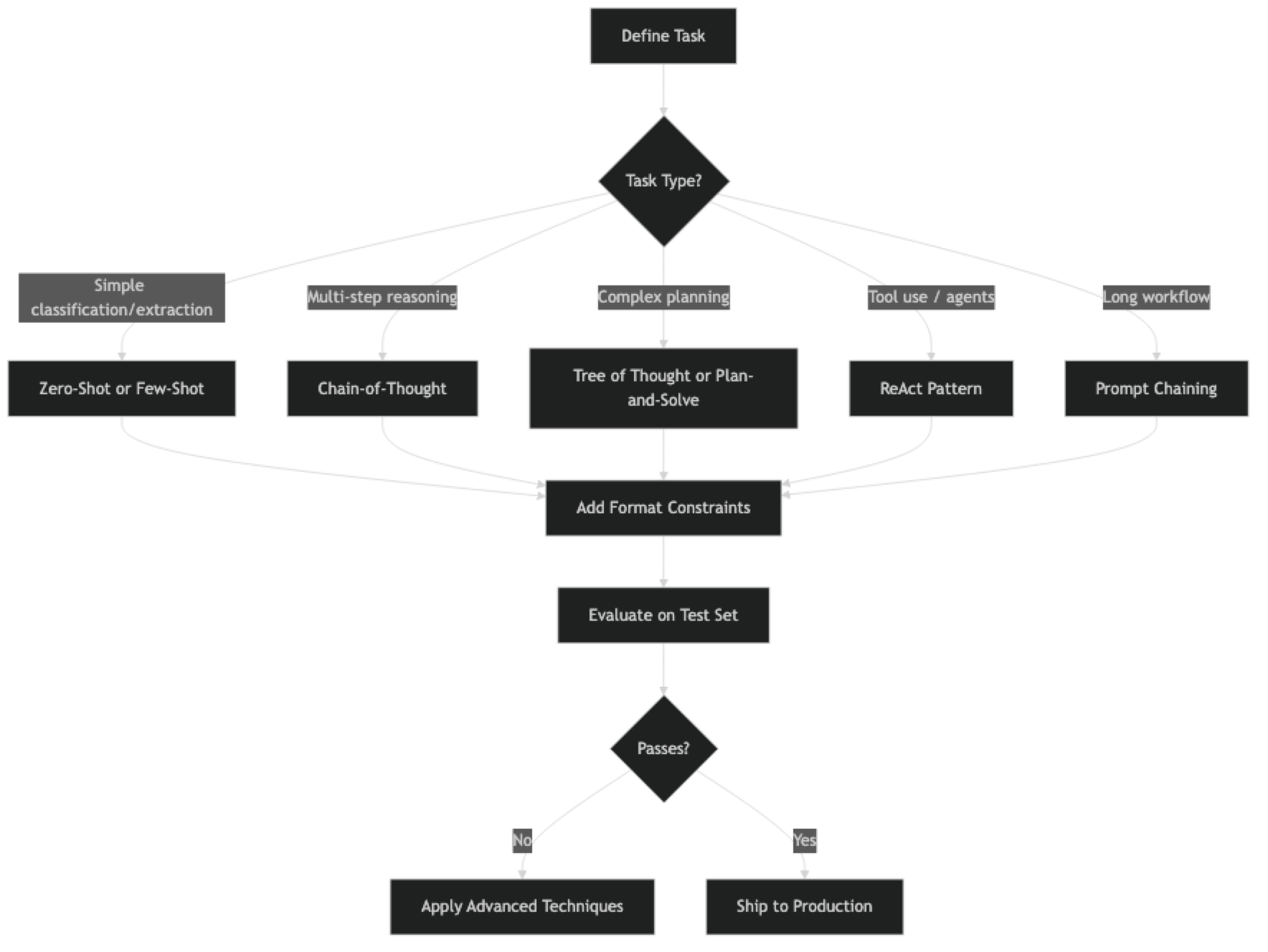
The best technique for any task depends on four things: task complexity, required consistency, token budget, and latency constraints. A classification task at high volume has different requirements than a one-off document analysis. Knowing which technique fits which constraint is the practical skill.
Techniques are composable. Few-shot + chain-of-thought + constrained output is a single prompt that combines three techniques. The art is knowing which combination to reach for.
How It Works
Implementation Example
Before the full list, here is a reference implementation showing how to apply four core techniques:
from openai import OpenAI
import json

client = OpenAI()

# ─── Technique 1: Zero-Shot ───────────────────────────────────────────────────
def zero_shot(task: str, input_text: str) -> str:
    response = client.chat.completions.create(
        model="gpt-4o",
        messages=[
            {"role": "system", "content": task},
            {"role": "user", "content": input_text}
        ],
        temperature=0
    )
    return response.choices[0].message.content

# ─── Technique 2: Few-Shot ────────────────────────────────────────────────────
def few_shot(system: str, examples: list[tuple], query: str) -> str:
    messages = [{"role": "system", "content": system}]
    for user_msg, assistant_msg in examples:
        messages.append({"role": "user", "content": user_msg})
        messages.append({"role": "assistant", "content": assistant_msg})
    messages.append({"role": "user", "content": query})

    response = client.chat.completions.create(
        model="gpt-4o",
        messages=messages,
        temperature=0
    )
    return response.choices[0].message.content

# ─── Technique 3: Chain-of-Thought ───────────────────────────────────────────
def chain_of_thought(question: str) -> str:
    response = client.chat.completions.create(
        model="gpt-4o",
        messages=[
            {"role": "system", "content": "Think through this step by step before giving your final answer."},
            {"role": "user", "content": question}
        ],
        temperature=0
    )
    return response.choices[0].message.content

# ─── Technique 4: Prompt Chaining ────────────────────────────────────────────
def prompt_chain(document: str) -> dict:
    # Step 1: Extract
    facts = json.loads(client.chat.completions.create(
        model="gpt-4o",
        messages=[
            {"role": "system", "content": "Extract 5 key facts. Return JSON: {\"facts\": [string]}"},
            {"role": "user", "content": document}
        ],
        temperature=0,
        response_format={"type": "json_object"}
    ).choices[0].message.content)

    # Step 2: Summarize from extracted facts
    summary = client.chat.completions.create(
        model="gpt-4o",
        messages=[
            {"role": "system", "content": "Write a 2-sentence summary grounded only in the provided facts."},
            {"role": "user", "content": str(facts["facts"])}
        ],
        temperature=0.2
    ).choices[0].message.content

    return {"facts": facts["facts"], "summary": summary}
Quick Reference: Which Technique to Use
| Technique | Use when | Avoid when | Cost vs zero-shot |
|---|---|---|---|
| Zero-Shot | Simple tasks, first attempt | Task needs examples to be precise | 1× |
| Few-Shot | Classification, extraction, formatting | Examples don't fit in context | 1.2–2× |
| Chain-of-Thought | Math, logic, multi-step reasoning | Simple lookup or classification | 2–4× |
| Zero-Shot CoT | No examples available, still need reasoning | High-stakes — unverified reasoning | 2–3× |
| Self-Consistency | High accuracy critical (medical, legal, finance) | Latency or cost is a constraint | 5–10× |
| Constrained Output | Structured data, JSON, API integration | Free-form creative tasks | 1× |
| Role Prompting | Tone/style control, domain expertise | Factual tasks — personas can hallucinate | 1× |
| RAG Prompting | Questions over private/recent documents | Documents fit in context window directly | 1–1.5× |
| Citation Prompting | Trustworthiness, source attribution required | Model doesn't have access to source docs | 1× |
| Prompt Templates | Repeatable workflows, team consistency | One-off experiments | 1× |
Rule of thumb: start with zero-shot → add few-shot examples → add CoT only if reasoning quality matters. Each step adds cost; measure before committing.
17 Prompt Engineering Techniques
Foundational Techniques
1. Zero-Shot Prompting Ask the model to complete a task with no examples. Works for clear, well-defined tasks that fall within the model's training distribution. Always the right starting point — add complexity only if zero-shot fails.
Classify the sentiment as Positive, Negative, or Neutral. Return only the label.
Review: "Battery lasts forever but the camera is unusable in low light."
2. Few-Shot Prompting Provide 2–5 input/output examples before the actual task. Dramatically improves format consistency and domain accuracy. Examples calibrate the model to your specific output style faster than instructions.
3. Chain-of-Thought (CoT) Add "Think step by step" to reasoning tasks. The model generates intermediate reasoning before committing to a final answer, reducing errors in math, logic, and multi-step problems. One of the highest-value techniques for almost no added complexity.
4. Zero-Shot CoT Append "Let's think step by step" to any question — no examples needed. Activates structured reasoning in most modern models with a single trigger phrase.
5. Few-Shot CoT Combine few-shot examples with step-by-step reasoning. Show worked examples of problem-solving, then let the model apply the same pattern. More reliable than zero-shot CoT on domain-specific reasoning.
6. Self-Consistency Run the same CoT prompt 5 times at non-zero temperature and take the majority answer. Improves accuracy on math and logic at the cost of 5× API calls. Use when accuracy matters more than latency.
from collections import Counter

def self_consistent(question: str, n: int = 5) -> str:
    answers = []
    for _ in range(n):
        r = client.chat.completions.create(
            model="gpt-4o",
            messages=[{"role": "user", "content": f"{question}\nThink step by step. End with 'Answer: [value]'"}],
            temperature=0.7
        )
        text = r.choices[0].message.content
        # Extract answer after "Answer:"
        if "Answer:" in text:
            answers.append(text.split("Answer:")[-1].strip())
    return Counter(answers).most_common(1)[0][0]
Instruction and Control
7. Instruction Prompting Give explicit, numbered instructions. "1. Extract all dates. 2. Format as ISO 8601. 3. Return valid JSON only." Structured instructions outperform vague requests on almost every task.
8. Constrained Output Specify the exact output format, including JSON schema. Critical for any code that parses LLM responses automatically. Always define the schema in the system prompt.
Respond with ONLY valid JSON in this format — no explanation, no markdown:
{"company": string, "role": string, "location": string | null, "remote": boolean}
9. Negative Prompting Tell the model explicitly what NOT to do. "Do not add explanations. Do not invent facts not in the source. If unsure, say 'I don't know'." Negative constraints address the most common failure modes directly.
10. Role Prompting Assign a specific persona: "You are a senior security engineer at a fintech company." Shifts vocabulary, tone, and domain emphasis. Effective for code review, writing, and specialized technical analysis.
11. Persona Switching Use different system prompts for different audiences. The same content reframed for a junior engineer versus a VP requires different personas. Maintain a library of persona templates for reuse.
12. Contrastive Prompting Show a bad example and a good example before the task. Makes quality criteria concrete. The model has a clear before/after reference rather than trying to infer quality from abstract instructions.
BAD response: "The system was compromised due to various issues."
GOOD response: "An attacker exploited CVE-2024-1234 in the login endpoint, gaining read access to 12,000 user records."

Now analyze this incident report using the GOOD format above:
13. Format Forcing
Use output anchors to force structure. Starting your prompt with "The answer is:" or "JSON:\n{" forces the model to continue in that format. Useful when response_format API options are unavailable.
Context and Retrieval
14. Context Injection Inject relevant facts, documents, or data directly into the prompt. The model reasons over what you provide, not just training data. Keep injected context focused — inject only what is relevant to the specific question.
15. Retrieval-Augmented Prompting Retrieve relevant chunks from a vector store, inject them as context, and instruct the model to answer only from that context. The backbone of production RAG applications.
Answer based ONLY on the provided context. If the context does not contain
the answer, respond: "I don't have enough information to answer this."

Context:
{retrieved_chunks}

Question: {user_question}
16. Citation Prompting Instruct the model to cite which retrieved source it used. Adds auditability and traceability. Essential for enterprise RAG applications where answers need to be verifiable.
17. Prompt Templates
Use parameterized templates with variables like {user_query}, {context}, {language}. Keeps prompts maintainable, testable, and reusable across different inputs.
from string import Template

REVIEW_TEMPLATE = Template("""
You are a $role reviewing $artifact_type.
Focus on: $focus_areas
Return findings as JSON: {"issues": [{"line": int, "description": str, "severity": str}]}

$artifact_type to review:
$content
""")

prompt = REVIEW_TEMPLATE.substitute(
    role="senior security engineer",
    artifact_type="Python code",
    focus_areas="SQL injection, authentication bypass, secrets in plaintext",
    content=code_to_review
)
Best Practices
Start minimal. Zero-shot first, then add complexity only when you have evidence it helps. Most developers skip straight to few-shot CoT with constrained output when zero-shot would have been fine.
Match technique to task type. Classification and extraction → zero-shot or few-shot. Math and logic → CoT. Structured output → constrained output + JSON schema. RAG applications → retrieval-augmented prompting with citation. Picking the wrong technique adds cost without benefit.
Measure before and after every change. Maintain a test set. A prompt change that improves three examples might break four others. You cannot know without measurement.
Keep prompts in version control. Prompts are code. Store them as constants in a dedicated module, document the reason for each change, and track performance metrics alongside revisions.
Use structured output APIs. response_format: json_object on OpenAI and tool-use on Anthropic enforce structure at the API level — more reliable than asking for JSON in prose.
Common Mistakes
Assuming more instructions equals better results. Long prompts can confuse models. Instructions that contradict each other are worse than no instructions. Be explicit but concise.
Using CoT for simple tasks. Chain-of-thought adds tokens and latency. For a simple label classification, it adds cost without benefit. Use CoT when you have evidence that direct answers are unreliable.
Writing prompts without a test set. Prompts that look great on two examples routinely fail on the third. Always evaluate against a representative set of inputs before deploying.
Not testing adversarial inputs. Users will try to override your system prompt, send empty inputs, and provide inputs in unexpected formats. Every production prompt needs adversarial testing.
Forgetting that examples are more powerful than instructions. A common mistake is writing three paragraphs of instructions when two good examples would be more effective and use fewer tokens.
Key Takeaways
- Use the simplest technique that reliably solves the task — add CoT, few-shot, or chaining only when evidence shows the simpler version fails
- Few-shot prompting (2-3 high-quality examples) gives the biggest improvement per effort unit — examples are more powerful than instructions for format consistency
- Zero-shot CoT ("think step by step") reliably improves accuracy on math and logic tasks; few-shot CoT is better for domain-specific reasoning patterns
- Constrained output techniques (
response_format, tool schemas) enforce structure at the API level — do not rely on prompt-only JSON instructions - Foundational techniques (zero-shot, few-shot, CoT) handle 80% of production use cases; add advanced patterns only when these fail
- Techniques are composable: few-shot + CoT + constrained output is a standard production pattern for structured reasoning tasks
- Measure whether each technique actually helps before adding it — prompts have token cost, and complexity without benefit is waste
- For agent systems, multi-step workflows, and self-critique patterns, see Advanced Prompt Engineering Techniques
FAQ
Which technique gives the biggest improvement with the least effort? Few-shot prompting. Adding 2-3 high-quality examples to an existing prompt consistently improves format consistency and accuracy without adding architectural complexity. Most developers underuse examples and over-rely on instruction length.
When does CoT hurt performance? On simple tasks. When the answer requires one step of reasoning, chain-of-thought generates unnecessary tokens, increases latency, and occasionally leads the model to overthink a correct initial answer. Profile tasks before adding CoT — it is not universally helpful.
How many examples should I use for few-shot prompting? Start with 2-3. Test 5. Beyond 5-6 examples, returns diminish and costs rise. Diversity matters more than quantity — cover different input types, edge cases, and formats. One well-chosen example that covers an unusual pattern is worth more than five examples of the same type.
Can I combine multiple techniques in one prompt? Yes, and this is common in production. Few-shot + CoT + constrained output is a standard pattern for structured reasoning tasks. The key is measuring whether each technique actually helps — add one at a time and evaluate each addition against your test set.
What is the difference between zero-shot CoT and few-shot CoT? Zero-shot CoT adds "Let us think step by step" with no examples — works well on modern capable models for many tasks. Few-shot CoT provides worked examples of complete reasoning chains before the question, which is more reliable for domain-specific or unusual reasoning patterns where the model needs to infer the right reasoning style.
When should I move beyond these foundational techniques? When your task involves multi-step agent behavior, tool use, or requires the model to evaluate and improve its own output. Those scenarios call for patterns like ReAct, plan-and-solve, or self-critique — covered in Advanced Prompt Engineering.
How do I choose between role prompting and a detailed system prompt? Role prompting sets a simple persona ("You are a senior security engineer"). A detailed system prompt adds explicit rules, format requirements, and constraints on top of the persona. Use role prompting alone for simple open-ended tasks. Add a detailed system prompt when the task has specific output requirements, must handle edge cases consistently, or needs explicit restrictions on what the model should or should not do.