OpenAI + LangChain: Build Pipelines Beyond Hello World (2026)
OpenAI + LangChain: Build Production AI Apps with GPT-4o (2026)
Last updated: March 2026
The most common question I get from developers starting with LangChain is: "Why use LangChain at all? I can just call the OpenAI API directly." It is a legitimate question, and the honest answer is: for simple use cases, raw API is often the right choice. LangChain adds value when your application involves multiple steps — retrieve context, inject into prompt, call LLM, parse output, store result — and you want a structured way to compose and test those steps without writing boilerplate glue code.
Where LangChain has historically struggled is in production reliability. The early versions of LangChain had unstable APIs, verbose abstractions, and made debugging difficult. LangChain Expression Language (LCEL), introduced in 2023 and matured by 2025, addresses most of these problems. LCEL provides a composable, streaming-native, observable pipeline syntax that makes it practical for real applications.
This guide covers the OpenAI + LangChain integration with a focus on what actually works in production: ChatOpenAI, LCEL chains, memory management, tool integration, and building a real document Q&A application.
Concept Overview
LangChain is a framework for composing LLM-powered application pipelines. It provides:
- Model wrappers (
ChatOpenAI,ChatAnthropic) — Consistent interface across providers - Prompt templates — Reusable, typed prompt construction
- LCEL (LangChain Expression Language) —
|operator for composing pipeline steps - Memory — Conversation history management
- Retrievers — Document retrieval for RAG
- Tools and agents — Tool-using agent patterns
- LangSmith integration — Observability and tracing
When LangChain adds value:
- RAG pipelines (retrieval → prompt → generation → parsing)
- Multi-step agents with tool use
- Applications that need to swap between models easily
- Teams that want standardized observability via LangSmith
When raw API is better:
- Simple single-step completions
- Performance-critical paths where abstraction overhead matters
- Applications with unusual streaming requirements
- Teams who prefer minimal dependencies
How It Works
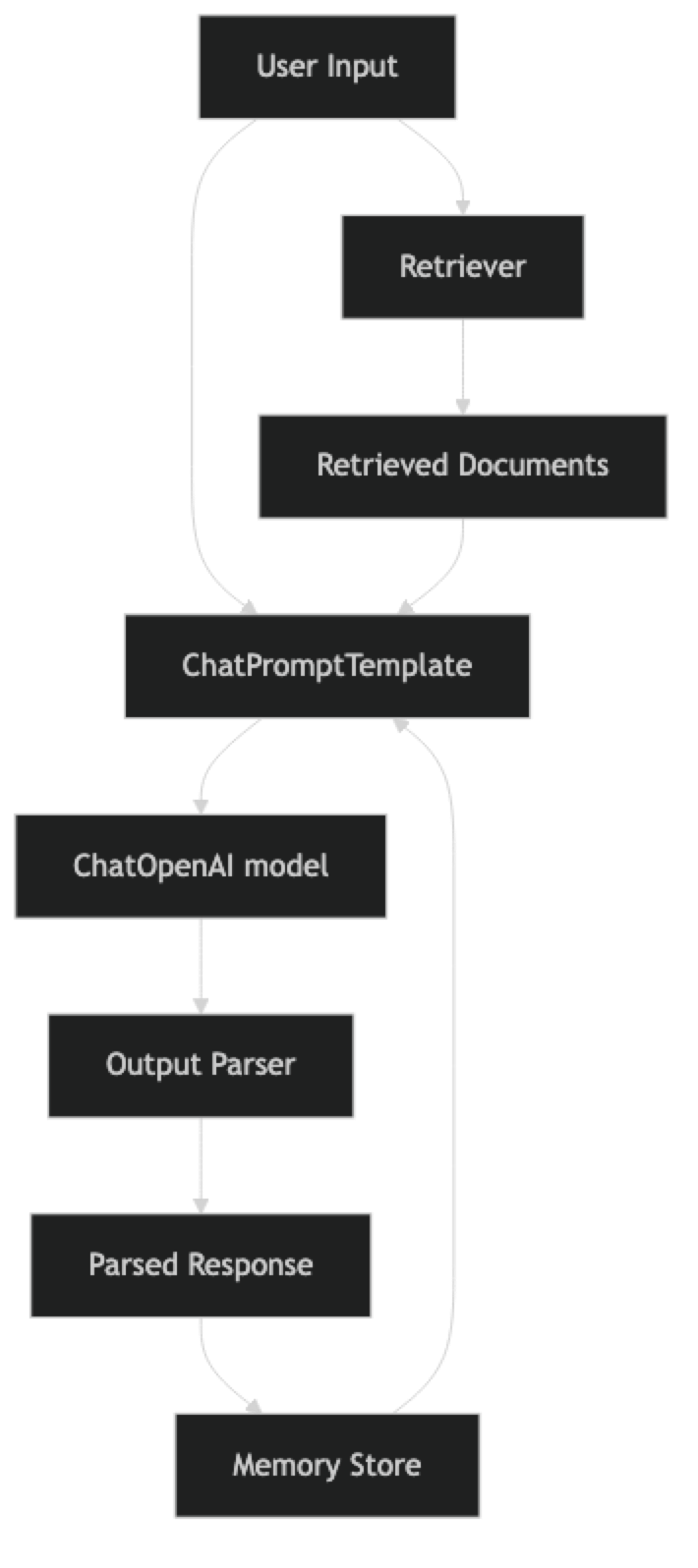
LCEL chains are built with the | pipe operator. Each component is a Runnable with .invoke(), .stream(), and .batch() methods. This uniformity means you can swap any component without changing the rest of the chain.
Implementation Example
Installation
pip install langchain langchain-openai langchain-community faiss-cpuChatOpenAI — The Foundation
from langchain_openai import ChatOpenAI
from langchain_core.messages import HumanMessage, SystemMessage

# Initialize model — similar to OpenAI client but with LangChain interface
llm = ChatOpenAI(
    model="gpt-4o-mini",
    temperature=0,
    max_tokens=1024,
    # api_key read from OPENAI_API_KEY env var
)

# Direct invocation
response = llm.invoke([
    SystemMessage(content="You are a concise Python expert."),
    HumanMessage(content="What is the difference between a list and a tuple?")
])
print(response.content)
print(f"Tokens used: {response.usage_metadata}")
Prompt Templates
from langchain_core.prompts import ChatPromptTemplate, MessagesPlaceholder

# Reusable prompt template
code_review_prompt = ChatPromptTemplate.from_messages([
    ("system", """You are an expert Python code reviewer.
Review the provided code for:
- Correctness and logic errors
- Performance issues
- Security vulnerabilities
- PEP 8 compliance
Be specific and actionable. Format as a numbered list."""),
    ("human", "Review this code:\n\n```python\n{code}\n```")
])

# Template with conversation history placeholder
chat_prompt = ChatPromptTemplate.from_messages([
    ("system", "You are a helpful {role}. Be concise and accurate."),
    MessagesPlaceholder(variable_name="history"),
    ("human", "{input}")
])
LCEL Chains
from langchain_core.output_parsers import StrOutputParser
from langchain_core.prompts import ChatPromptTemplate

# Basic LCEL chain: prompt | model | parser
code_chain = (
    code_review_prompt
    | ChatOpenAI(model="gpt-4o-mini", temperature=0)
    | StrOutputParser()
)

# Invoke
review = code_chain.invoke({
    "code": """
def find_user(users, name):
    for i in range(len(users)):
        if users[i]['name'] == name:
            return users[i]
"""
})
print(review)

# Stream
for chunk in code_chain.stream({"code": "x = [i for i in range(1000000)]"}):
    print(chunk, end="", flush=True)

# Batch — process multiple items efficiently
reviews = code_chain.batch([
    {"code": "import *"},
    {"code": "password = 'admin123'"},
])
Structured Output
from langchain_openai import ChatOpenAI
from pydantic import BaseModel, Field
from typing import Optional

class CodeReview(BaseModel):
    """Structured code review output."""
    severity: str = Field(description="Overall severity: critical/major/minor/pass")
    issues: list[str] = Field(description="List of specific issues found")
    suggestions: list[str] = Field(description="Actionable improvement suggestions")
    estimated_fix_time: Optional[str] = Field(description="Rough time to fix all issues")

# Structured output via .with_structured_output()
structured_llm = ChatOpenAI(model="gpt-4o-mini").with_structured_output(CodeReview)

structured_prompt = ChatPromptTemplate.from_messages([
    ("system", "You are a code reviewer. Analyze the code and provide structured feedback."),
    ("human", "Review:\n```python\n{code}\n```")
])

structured_chain = structured_prompt | structured_llm

result = structured_chain.invoke({"code": "def calc(x): return x*x*x"})
print(f"Severity: {result.severity}")
print(f"Issues: {result.issues}")
print(f"Suggestions: {result.suggestions}")
Memory Management
from langchain_core.chat_history import BaseChatMessageHistory
from langchain_core.messages import AIMessage, HumanMessage
from langchain_core.runnables.history import RunnableWithMessageHistory
from langchain_openai import ChatOpenAI

# In-memory chat history store (replace with Redis/database for production)
store: dict = {}

def get_session_history(session_id: str) -> BaseChatMessageHistory:
    from langchain_community.chat_message_histories import ChatMessageHistory
    if session_id not in store:
        store[session_id] = ChatMessageHistory()
    return store[session_id]

# Base chain
base_prompt = ChatPromptTemplate.from_messages([
    ("system", "You are a helpful Python tutor. Be concise."),
    MessagesPlaceholder(variable_name="history"),
    ("human", "{input}")
])

base_chain = base_prompt | ChatOpenAI(model="gpt-4o-mini") | StrOutputParser()

# Wrap with memory
chain_with_memory = RunnableWithMessageHistory(
    base_chain,
    get_session_history,
    input_messages_key="input",
    history_messages_key="history"
)

# Use session_id to maintain separate conversations per user
config = {"configurable": {"session_id": "user-123"}}

print(chain_with_memory.invoke({"input": "What is list comprehension?"}, config=config))
print(chain_with_memory.invoke({"input": "Can you show an example with filtering?"}, config=config))
print(chain_with_memory.invoke({"input": "How does this differ from filter()?"}, config=config))
Document Q&A Application (Complete Example)
This is the most common LangChain use case — RAG over your own documents.
from langchain_openai import ChatOpenAI, OpenAIEmbeddings
from langchain_community.document_loaders import PyPDFLoader, TextLoader
from langchain.text_splitter import RecursiveCharacterTextSplitter
from langchain_community.vectorstores import FAISS
from langchain_core.prompts import ChatPromptTemplate
from langchain_core.output_parsers import StrOutputParser
from langchain_core.runnables import RunnablePassthrough
from pathlib import Path
import os

class DocumentQA:
    """RAG-based document Q&A system built with LangChain + OpenAI."""

    def __init__(self, model: str = "gpt-4o-mini"):
        self.embeddings = OpenAIEmbeddings(model="text-embedding-3-small")
        self.llm = ChatOpenAI(model=model, temperature=0)
        self.vectorstore = None
        self.retriever = None

        self.prompt = ChatPromptTemplate.from_messages([
            ("system", """You are a precise assistant that answers questions based only on the provided context.
If the answer is not in the context, say "I cannot find this in the provided documents."
Do not make up information or use external knowledge.

Context:
{context}"""),
            ("human", "{question}")
        ])

    def load_documents(self, file_paths: list[str]) -> int:
        """Load and index documents from file paths."""
        documents = []

        for path in file_paths:
            if path.endswith(".pdf"):
                loader = PyPDFLoader(path)
            else:
                loader = TextLoader(path)
            documents.extend(loader.load())

        # Split into chunks
        splitter = RecursiveCharacterTextSplitter(
            chunk_size=1000,
            chunk_overlap=200,
            separators=["\n\n", "\n", ". ", " "]
        )
        chunks = splitter.split_documents(documents)

        # Create vector store
        self.vectorstore = FAISS.from_documents(chunks, self.embeddings)
        self.retriever = self.vectorstore.as_retriever(
            search_kwargs={"k": 4}  # Return top 4 chunks
        )

        print(f"Indexed {len(chunks)} chunks from {len(documents)} documents")
        return len(chunks)

    def _format_docs(self, docs) -> str:
        """Format retrieved documents into a single context string."""
        formatted = []
        for i, doc in enumerate(docs, 1):
            source = doc.metadata.get("source", "Unknown")
            page = doc.metadata.get("page", "")
            header = f"[Document {i} — {Path(source).name}{f', page {page}' if page else ''}]"
            formatted.append(f"{header}\n{doc.page_content}")
        return "\n\n---\n\n".join(formatted)

    def build_chain(self):
        """Build the RAG chain using LCEL."""
        self.chain = (
            {
                "context": self.retriever | self._format_docs,
                "question": RunnablePassthrough()
            }
            | self.prompt
            | self.llm
            | StrOutputParser()
        )

    def ask(self, question: str) -> str:
        """Answer a question using retrieved context."""
        if not self.chain:
            self.build_chain()
        return self.chain.invoke(question)

    def ask_with_sources(self, question: str) -> dict:
        """Answer a question and return sources."""
        # Get retrieved documents separately
        docs = self.retriever.invoke(question)
        sources = [
            {
                "source": doc.metadata.get("source", "Unknown"),
                "page": doc.metadata.get("page", "N/A"),
                "preview": doc.page_content[:200] + "..."
            }
            for doc in docs
        ]

        answer = self.ask(question)
        return {"answer": answer, "sources": sources}


# Usage
qa = DocumentQA(model="gpt-4o-mini")

# Load your documents
chunk_count = qa.load_documents([
    "./engineering_spec.pdf",
    "./api_documentation.txt"
])

qa.build_chain()

# Simple Q&A
answer = qa.ask("What authentication method does the API use?")
print(answer)

# Q&A with sources
result = qa.ask_with_sources("What are the rate limits?")
print(f"Answer: {result['answer']}")
print(f"Sources: {[s['source'] for s in result['sources']]}")
Raw API vs LangChain: When to Choose Each
| Consideration | Raw API | LangChain |
|---|---|---|
| Simple completions | Simpler | Over-engineered |
| RAG pipelines | Verbose boilerplate | Clean composition |
| Multi-provider support | Manual | Built-in |
| Streaming | Straightforward | Uniform .stream() |
| Observability | Manual logging | LangSmith integration |
| Debugging | Transparent | Can obscure errors |
| Dependencies | Minimal | Heavy |
| Customization | Full control | Limited by abstractions |
In practice, many teams use LangChain for prototyping and initial builds, then selectively replace components with direct API calls in performance-critical paths.
Best Practices
Use LCEL over legacy chain classes. LLMChain, SequentialChain, and ConversationalRetrievalChain are legacy patterns. LCEL with | composition is more readable, testable, and streaming-native. Avoid the legacy classes in new code.
Enable LangSmith in production. Set LANGCHAIN_API_KEY and LANGCHAIN_TRACING_V2=true environment variables. LangSmith traces every chain invocation, shows token usage per step, and lets you replay and debug failures. It is the most valuable tool for debugging LangChain applications.
Test individual chain components. LCEL chains are composable, which means each step can be tested independently. Test your retriever, your prompt template rendering, and your output parser separately before testing the full chain.
Store conversation history in a database. The in-memory ChatMessageHistory is convenient for development but does not persist across server restarts. Use RedisChatMessageHistory or a custom database-backed implementation for production.
Common Mistakes
Using LangChain for simple one-shot completions. If your use case is a single API call, the raw
openaiSDK is simpler and has no overhead. Reserve LangChain for multi-step pipelines.Ignoring LCEL in favor of legacy classes. Legacy chain classes like
LLMChainare harder to debug and do not support streaming natively. LCEL is the right abstraction for 2025+.Not using
RunnableWithMessageHistoryfor session isolation. Each user should have their own session ID and message history. Using a global history object causes users to see each other's conversations.Over-relying on LangChain's default splitters without tuning. The default
RecursiveCharacterTextSplitterparameters (chunk size 1000, overlap 200) are starting points, not optimal for all documents. Tune chunk size for your specific document structure and retrieval task.Not logging chain latency by step. When a chain is slow, you need to know which step is responsible. LangSmith traces each step. Without it, you are guessing.
Key Takeaways
- LangChain adds value for multi-step pipelines (RAG, agents, memory management) but is over-engineered for simple single-step completions — use the raw OpenAI SDK for those.
- LCEL (LangChain Expression Language) uses the
|pipe operator to compose Runnables — every component (prompt, model, parser, retriever) implements.invoke(),.stream(),.batch()uniformly. - Avoid legacy chain classes (
LLMChain,SequentialChain,ConversationalRetrievalChain) — they do not support streaming natively and are harder to debug; LCEL is the recommended pattern. ChatPromptTemplatewithMessagesPlaceholderis the clean way to inject conversation history into prompts — it keeps history separate from static instructions.RunnableWithMessageHistorywith asession_idkey provides session-isolated conversation memory — without session isolation, all users share the same history object.- Store conversation history in Redis or a database for production — in-memory
ChatMessageHistorydoes not persist across server restarts. - Enable LangSmith tracing (
LANGCHAIN_TRACING_V2=true) in production — it traces every step, shows token usage per component, and makes debugging chain failures tractable. - LangChain works with Anthropic and Gemini via drop-in swaps:
ChatAnthropicorChatGoogleGenerativeAIreplaceChatOpenAIwhile the rest of the LCEL chain stays identical.
FAQ
Is LangChain still worth using in 2026?
Yes, but more selectively than in 2023–2024. LCEL is solid for RAG pipelines and multi-step chains. The ecosystem has matured. The main caveat: for simple use cases, raw API calls are still simpler. Use LangChain when you need the composition, memory, or retriever abstractions.
What is LCEL and how is it different from the old LangChain chains?
LCEL (LangChain Expression Language) uses the | operator to compose runnables. Every component — prompts, models, parsers, retrievers — implements the same Runnable interface with .invoke(), .stream(), .batch(). Old chains like LLMChain were class-based and did not support streaming natively. LCEL is the current recommended pattern.
Can I use LangChain with Anthropic and Gemini too?
Yes. Install langchain-anthropic or langchain-google-genai and swap ChatOpenAI for ChatAnthropic or ChatGoogleGenerativeAI. The rest of your LCEL chain stays the same — that provider-agnostic interface is one of LangChain's primary value propositions.
How do I switch from LangChain back to the raw API for a specific part of my chain?
Wrap any function in RunnableLambda to make it LCEL-compatible: RunnableLambda(my_function). This lets you mix raw API calls with LangChain components in the same chain. Useful for performance-critical steps where you want direct SDK access.
How do I debug a LangChain chain that is returning wrong answers?
Enable LangSmith tracing to see exactly what prompt was sent to the model, what the model returned at each step, and where the chain diverged from expectations. Without tracing, you are guessing which step produced the wrong output. LangSmith replays are especially valuable for RAG failures where the retrieved context is wrong or incomplete.
What chunk size should I use for document splitting?
Start with chunk_size=1000 and chunk_overlap=200 as defaults, then tune based on your document structure. Technical documentation with short sections works better with smaller chunks (500–700 tokens). Long-form narrative text works better with larger chunks (1000–1500 tokens). Always evaluate retrieval quality on a representative query set before choosing final parameters.
When should I use RunnableParallel vs sequential chain steps?
Use RunnableParallel when two or more steps do not depend on each other's output and can run simultaneously — for example, retrieving context from multiple sources while also counting tokens. Use sequential composition (just pipe |) when each step depends on the previous output. Parallel execution reduces total latency for independent steps.