OpenAI API: Docs Confusing? Build First App in 10 Min (2026)
OpenAI API Tutorial for Developers (2026)
You can go from zero API knowledge to a working AI feature in about 30 minutes with the OpenAI API. No infrastructure to manage, no models to host, and a Python SDK that makes the most common patterns feel natural. But the gap between a demo that works once and an API integration that behaves reliably in production is significant — and it shows up in the specifics: how you handle tokens, structure prompts, parse output, manage conversation history, and handle the inevitable rate limit errors.
The OpenAI API surface in 2026 is broader than it was two years ago. Beyond chat completions, you have streaming, function calling, structured outputs with JSON schema enforcement, embeddings, vision, audio transcription, and the Batch API for cost-effective async processing. Each capability is useful in specific contexts. Understanding which tool to reach for — and how to use it correctly — is what this tutorial covers.
This guide assumes you can write Python. It covers everything from initial setup through production patterns, with runnable code for each feature.
Concept Overview
The OpenAI API is a REST API (with official Python and Node.js SDKs) that provides access to:
- Chat completions — GPT-4o and GPT-4o-mini for text generation, reasoning, and code
- Structured outputs — JSON schema enforcement for reliable data extraction
- Embeddings —
text-embedding-3-smallandtext-embedding-3-largefor semantic search - Vision — Image analysis via GPT-4o multimodal inputs
- Audio — Whisper for speech-to-text, TTS for text-to-speech
- Function calling — Schema-enforced tool use for agent patterns
- Batch API — Async processing at 50% lower cost
GPT-4o vs GPT-4o-mini (2026):
| Feature | GPT-4o | GPT-4o-mini |
|---|---|---|
| Context window | 128K | 128K |
| Input price | $2.50/1M tokens | $0.15/1M tokens |
| Output price | $10.00/1M tokens | $0.60/1M tokens |
| Quality | Frontier | High (close to GPT-4o for most tasks) |
| Speed | Fast | Faster |
For most production applications, GPT-4o-mini handles 70–80% of tasks adequately at 15–20x lower cost. Reserve GPT-4o for tasks that require the highest reasoning quality.
How It Works
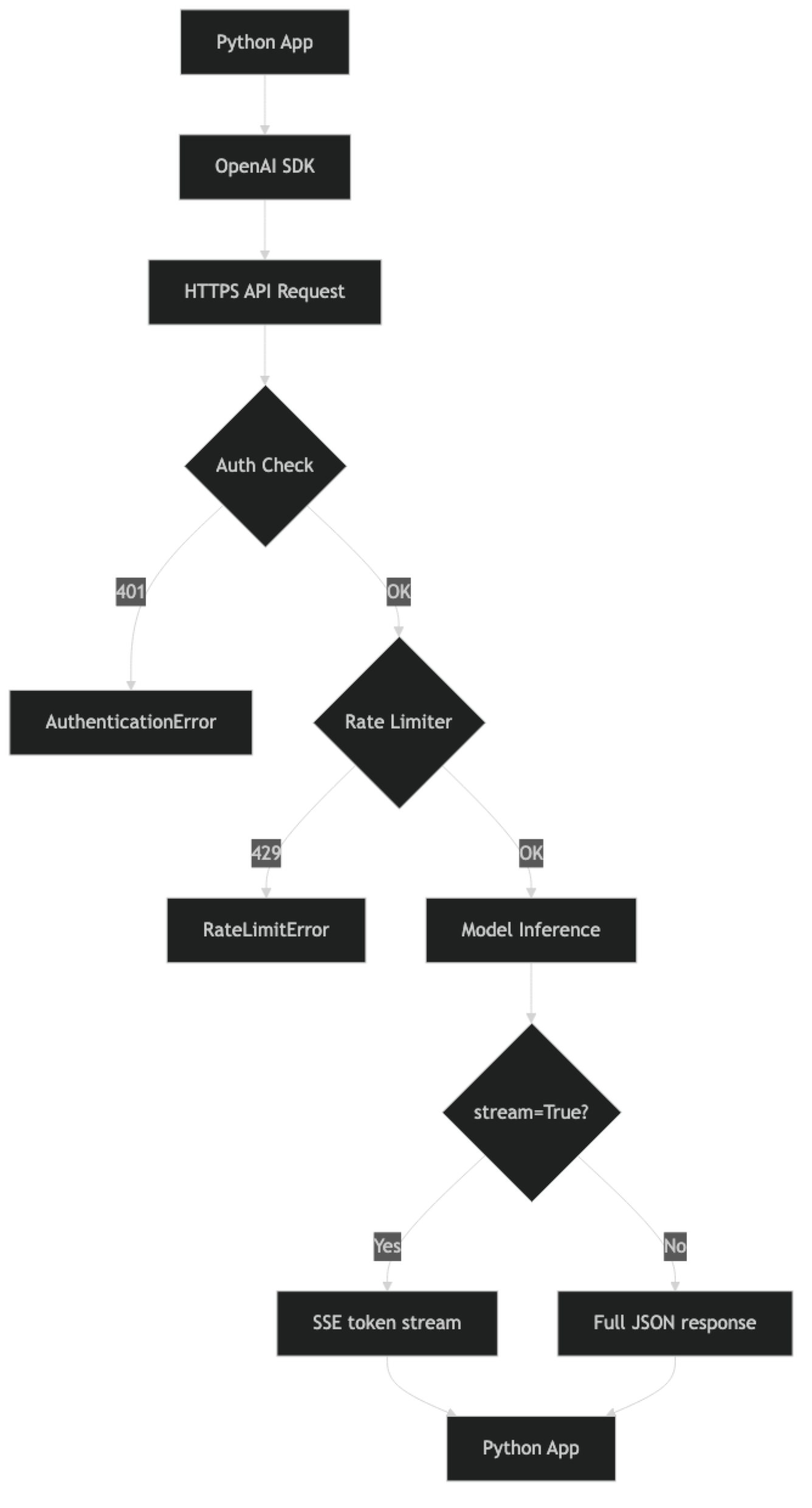
Implementation Example
Setup
pip install openai tiktoken
export OPENAI_API_KEY="sk-proj-..."from openai import OpenAI
# SDK reads OPENAI_API_KEY from environment automatically
client = OpenAI()
# Verify connection
models = client.models.list()
print(f"Connected. Available models: {len(list(models))}")Never hardcode your API key. Use environment variables in development, and AWS Secrets Manager, GCP Secret Manager, or HashiCorp Vault in production. If a key hits a public git repository, rotate it immediately.
Chat Completions
response = client.chat.completions.create(
    model="gpt-4o-mini",
    messages=[
        {
            "role": "system",
            "content": "You are a concise Python expert. Answer technically and precisely."
        },
        {
            "role": "user",
            "content": "What is the difference between a generator and an iterator in Python?"
        }
    ],
    temperature=0,        # Deterministic output
    max_tokens=500        # Always set a limit
)

print(response.choices[0].message.content)
print(f"\nTokens: {response.usage.prompt_tokens} in / {response.usage.completion_tokens} out")
print(f"Model: {response.model}")
print(f"Finish reason: {response.choices[0].finish_reason}")
Message roles:
system— Sets assistant behavior and persona. Applied to every turn.user— Human input.assistant— Previous model responses. Include for multi-turn context.
Key parameters:
| Parameter | Purpose | Recommended Setting |
|---|---|---|
temperature |
Output randomness (0–2) | 0 for extraction/code, 0.7 for creative |
max_tokens |
Maximum response length | Always set — no default cap |
stream |
Token streaming | True for user-facing UIs |
top_p |
Nucleus sampling | Leave at default unless fine-tuning sampling |
Streaming Responses
For user-facing applications, streaming is not optional — it is expected. A non-streamed response forces the user to wait 5–10 seconds. Streamed responses start appearing in under a second.
def stream_to_console(prompt: str, system: str = "") -> str:
    """Stream response to console and return full text."""
    full_text = ""

    messages = []
    if system:
        messages.append({"role": "system", "content": system})
    messages.append({"role": "user", "content": prompt})

    with client.chat.completions.stream(
        model="gpt-4o-mini",
        messages=messages,
        max_tokens=1024,
        temperature=0.7
    ) as stream:
        for text in stream.text_stream:
            print(text, end="", flush=True)
            full_text += text

    print()  # Terminal newline

    # Access final completion for usage stats
    final = stream.get_final_completion()
    print(f"\nTokens: {final.usage.prompt_tokens} in / {final.usage.completion_tokens} out")

    return full_text

result = stream_to_console(
    "Write a Python class for a binary search tree with insert and search methods.",
    system="You are an expert Python engineer. Include type hints and docstrings."
)
Token Counting
Token counting before sending requests helps you avoid context window errors and estimate costs.
import tiktoken

def count_tokens(messages: list, model: str = "gpt-4o-mini") -> int:
    """
    Count tokens for a chat completion request.
    Based on OpenAI's official token counting approach.
    """
    try:
        encoding = tiktoken.encoding_for_model(model)
    except KeyError:
        encoding = tiktoken.get_encoding("cl100k_base")

    # Models using cl100k_base encoding
    tokens_per_message = 3  # Every message has role, content, separators
    tokens_per_name = 1     # If there is a name field

    total = 0
    for message in messages:
        total += tokens_per_message
        for key, value in message.items():
            total += len(encoding.encode(str(value)))
            if key == "name":
                total += tokens_per_name

    total += 3  # Reply priming
    return total

# Example
messages = [
    {"role": "system", "content": "You are a helpful assistant."},
    {"role": "user", "content": "Explain the CAP theorem in distributed systems."}
]
token_count = count_tokens(messages)
print(f"Estimated input tokens: {token_count}")

# Rough cost estimate
cost_mini = (token_count / 1_000_000) * 0.15
print(f"Estimated input cost (gpt-4o-mini): ${cost_mini:.6f}")
Function Calling
Function calling gives you schema-enforced structured output — more reliable than asking for JSON in the prompt.
import json

tools = [
    {
        "type": "function",
        "function": {
            "name": "extract_task",
            "description": (
                "Extract a structured task from natural language input. "
                "Use this to parse task descriptions into actionable items."
            ),
            "parameters": {
                "type": "object",
                "properties": {
                    "title": {
                        "type": "string",
                        "description": "Short task title, max 10 words"
                    },
                    "priority": {
                        "type": "string",
                        "enum": ["low", "medium", "high", "critical"],
                        "description": "Task priority based on urgency and impact"
                    },
                    "due_date": {
                        "type": "string",
                        "description": "Due date in YYYY-MM-DD format, or null if not specified"
                    },
                    "assignee": {
                        "type": "string",
                        "description": "Person responsible for the task, or null"
                    },
                    "tags": {
                        "type": "array",
                        "items": {"type": "string"},
                        "description": "Relevant category tags"
                    }
                },
                "required": ["title", "priority", "tags"],
                "additionalProperties": False
            }
        }
    }
]

def extract_task(text: str) -> dict:
    """Extract structured task data from natural language."""
    response = client.chat.completions.create(
        model="gpt-4o-mini",
        messages=[
            {
                "role": "system",
                "content": "Extract task information accurately from the provided text."
            },
            {
                "role": "user",
                "content": f"Extract task: {text}"
            }
        ],
        tools=tools,
        tool_choice={"type": "function", "function": {"name": "extract_task"}},
        temperature=0,
        max_tokens=256
    )

    tool_call = response.choices[0].message.tool_calls[0]
    return json.loads(tool_call.function.arguments)

# Example
task = extract_task(
    "Sarah needs to deploy the auth service by Friday — it's blocking 3 other teams. "
    "High priority, infrastructure and backend tags."
)
print(json.dumps(task, indent=2))
# Output:
# {
#   "title": "Deploy auth service",
#   "priority": "high",
#   "due_date": "2026-03-20",
#   "assignee": "Sarah",
#   "tags": ["infrastructure", "backend"]
# }
Structured Outputs (JSON Schema Mode)
The newer response_format with JSON schema is cleaner for simple extraction use cases:
from pydantic import BaseModel
from typing import Optional

class ProductReview(BaseModel):
    sentiment: str  # positive, negative, neutral
    score: int      # 1-5
    key_issues: list[str]
    key_positives: list[str]
    would_recommend: bool

def analyze_review(review_text: str) -> ProductReview:
    """Analyze a product review with structured output."""
    response = client.beta.chat.completions.parse(
        model="gpt-4o-mini",
        messages=[
            {
                "role": "system",
                "content": "Analyze product reviews accurately and objectively."
            },
            {
                "role": "user",
                "content": f"Analyze this review:\n\n{review_text}"
            }
        ],
        response_format=ProductReview,
        temperature=0,
        max_tokens=512
    )
    return response.choices[0].message.parsed

result = analyze_review(
    "Great battery life and the camera is phenomenal. The screen brightness "
    "is mediocre indoors and the speaker is tinny. Overall I'd buy it again."
)
print(f"Sentiment: {result.sentiment}, Score: {result.score}")
print(f"Issues: {result.key_issues}")
print(f"Positives: {result.key_positives}")
Embeddings
Embeddings convert text to dense vectors for semantic search and similarity comparison.
import numpy as np
from typing import Union

def get_embeddings(
    texts: Union[str, list[str]],
    model: str = "text-embedding-3-small"
) -> list[list[float]]:
    """Generate embeddings for one or more texts."""
    if isinstance(texts, str):
        texts = [texts]

    response = client.embeddings.create(
        model=model,
        input=texts
    )
    return [item.embedding for item in response.data]

def cosine_similarity(a: list[float], b: list[float]) -> float:
    """Compute cosine similarity between two embedding vectors."""
    a_arr, b_arr = np.array(a), np.array(b)
    return float(np.dot(a_arr, b_arr) / (np.linalg.norm(a_arr) * np.linalg.norm(b_arr)))

# Semantic similarity comparison
texts = [
    "How does retrieval-augmented generation work?",
    "Explain RAG in machine learning systems",
    "What is the capital of France?"
]
embeddings = get_embeddings(texts)

sim_01 = cosine_similarity(embeddings[0], embeddings[1])
sim_02 = cosine_similarity(embeddings[0], embeddings[2])

print(f"RAG question vs RAG explanation: {sim_01:.3f}")  # High: ~0.90
print(f"RAG question vs Paris question: {sim_02:.3f}")   # Low: ~0.40

# text-embedding-3-small: 1536 dimensions, cheap, fast — right for most use cases
# text-embedding-3-large: 3072 dimensions, higher precision — use for critical retrieval
print(f"Embedding dimensions: {len(embeddings[0])}")
Vision — Image Analysis
import base64
from pathlib import Path

def analyze_image_url(image_url: str, prompt: str) -> str:
    """Analyze an image from URL."""
    response = client.chat.completions.create(
        model="gpt-4o",  # Vision requires gpt-4o
        messages=[
            {
                "role": "user",
                "content": [
                    {"type": "text", "text": prompt},
                    {"type": "image_url", "image_url": {"url": image_url}}
                ]
            }
        ],
        max_tokens=1024
    )
    return response.choices[0].message.content

def analyze_local_image(image_path: str, prompt: str) -> str:
    """Analyze a local image file via base64 encoding."""
    image_bytes = Path(image_path).read_bytes()
    b64_image = base64.b64encode(image_bytes).decode()

    # Determine media type from extension
    ext_to_mime = {
        ".jpg": "image/jpeg", ".jpeg": "image/jpeg",
        ".png": "image/png", ".gif": "image/gif", ".webp": "image/webp"
    }
    ext = Path(image_path).suffix.lower()
    mime_type = ext_to_mime.get(ext, "image/jpeg")

    response = client.chat.completions.create(
        model="gpt-4o",
        messages=[
            {
                "role": "user",
                "content": [
                    {"type": "text", "text": prompt},
                    {
                        "type": "image_url",
                        "image_url": {
                            "url": f"data:{mime_type};base64,{b64_image}",
                            "detail": "high"  # "low" for faster/cheaper, "high" for detail
                        }
                    }
                ]
            }
        ],
        max_tokens=1024
    )
    return response.choices[0].message.content

# Examples
description = analyze_image_url(
    "https://example.com/system-architecture.png",
    "Describe this architecture diagram. Identify the main components and data flow."
)
print(description)
Multi-Turn Conversations
class ConversationManager:
    """Manages conversation history with automatic truncation."""

    def __init__(
        self,
        system_prompt: str,
        model: str = "gpt-4o-mini",
        max_history_tokens: int = 50_000
    ):
        self.system_prompt = system_prompt
        self.model = model
        self.max_history_tokens = max_history_tokens
        self.history: list[dict] = []

    def _build_messages(self) -> list[dict]:
        """Build messages list with system prompt."""
        return [{"role": "system", "content": self.system_prompt}] + self.history

    def _count_tokens(self, messages: list) -> int:
        return count_tokens(messages, self.model)

    def _truncate_history(self):
        """Remove oldest turns when approaching token limit."""
        while (self._count_tokens(self._build_messages()) > self.max_history_tokens
               and len(self.history) > 2):
            # Remove the oldest two messages (one user + one assistant turn)
            self.history = self.history[2:]

    def chat(self, user_message: str, temperature: float = 0.7) -> str:
        self.history.append({"role": "user", "content": user_message})
        self._truncate_history()

        messages = self._build_messages()
        response = client.chat.completions.create(
            model=self.model,
            messages=messages,
            max_tokens=1024,
            temperature=temperature
        )

        assistant_reply = response.choices[0].message.content
        self.history.append({"role": "assistant", "content": assistant_reply})
        return assistant_reply

    def clear(self):
        self.history = []


# Usage
conv = ConversationManager(
    system_prompt="You are a concise technical mentor specializing in distributed systems.",
    model="gpt-4o-mini"
)

print(conv.chat("What is eventual consistency?"))
print(conv.chat("How does this differ from strong consistency?"))
print(conv.chat("Can you give me a real-world example using databases?"))
print(f"History: {len(conv.history) // 2} turns, ~{count_tokens(conv._build_messages())} tokens")
Error Handling and Retry Logic
from openai import (
    OpenAI,
    RateLimitError,
    APITimeoutError,
    APIConnectionError,
    BadRequestError,
    AuthenticationError,
    InternalServerError
)
import time
import random

def robust_completion(
    messages: list,
    model: str = "gpt-4o-mini",
    max_retries: int = 5,
    timeout: float = 30.0
) -> str:
    """
    OpenAI chat completion with retry logic and comprehensive error handling.
    """
    for attempt in range(max_retries):
        try:
            response = client.chat.completions.create(
                model=model,
                messages=messages,
                max_tokens=1024,
                timeout=timeout
            )
            return response.choices[0].message.content

        except AuthenticationError:
            # Do not retry — fix the API key
            raise RuntimeError("Invalid API key. Check OPENAI_API_KEY environment variable.")

        except BadRequestError as e:
            # Do not retry — fix the request
            raise ValueError(f"Bad request: {e}") from e

        except RateLimitError:
            if attempt == max_retries - 1:
                raise
            delay = min(1.0 * (2 ** attempt), 60.0)
            delay += delay * 0.25 * (random.random() * 2 - 1)  # jitter
            print(f"Rate limited. Waiting {delay:.1f}s (attempt {attempt + 1})")
            time.sleep(max(0.1, delay))

        except (APITimeoutError, APIConnectionError) as e:
            if attempt == max_retries - 1:
                raise RuntimeError(f"API unreachable after {max_retries} attempts: {e}") from e
            time.sleep(1.0 * (2 ** attempt))

        except InternalServerError:
            if attempt == max_retries - 1:
                raise
            time.sleep(2.0 * (2 ** attempt))  # Longer wait for server errors

    raise RuntimeError("Max retries exceeded")
OpenAI Batch API
For background workloads that do not need real-time results, the Batch API is 50% cheaper.
import json
from openai import OpenAI

client = OpenAI()

def submit_batch_job(items: list[dict], system_prompt: str) -> str:
    """Submit a batch job to the OpenAI Batch API. Returns batch ID."""

    # Build batch requests in JSONL format
    batch_requests = []
    for i, item in enumerate(items):
        batch_requests.append(json.dumps({
            "custom_id": f"item-{i}",
            "method": "POST",
            "url": "/v1/chat/completions",
            "body": {
                "model": "gpt-4o-mini",
                "messages": [
                    {"role": "system", "content": system_prompt},
                    {"role": "user", "content": item["text"]}
                ],
                "max_tokens": 200,
                "temperature": 0
            }
        }))

    jsonl_content = "\n".join(batch_requests)

    # Upload batch file
    batch_file = client.files.create(
        file=("batch.jsonl", jsonl_content.encode(), "application/json"),
        purpose="batch"
    )

    # Create batch job
    batch = client.batches.create(
        input_file_id=batch_file.id,
        endpoint="/v1/chat/completions",
        completion_window="24h"
    )

    print(f"Batch submitted: {batch.id} | {len(items)} items | ~24h processing")
    return batch.id

def check_batch_status(batch_id: str) -> dict:
    """Check batch job status and retrieve results when complete."""
    batch = client.batches.retrieve(batch_id)
    print(f"Status: {batch.status} | "
          f"Completed: {batch.request_counts.completed}/{batch.request_counts.total}")

    if batch.status == "completed":
        result_file = client.files.content(batch.output_file_id)
        results = {}
        for line in result_file.text.strip().split("\n"):
            item = json.loads(line)
            results[item["custom_id"]] = (
                item["response"]["body"]["choices"][0]["message"]["content"]
            )
        return {"status": "completed", "results": results}

    return {"status": batch.status}
Best Practices
Always set max_tokens. Without a limit, an open-ended prompt can generate thousands of tokens unexpectedly. Set it based on the maximum reasonable output for your specific use case.
Use temperature=0 for deterministic tasks. Extraction, classification, structured output, and code generation should be consistent across calls. Temperature adds randomness that serves no purpose in these contexts.
Track costs per feature. Tag every API call with a feature identifier. Aggregate cost by feature in your logging pipeline. This is how you identify which features are responsible for cost spikes.
Set spending limits in the OpenAI dashboard. Configure a monthly hard limit. An infinite loop or unexpected traffic spike can generate significant charges quickly. The spending limit is a safety net.
Version your prompts. Store prompts in named constants, not inline strings. When you change a prompt, document the change and run regression tests against your test set to catch quality regressions.
Use the async client in async frameworks. In FastAPI or any async Python application, use AsyncOpenAI to avoid blocking the event loop. The synchronous client blocks on I/O, degrading concurrency.
Common Mistakes
Hardcoding API keys in source code. A key in a public git repo, even briefly, should be treated as compromised. Rotate immediately and use environment variables.
Not handling rate limits. OpenAI enforces TPM and RPM limits per model. Without exponential backoff retry logic, rate limit errors surface as 429 responses to users. This is table stakes for production.
Unbounded conversation history. History grows unbounded without truncation. After 20–30 complex turns, you will approach the 128K context limit. Implement truncation before reaching 70% of the context window.
Using GPT-4o for everything. GPT-4o-mini handles the majority of tasks at 15–20x lower cost. Default to GPT-4o-mini; only upgrade specific high-complexity calls where quality difference is measurable.
Parsing JSON from plain text responses. Asking "respond in JSON" in the system prompt produces inconsistent output. Use function calling or
response_formatwith a JSON schema for reliable structured output.Not setting timeouts. The SDK default timeout may be too long for user-facing calls. Set a 15–30 second timeout and handle
APITimeoutErrorwith a user-friendly message.Ignoring
finish_reason. Afinish_reasonoflengthmeans the response was truncated because it hitmax_tokens. If you rely on complete responses, check this field and handle truncation.
Key Takeaways
- The OpenAI Python SDK provides a clean, typed interface for chat completions, embeddings, streaming, vision, function calling, and the Batch API from a single client object.
- GPT-4o-mini handles 70–80% of production tasks at 15–20x lower cost than GPT-4o — always start with mini and upgrade only when you measure a quality gap.
- Always set
max_tokenson every request; without it an open-ended prompt can generate thousands of tokens and spike costs unexpectedly. - Set
temperature=0for extraction, classification, code generation, and any task where consistency matters more than creativity. - Streaming (
stream=True) reduces perceived latency from 5–10 seconds to under one second — it is not optional for user-facing chat interfaces. - Function calling and
response_formatwith JSON schema are the only reliable ways to extract structured data; plain-text JSON instructions produce inconsistent output. - Implement exponential backoff with jitter for all 429 and 5xx errors; rate limit handling is table stakes for production applications.
- Track token counts with
tiktokenand implement conversation history truncation before you reach 70–80% of the 128K context window.
FAQ
When should I use GPT-4o vs GPT-4o-mini?
Default to GPT-4o-mini. It handles classification, summarization, simple Q&A, code generation for common patterns, and structured extraction at a fraction of GPT-4o's cost. Use GPT-4o when you have measured that GPT-4o-mini produces noticeably worse output on your specific task — complex multi-step reasoning, advanced code review, and nuanced analysis are the most common cases.
How do I handle the 128K context window limit?
Track token count with tiktoken before sending requests. When you approach 80–90% of the limit, truncate conversation history from the oldest messages while keeping the system prompt and most recent turns. For document analysis, consider chunking or using embeddings-based retrieval rather than passing entire documents.
Is GPT-4o vision capability production-ready?
Yes. GPT-4o vision handles diagrams, screenshots, charts, documents, and natural images reliably. Use detail: "low" for general description (cheaper, faster) and detail: "high" when you need fine-grained text or detail extraction. Images sent via URL are processed without base64 overhead.
How do I test OpenAI API integrations without incurring costs?
For unit tests: mock the OpenAI client with unittest.mock to return fixed responses without making API calls. For integration testing: use cheap models (gpt-4o-mini) with minimal max_tokens (10–50) to reduce cost while verifying API connectivity and response parsing. Keep a regression test set of representative inputs.
What is the difference between function calling and structured outputs?
Function calling (tools API) is more flexible — it supports multi-step tool execution loops and parallel tool calls. Structured outputs (response_format with Pydantic model or JSON schema) is simpler for single-step extraction — the response is automatically parsed into a Python object. Use structured outputs for simple extraction; use function calling for agent patterns requiring tool execution.
When should I use the Batch API?
Use the Batch API for any workload that does not need real-time results: document classification pipelines, bulk data enrichment, overnight report generation, or any background processing job. It runs at 50% lower cost than the synchronous API and supports up to 50,000 requests per batch with a 24-hour completion window.
How do I prevent API key exposure in production?
Never hardcode API keys in source code or commit them to version control. Use environment variables in development and a secrets manager (AWS Secrets Manager, GCP Secret Manager, or HashiCorp Vault) in production. If a key appears in a public repository even briefly, rotate it immediately and treat it as compromised.