Open Source LLMs: Choose and Deploy the Right Model (2026)
Open Source LLMs: Complete Developer Guide to Self-Hosted AI (2026)
Last updated: March 2026
For most of 2023, if you wanted a capable language model in production, the answer was OpenAI. The quality gap between GPT-4 and anything you could run yourself was significant enough that the decision was easy. That calculus has shifted dramatically. Open source models have closed the gap on many practical tasks, and for a growing set of production workloads — particularly anything involving sensitive data, fine-tuning requirements, or sustained inference volume — self-hosted models are now the technically superior choice.
The challenge has moved from "can open source models even do this" to "which model, which runtime, and what hardware configuration." This guide covers the full landscape: the model families you need to know, the runtimes that make local deployment practical, quantization formats that let you run 70B models on a single consumer GPU, and a framework for deciding when proprietary APIs still make sense.
This is not a benchmarks-only comparison. Benchmarks matter, but production decisions also involve latency requirements, hardware budgets, data residency constraints, and the operational overhead of running your own inference stack. All of that is covered here.
Concept Overview
The open source LLM ecosystem has three distinct layers that you need to understand before making deployment decisions.
Model families are the pretrained base models: Llama 3, Mistral, Qwen 2.5, Phi-4, Gemma 3. These are released with permissive licenses (mostly Apache 2.0 or MIT) that allow commercial use, fine-tuning, and redistribution. Each family has multiple sizes optimized for different hardware profiles.
Runtimes are the software that loads and runs these models: Ollama for developer-friendly local inference, llama.cpp for CPU-capable quantized inference, vLLM for high-throughput GPU serving. The runtime determines your deployment options, performance ceiling, and operational complexity.
Quantization formats determine how model weights are stored. The full-precision weights of a 70B model require roughly 140GB of VRAM — unusable for most hardware setups. GGUF quantization (4-bit, 5-bit, 8-bit) compresses those weights to 40–70GB with acceptable quality loss, making large models runnable on a single high-end consumer GPU.
Understanding all three layers together is what separates engineers who successfully deploy open source LLMs from those who spend weeks debugging memory errors and inference failures.
How It Works
The Open Source LLM Deployment Stack
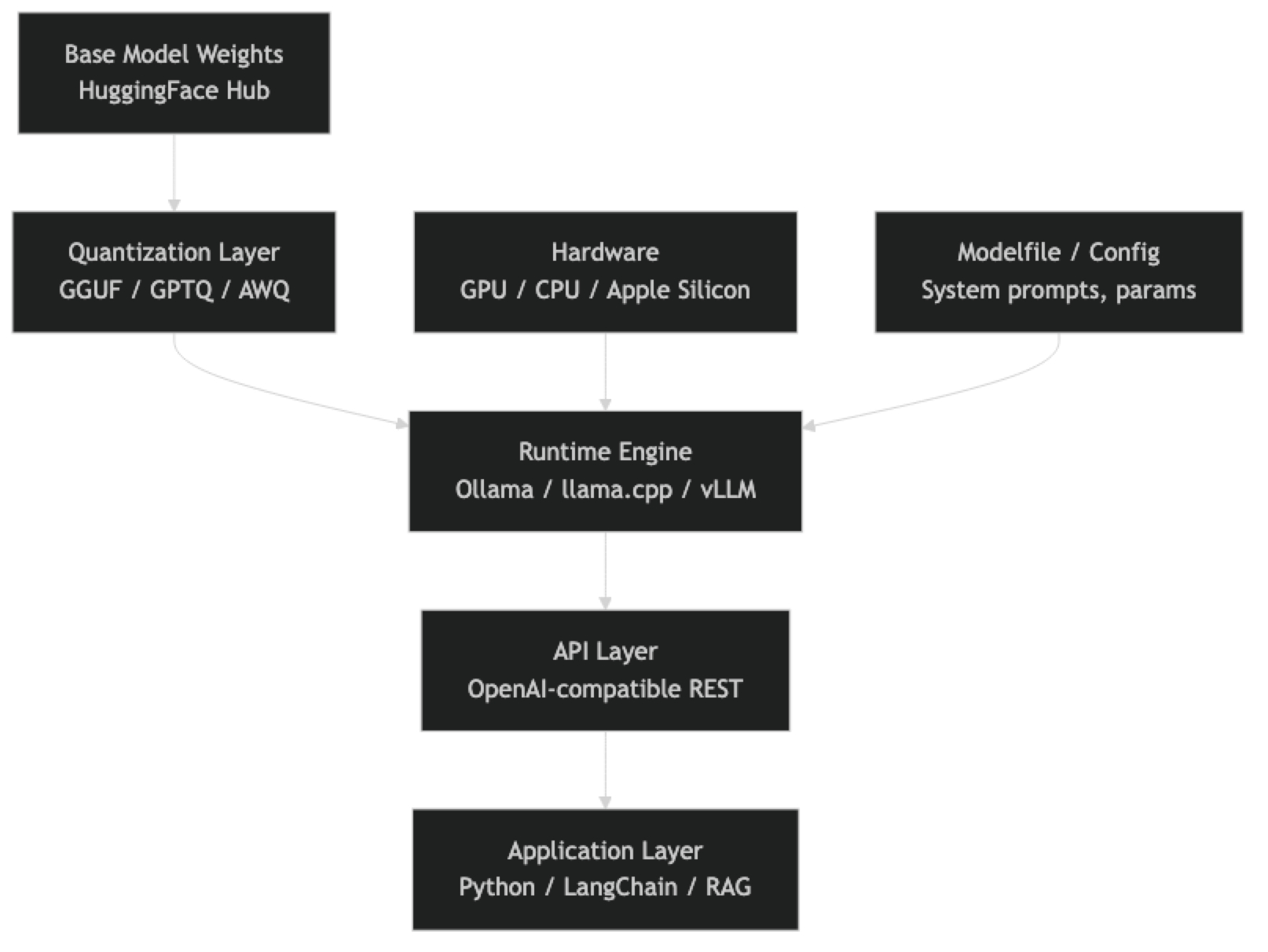
Each layer has options, and the choices are not always interchangeable. A model quantized in GGUF format runs on llama.cpp and Ollama but not natively on vLLM. A model served through vLLM benefits from continuous batching and PagedAttention but requires CUDA-compatible GPUs. Understanding which combinations work together saves significant debugging time.
Model Families: What You Need to Know
Llama 3 (Meta)
Llama 3 is the current anchor point for the open source ecosystem. The 3.3 70B Instruct model is the most capable open model for general reasoning and instruction following as of early 2026. The 8B model runs comfortably on consumer hardware and punches well above its weight on coding and analysis tasks.
Key Llama 3 variants:
- Llama 3.3 70B Instruct — Top-tier open source reasoning, fits in 40GB VRAM at 4-bit quantization
- Llama 3.1 8B Instruct — Excellent edge/consumer GPU model, runs on 8GB VRAM
- Llama 3.2 3B / 1B — Embedded and mobile deployment targets
- Llama 3.2 11B / 90B Vision — Multimodal variants with image understanding
The license is permissive for commercial use with usage guidelines attached. For most production use cases, it is effectively open.
Mistral
Mistral AI has consistently produced efficient models — high capability relative to parameter count. The 7B model was the quality benchmark for small models throughout 2023 and 2024.
Key Mistral variants:
- Mistral 7B v0.3 — The baseline small model, Apache 2.0, no usage restrictions
- Mistral Small 3 (24B) — Strong instruction following, significantly better than 7B on complex tasks
- Mistral Nemo (12B) — Co-developed with NVIDIA, excellent 128k context window
- Mixtral 8x7B / 8x22B — Sparse mixture-of-experts architecture, efficient inference relative to capability
Mistral's Apache 2.0 licensing on their core models makes them attractive for commercial use cases where the Llama usage policy creates ambiguity.
Qwen 2.5 (Alibaba)
Qwen has emerged as a serious competitor, particularly on coding and multilingual tasks. The Qwen 2.5 72B model outperforms Llama 3.1 70B on several coding benchmarks.
Key Qwen 2.5 variants:
- Qwen2.5 72B Instruct — Best-in-class open source coding, strong math reasoning
- Qwen2.5 32B Instruct — Fits in 24GB VRAM at 4-bit, excellent price/performance
- Qwen2.5 Coder 32B — Specialized code model, competitive with larger general models
- Qwen2.5 7B Instruct — Strong multilingual small model
One thing many developers overlook is Qwen's multilingual depth. For applications serving non-English users, Qwen often significantly outperforms Llama equivalents.
Phi-4 (Microsoft)
The Phi series demonstrates that model size is not the only lever for capability. Phi-4 (14B) achieves performance competitive with much larger models on reasoning and STEM tasks by training on curated, high-quality synthetic data.
Key Phi-4 variants:
- Phi-4 (14B) — Exceptional reasoning for model size, excellent on math and coding
- Phi-3.5 Mini (3.8B) — Fits on mobile devices, strong on-device inference candidate
The trade-off is weaker performance on open-ended generation and creative tasks compared to larger general models.
Gemma 3 (Google)
Gemma 3 is Google's open model family. The 27B model is a strong all-rounder with good instruction following. Gemma models use a modified Llama architecture and are compatible with most Llama tooling.
Key Gemma 3 variants:
- Gemma 3 27B IT — Best Gemma model, competitive with Llama 3 8B on many tasks
- Gemma 3 9B IT — Efficient mid-size model
- Gemma 3 4B / 1B IT — Lightweight deployment targets
Runtime Options
Ollama
Ollama is the recommended starting point for local development. It handles model downloading, quantization selection, and serving through an OpenAI-compatible API — all with a simple CLI.
# Install Ollama (macOS/Linux)
curl -fsSL https://ollama.ai/install.sh | sh

# Pull and run models
ollama pull llama3.3:70b-instruct-q4_K_M
ollama pull mistral:7b-instruct
ollama pull qwen2.5:32b

# Start interactive session
ollama run llama3.3:70b-instruct-q4_K_M
Ollama automatically uses GPU if available and falls back to CPU. The built-in OpenAI-compatible endpoint runs at http://localhost:11434/v1, making it a drop-in replacement for OpenAI API calls in existing code.
llama.cpp
llama.cpp is the runtime that powers Ollama under the hood. You use it directly when you need fine-grained control over quantization settings, CPU thread counts, memory-mapped inference, or when deploying on hardware that Ollama does not support well.
# Build from source
git clone https://github.com/ggerganov/llama.cpp
cd llama.cpp && make -j8

# Download a GGUF model and run
./llama-cli -m models/llama-3.3-70b-instruct-q4_K_M.gguf \
  --prompt "Explain transformer attention in 3 sentences" \
  -n 200 --threads 8
vLLM
vLLM is the production serving stack for high-throughput GPU inference. It implements PagedAttention (efficient KV cache management), continuous batching (no padding waste), and tensor parallelism for multi-GPU setups. If you are serving many concurrent users, vLLM will significantly outperform Ollama on throughput.
from vllm import LLM, SamplingParams

llm = LLM(model="meta-llama/Llama-3.3-70B-Instruct",
          tensor_parallel_size=2)  # 2 GPUs
params = SamplingParams(temperature=0.7, max_tokens=512)
outputs = llm.generate(["Summarize quantum computing"], params)
The trade-off: vLLM requires CUDA, has more complex setup than Ollama, and is overkill for single-user local development.
Implementation Example
Python Integration with Ollama
import ollama
from openai import OpenAI

# Method 1: Native Ollama Python client
def chat_with_ollama(model: str, prompt: str) -> str:
    response = ollama.chat(
        model=model,
        messages=[{"role": "user", "content": prompt}]
    )
    return response["message"]["content"]

# Method 2: OpenAI-compatible client (drop-in for existing code)
client = OpenAI(
    base_url="http://localhost:11434/v1",
    api_key="ollama"  # required but ignored
)

def chat_openai_compat(model: str, prompt: str, system: str = "") -> str:
    messages = []
    if system:
        messages.append({"role": "system", "content": system})
    messages.append({"role": "user", "content": prompt})

    response = client.chat.completions.create(
        model=model,
        messages=messages,
        temperature=0.7,
        max_tokens=1024
    )
    return response.choices[0].message.content

# Example: multi-model comparison
models = ["llama3.3:70b-instruct-q4_K_M", "qwen2.5:32b", "mistral:7b-instruct"]
prompt = "Write a Python function that validates email addresses using regex."

for model in models:
    print(f"\n=== {model} ===")
    print(chat_openai_compat(model, prompt))
Streaming Responses
import ollama

def stream_response(model: str, prompt: str):
    """Stream tokens as they are generated."""
    stream = ollama.chat(
        model=model,
        messages=[{"role": "user", "content": prompt}],
        stream=True
    )

    for chunk in stream:
        content = chunk["message"]["content"]
        print(content, end="", flush=True)
    print()  # newline after completion

stream_response("llama3.3:70b-instruct-q4_K_M",
               "Explain the attention mechanism in transformers.")
Custom Modelfile
Ollama supports Modelfile configuration for system prompts and parameter tuning:
# Modelfile
FROM llama3.3:70b-instruct-q4_K_M

SYSTEM """
You are a senior Python engineer. Provide concise, production-ready code.
Always include error handling and type hints. Prefer standard library solutions.
"""

PARAMETER temperature 0.3
PARAMETER top_p 0.9
PARAMETER num_ctx 8192ollama create python-expert -f Modelfile
ollama run python-expert "Write a function to parse CSV files robustly"Quantization Formats: A Practical Guide
The GGUF format (used by llama.cpp and Ollama) offers several quantization levels. Choosing the right level is a balance between model quality and hardware requirements.
| Quantization | VRAM (70B) | Quality vs FP16 | Use Case |
|---|---|---|---|
| Q2_K | ~26GB | Significant degradation | Research only |
| Q4_K_M | ~42GB | 95–97% retention | Recommended default |
| Q5_K_M | ~50GB | 97–99% retention | High-quality production |
| Q8_0 | ~74GB | ~99% retention | Near-lossless |
| FP16 | ~140GB | Baseline | Full-precision training |
In practice, Q4_K_M is the sweet spot for most production workloads. The quality difference between Q4_K_M and Q8_0 is measurable in benchmarks but rarely noticeable in real application outputs.
Hardware Requirements
VRAM is the primary constraint for GPU inference. The formula is simple: quantized model size + KV cache overhead.
| Model Size | Q4_K_M VRAM | Minimum GPU | Recommended |
|---|---|---|---|
| 7B | ~4.5GB | RTX 3060 8GB | RTX 4070 12GB |
| 13B | ~8GB | RTX 3080 10GB | RTX 3090 24GB |
| 34B | ~20GB | RTX 3090 24GB | RTX 4090 24GB |
| 70B | ~40GB | 2× RTX 3090 | RTX 6000 Ada |
Apple Silicon M-series chips are genuinely competitive for local inference because they use unified memory — an M3 Max with 128GB RAM can run 70B models at reasonable speeds (8–12 tokens/second). This is the best single-machine option for most developers who are not buying server hardware.
CPU-only inference with llama.cpp works for smaller models (7B, 13B) with sufficient system RAM. Expect 2–6 tokens/second on modern consumer CPUs.
When to Use Open Source vs Proprietary APIs
Open source models are the right choice when:
- You need data residency or cannot send data to external APIs
- You are fine-tuning for a specific domain or task
- Your inference volume makes API costs prohibitive (>$500/month)
- You need sub-100ms latency that external API round trips cannot provide
- You require the ability to inspect or modify the model
Proprietary APIs (GPT-4o, Claude 3.5 Sonnet, Gemini 2.0) remain superior when:
- You need frontier-level reasoning on complex tasks
- You have no GPU infrastructure and low inference volume
- Time-to-production matters more than unit cost
- Multimodal capabilities (especially vision) are central to your use case
A common mistake in production systems is making this a binary choice. Many successful architectures use open source models for high-volume routine tasks (classification, extraction, summarization) and route complex reasoning tasks to proprietary APIs.
Best Practices
Start with Ollama for local development. The setup overhead is minimal, and the OpenAI-compatible API means your code transfers directly to production with a URL change.
Match model size to task complexity. A 7B model handles classification, extraction, and simple Q&A well. Reserve 70B models for reasoning chains, code generation, and tasks where quality is measurable.
Test multiple quant levels before committing. Run your actual production prompts through Q4_K_M and Q5_K_M. If the outputs are indistinguishable, use Q4_K_M for the VRAM savings.
Use system prompts aggressively. Open source models are generally more sensitive to system prompt quality than proprietary models. A well-crafted system prompt can close much of the quality gap.
Monitor inference latency, not just output quality. Production systems need both. A 70B model generating 8 tokens/second may not meet your UX requirements even if output quality is excellent.
Common Mistakes
Underestimating VRAM requirements. Model weights are only part of the memory picture. The KV cache scales with context length and batch size. A 70B Q4 model that fits in 42GB VRAM can OOM at 8k context length if you are not accounting for KV cache overhead.
Running GPU models on CPU by mistake. Ollama silently falls back to CPU if GPU initialization fails. Always check
ollama psto confirm which layer is active.Using base models instead of instruct-tuned variants. Base models require few-shot prompting to behave like assistants. Instruct-tuned variants (Llama 3.3 70B Instruct, Mistral Instruct) are what you want for chat and instruction following.
Skipping the model card. Every major model family publishes a model card detailing training data, intended use, and known limitations. Skipping this leads to surprises in production — particularly around languages, domains, and output formats the model was not trained for.
Benchmarking on public leaderboard tasks instead of your own data. MMLU and HumanEval tell you about general capability. They do not tell you how the model performs on your specific prompts and data. Build an internal eval set before making a model selection.
Not versioning model versions. Ollama model tags like
llama3.3:latestchange over time. Pin to specific versions in production (llama3.3:70b-instruct-q4_K_M) to ensure reproducible behavior.
Summary
The open source LLM ecosystem in 2026 is mature enough for serious production workloads. Llama 3.3 70B, Qwen 2.5 72B, and Mistral Small 24B cover the vast majority of production use cases. Ollama handles local development and single-machine serving. vLLM handles high-throughput production serving. GGUF quantization (Q4_K_M) makes 70B models practical on 48GB of VRAM.
The decision framework is straightforward: if your data cannot leave your infrastructure, or your inference volume justifies the hardware investment, open source is the technically superior path. If you need frontier reasoning with minimal operational overhead and low volume, proprietary APIs are still the pragmatic choice. Most production systems benefit from using both.
Related Articles
- Ollama Tutorial: Run Llama 3 & Mistral Locally
- Open Source LLM Comparison
- GGUF Models Explained
- LLM Quantization: Run 70B Models on Consumer GPUs
- Open Source vs Closed LLMs
FAQ
Can I use open source LLMs commercially?
Most major open source models (Mistral Apache 2.0, Qwen Apache 2.0, Gemma) are explicitly licensed for commercial use. Llama 3 uses Meta's community license, which allows commercial use for most organizations but restricts some specific applications. Always read the model card and license before deploying.
What is the minimum hardware to run a useful open source LLM?
An 8GB VRAM GPU (RTX 3060, RTX 4060) can run Llama 3.1 8B or Mistral 7B at Q4 quantization with good performance. For CPU-only inference, 16GB system RAM handles 7B models at 2–4 tokens/second with llama.cpp.
How do open source models compare to GPT-4o in practice?
On straightforward tasks — code generation, summarization, data extraction, Q&A — the gap is small and often application-specific. On complex multi-step reasoning, long-context synthesis, and novel problem-solving, proprietary frontier models still have an advantage. The gap is narrowing rapidly.
Should I use Ollama or llama.cpp directly?
Use Ollama unless you have a specific reason not to. It wraps llama.cpp with better UX, automatic GPU detection, model management, and an OpenAI-compatible API. Move to llama.cpp directly only when you need custom build flags, quantization that Ollama does not expose, or non-standard hardware configurations.
How often do I need to update my models?
The open source ecosystem moves quickly — major model releases every 2–3 months. For production systems, evaluate new releases against your internal eval set before upgrading. Treat model updates like dependency updates: tested, versioned, and deployed deliberately.