Ollama: Run Any LLM Locally in 5 Minutes, No GPU Needed (2026)
Ollama Tutorial: Run Llama 3, Mistral & Gemma Locally in 10 Minutes (2026)
Last updated: March 2026
The first time you run a large language model locally and see tokens streaming into your terminal without a network request, without an API key, without billing — something shifts in how you think about AI infrastructure. The model is just software. It runs on your hardware. You own the inference.
Ollama makes this accessible. It handles the complexity of model management, quantization selection, GPU initialization, and serving — wrapping llama.cpp in a simple CLI and exposing an OpenAI-compatible REST API that your existing Python code can talk to with a one-line change. I have seen teams move from "evaluating local inference" to a working local RAG prototype in an afternoon using Ollama.
This guide covers everything: installation, model pulling, Python integration using both the native Ollama library and the OpenAI-compatible endpoint, custom Modelfiles for configuring behavior, and a practical chatbot you can run immediately. Hardware expectations and GPU/CPU differences are included so you can make informed decisions before committing to a model size.
Concept Overview
Ollama has three components that are useful to understand before diving into code.
The Ollama daemon runs in the background as a service. It manages model storage, handles GPU initialization, and serves the REST API on port 11434. When you run ollama serve (or install as a system service), this daemon starts.
The model registry is Ollama's curated library at ollama.ai/library. Models are stored in GGUF format with multiple quantization options. Each ollama pull downloads a specific variant to your local model store (~/.ollama/models/).
The API layer exposes two interfaces: a native Ollama API and an OpenAI-compatible completions/chat API at /v1/chat/completions. The OpenAI-compatible endpoint means any library that supports custom base URLs — LangChain, LlamaIndex, the official openai Python package — works with Ollama without modification.
How It Works
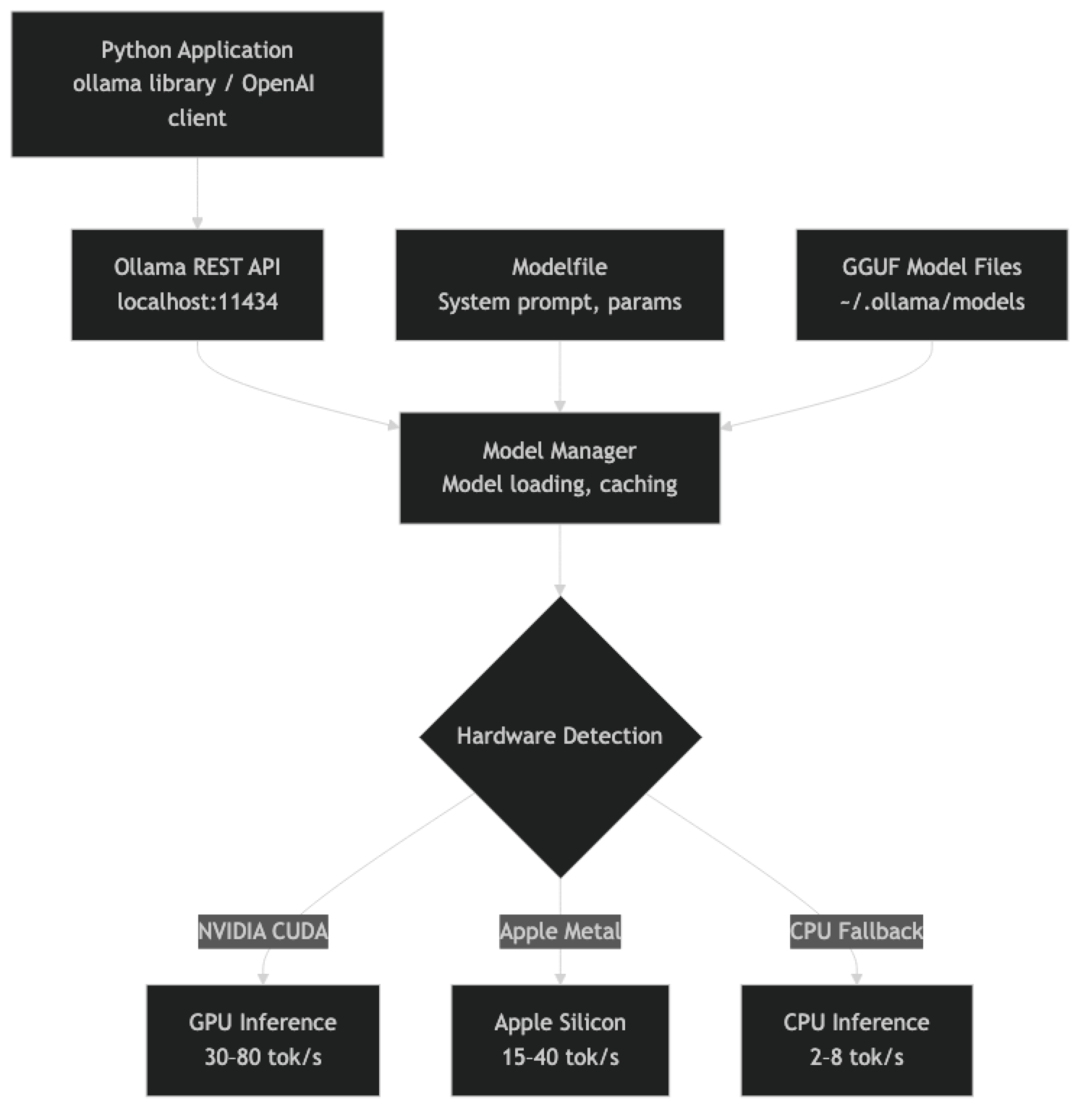
The model stays loaded in memory between requests (configurable timeout). The first request after a cold start incurs a model load delay — typically 5–30 seconds depending on model size. Subsequent requests use the cached model and respond in milliseconds for the first token.
Installation
# macOS / Linux
curl -fsSL https://ollama.ai/install.sh | sh

# Windows: download installer from https://ollama.ai
# or use WSL2 with the Linux install script

# Verify installation
ollama --version

# Start the service (auto-starts on macOS/Linux after install)
ollama serve
On macOS, Ollama installs as a menu bar app and starts automatically. On Linux, it installs as a systemd service. On Windows with WSL2, run ollama serve in a terminal.
Pulling Models
# Small models (fits on 8GB VRAM or CPU-only)
ollama pull llama3.1:8b
ollama pull mistral:7b-instruct
ollama pull phi4:14b           # Surprisingly capable at 14B

# Mid-size models (16–24GB VRAM)
ollama pull qwen2.5:32b
ollama pull mistral-small:24b-instruct-2501

# Large models (40–48GB VRAM or Apple Silicon with 48GB+ unified memory)
ollama pull llama3.3:70b-instruct-q4_K_M

# List downloaded models
ollama list

# Check running models and resource usage
ollama ps

# Remove a model
ollama rm mistral:7b-instruct
Model tags follow the format name:size-variant-quantization. When you omit the quantization tag, Ollama picks a sensible default based on your available VRAM.
Implementation Example
Basic Inference — Native Ollama Client
import ollama

# Simple single-turn completion
response = ollama.chat(
    model="llama3.1:8b",
    messages=[
        {"role": "user", "content": "Explain what a transformer attention head does in 3 sentences."}
    ]
)
print(response["message"]["content"])

# With system prompt
response = ollama.chat(
    model="llama3.1:8b",
    messages=[
        {
            "role": "system",
            "content": "You are a concise technical assistant. Respond in bullet points when listing items."
        },
        {
            "role": "user",
            "content": "What are the main differences between RAG and fine-tuning?"
        }
    ],
    options={
        "temperature": 0.3,
        "top_p": 0.9,
        "num_ctx": 4096,       # Context window size
        "num_predict": 512,    # Max output tokens
    }
)
print(response["message"]["content"])
OpenAI-Compatible Client (Drop-in Replacement)
from openai import OpenAI

# One-line change from OpenAI to local Ollama
client = OpenAI(
    base_url="http://localhost:11434/v1",
    api_key="ollama"  # Required by the client but ignored by Ollama
)

response = client.chat.completions.create(
    model="llama3.1:8b",
    messages=[
        {"role": "system", "content": "You are a helpful Python engineer."},
        {"role": "user", "content": "Show me how to use Python's contextlib.suppress correctly."}
    ],
    temperature=0.4,
    max_tokens=800
)
print(response.choices[0].message.content)
This pattern is the most practical for migrating existing OpenAI code to local inference. Change the base_url and model name — nothing else.
Streaming Responses
import ollama

def stream_chat(model: str, prompt: str, system: str = "") -> None:
    """Stream LLM output token by token."""
    messages = []
    if system:
        messages.append({"role": "system", "content": system})
    messages.append({"role": "user", "content": prompt})

    print(f"[{model}] ", end="")
    for chunk in ollama.chat(model=model, messages=messages, stream=True):
        token = chunk["message"]["content"]
        print(token, end="", flush=True)
    print()  # Final newline

stream_chat(
    model="llama3.1:8b",
    system="You are a code reviewer. Be concise and direct.",
    prompt="Review this function: def div(a, b): return a / b"
)
Full Chatbot Implementation
import ollama
from typing import List

class LocalChatbot:
    """A multi-turn chatbot backed by a local Ollama model."""

    def __init__(self, model: str, system_prompt: str = ""):
        self.model = model
        self.history: List[dict] = []
        if system_prompt:
            self.history.append({"role": "system", "content": system_prompt})

    def chat(self, user_message: str, stream: bool = True) -> str:
        """Send a message and get a response. Maintains conversation history."""
        self.history.append({"role": "user", "content": user_message})

        if stream:
            response_text = ""
            for chunk in ollama.chat(
                model=self.model,
                messages=self.history,
                stream=True
            ):
                token = chunk["message"]["content"]
                print(token, end="", flush=True)
                response_text += token
            print()
        else:
            response = ollama.chat(model=self.model, messages=self.history)
            response_text = response["message"]["content"]

        self.history.append({"role": "assistant", "content": response_text})
        return response_text

    def reset(self) -> None:
        """Clear conversation history (keep system prompt)."""
        self.history = [msg for msg in self.history if msg["role"] == "system"]

# Usage
bot = LocalChatbot(
    model="llama3.1:8b",
    system_prompt="You are a senior Python engineer. Be direct and practical."
)

print("Chat with your local LLM. Type 'quit' to exit, 'reset' to start over.\n")
while True:
    user_input = input("You: ").strip()
    if user_input.lower() == "quit":
        break
    elif user_input.lower() == "reset":
        bot.reset()
        print("Conversation reset.")
        continue
    elif not user_input:
        continue

    print("Assistant: ", end="")
    bot.chat(user_input)
Custom Modelfiles
Modelfiles let you create named model variants with specific system prompts, sampling parameters, and base model configurations. They are the equivalent of a saved deployment configuration.
# Modelfile — save as 'Modelfile.code-reviewer'
FROM llama3.3:70b-instruct-q4_K_M

SYSTEM """
You are a senior software engineer conducting code reviews.

For every code snippet you review:
1. Identify bugs, edge cases, and potential exceptions
2. Comment on code style and readability
3. Suggest specific improvements with corrected code
4. Note any security concerns

Be direct and concise. Prioritize correctness over style comments.
"""

PARAMETER temperature 0.2
PARAMETER top_p 0.9
PARAMETER num_ctx 16384
PARAMETER stop "<|eot_id|>"# Create the model
ollama create code-reviewer -f Modelfile.code-reviewer
# Use it
ollama run code-reviewer "Review this: def get_user(id): return db.query(f'SELECT * FROM users WHERE id={id}')"
# List all models (including custom)
ollama listCommon Modelfile parameters:
| Parameter | Effect | Typical Range |
|---|---|---|
| temperature | Randomness of sampling | 0.1 (focused) – 0.9 (creative) |
| top_p | Nucleus sampling cutoff | 0.8 – 0.95 |
| top_k | Token candidate pool size | 20 – 80 |
| num_ctx | Context window size | 2048 – 131072 |
| num_predict | Maximum output tokens | 256 – 4096 |
| repeat_penalty | Repetition suppression | 1.0 – 1.2 |
Running Multiple Models
Ollama can keep multiple models loaded simultaneously if you have sufficient VRAM. This is useful for routing different task types to different models.
import ollama
from enum import Enum

class TaskType(Enum):
    CODE = "code"
    REASONING = "reasoning"
    CHAT = "chat"
    EXTRACTION = "extraction"

MODEL_ROUTING = {
    TaskType.CODE: "qwen2.5-coder:32b",
    TaskType.REASONING: "phi4:14b",
    TaskType.CHAT: "llama3.1:8b",
    TaskType.EXTRACTION: "mistral:7b-instruct",
}

def routed_inference(task_type: TaskType, prompt: str) -> str:
    """Route tasks to the most appropriate local model."""
    model = MODEL_ROUTING[task_type]
    response = ollama.chat(
        model=model,
        messages=[{"role": "user", "content": prompt}]
    )
    return response["message"]["content"]

# Code task goes to Qwen Coder
result = routed_inference(
    TaskType.CODE,
    "Write a Python function to debounce async coroutines."
)

# Extraction task goes to smaller, faster Mistral
result = routed_inference(
    TaskType.EXTRACTION,
    "Extract the date and amount from: 'Invoice #4821 dated January 15, 2026 for $1,240.00'"
)
GPU vs CPU Inference
Ollama auto-detects hardware. Check what is actually running:
# See which GPU/CPU layer is active
ollama ps

# Example output:
# NAME                          ID        SIZE      PROCESSOR    UNTIL
# llama3.1:8b                   abc123    5.2 GB    100% GPU     4 minutes from now
GPU inference (NVIDIA CUDA or Apple Metal) typically achieves 20–80 tokens/second depending on model size and GPU tier. CPU inference with llama.cpp typically achieves 2–8 tokens/second on modern hardware with enough threads.
For CPU inference to be usable, keep models at 13B or smaller. A 7B model at Q4 on a modern CPU (16 threads) runs at roughly 3–5 tokens/second — slow but functional for batch processing or development.
Best Practices
Use the num_ctx parameter explicitly. Ollama defaults to a relatively small context window for some models. If you are passing long documents, set num_ctx to match your needs in the Modelfile or API call. Remember that larger context windows consume more VRAM.
Keep models warm for latency-sensitive applications. The first inference after idle causes a model reload. For production serving, send periodic keepalive requests or set OLLAMA_KEEP_ALIVE to a longer duration.
Pin model versions in production. Use full tags like llama3.3:70b-instruct-q4_K_M rather than llama3.3:latest. The latest tag can update when you run ollama pull, changing model behavior unexpectedly.
Monitor memory with ollama ps. Running out of VRAM causes silent fallback to CPU, which degrades throughput dramatically. Always verify your model is using GPU with ollama ps.
Common Mistakes
Forgetting to start the Ollama service. If you get a connection refused error, run
ollama serveor check that the system service is running (systemctl status ollamaon Linux).Using the wrong model name in Python. The model name in your API call must exactly match the name shown in
ollama list. Typos cause a model-not-found error, not an automatic fallback.Not accounting for model load time in latency measurements. If you benchmark cold-start inference, the model load dominates. Warm inference latency (second request onward) is what matters for production.
Setting context window larger than the model supports. Models have hard context limits. Setting
num_ctxabove the model's maximum does not silently clip — it can cause errors or unexpected behavior.Running large models on insufficient VRAM. Ollama will fall back to CPU (or split between CPU and GPU), which works but is very slow. Check that
ollama psshows100% GPUfor your model.
Key Takeaways
- Ollama wraps llama.cpp in a simple CLI and REST API, handling model downloading, quantization selection, and GPU initialization automatically
- The OpenAI-compatible endpoint at
localhost:11434/v1means existing OpenAI SDK code switches to local inference by changing only thebase_url— no other code changes required - Models stay loaded in memory between requests; the first request after idle incurs a 5–30 second model load delay, but subsequent requests return in milliseconds
- Use full version tags like
llama3.3:70b-instruct-q4_K_Minstead oflatestin production to prevent unintended model updates onollama pull - GPU inference with Ollama achieves 20–80 tokens/second; CPU inference achieves 2–8 tokens/second — stick to 13B or smaller for CPU-only setups
- Modelfiles let you create named model variants with fixed system prompts, sampling parameters, and base model configurations — useful for deploying specialized assistants
- Run
ollama psto verify GPU utilization; silent fallback to CPU happens when VRAM is insufficient and degrades throughput dramatically - For multi-user production workloads requiring high concurrency, vLLM with continuous batching is the appropriate upgrade from Ollama
FAQ
Does Ollama work without a GPU? Yes. Ollama falls back to CPU inference using llama.cpp when no compatible GPU is detected. Performance is significantly slower (2–8 tok/s vs 30–80 tok/s on GPU), but it works. Stick to 7B or smaller models for CPU-only inference.
Can I use Ollama in production serving multiple users? For low-concurrency use (up to ~5 concurrent requests), yes. For high-concurrency production, vLLM is more appropriate — it implements continuous batching and PagedAttention, which Ollama does not. Ollama is primarily optimized for single-user local inference.
How do I connect LangChain to Ollama?
LangChain has a native Ollama integration: from langchain_ollama import ChatOllama. Alternatively, use LangChain's OpenAI provider with base_url="http://localhost:11434/v1". Both work identically.
What happens to the model when I close the terminal? The Ollama service runs as a background daemon, not attached to your terminal session. Models stay loaded in memory until the OLLAMA_KEEP_ALIVE timeout expires (default: 5 minutes). The service persists until you stop it explicitly.
Can I run Ollama on a remote server and access it from my laptop?
Yes. Set OLLAMA_HOST=0.0.0.0:11434 on the server before starting Ollama, then point your client to http://server-ip:11434 instead of localhost. Add firewall rules to restrict access appropriately.
What is the difference between the native Ollama API and the OpenAI-compatible endpoint?
The native Ollama API (/api/chat) returns responses in Ollama-specific JSON format using the ollama Python library. The OpenAI-compatible endpoint (/v1/chat/completions) mirrors the OpenAI response format, allowing any OpenAI SDK or LangChain integration to work without modification. For new projects, the OpenAI-compatible endpoint is recommended for portability.
How do I keep a model warm and avoid cold-start latency?
Set the OLLAMA_KEEP_ALIVE environment variable to a longer duration (e.g., OLLAMA_KEEP_ALIVE=30m) before starting Ollama. For latency-sensitive applications, send a periodic keepalive request to the API to prevent the model from unloading. You can also set keep_alive: -1 in an API request to keep the model loaded indefinitely.