Multi-Agent Systems: Solve Problems One Agent Cannot (2026)
Multi-Agent Systems Explained
Single agents have a hard ceiling. Once you push past twenty or thirty steps, the context window gets crowded with tool call history, reasoning traces, and accumulated observations. The model starts losing track of earlier findings, making contradictory tool calls, or circling back to work it already did. The simple loop architecture that works beautifully for focused tasks starts to break under the weight of complex, multi-domain problems.
Multi-agent systems solve this by dividing work across specialized agents. Instead of one agent that knows how to search the web, write code, query databases, and generate reports, you have specialized agents — a researcher, a coder, a data analyst, a writer — each with a focused tool set and a shorter, more coherent context. A coordinator routes work between them.
This is not the right architecture for every problem. The coordination overhead is real, and a multi-agent system that does the work of a single-agent system will be slower and more expensive. The decision depends on task complexity, the degree of specialization required, and how much parallelism is available.
Concept Overview
Multi-agent systems organize multiple LLM-powered agents to work together on a task. The three primary coordination patterns are:
Supervisor-Worker — A supervisor agent receives the task, breaks it down, delegates sub-tasks to specialized workers, and synthesizes the results. Workers do not communicate with each other directly.
Peer-to-Peer — Agents communicate directly with each other, passing outputs as inputs. No central coordinator. This works when the workflow has a clear linear sequence.
Hierarchical — Multiple levels of supervision. A top-level coordinator delegates to mid-level supervisors, which delegate to specialized workers. Useful for very large, complex workflows.
Each pattern has different trade-offs in terms of control, debuggability, and the cost of coordination overhead.
How It Works
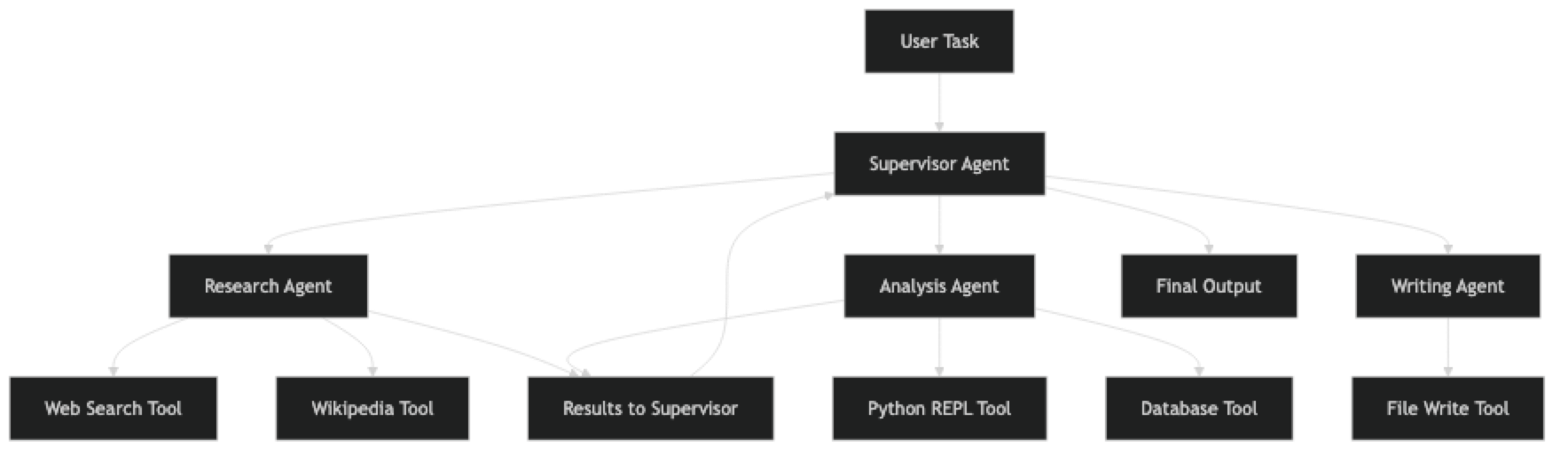
The supervisor receives the task and decides how to split it. It assigns sub-tasks to specialized agents, collects their outputs, and synthesizes a final response. Critically, each worker agent has a focused tool set — the research agent does not have access to the code execution tool, and the coding agent does not have access to web search. This keeps each agent's decision space small and its reasoning more reliable.
Implementation Example
Option 1: CrewAI — Role-Based Multi-Agent Workflows
CrewAI is optimized for multi-agent systems where agents have defined roles and a clear workflow. It is the fastest way to get a multi-agent system running.
from crewai import Agent, Task, Crew, Process
from langchain_openai import ChatOpenAI
from langchain_community.tools import DuckDuckGoSearchRun

llm = ChatOpenAI(model="gpt-4o", temperature=0)
search_tool = DuckDuckGoSearchRun()

# Define specialized agents with distinct roles
researcher = Agent(
    role="Senior Research Analyst",
    goal="Find accurate, comprehensive information on any given topic from multiple reliable sources",
    backstory="""You are an experienced research analyst who has spent years gathering
    intelligence from diverse sources. You are thorough, skeptical, and always verify
    claims against multiple sources before reporting findings.""",
    tools=[search_tool],
    llm=llm,
    verbose=True,
    max_iter=5,         # Limit iterations per agent
    allow_delegation=False  # This agent does not delegate
)

analyst = Agent(
    role="Data Analyst",
    goal="Analyze research findings, identify patterns, and extract key insights",
    backstory="""You are an analytical expert who transforms raw research data into
    structured insights. You excel at identifying trends, comparing options, and
    presenting findings clearly.""",
    tools=[],           # Analysis agent reasons without external tools
    llm=llm,
    verbose=True,
    max_iter=3,
    allow_delegation=False
)

writer = Agent(
    role="Technical Writer",
    goal="Produce clear, well-structured written content based on research and analysis",
    backstory="""You are a technical writer who specializes in making complex topics
    accessible. You structure content logically and write in a clear, professional tone.""",
    tools=[],
    llm=llm,
    verbose=True,
    max_iter=3,
    allow_delegation=False
)

# Define tasks for each agent
research_task = Task(
    description="""Research the current state of AI agent frameworks in 2026.
    Focus on: LangChain, LangGraph, CrewAI, AutoGen, and AutoGPT.
    Find: release dates, key features, adoption trends, and notable use cases.
    Provide at least 5 specific data points with sources.""",
    expected_output="A structured research report with specific facts, dates, and sources for each framework",
    agent=researcher
)

analysis_task = Task(
    description="""Using the research report provided, analyze and compare the AI agent frameworks.
    Create a comparison matrix covering: ease of use, production readiness, multi-agent support,
    community size, and documentation quality. Rate each on a 1-10 scale with justification.""",
    expected_output="A comparison matrix with ratings and 2-3 sentence justifications for each rating",
    agent=analyst,
    context=[research_task]   # This task depends on research_task output
)

writing_task = Task(
    description="""Write a comprehensive guide based on the research and analysis provided.
    Structure: Introduction, Framework Overviews, Comparison Table, Recommendation by Use Case, Conclusion.
    Target audience: senior developers choosing a framework for production use.""",
    expected_output="A 600-800 word technical guide in markdown format",
    agent=writer,
    context=[research_task, analysis_task]  # Depends on both prior tasks
)

# Assemble the crew
crew = Crew(
    agents=[researcher, analyst, writer],
    tasks=[research_task, analysis_task, writing_task],
    process=Process.sequential,   # Tasks run in order
    verbose=True,
    max_rpm=10              # Rate limit to avoid API throttling
)

# Execute
result = crew.kickoff()
print(result)
The context=[research_task] parameter tells CrewAI to pass the output of research_task as input to the analysis task. This is how information flows between agents in a sequential workflow.
Option 2: LangGraph — Stateful Multi-Agent Graphs
LangGraph gives you explicit control over agent state and transitions. It is more verbose but more powerful for complex, conditional workflows.
from langgraph.graph import StateGraph, END
from langchain_openai import ChatOpenAI
from langchain.agents import AgentExecutor, create_tool_calling_agent
from langchain_core.prompts import ChatPromptTemplate, MessagesPlaceholder
from typing import TypedDict

# Define shared state structure
class AgentState(TypedDict):
    task: str
    research_results: str
    analysis: str
    final_report: str
    current_agent: str
    error: str

# Create individual agents
llm = ChatOpenAI(model="gpt-4o", temperature=0)

def create_agent(tools: list, instructions: str) -> AgentExecutor:
    prompt = ChatPromptTemplate.from_messages([
        ("system", instructions),
        ("human", "{input}"),
        MessagesPlaceholder("agent_scratchpad"),
    ])
    agent = create_tool_calling_agent(llm=llm, tools=tools, prompt=prompt)
    return AgentExecutor(agent=agent, tools=tools, max_iterations=8, verbose=True)

search_tool = DuckDuckGoSearchRun()

research_agent = create_agent(
    tools=[search_tool],
    instructions="You are a research specialist. Search the web to find comprehensive information on the given topic. Return structured findings."
)

analysis_agent = create_agent(
    tools=[],
    instructions="You are an analyst. Analyze the provided research findings and extract key insights, patterns, and recommendations."
)

# Define agent node functions
def research_node(state: AgentState) -> AgentState:
    result = research_agent.invoke({
        "input": f"Research this topic thoroughly: {state['task']}"
    })
    return {**state, "research_results": result["output"], "current_agent": "analysis"}

def analysis_node(state: AgentState) -> AgentState:
    result = analysis_agent.invoke({
        "input": f"Analyze these research findings:\n\n{state['research_results']}"
    })
    return {**state, "analysis": result["output"], "current_agent": "writing"}

def writing_node(state: AgentState) -> AgentState:
    writing_prompt = f"""Based on the research and analysis below, write a comprehensive report.

Research:
{state['research_results']}

Analysis:
{state['analysis']}

Write a structured, professional report in markdown format."""

    response = llm.invoke(writing_prompt)
    return {**state, "final_report": response.content, "current_agent": "done"}

def route_agent(state: AgentState) -> str:
    """Route to next agent based on current state."""
    return state["current_agent"]

# Build the graph
workflow = StateGraph(AgentState)

workflow.add_node("research", research_node)
workflow.add_node("analysis", analysis_node)
workflow.add_node("writing", writing_node)

workflow.set_entry_point("research")
workflow.add_conditional_edges(
    "research",
    route_agent,
    {"analysis": "analysis"}
)
workflow.add_conditional_edges(
    "analysis",
    route_agent,
    {"writing": "writing"}
)
workflow.add_edge("writing", END)

# Compile and run
graph = workflow.compile()

result = graph.invoke({
    "task": "Compare the top AI agent frameworks for production use in 2026",
    "research_results": "",
    "analysis": "",
    "final_report": "",
    "current_agent": "analysis",
    "error": ""
})

print(result["final_report"])
LangGraph's typed state is its key advantage. Every piece of information passed between agents is defined in the AgentState TypedDict, which makes the data flow explicit and debuggable.
Best Practices
Choose the right coordination pattern for the task structure. Sequential workflows (research → analyze → write) fit the sequential pattern. Tasks with independent sub-components that can run in parallel benefit from a supervisor pattern with concurrent execution. Do not force parallelism where tasks have dependencies.
Keep agent tool sets focused. A research agent with three tools (search, wikipedia, arxiv) will outperform a general agent with twenty tools on research tasks. Specialization reduces the model's decision space and improves reliability.
Implement inter-agent communication contracts. Define what each agent expects to receive and what it will produce. Treat agent outputs like API responses: structured, typed, and validated before passing to the next agent.
Monitor cost at the agent level. In a multi-agent system, it is easy to lose track of how much each agent is spending. Log token usage per agent and per task. Research agents tend to be the most expensive due to large tool observations.
Common Mistakes
Using multi-agent architecture when a single agent would work. Multi-agent systems are slower, more expensive, and harder to debug. If a task fits in a single agent's context window and does not require specialization, use a single agent.
Not handling inter-agent failures. When one agent in a pipeline fails, the failure cascades to downstream agents. Build explicit error handling at each stage and decide whether to retry, skip, or abort.
Letting agents communicate in free text without structure. When one agent passes results to another as an unstructured string, the receiving agent must parse it. Use structured output (JSON, TypedDicts) between agents.
Over-parallelizing. Running too many agents concurrently can hit API rate limits and produce out-of-order results. Implement a rate limiter and use async execution only where true parallelism is beneficial.
No global context. Each agent has its own context, but they all need to know the original task. Always pass the top-level goal to every agent, not just the immediate sub-task.
Key Takeaways
- Use
create_tool_calling_agent(not deprecatedcreate_openai_functions_agent) in LangGraph node functions - Multi-agent architecture is justified when tasks require genuinely different capabilities or exceed a single agent's context window — not for simpler tasks a single agent handles well
- Keep each agent's tool set focused: a research agent with 3 tools outperforms a general agent with 20 tools on research tasks
- Define structured output contracts between agents (TypedDicts, JSON) instead of passing free-form strings — parsing adds failure modes
- Always pass the top-level task goal to every agent, not just the immediate sub-task — agents without full context make locally reasonable but globally wrong decisions
- Monitor token usage per agent in production — research agents are often the most expensive due to large tool observations
- Build explicit error handling at each stage — failures cascade without it and the root cause becomes hard to trace
- Test each agent in isolation with expected inputs before testing the full multi-agent pipeline
FAQ
When should I use multi-agent instead of a single agent? Use multi-agent when the task requires genuinely different capabilities (research vs. coding vs. analysis), when the context window of a single agent is insufficient for the accumulated observations, or when independent sub-tasks can be parallelized for speed. If your task fits in one agent's context window and does not require specialization, a single agent is simpler and cheaper.
How do agents in a multi-agent system communicate?
Agents communicate through shared state. In CrewAI, task outputs are passed as context to dependent tasks via context=[prior_task]. In LangGraph, all agents read from and write to a shared TypedDict state object. Define the state schema before writing agent functions — it acts as the contract between agents.
Can multi-agent systems run agents in parallel?
Yes. CrewAI supports Process.hierarchical for parallel execution. LangGraph supports parallel node execution by adding multiple edges from a single node to sibling nodes that can run concurrently. Parallel execution reduces latency but increases cost and API rate limit risk — implement rate limiting when running more than 3 agents concurrently.
How do I debug a multi-agent system when it produces wrong output? Enable verbose logging for every agent and inspect the output of each stage independently. Start from the final output and work backwards — if the report is wrong, check the writing agent's input. If the analysis is wrong, check the research agent output. Isolate each agent and test it with the exact input it would receive in the pipeline.
Is multi-agent more expensive than single agent? Yes, typically. The coordination overhead — supervisor reasoning, inter-agent communication tokens, multiple context windows — adds cost. However, specialized agents often produce better results with fewer iterations than a single general agent struggling with a complex task. Profile your specific task before assuming multi-agent is too expensive.
What is the supervisor-worker pattern and when should I use it? The supervisor pattern uses a coordinator agent to receive the top-level task, break it into sub-tasks, delegate to specialized worker agents, and synthesize results. Workers do not communicate directly. Use it when: the sub-tasks are independent, you need a central point for error handling and quality control, or you want to route dynamically based on the task type. It is the most practical pattern for most production multi-agent systems.
How do I prevent a failing agent from cascading failures to downstream agents? Build explicit error handling in each node function. When an agent fails, the node should return a structured error state rather than propagating an exception. Downstream nodes should check for the error flag and either retry, use a fallback, or gracefully skip with an appropriate message. In LangGraph, add a dedicated error-handling node with conditional edges from all other nodes.