LoRA Fine-Tuning: Train Llama 3 in 30 Min on Free GPU (2026)
LoRA Fine-Tuning Tutorial: Train Custom LLMs on a Single GPU (2026)
Last updated: March 2026
Fine-tuning a 7B parameter model with standard methods means updating 7 billion parameters — each requiring gradient computation and optimizer state storage. The memory footprint is enormous. On most hardware, it is simply not feasible.
LoRA (Low-Rank Adaptation) changes the calculus entirely. Instead of updating all 7 billion parameters, LoRA freezes the base model and trains only a small set of adapter matrices — typically 40–80 million parameters, representing less than 1% of the total. The results are comparable to full fine-tuning for most tasks, but the VRAM requirement drops from ~100GB to ~16GB for a 7B model.
This tutorial walks through the complete LoRA fine-tuning workflow: from understanding the math to running a training job and merging the adapter for deployment. All code is tested and runnable on a single GPU.
Concept Overview
LoRA was introduced by Hu et al. in 2021 and has since become the standard approach for fine-tuning large models in resource-constrained environments. The core idea is elegant: weight updates during fine-tuning are inherently low-rank. Rather than materializing the full update matrix, LoRA approximates it as the product of two smaller matrices.
In a transformer attention layer, the weight matrix W has shape [d_model, d_model]. For Llama 3 8B, that is [4096, 4096] — over 16 million parameters per matrix. During fine-tuning, the update to W is not random; it has structure. LoRA exploits this by decomposing the update into two matrices: A with shape [d_model, r] and B with shape [r, d_model], where r is a small rank (typically 8–64).
The effective update is ΔW = B × A, with only 2 × d_model × r trainable parameters. At r=16, that is 131,072 parameters instead of 16,777,216 — a 128x reduction for that layer.
Key hyperparameters:
r(rank): Controls adapter capacity. Higher = more expressive but more parameters. Start at 16.lora_alpha: Scaling factor. Convention isalpha == rfor normalized updates.target_modules: Which layers to apply LoRA to. Attention projections (q, k, v, o) are standard; adding MLP layers (gate, up, down) increases capacity.lora_dropout: Regularization on adapter weights. Often 0–0.05.
How It Works
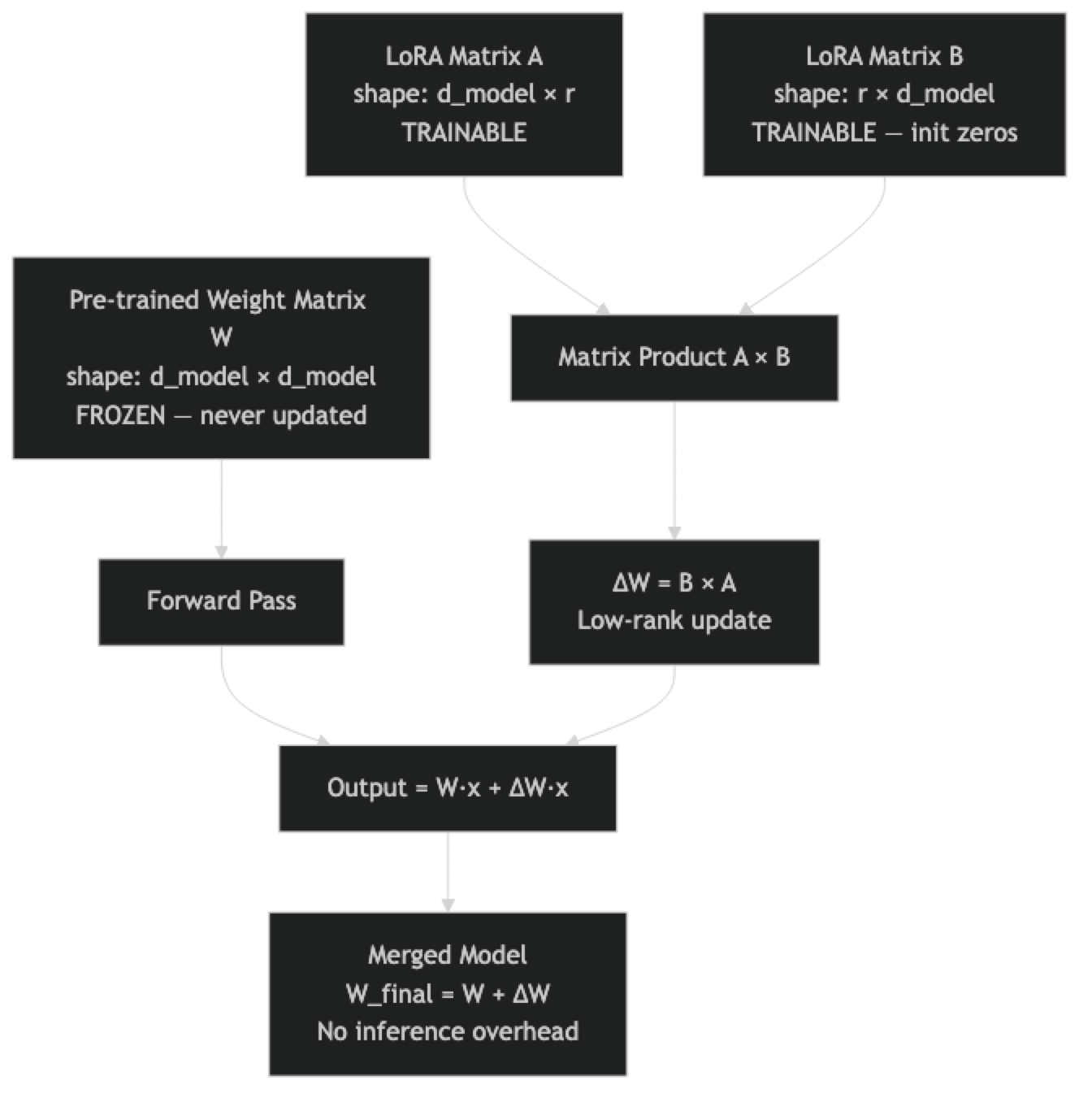
One thing many developers overlook: matrix B is initialized to zeros at the start of training. This means ΔW = 0 at initialization — the LoRA model begins training from exactly the base model's behavior, with no random disruption. This is why LoRA training is stable even at relatively high learning rates.
Implementation Example
Step 1: Install Dependencies
pip install unsloth trl peft transformers datasets accelerate bitsandbytesUnsloth is optional but strongly recommended for single-GPU training. It provides 2–5x faster training and 30–50% lower memory usage through optimized CUDA kernels, with no change to the training API.
Step 2: Load the Base Model with LoRA
from unsloth import FastLanguageModel
import torch

MODEL_NAME = "unsloth/Meta-Llama-3-8B-Instruct"
MAX_SEQ_LEN = 2048

# Load model — use load_in_4bit=True for QLoRA (saves ~6GB VRAM)
# Set to False for pure LoRA with 16-bit base model (~16GB VRAM)
model, tokenizer = FastLanguageModel.from_pretrained(
    model_name=MODEL_NAME,
    max_seq_length=MAX_SEQ_LEN,
    dtype=None,           # Auto-detect bfloat16 or float16
    load_in_4bit=True,    # QLoRA mode — fine-tune 7B on 10GB VRAM
)

# Apply LoRA adapters
model = FastLanguageModel.get_peft_model(
    model,
    r=16,
    target_modules=[
        "q_proj", "k_proj", "v_proj", "o_proj",   # Attention
        "gate_proj", "up_proj", "down_proj",        # MLP (optional, adds capacity)
    ],
    lora_alpha=16,
    lora_dropout=0.0,
    bias="none",
    use_gradient_checkpointing="unsloth",
    random_state=42,
    use_rslora=False,     # RSLoRA normalizes rank-scaling — useful at r > 64
)

model.print_trainable_parameters()
# Output: trainable params: 41,943,040 || all params: 8,072,884,224 || trainable%: 0.5196%
Step 3: Prepare Your Dataset
Dataset formatting is where most LoRA fine-tuning failures originate. The model expects training examples in its exact chat template format. Using a custom format or applying the template incorrectly causes quality degradation that is hard to diagnose.
from datasets import load_dataset, Dataset
import json

# Example: load a JSONL file with instruction-output pairs
# Expected format: {"instruction": "...", "output": "...", "system": "..."}
raw_data = []
with open("training_data.jsonl") as f:
    for line in f:
        raw_data.append(json.loads(line))

dataset = Dataset.from_list(raw_data)
print(f"Loaded {len(dataset)} examples")

def format_as_chat(example):
    """Apply Llama 3 chat template to each training example."""
    messages = [
        {
            "role": "system",
            "content": example.get("system", "You are a helpful assistant.")
        },
        {
            "role": "user",
            "content": example["instruction"]
        },
        {
            "role": "assistant",
            "content": example["output"]
        }
    ]
    # apply_chat_template handles the special tokens correctly
    formatted = tokenizer.apply_chat_template(
        messages,
        tokenize=False,
        add_generation_prompt=False
    )
    return {"text": formatted}

dataset = dataset.map(format_as_chat, remove_columns=dataset.column_names)

# Verify one example — always do this before training
print("Sample training example:")
print(dataset[0]["text"])
print(f"\nToken count: {len(tokenizer.encode(dataset[0]['text']))}")

# Train/eval split
split = dataset.train_test_split(test_size=0.1, seed=42)
train_ds = split["train"]
eval_ds  = split["test"]
print(f"\nTrain: {len(train_ds)}, Eval: {len(eval_ds)}")
Step 4: Configure and Run Training
from trl import SFTTrainer, SFTConfig

training_config = SFTConfig(
    output_dir="./llama3-lora",
    # Training duration
    num_train_epochs=3,
    # Batch configuration
    per_device_train_batch_size=2,
    per_device_eval_batch_size=2,
    gradient_accumulation_steps=8,  # Effective batch = 16
    # Learning rate schedule
    learning_rate=2e-4,
    warmup_ratio=0.05,
    lr_scheduler_type="cosine",
    # Precision and memory
    bf16=torch.cuda.is_bf16_supported(),
    fp16=not torch.cuda.is_bf16_supported(),
    # Regularization
    weight_decay=0.01,
    max_grad_norm=1.0,
    # Evaluation and saving
    eval_strategy="steps",
    eval_steps=50,
    save_strategy="steps",
    save_steps=100,
    load_best_model_at_end=True,
    metric_for_best_model="eval_loss",
    # Dataset
    max_seq_length=MAX_SEQ_LEN,
    dataset_text_field="text",
    # Logging
    logging_steps=10,
    report_to="none",       # Set to "wandb" for experiment tracking
    # Optimizer
    optim="adamw_8bit",
)

trainer = SFTTrainer(
    model=model,
    tokenizer=tokenizer,
    train_dataset=train_ds,
    eval_dataset=eval_ds,
    args=training_config,
)

# Print memory usage before training
gpu_stats = torch.cuda.get_device_properties(0)
start_gpu_memory = round(torch.cuda.max_memory_reserved() / 1024 / 1024 / 1024, 3)
print(f"GPU: {gpu_stats.name} | Total VRAM: {round(gpu_stats.total_memory / 1024 / 1024 / 1024, 3)} GB")
print(f"Reserved VRAM before training: {start_gpu_memory} GB")

trainer_stats = trainer.train()

end_gpu_memory = round(torch.cuda.max_memory_reserved() / 1024 / 1024 / 1024, 3)
print(f"\nPeak VRAM during training: {end_gpu_memory} GB")
print(f"Training loss: {trainer_stats.training_loss:.4f}")
Step 5: Test the Adapter Before Merging
# Switch to inference mode
FastLanguageModel.for_inference(model)

def generate_response(prompt, system="You are a helpful assistant.", max_new_tokens=256):
    messages = [
        {"role": "system", "content": system},
        {"role": "user", "content": prompt},
    ]
    inputs = tokenizer.apply_chat_template(
        messages, tokenize=True, add_generation_prompt=True, return_tensors="pt"
    ).to("cuda")

    with torch.no_grad():
        outputs = model.generate(
            inputs,
            max_new_tokens=max_new_tokens,
            temperature=0.1,
            do_sample=True,
            pad_token_id=tokenizer.eos_token_id,
        )
    # Decode only the generated tokens (not the input)
    generated = outputs[0][inputs.shape[1]:]
    return tokenizer.decode(generated, skip_special_tokens=True)

# Test with a few prompts from your eval set
test_prompts = [
    "Explain the difference between TCP and UDP in simple terms.",
    "Write a Python function that reverses a linked list.",
    "What are the main causes of inflation?",
]

for prompt in test_prompts:
    print(f"Prompt: {prompt}")
    print(f"Response: {generate_response(prompt)}")
    print("-" * 60)
Step 6: Save and Merge Adapter
# Option A: Save adapter only (small, ~50-200MB)
# Use this if you want to hot-swap adapters or share the adapter separately
model.save_pretrained("./lora-adapter")
tokenizer.save_pretrained("./lora-adapter")
print("Adapter saved.")

# Option B: Merge and save as full model (larger, but no inference overhead)
# Use this for production deployment with vLLM, Ollama, or llama.cpp
model.save_pretrained_merged(
    "./merged-llama3",
    tokenizer,
    save_method="merged_16bit",
)
print("Merged model saved in 16-bit float format.")

# Option C: Merge and save in 4-bit GGUF for Ollama/llama.cpp
model.save_pretrained_gguf(
    "./llama3-gguf",
    tokenizer,
    quantization_method="q4_k_m",  # Good balance of speed and quality
)
print("GGUF model saved. Ready for Ollama deployment.")
Step 7: Load Adapter for Inference Later
# Load adapter on top of base model (adds minimal overhead)
from peft import PeftModel
from transformers import AutoModelForCausalLM, AutoTokenizer

base_model = AutoModelForCausalLM.from_pretrained(
    "meta-llama/Meta-Llama-3-8B-Instruct",
    torch_dtype=torch.bfloat16,
    device_map="auto",
)
model = PeftModel.from_pretrained(base_model, "./lora-adapter")
tokenizer = AutoTokenizer.from_pretrained("./lora-adapter")
print("Adapter loaded on base model.")
Best Practices
Use gradient checkpointing. It reduces VRAM usage by ~30% at the cost of ~20% slower training — almost always worth it for single-GPU training. Unsloth's "unsloth" gradient checkpointing mode is more memory-efficient than PyTorch's default.
Log to Weights & Biases or MLflow. Training runs are opaque without experiment tracking. At minimum, track loss curves, learning rate, and gradient norms. Set report_to="wandb" in SFTConfig for automatic logging.
Choose r based on task complexity. For simple format/style adaptation, r=8 or r=16 is sufficient. For behavioral changes or adapting across many topics, r=32 or r=64 captures more of the necessary update structure. Monitor eval loss — if it plateaus high, increase r.
Use RSLoRA at high ranks. At r > 32, the default LoRA scaling can cause instability. Setting use_rslora=True applies rank-stabilized scaling (alpha / sqrt(r) instead of alpha / r), which improves training stability at high ranks.
Validate data format on the first example. Before launching a full training run, print one formatted training example, verify token count, and confirm the chat template is correct. This saves the embarrassing experience of discovering a formatting bug after 2 hours of training.
Common Mistakes
Not applying
prepare_model_for_kbit_trainingwhen using standard PEFT (not Unsloth). This function sets up gradient checkpointing for quantized models correctly. With Unsloth, it is handled automatically. With standard PEFT, forgetting this causes gradient computation errors.Setting
lora_dropout > 0with Unsloth. Unsloth uses custom CUDA kernels that are optimized fordropout=0. Non-zero dropout disables the fast kernels and removes the performance benefit. Uselora_dropout=0.0with Unsloth.Only targeting q and v projections. This is a common shortcut from older LoRA tutorials. Including k, o, and the MLP projections (gate, up, down) gives more capacity and consistently better results, with only a modest parameter increase.
Using too many epochs on small datasets. With 500 examples and 5 epochs, the model will memorize the training set. Eval loss increases while training loss continues to fall. Use 2–3 epochs for datasets under 2,000 examples.
Not testing before merging. Merging is not reversible unless you preserve both the base model and the adapter checkpoint. Always evaluate the adapter against your test set before running the merge step.
Key Takeaways
- LoRA freezes the base model and trains only two small matrices (A and B) per target layer; the update is computed as BA where r is typically 8–64, reducing trainable parameters to under 1% of total.
- Matrix B is initialized to zero, so the LoRA model starts training from exactly the same behavior as the base model — this initialization is what makes LoRA training stable at learning rates as high as 2e-4.
- For a 7B model: standard LoRA needs approximately 16GB VRAM, QLoRA needs approximately 10GB, and Unsloth further reduces this by 30–50% through optimized CUDA kernels.
- Always verify one formatted training example before launching a full run — a silent template error will train the model on malformed data and degrade quality with no obvious error message.
- Use
lora_dropout=0.0with Unsloth; non-zero dropout disables the custom CUDA kernels that provide the speed and memory benefits. - After training, test the adapter on your held-out evaluation set before merging — merging is not reversible unless you have both the adapter checkpoint and the base model identifier preserved.
- Enable
use_rslora=Trueat ranks above r=32 to apply rank-stabilized scaling (alpha / sqrt(r)instead ofalpha / r), which improves training stability at high ranks. - The full workflow — load model, apply LoRA, format data, train with SFTTrainer, test, merge — takes under two hours on a single GPU for datasets up to 2,000 examples.
FAQ
What is the best LoRA rank to start with?
Start at r=16 for most fine-tuning tasks. If eval loss is high and the model is clearly underfitting, increase to r=32 or r=64. If you have a simple, narrow task (for example, enforcing a specific output format), r=8 is often sufficient and trains faster.
Can I use LoRA with models larger than 13B?
Yes. LoRA works at any model size. For 30B+ models, use QLoRA (4-bit quantization) to keep VRAM manageable. A 70B model with QLoRA and LoRA fits on an A100 80GB. Unsloth has pre-quantized versions of most popular models ready to fine-tune.
How do I know if my LoRA fine-tuning is working?
Track both training and eval loss curves. Training loss should decrease smoothly. Eval loss should also decrease and then level off. If eval loss rises while training loss falls, you are overfitting. Beyond metrics, generate test examples every 100 steps and evaluate output quality manually.
Is the merged model exactly equivalent to loading base plus adapter separately?
Mathematically yes — merging computes W_new = W_base + B x A per layer, which produces identical outputs to applying the adapter at inference time. The difference is inference speed: a merged model has no adapter overhead, while a loaded adapter adds computation at each forward pass.
Can I fine-tune on MacBook with Apple Silicon?
Yes, with limitations. Using MPS backend (device_map="mps"), you can fine-tune models up to approximately 7B on a 32GB M-series Mac. Unsloth does not support MPS — use standard HuggingFace PEFT. Training is slower than a GPU, but feasible for experimentation.
How many training epochs should I use for LoRA?
For datasets under 2,000 examples, 2–3 epochs is the practical limit before overfitting begins. For larger datasets (5,000+), you may benefit from 3–5 epochs. Watch the validation loss — if it plateaus or rises after the first epoch, stop and use the best checkpoint. Setting load_best_model_at_end=True in SFTConfig handles this automatically.
What is the difference between saving the adapter and saving the merged model?
Saving the adapter produces a small file (50–200MB) that contains only the trained LoRA weights — you need both the base model and the adapter to run inference. Saving the merged model produces a full model file (15GB for a 7B model) that is self-contained and ready for deployment with standard tools like vLLM or Ollama. Use adapter-only saving during development and merge for production.