Local AI Dev: Run LLMs Offline with Zero API Costs (2026)
Local AI Development: Run LLMs Offline with Ollama, llama.cpp & LM Studio
Last updated: March 2026
Most AI development tutorials assume you have an OpenAI API key, a credit card loaded with budget, and an appetite for sending your data to third-party servers. That works for prototypes, but it creates real problems at production scale: cost, latency, data residency, and a dependency you cannot control.
A fully local AI development stack eliminates all of that. With Ollama for model serving, Python for orchestration, ChromaDB for vector storage, and LangChain for composition, you can build RAG pipelines, chatbots, and extraction systems that run entirely on your machine — no internet required after the initial setup.
The barrier to getting this working used to be genuine. Installing llama.cpp, managing model weights, writing inference wrappers, wiring up a vector store — it was a half-day of configuration before you wrote any actual application code. Ollama has changed that. The whole inference stack is a one-line install and a curl. This guide covers the full setup from zero to a working local RAG chatbot.
Concept Overview
A local AI development stack has four components:
Model runtime — Ollama serves models locally through an OpenAI-compatible REST API. It handles GPU initialization, model management, and context window configuration.
Orchestration layer — LangChain connects the model runtime to your data sources, prompts, and application logic. The local Ollama integration is a first-class citizen in LangChain.
Vector store — ChromaDB stores and retrieves document embeddings for RAG. It runs in-process with no separate server required, making it ideal for local development. The embeddings themselves are generated by a local embedding model through Ollama.
Application code — Python ties everything together. The data flow: documents → chunking → local embeddings → ChromaDB → query → retrieved context → local LLM → response.
How It Works
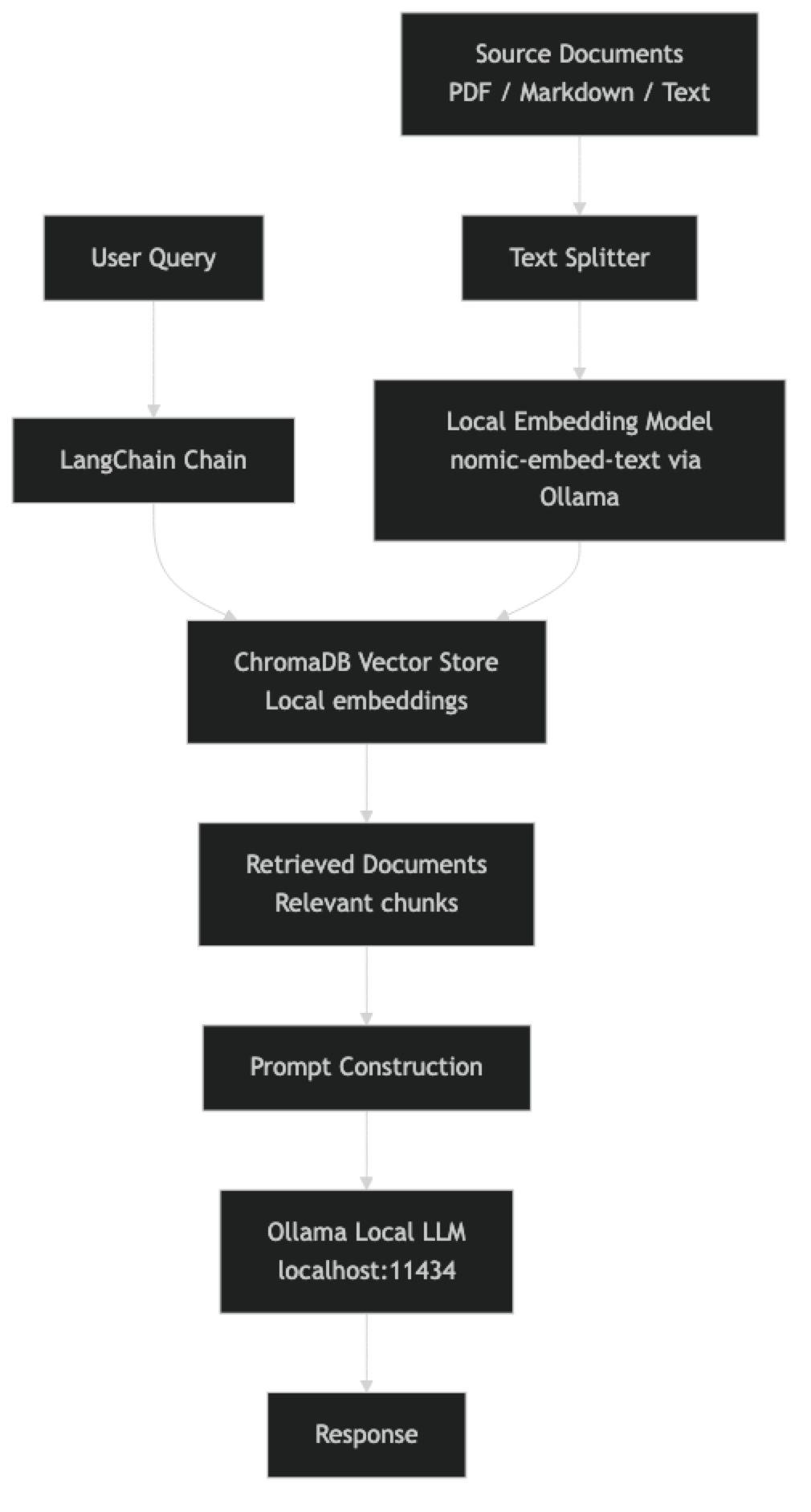
Environment Setup
Install Ollama and Pull Required Models
# Install Ollama
curl -fsSL https://ollama.ai/install.sh | sh

# Pull the LLM for chat
ollama pull llama3.1:8b

# Pull a local embedding model (no cloud required)
ollama pull nomic-embed-text

# Optional: pull a more capable model for complex reasoning
ollama pull qwen2.5:32b

# Verify models are available
ollama list
Python Environment
# Create a virtual environment
python -m venv .venv
source .venv/bin/activate  # Linux/macOS
# .venv\Scripts\activate   # Windows

# Install dependencies
pip install \
  langchain \
  langchain-ollama \
  langchain-chroma \
  chromadb \
  pypdf \
  python-dotenv \
  rich  # For prettier terminal output
Project Structure
local-ai/
├── .env                    # Configuration (no API keys needed!)
├── main.py                 # Chatbot entrypoint
├── ingest.py               # Document ingestion pipeline
├── rag_chain.py            # RAG chain construction
├── documents/              # Source documents for RAG
│   ├── manual.pdf
│   └── notes.md
└── vectorstore/            # ChromaDB storage (auto-created)
Implementation Example
Document Ingestion Pipeline
# ingest.py
import os
from pathlib import Path
from langchain_community.document_loaders import PyPDFLoader, TextLoader
from langchain.text_splitter import RecursiveCharacterTextSplitter
from langchain_ollama import OllamaEmbeddings
from langchain_chroma import Chroma

VECTORSTORE_PATH = "./vectorstore"
DOCUMENTS_PATH = "./documents"
EMBED_MODEL = "nomic-embed-text"

def load_documents(docs_path: str) -> list:
    """Load all PDF and text documents from a directory."""
    documents = []
    path = Path(docs_path)

    for file in path.rglob("*.pdf"):
        loader = PyPDFLoader(str(file))
        documents.extend(loader.load())
        print(f"Loaded PDF: {file.name} ({len(documents)} total pages)")

    for file in path.rglob("*.md"):
        loader = TextLoader(str(file), encoding="utf-8")
        documents.extend(loader.load())
        print(f"Loaded Markdown: {file.name}")

    for file in path.rglob("*.txt"):
        loader = TextLoader(str(file), encoding="utf-8")
        documents.extend(loader.load())
        print(f"Loaded Text: {file.name}")

    return documents

def ingest_documents(docs_path: str = DOCUMENTS_PATH) -> Chroma:
    """Ingest documents into ChromaDB with local embeddings."""
    print(f"Loading documents from {docs_path}...")
    raw_docs = load_documents(docs_path)

    if not raw_docs:
        raise ValueError(f"No documents found in {docs_path}")

    print(f"Splitting {len(raw_docs)} documents into chunks...")
    splitter = RecursiveCharacterTextSplitter(
        chunk_size=1000,       # Characters per chunk
        chunk_overlap=200,     # Overlap to preserve context at boundaries
        length_function=len,
        separators=["\n\n", "\n", ". ", " ", ""],
    )
    chunks = splitter.split_documents(raw_docs)
    print(f"Created {len(chunks)} chunks")

    print(f"Generating embeddings with {EMBED_MODEL} (local)...")
    embeddings = OllamaEmbeddings(
        model=EMBED_MODEL,
        base_url="http://localhost:11434",
    )

    vectorstore = Chroma.from_documents(
        documents=chunks,
        embedding=embeddings,
        persist_directory=VECTORSTORE_PATH,
        collection_name="local_rag",
    )
    print(f"Vector store created with {vectorstore._collection.count()} vectors")
    return vectorstore

if __name__ == "__main__":
    ingest_documents()
    print("Ingestion complete. Run main.py to start the chatbot.")
RAG Chain Construction
# rag_chain.py
from langchain_ollama import OllamaEmbeddings, ChatOllama
from langchain_chroma import Chroma
from langchain.prompts import ChatPromptTemplate
from langchain_core.output_parsers import StrOutputParser
from langchain_core.runnables import RunnablePassthrough

VECTORSTORE_PATH = "./vectorstore"
EMBED_MODEL = "nomic-embed-text"
CHAT_MODEL = "llama3.1:8b"

RAG_PROMPT_TEMPLATE = """You are an assistant answering questions based on provided context.

Use only the information in the context below to answer. If the answer is not in the context,
say "I don't have enough information in the provided documents to answer this question."

Context:
{context}

Question: {question}

Answer:"""

def format_docs(docs) -> str:
    """Format retrieved documents into a single context string."""
    return "\n\n---\n\n".join(
        f"Source: {doc.metadata.get('source', 'Unknown')}\n{doc.page_content}"
        for doc in docs
    )

def build_rag_chain():
    """Build the local RAG chain with Ollama + ChromaDB."""
    embeddings = OllamaEmbeddings(
        model=EMBED_MODEL,
        base_url="http://localhost:11434",
    )

    vectorstore = Chroma(
        persist_directory=VECTORSTORE_PATH,
        embedding_function=embeddings,
        collection_name="local_rag",
    )

    retriever = vectorstore.as_retriever(
        search_type="similarity",
        search_kwargs={"k": 4},  # Retrieve top 4 most relevant chunks
    )

    llm = ChatOllama(
        model=CHAT_MODEL,
        base_url="http://localhost:11434",
        temperature=0.3,
        num_ctx=8192,
    )

    prompt = ChatPromptTemplate.from_template(RAG_PROMPT_TEMPLATE)

    rag_chain = (
        {"context": retriever | format_docs, "question": RunnablePassthrough()}
        | prompt
        | llm
        | StrOutputParser()
    )

    return rag_chain, retriever

def stream_rag_response(chain, question: str) -> str:
    """Stream a RAG response to the terminal."""
    full_response = ""
    for chunk in chain.stream(question):
        print(chunk, end="", flush=True)
        full_response += chunk
    print()
    return full_response
Interactive Chatbot Main
# main.py
import sys
from rich.console import Console
from rich.panel import Panel
from rich.text import Text
from rag_chain import build_rag_chain, stream_rag_response

console = Console()

def main():
    console.print(Panel(
        "[bold green]Local RAG Chatbot[/bold green]\n"
        "Powered by Ollama + ChromaDB + LangChain\n"
        "No cloud. No API keys. Your data stays local.",
        title="AI Assistant",
        border_style="green"
    ))

    console.print("[yellow]Loading local models and vector store...[/yellow]")

    try:
        chain, retriever = build_rag_chain()
    except Exception as e:
        console.print(f"[red]Failed to initialize: {e}[/red]")
        console.print("[yellow]Make sure Ollama is running and documents are ingested.[/yellow]")
        console.print("[yellow]Run: python ingest.py[/yellow]")
        sys.exit(1)

    console.print("[green]Ready. Type your question or 'quit' to exit.[/green]\n")

    while True:
        try:
            question = input("You: ").strip()
        except (KeyboardInterrupt, EOFError):
            console.print("\n[yellow]Goodbye.[/yellow]")
            break

        if not question:
            continue
        if question.lower() in ("quit", "exit", "q"):
            console.print("[yellow]Goodbye.[/yellow]")
            break

        # Show retrieved context sources for transparency
        docs = retriever.invoke(question)
        if docs:
            sources = list({doc.metadata.get("source", "unknown") for doc in docs})
            console.print(f"[dim]Sources: {', '.join(sources)}[/dim]")

        console.print("[bold]Assistant:[/bold] ", end="")
        stream_rag_response(chain, question)
        print()

if __name__ == "__main__":
    main()
Running the Complete System
# 1. Start Ollama (if not auto-started)
ollama serve

# 2. Create a test document
mkdir -p documents
cat > documents/notes.md << 'EOF'
# AI Learning Notes

## Transformer Architecture
Transformers use self-attention mechanisms to process sequences in parallel.
The attention mechanism allows each token to attend to all other tokens.
Key components: multi-head attention, feed-forward layers, layer normalization.

## RAG Systems
RAG (Retrieval-Augmented Generation) combines retrieval and generation.
Documents are chunked, embedded, and stored in a vector database.
At query time, relevant chunks are retrieved and passed to the LLM as context.
EOF

# 3. Ingest documents
python ingest.py

# 4. Start chatbot
python main.py
Testing and Debugging Local Inference
# test_local_setup.py — Verify your setup is working
import requests
import ollama

def test_ollama_connection() -> bool:
    """Test Ollama service is running."""
    try:
        resp = requests.get("http://localhost:11434/api/tags", timeout=5)
        models = [m["name"] for m in resp.json().get("models", [])]
        print(f"Ollama running. Models: {models}")
        return True
    except requests.exceptions.ConnectionError:
        print("Ollama not running. Start with: ollama serve")
        return False

def test_inference(model: str = "llama3.1:8b") -> bool:
    """Test basic inference is working."""
    try:
        response = ollama.chat(
            model=model,
            messages=[{"role": "user", "content": "Reply with just the word: working"}]
        )
        output = response["message"]["content"].strip().lower()
        print(f"Inference test: {output}")
        return "working" in output
    except Exception as e:
        print(f"Inference failed: {e}")
        return False

def test_embeddings(model: str = "nomic-embed-text") -> bool:
    """Test embedding model is working."""
    try:
        response = ollama.embeddings(model=model, prompt="test embedding")
        dim = len(response["embedding"])
        print(f"Embeddings test: {dim}-dimensional vector")
        return dim > 0
    except Exception as e:
        print(f"Embeddings failed: {e}")
        return False

if __name__ == "__main__":
    all_pass = all([
        test_ollama_connection(),
        test_inference(),
        test_embeddings(),
    ])
    print(f"\nSetup status: {'All tests passed' if all_pass else 'Some tests failed'}")
Best Practices
Use a dedicated embedding model separate from your chat model. nomic-embed-text is fast, high quality, and stays loaded independently. Running your chat model double-duty for embeddings is slower and burns context window.
Tune chunk size to your document type. Technical documentation with dense information per paragraph benefits from smaller chunks (500–800 chars). Narrative text or long-form articles work better with larger chunks (1,200–1,500 chars). Always overlap chunks to preserve context at boundaries.
Cache your vector store between sessions. ChromaDB with persist_directory saves to disk. Re-ingesting identical documents on every run is wasteful. Check if the collection already exists before running ingestion.
Set num_ctx explicitly for your context budget. A RAG system that retrieves 4 chunks of 1,000 chars each plus your question can easily hit 6,000+ tokens. Make sure num_ctx in your Ollama configuration exceeds your expected context size.
Common Mistakes
Not running the embedding model separately from the chat model. If you use the same model for both, you need to ensure it is not swapped out between operations. Use dedicated embedding models.
Chunking without overlap. A sentence split across two chunks loses its meaning when retrieved individually. Always set
chunk_overlapto at least 100–200 characters.Not filtering retrieved chunks by relevance score. ChromaDB returns results with distance scores. Without a distance threshold, you may retrieve weakly related chunks that mislead the LLM. Add a minimum similarity filter.
Ingesting documents every time the app starts. Build an idempotent ingestion step that checks for existing embeddings before re-processing. Re-embedding is slow and wasteful.
Forgetting to pull the embedding model separately.
ollama pull nomic-embed-textis a separate step from pulling your chat model. A common error is the embedding step failing because the model is not downloaded.
Key Takeaways
- A fully local AI development stack — Ollama, LangChain, ChromaDB — requires zero cloud dependencies after initial model pulls; data stays on your machine and inference costs are fixed hardware costs
- The OpenAI-compatible API (
localhost:11434/v1) means local development code migrates to cloud serving by changing one environment variable — no other code changes required - Use dedicated embedding models separate from your chat model —
nomic-embed-textis fast, high quality, and stays resident in memory independently; running chat models double-duty for embeddings is slower - Cache your ChromaDB vector store between sessions using
persist_directory— re-ingesting identical documents on every run is slow and wasteful; check if the collection exists before running ingestion - Set
num_ctxexplicitly in your Ollama configuration to match your expected context budget — the default is often smaller than what a RAG pipeline needs with multiple retrieved chunks - Chunk overlap of at least 100–200 characters is required — a sentence split across two chunks without overlap loses its meaning when retrieved individually and degrades generation quality
- Local development eliminates data privacy concerns that prevent testing with real documents — proprietary code, legal documents, and medical records can be safely used for local evaluation
- Use
nomic-embed-textfor English documents; switch toparaphrase-multilingual-mpnet-base-v2via sentence-transformers for multilingual document collections
FAQ
Can this RAG setup handle large document collections?
ChromaDB scales to millions of vectors on a single machine. For tens of thousands of documents, local ChromaDB with nomic-embed-text handles the workload well. For hundreds of thousands of documents with concurrent users, consider Qdrant or Weaviate with a dedicated embedding server.
What embedding model should I use with Ollama?
nomic-embed-text is the default recommendation — 768-dimensional vectors, Apache 2.0 licensed, fast inference. For multilingual documents, consider paraphrase-multilingual-mpnet-base-v2 via sentence-transformers.
How do I debug poor RAG retrieval quality?
First, check your chunk size and overlap — most retrieval quality issues come from chunks that are too small or missing context at boundaries. Second, inspect the retrieved chunks directly by printing the docs variable in your chain. Third, try hybrid search (BM25 + semantic) if semantic-only retrieval is missing keyword-specific content.
Will this setup work offline? Yes, completely. After initial model pulls and document ingestion, the entire system runs offline. No network requests are made during inference or retrieval.
How do I migrate a local Ollama development setup to OpenAI for production?
Change one environment variable: set OPENAI_BASE_URL to the OpenAI endpoint (https://api.openai.com/v1) and OPENAI_API_KEY to your real API key. Update the model name from llama3.2 to gpt-4o-mini or your chosen model. If you built against openai.OpenAI with a configurable base_url, this is a single line change. Test embedding model compatibility — local embeddings from nomic-embed-text are not compatible with OpenAI embeddings; if you switch embedding models you need to re-index.
What hardware do I need for local AI development? 8GB RAM runs 7B models in Q4 quantization for development use. 16GB RAM handles 13B models and larger ChromaDB collections. 32GB+ is comfortable for 13B–30B models. Apple Silicon (M-series) chips with unified memory are particularly efficient for local inference — a MacBook Pro with 16GB unified memory runs 13B models at useful speeds.
How do I share a local AI development setup with my team?
Use Docker Compose to define Ollama, ChromaDB, and your application services together. Each developer runs docker compose up and gets an identical environment. Store Modelfiles and model pull scripts in the repository so team members can reproduce the exact setup. For shared document collections, store the ChromaDB persist directory in a shared volume or check it into the repository for small collections.