LLM Streaming: Real-Time Output Without the Complexity (2026)
LLM Streaming: Stream Token-by-Token Responses with OpenAI & FastAPI
Last updated: March 2026
The difference between a good chatbot experience and a frustrating one often comes down to a single parameter: stream=True. Without streaming, a user asks a question and stares at a blank screen for three to eight seconds while the model generates the complete response. With streaming, text starts appearing in under a second. The total latency is the same — but the perceived experience is completely different.
Most developers add streaming as an afterthought, after shipping a non-streaming version and receiving complaints about the UX. The implementation details matter more than the basic stream=True toggle. Streaming in a CLI script is trivial. Streaming from an LLM API through a backend server to a browser — with proper error handling, backpressure, and connection management — has real surface area.
This guide covers how LLM streaming works at the protocol level, how to implement it with OpenAI, Anthropic, and Gemini, and how to build a production-quality streaming backend with FastAPI.
Concept Overview
LLMs generate text autoregressively — one token at a time, where each token is conditioned on all previous tokens. This means the model does not "know" the full response before starting to generate; it builds it incrementally. Streaming exposes this incremental generation to the client instead of waiting for the full response.
Server-Sent Events (SSE) is the underlying protocol. The server sends a stream of data: events over an HTTP connection that stays open. Each event contains a partial response chunk. The browser or client accumulates chunks into the full response.
SSE format:
data: {"choices":[{"delta":{"content":"Hello"}}]}

data: {"choices":[{"delta":{"content":" world"}}]}

data: [DONE]
SSE is one-directional (server to client) and works over standard HTTP — no WebSocket handshake required. It reconnects automatically on dropped connections in most HTTP clients. This makes it simpler to implement and more robust than WebSockets for the streaming use case.
Key streaming concepts:
- Time to first token (TTFT) — How quickly the first chunk arrives. With streaming, this is typically under 1 second. This is the metric that drives perceived UX quality.
- Tokens per second — Throughput rate. Matters for longer responses.
- Chunk buffering — The client accumulates chunks into the full response. Partial renders (displaying text as it arrives) require client-side state management.
How It Works
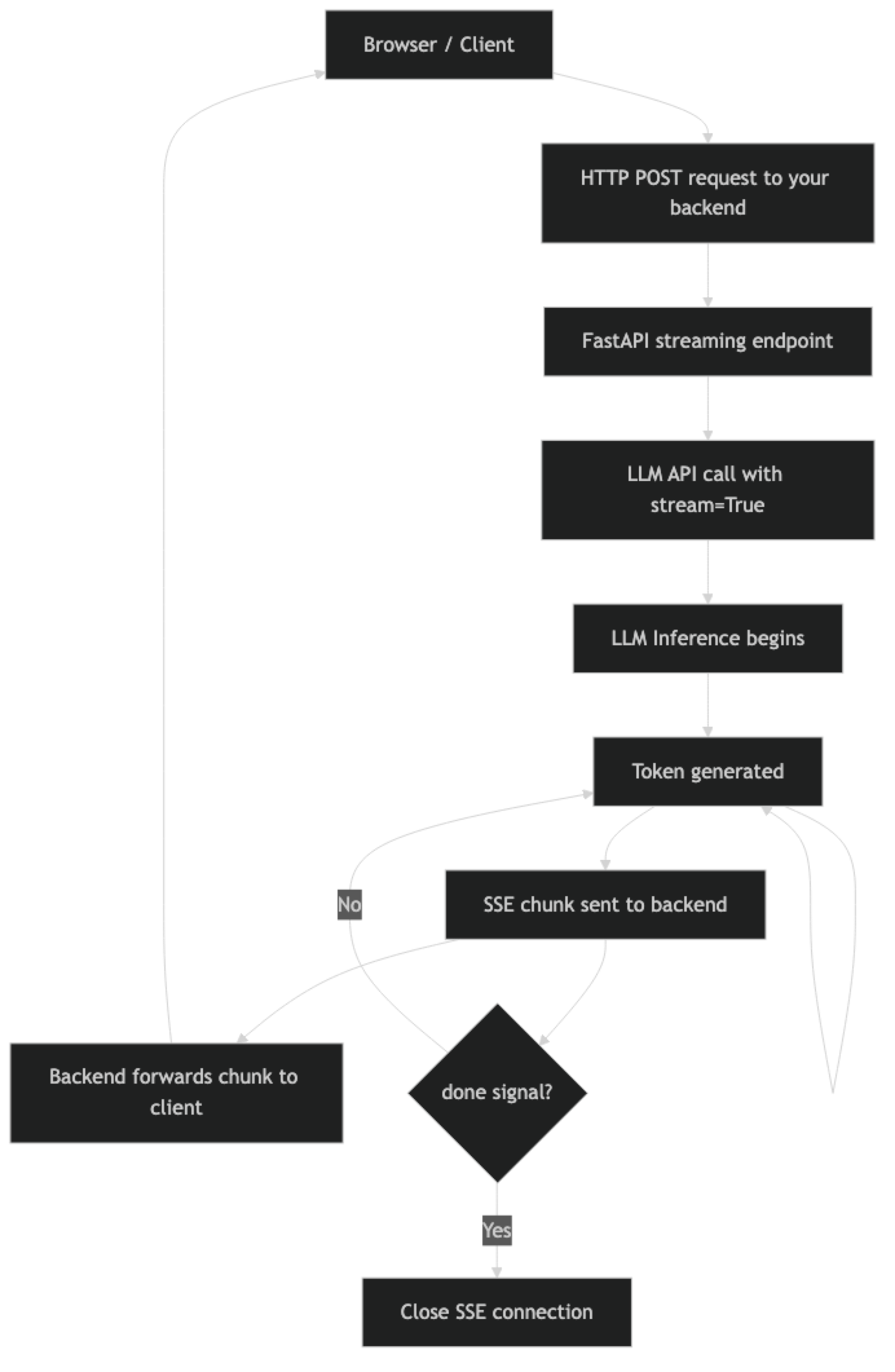
The backend acts as a streaming proxy: it receives the SSE stream from the LLM API and forwards chunks to the client. This pattern keeps your API key server-side (never exposed to the browser) and lets you add authentication, logging, and per-user rate limiting in the middle.
Implementation Example
Streaming with OpenAI
from openai import OpenAI

client = OpenAI()

def stream_to_console(prompt: str):
    """Basic streaming — accumulate and display."""
    full_response = ""

    with client.chat.completions.stream(
        model="gpt-4o-mini",
        messages=[
            {"role": "system", "content": "You are a helpful coding assistant."},
            {"role": "user", "content": prompt}
        ],
        max_tokens=1024,
        temperature=0.7
    ) as stream:
        for text in stream.text_stream:
            print(text, end="", flush=True)
            full_response += text

    print()  # terminal newline
    return full_response

result = stream_to_console("Write a Python function to parse a CSV file into a list of dicts.")
The .text_stream iterator handles SSE parsing and yields only the text delta content. If you need access to the raw chunks (for tool call streaming, usage statistics, etc.), iterate over stream directly:
from openai import OpenAI

client = OpenAI()

def stream_with_metadata(messages: list):
    """Streaming with full chunk access for tool calls and usage."""
    with client.chat.completions.stream(
        model="gpt-4o-mini",
        messages=messages,
        max_tokens=1024
    ) as stream:
        for event in stream:
            chunk = event  # Each event is a ChatCompletionChunk

            if not chunk.choices:
                continue

            delta = chunk.choices[0].delta

            # Text content
            if delta.content:
                yield delta.content

            # Tool call streaming (partial JSON in arguments)
            if delta.tool_calls:
                for tool_call_delta in delta.tool_calls:
                    if tool_call_delta.function.arguments:
                        # Arguments arrive as partial JSON strings
                        # Accumulate until complete, then parse
                        pass

    # After stream closes, get final usage
    final = stream.get_final_completion()
    print(f"\nUsage: {final.usage.total_tokens} tokens")
Streaming with Anthropic Claude
import anthropic

client = anthropic.Anthropic()

def stream_claude(prompt: str, system: str = "") -> str:
    """Stream response from Claude with usage reporting."""
    full_text = ""

    with client.messages.stream(
        model="claude-3-5-sonnet-20241022",
        max_tokens=1024,
        system=system,
        messages=[{"role": "user", "content": prompt}]
    ) as stream:
        for text in stream.text_stream:
            print(text, end="", flush=True)
            full_text += text

    # Access final message for usage stats
    final_message = stream.get_final_message()
    print(f"\nInput tokens: {final_message.usage.input_tokens}")
    print(f"Output tokens: {final_message.usage.output_tokens}")

    return full_text

result = stream_claude(
    "Explain the CAP theorem and give a real-world example of each tradeoff.",
    system="You are a senior distributed systems engineer."
)
Claude's streaming API follows the same pattern — messages.stream() returns a context manager, and text_stream yields text deltas. Usage statistics are available only on the final message after the stream closes.
Streaming with Gemini
import google.generativeai as genai

genai.configure(api_key="your-key")
model = genai.GenerativeModel("gemini-1.5-flash")

def stream_gemini(prompt: str) -> str:
    """Stream tokens from Gemini Flash."""
    full_text = ""

    response = model.generate_content(prompt, stream=True)
    for chunk in response:
        if chunk.text:
            print(chunk.text, end="", flush=True)
            full_text += chunk.text

    print()
    return full_text
Streaming FastAPI Backend
This is the production pattern most developers need: an API endpoint that proxies LLM streaming to a browser client using SSE.
import asyncio
from fastapi import FastAPI, HTTPException
from fastapi.responses import StreamingResponse
from openai import AsyncOpenAI
from pydantic import BaseModel
import json

app = FastAPI()
client = AsyncOpenAI()  # Use async client for FastAPI

class ChatRequest(BaseModel):
    message: str
    conversation_history: list[dict] = []

async def generate_stream(request: ChatRequest):
    """Generator that yields SSE-formatted chunks from OpenAI."""
    messages = request.conversation_history + [
        {"role": "user", "content": request.message}
    ]

    try:
        async with client.chat.completions.stream(
            model="gpt-4o-mini",
            messages=messages,
            max_tokens=1024,
            temperature=0.7
        ) as stream:
            async for text in stream.text_stream:
                # Format as SSE
                data = json.dumps({"content": text, "done": False})
                yield f"data: {data}\n\n"

        # Send done signal
        yield f"data: {json.dumps({'content': '', 'done': True})}\n\n"

    except Exception as e:
        error_data = json.dumps({"error": str(e), "done": True})
        yield f"data: {error_data}\n\n"

@app.post("/chat/stream")
async def chat_stream(request: ChatRequest):
    """Streaming chat endpoint — returns SSE stream."""
    return StreamingResponse(
        generate_stream(request),
        media_type="text/event-stream",
        headers={
            "Cache-Control": "no-cache",
            "Connection": "keep-alive",
            "X-Accel-Buffering": "no"  # Disable Nginx buffering
        }
    )

@app.get("/health")
async def health():
    return {"status": "ok"}
The X-Accel-Buffering: no header is important and frequently overlooked. Without it, Nginx (and some other reverse proxies) will buffer the entire response before forwarding it to the client — destroying the streaming experience completely. This header tells Nginx to pass chunks through immediately.
JavaScript Client (Browser-side SSE)
async function streamChat(message) {
  const response = await fetch('/chat/stream', {
    method: 'POST',
    headers: { 'Content-Type': 'application/json' },
    body: JSON.stringify({ message, conversation_history: [] })
  });

  const reader = response.body.getReader();
  const decoder = new TextDecoder();
  let buffer = '';

  while (true) {
    const { done, value } = await reader.read();
    if (done) break;

    buffer += decoder.decode(value, { stream: true });

    // Process complete SSE events
    const lines = buffer.split('\n\n');
    buffer = lines.pop(); // Keep incomplete event in buffer

    for (const line of lines) {
      if (line.startsWith('data: ')) {
        const data = JSON.parse(line.slice(6));

        if (data.error) {
          console.error('Stream error:', data.error);
          break;
        }

        if (!data.done) {
          // Append text to UI
          document.getElementById('response').textContent += data.content;
        }
      }
    }
  }
}
Handling Partial JSON in Tool Call Streaming
When function calling is used with streaming, tool call arguments arrive as partial JSON strings — the JSON is assembled incrementally across multiple chunks.
from openai import OpenAI
import json

client = OpenAI()

def stream_with_tool_calls(messages: list, tools: list):
    """Stream with tool call support — accumulate partial JSON."""
    tool_calls_accumulator = {}

    with client.chat.completions.stream(
        model="gpt-4o-mini",
        messages=messages,
        tools=tools,
        max_tokens=1024
    ) as stream:
        for event in stream:
            if not event.choices:
                continue

            delta = event.choices[0].delta

            # Text content streaming
            if delta.content:
                yield {"type": "text", "content": delta.content}

            # Tool call argument streaming
            if delta.tool_calls:
                for tc_delta in delta.tool_calls:
                    idx = tc_delta.index
                    if idx not in tool_calls_accumulator:
                        tool_calls_accumulator[idx] = {
                            "id": tc_delta.id,
                            "name": tc_delta.function.name or "",
                            "arguments": ""
                        }

                    if tc_delta.function.arguments:
                        tool_calls_accumulator[idx]["arguments"] += (
                            tc_delta.function.arguments
                        )

    # After stream: parse completed tool calls
    for tc in tool_calls_accumulator.values():
        args = json.loads(tc["arguments"])
        yield {"type": "tool_call", "name": tc["name"], "arguments": args}
Best Practices
Always use the async client in FastAPI. Using the synchronous OpenAI/Anthropic client inside a FastAPI async endpoint blocks the event loop and degrades server concurrency. Import AsyncOpenAI and await the stream.
Disable reverse proxy buffering explicitly. Set X-Accel-Buffering: no for Nginx, Transfer-Encoding: chunked for Apache. If you deploy to a PaaS (Heroku, Render, Railway), check their streaming support — some proxies buffer by default and require configuration.
Implement connection timeout and cleanup. If a client disconnects mid-stream, your server should stop generating tokens to avoid wasting LLM API costs. FastAPI handles this with request.is_disconnected() — check periodically inside the generator.
Log time to first token separately from total latency. TTFT is the user-perceived latency metric. Total latency includes generation time and scales with output length. Track both in production monitoring.
Accumulate the full response for logging. Even when streaming to the client, maintain a server-side accumulator of the full response text. You need it for logging, token counting, and conversation history management.
Common Mistakes
Using the synchronous SDK in async FastAPI endpoints. This blocks the event loop and kills server concurrency. Always use
AsyncOpenAI,AsyncAnthropic, etc. in async contexts.Forgetting
X-Accel-Buffering: nobehind Nginx. This is the most common reason streaming "works locally but not in production." The reverse proxy caches the entire response before forwarding it.Not handling client disconnects. If you do not check for client disconnection, your server keeps calling the LLM API and accumulating costs even after the user has closed the browser tab.
Trying to parse partial JSON tool call arguments. Tool call arguments arrive as an incomplete JSON string across multiple chunks. You must accumulate all chunks before attempting
json.loads().Streaming binary data (images, audio) over SSE. SSE is text-only. For binary streaming (like audio from TTS), use chunked binary responses or WebSockets instead.
Key Takeaways
- LLM streaming uses Server-Sent Events (SSE), a one-directional HTTP streaming protocol — no WebSocket handshake required, and it reconnects automatically on dropped connections.
- Time to first token (TTFT) is the UX metric that matters — streaming reduces perceived latency from 5–10 seconds to under one second by delivering the first tokens immediately.
- Use
AsyncOpenAIandAsyncAnthropicin FastAPI endpoints — the synchronous clients block the event loop and destroy server concurrency under load. - Set
X-Accel-Buffering: noheader in your FastAPIStreamingResponse— without it Nginx buffers the entire response before forwarding, silently breaking the streaming experience in production. - Tool call arguments arrive as partial JSON across multiple stream chunks — accumulate all chunks before attempting
json.loads(), never parse partial JSON. - Detect client disconnects inside your generator and cancel the upstream API call — if you do not, the server keeps calling the LLM and accumulating costs after the user has closed the tab.
- Maintain a server-side accumulator of the full response text even when streaming — you need it for logging, token counting, and conversation history management.
- Log time to first token separately from total latency in production monitoring — they tell different stories about where time is being spent.
FAQ
Should I always use streaming?
For user-facing chat interfaces, yes — it makes a meaningful UX difference. For background batch processing, data extraction pipelines, or internal automation where a human is not watching, non-streaming is simpler and equally effective.
How does SSE compare to WebSockets for LLM streaming?
SSE is simpler — it works over standard HTTP, reconnects automatically, and requires no handshake. WebSockets are bidirectional and lower latency, but more complex to implement. For LLM streaming (server-to-client text chunks), SSE is the better fit in almost all cases.
What happens if the stream is interrupted mid-response?
The client-side SSE implementation will attempt to reconnect automatically. From the server side, the LLM API call may still be running — you need to detect the client disconnect and cancel the upstream API call to avoid wasting tokens.
Can I stream from multiple LLM providers simultaneously?
Yes. You can make parallel streaming calls to multiple providers and merge the streams — useful for fallback logic where you start both a primary and secondary provider and use whichever responds first. This requires async handling and careful stream merging logic.
How do I measure streaming performance in production?
Track three metrics: time to first token (from request to first chunk), tokens per second (throughput), and total request latency. Instrument your streaming generator to record the timestamp of the first yielded chunk. Log all three with each request.
Why does streaming work locally but not in production?
The most common cause is reverse proxy buffering. Nginx, Apache, and some PaaS proxies buffer the entire response before forwarding it to the client by default. Set X-Accel-Buffering: no for Nginx. For other proxies, check the documentation for chunked transfer encoding or streaming bypass configuration.
How do I handle streaming in a React frontend?
Use the Fetch API with response.body.getReader() to read chunks incrementally. Decode each chunk, split on double newlines to find complete SSE events, parse the JSON data field, and append content to your state. Avoid using the native EventSource API for POST requests — it only supports GET.