LLM Quantization: Run Bigger Models Without Bigger GPUs (2026)
LLM Quantization: Run 70B Models on Consumer GPUs with GGUF & GPTQ
Last updated: March 2026
A 70-billion-parameter model stored in 16-bit floating point occupies roughly 140GB of VRAM. For the vast majority of developers, that is simply not runnable. An A100 80GB GPU maxes out at 40B parameters in FP16, and consumer hardware stops meaningfully at 13B. If quantization did not exist, the open source LLM ecosystem would be largely inaccessible outside hyperscaler infrastructure.
Quantization reduces this by compressing the weight representation. The insight is that neural network weights, despite being stored as 16-bit floats, do not actually require that precision for useful inference. The difference between storing a weight as 0.47823 versus 0.48 is, for most purposes, imperceptible in the final output. Four-bit quantization reduces that 140GB model to roughly 35–42GB — runnable on a pair of consumer GPUs or on Apple Silicon with enough unified memory.
The trade-offs are real but manageable. Understanding them — and knowing which quantization format to choose for which situation — is one of the more practically impactful things you can learn about running LLMs in production.
Concept Overview
Quantization is the process of reducing the numerical precision of model weights and, in some methods, activations. The terminology you will encounter most often:
FP32 / FP16 / BF16 — Full-precision formats. FP16 is the standard training and inference format. Models from HuggingFace are typically stored in BF16. These offer maximum precision but maximum memory usage.
INT8 — 8-bit integer quantization. Reduces memory by 2× vs FP16 with minimal quality loss. Well-supported in hardware (NVIDIA's Tensor Cores handle INT8 natively). This is what bitsandbytes LLM.int8() provides.
INT4 / NF4 — 4-bit quantization. Reduces memory by 4× vs FP16. Quality degrades more noticeably but remains highly usable for most tasks. QLoRA uses NF4 (normalized float 4) for fine-tuning efficiency. GPTQ and AWQ produce INT4 GPU-native models. GGUF Q4_K_M is the CPU/llama.cpp equivalent.
GGUF — A file format (not a quantization method itself) used by llama.cpp and Ollama. It packages the model weights in any of several quantization levels (Q2 through Q8) with metadata in a single portable file.
How It Works
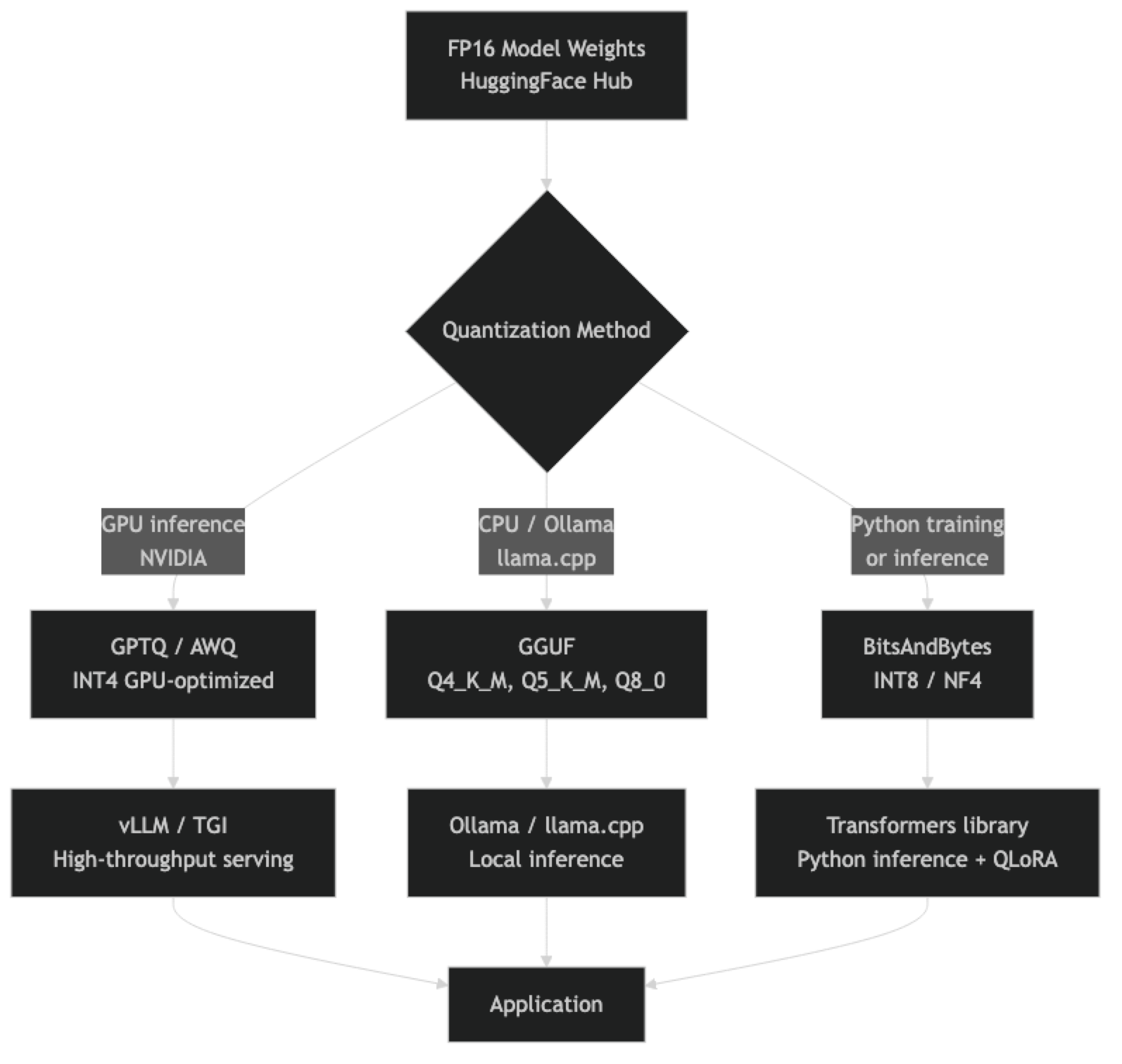
The calibration step is important: when quantizing, most methods run a small representative dataset through the model to determine optimal quantization parameters per layer. Methods that skip calibration (round-to-nearest) produce lower quality than calibrated methods (GPTQ, AWQ, GGUF's K-quants).
Implementation Example
BitsAndBytes: INT8 and NF4 Inference in Python
from transformers import AutoModelForCausalLM, AutoTokenizer, BitsAndBytesConfig
import torch

# INT8 quantization — 2x memory reduction, minimal quality loss
def load_model_int8(model_name: str):
    bnb_config = BitsAndBytesConfig(
        load_in_8bit=True,
    )
    model = AutoModelForCausalLM.from_pretrained(
        model_name,
        quantization_config=bnb_config,
        device_map="auto",
    )
    tokenizer = AutoTokenizer.from_pretrained(model_name)
    return model, tokenizer

# NF4 (4-bit) quantization — 4x memory reduction
def load_model_nf4(model_name: str):
    bnb_config = BitsAndBytesConfig(
        load_in_4bit=True,
        bnb_4bit_quant_type="nf4",           # NF4 is better than fp4 for LLMs
        bnb_4bit_compute_dtype=torch.bfloat16,  # Compute in BF16 for speed
        bnb_4bit_use_double_quant=True,        # Further 0.4-bit reduction in metadata
    )
    model = AutoModelForCausalLM.from_pretrained(
        model_name,
        quantization_config=bnb_config,
        device_map="auto",
    )
    tokenizer = AutoTokenizer.from_pretrained(model_name)
    return model, tokenizer

# Usage
model_name = "meta-llama/Llama-3.1-8B-Instruct"
model, tokenizer = load_model_nf4(model_name)

# Inference
inputs = tokenizer("Explain quantization in 3 sentences:", return_tensors="pt").to("cuda")
with torch.no_grad():
    outputs = model.generate(**inputs, max_new_tokens=200, temperature=0.7, do_sample=True)
print(tokenizer.decode(outputs[0], skip_special_tokens=True))
GGUF Quantization with llama.cpp
# Clone and build llama.cpp
git clone https://github.com/ggerganov/llama.cpp
cd llama.cpp
make -j8 LLAMA_CUDA=1   # Add LLAMA_CUDA=1 for GPU support

# Download FP16 model from HuggingFace
pip install huggingface_hub
python -c "
from huggingface_hub import snapshot_download
snapshot_download('meta-llama/Llama-3.1-8B-Instruct',
                  local_dir='./models/llama-3.1-8b-fp16')
"

# Convert to GGUF FP16 first
python convert_hf_to_gguf.py models/llama-3.1-8b-fp16 \
  --outtype f16 \
  --outfile models/llama-3.1-8b-f16.gguf

# Quantize to Q4_K_M (recommended)
./llama-quantize models/llama-3.1-8b-f16.gguf \
                 models/llama-3.1-8b-q4_K_M.gguf \
                 Q4_K_M

# Quantize to Q8_0 (near-lossless)
./llama-quantize models/llama-3.1-8b-f16.gguf \
                 models/llama-3.1-8b-q8_0.gguf \
                 Q8_0

# Run inference
./llama-cli -m models/llama-3.1-8b-q4_K_M.gguf \
  --prompt "Explain neural network quantization" \
  -n 300 --threads 8 --gpu-layers 35
Loading GGUF with llama-cpp-python
from llama_cpp import Llama

# Load a GGUF model
llm = Llama(
    model_path="./models/llama-3.1-8b-q4_K_M.gguf",
    n_gpu_layers=35,    # Number of layers to offload to GPU (-1 = all)
    n_ctx=4096,         # Context window
    n_threads=8,        # CPU threads for non-GPU layers
    verbose=False,
)

# Chat completion
response = llm.create_chat_completion(
    messages=[
        {"role": "system", "content": "You are a helpful assistant."},
        {"role": "user", "content": "What is the difference between INT8 and INT4 quantization?"}
    ],
    temperature=0.7,
    max_tokens=512,
)
print(response["choices"][0]["message"]["content"])

# Streaming
for chunk in llm.create_chat_completion(
    messages=[{"role": "user", "content": "Explain attention mechanisms briefly."}],
    stream=True,
    max_tokens=256,
):
    delta = chunk["choices"][0]["delta"]
    if "content" in delta:
        print(delta["content"], end="", flush=True)
Quantization Levels Compared
GGUF K-Quants (llama.cpp / Ollama)
The K-quant variants use mixed precision — different layers are quantized at different bit depths, preserving precision in the most sensitive layers. This makes them meaningfully better than naive uniform quantization at the same bit depth.
| Format | Bits/Weight | 7B Model Size | 70B Model Size | Quality vs FP16 |
|---|---|---|---|---|
| Q2_K | 2.63 | ~2.7GB | ~26GB | Poor — noticeable degradation |
| Q3_K_M | 3.35 | ~3.5GB | ~34GB | Acceptable for testing |
| Q4_K_M | 4.83 | ~4.9GB | ~48GB | Good — recommended default |
| Q5_K_M | 5.68 | ~5.7GB | ~56GB | Very good — minimal loss |
| Q6_K | 6.57 | ~6.6GB | ~65GB | Excellent |
| Q8_0 | 8.50 | ~8.6GB | ~85GB | Near-lossless |
In practice, Q4_K_M is the default for most Ollama models and the right choice for production unless your evaluation shows a meaningful quality difference that justifies Q5_K_M's higher VRAM requirement.
GPU Quantization Formats (GPTQ / AWQ)
GPTQ and AWQ are calibrated quantization methods designed for GPU inference (not CPU). They are what you use when running models on NVIDIA hardware through vLLM or Text Generation Inference.
| Method | Precision | Quality | Requirement |
|---|---|---|---|
| GPTQ INT4 | 4-bit | Good | CUDA GPU, calibration dataset |
| GPTQ INT8 | 8-bit | Very good | CUDA GPU, calibration dataset |
| AWQ INT4 | 4-bit | Better than GPTQ | CUDA GPU, faster inference |
AWQ (Activation-aware Weight Quantization) generally outperforms GPTQ at the same bit depth because it considers activation magnitudes when determining which weights are most important to preserve. For new deployments on NVIDIA hardware, AWQ is the better choice over GPTQ.
Best Practices
Default to Q4_K_M for GGUF. The quality-to-size ratio is optimal at this level. Only move to Q5_K_M or Q8_0 if your application-specific eval shows a measurable quality difference.
Use double quantization when using BitsAndBytes NF4. The bnb_4bit_use_double_quant=True parameter quantizes the quantization constants themselves, saving roughly 0.4 bits per weight with no practical quality impact.
Always use BF16 compute dtype with NF4 weights. Set bnb_4bit_compute_dtype=torch.bfloat16. This keeps numerical stability during the computation step even though weights are stored in 4-bit. Using float32 for compute is unnecessarily slow.
Test quantization effects on your specific use case. Quantization degrades model performance unevenly — tasks requiring precise numerical reasoning or rare knowledge are more affected than common text generation tasks. Always eval on your actual workload.
Calibrate on domain-representative data. GPTQ and AWQ use a calibration dataset to determine optimal quantization parameters. Using a generic calibration set (like Wikitext-103) when your application is medical Q&A will produce slightly suboptimal quantization. Use domain-representative text for calibration when possible.
Common Mistakes
Conflating quantization levels when comparing models. "Llama 3 70B" at Q2 performs very differently from "Llama 3 70B" at Q8. Always include quantization level in your comparisons.
Using Q2 or Q3 quantization expecting reasonable quality. Below Q4, quality degrades meaningfully for most tasks. Q2 and Q3 are useful for research and very tight hardware budgets, not for production quality requirements.
Applying quantization to model activations without understanding the impact. Some quantization methods quantize both weights and activations. Activation quantization can cause significant quality loss on tasks that produce outlier activation values, which is common in complex reasoning.
Not accounting for KV cache memory. Model weights are only part of VRAM usage. The KV cache scales with context length and batch size. A Q4 model that fits in 10GB can OOM at long context lengths if you have not budgeted for KV cache overhead.
Quantizing embedding layers. Most quantization methods skip the embedding layers by default — and for good reason. Quantizing embeddings produces disproportionate quality loss. Make sure your quantization settings preserve embedding precision.
Key Takeaways
- Quantization reduces model weight precision (FP16 → INT8 → INT4), cutting VRAM requirements by 2–4× with manageable quality loss
- Q4_K_M GGUF is the recommended default for Ollama and llama.cpp deployments — 60% memory reduction, 1–4% benchmark drop
- BitsAndBytes NF4 is the go-to for Python-native inference with HuggingFace Transformers and is the basis for QLoRA fine-tuning
- AWQ INT4 outperforms GPTQ at equivalent bit depth for NVIDIA GPU production serving — use it with vLLM or Text Generation Inference
- K-quant variants (Q4_K_M, Q5_K_M) use mixed precision across layers and outperform naive uniform quantization at the same bit depth
- Double quantization (
bnb_4bit_use_double_quant=True) saves 0.4 additional bits per weight with no practical quality impact - KV cache memory is separate from model weight memory — budget 20–30% additional VRAM for KV cache at your target context length
- Always evaluate quantization effects on your specific task — quantization degrades numerical reasoning tasks more than standard text generation
FAQ
Does quantization permanently reduce model quality? The quantized model file has reduced precision, and the loss is largely irreversible. You cannot re-quantize to higher precision from a Q4 file — you need the original FP16 weights. This is why it is important to keep or pin access to the original model checkpoint.
Which is better for CPU inference — GGUF Q4 or BitsAndBytes INT8? GGUF Q4 via llama.cpp is significantly better for CPU inference. BitsAndBytes requires CUDA and does not work on CPU. For CPU-only deployments, GGUF is the only practical choice.
Can I fine-tune a quantized model? Yes. You can fine-tune using QLoRA (LoRA adapters on an NF4 quantized base model). The base model weights stay frozen and quantized; only the LoRA adapter weights are trained in full precision. This is the standard approach for low-cost fine-tuning.
How much quality is lost with Q4_K_M versus full precision? On standard benchmarks (MMLU, HumanEval), Q4_K_M models typically score 1–4% lower than FP16. In production applications, the difference is often imperceptible. Tasks involving precise numerical calculations or rare knowledge are most affected.
What is the difference between GPTQ and AWQ? Both are calibrated GPU quantization methods, but AWQ (Activation-aware Weight Quantization) considers activation magnitudes when deciding which weights are most important to preserve. AWQ generally outperforms GPTQ at the same bit depth. For new NVIDIA GPU deployments, AWQ is the better choice.
What happens to quality below Q4 quantization? Below Q4 (Q3_K_M, Q2_K), quality degrades meaningfully for most tasks. Q2_K is useful only for research and extremely tight hardware budgets. Do not use sub-Q4 quantization for production applications where output quality matters.
How do I choose between INT8 and NF4 for inference? Use INT8 when you want minimal quality loss with 2× memory reduction. Use NF4 when you need 4× memory reduction and can accept slightly more quality degradation. NF4 with double quantization is standard for consumer GPU inference and QLoRA fine-tuning.