LLM Hardware: Pick the Right GPU and Save Thousands (2026)
LLM Hardware Guide: GPU Requirements for Running and Training LLMs (2026)
Last updated: March 2026
The most common question I get from engineers setting up local LLM inference is some variant of "will my hardware work." The answer is almost always yes — it is a matter of which models you can run and at what speed. Understanding the relationship between VRAM, model size, and quantization is more useful than any specific hardware recommendation, because it gives you the framework to evaluate any hardware configuration against any model.
The core constraint is VRAM. Modern LLM inference is primarily memory-bandwidth bound, not compute bound. A 70B parameter model requires roughly 40GB of VRAM at Q4 quantization just for the weights — before you account for the KV cache, which grows with context length and batch size. If your weights fit in VRAM, inference is fast. If they do not, you are either splitting across CPU and GPU (slow) or running entirely on CPU (very slow).
This guide gives you the numbers you need: VRAM requirements by model size and quantization level, concrete GPU comparisons across consumer and professional tiers, Apple Silicon performance characteristics, CPU-only inference options, and cloud GPU alternatives when local hardware is not sufficient.
Concept Overview
Three hardware metrics determine your LLM inference performance:
VRAM is the primary constraint. It must be large enough to hold model weights plus KV cache. If VRAM is exceeded, the model falls back to CPU RAM — inference continues but at 10–20× reduced throughput.
Memory bandwidth determines how fast weights can be fed to GPU compute cores. This is the actual bottleneck for single-user inference. An RTX 4090 has 1,008 GB/s memory bandwidth; an RTX 4060 has 272 GB/s. For long context or large models, bandwidth matters more than CUDA core count.
System RAM matters for CPU-only inference and for models that partially run on CPU. Fast RAM (DDR5) helps; more RAM (64–128GB) determines which models fit in CPU memory.
How It Works
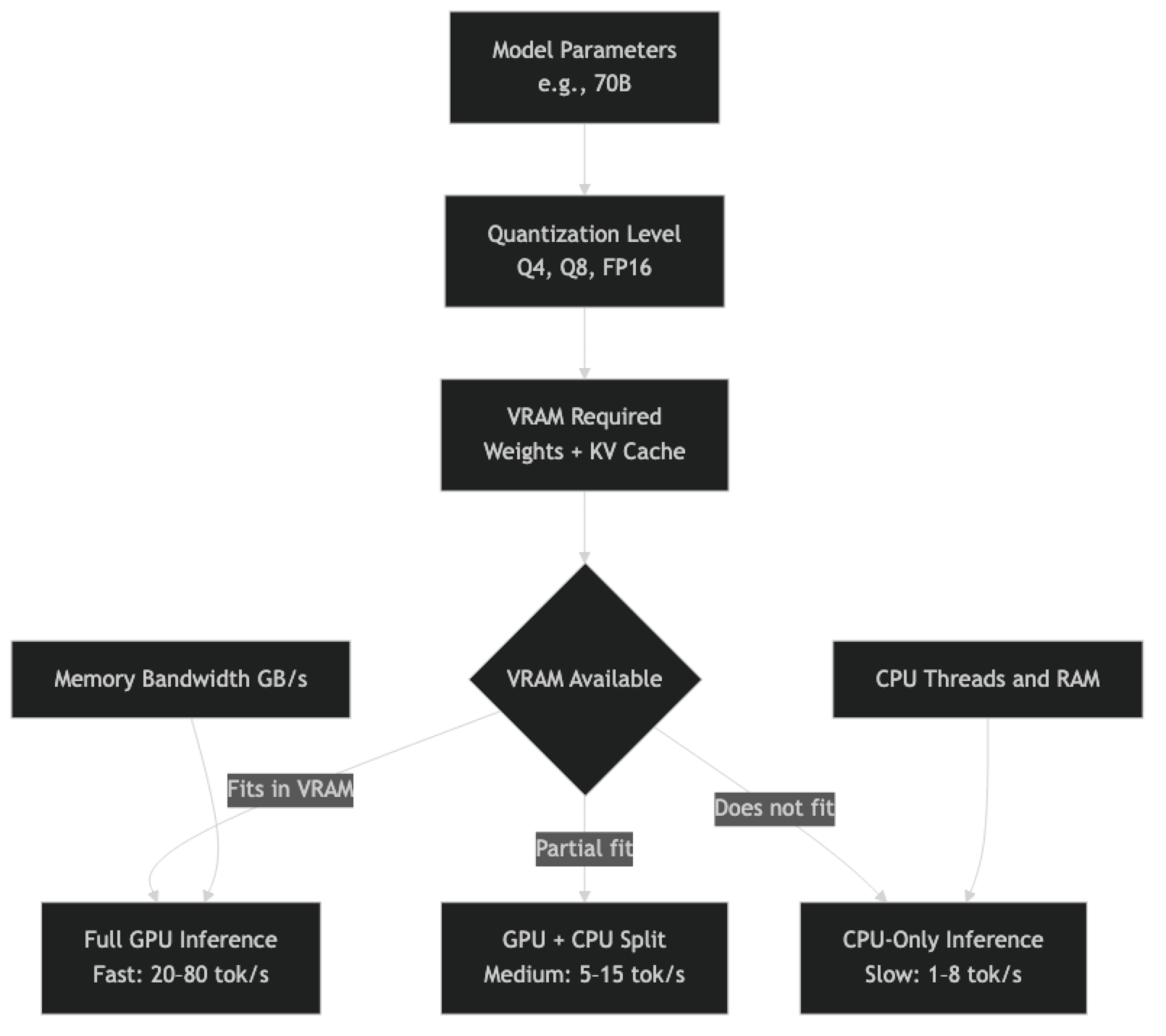
VRAM Requirements by Model Size
The formula for minimum VRAM (in GB) is approximately: (parameters × bits_per_weight / 8) × 1.1
The 1.1 multiplier accounts for overhead. For actual production usage, add KV cache budget on top.
Weight Memory at Different Quantization Levels
| Model Size | FP16 | Q8_0 | Q5_K_M | Q4_K_M | Q3_K_M | Q2_K |
|---|---|---|---|---|---|---|
| 1B | 2.0GB | 1.1GB | 0.8GB | 0.7GB | 0.5GB | 0.4GB |
| 3B | 6.0GB | 3.3GB | 2.4GB | 2.0GB | 1.6GB | 1.1GB |
| 7B / 8B | 14–16GB | 8.6GB | 5.7GB | 4.9GB | 3.5GB | 2.7GB |
| 13B | 26GB | 14.3GB | 9.5GB | 8.1GB | 5.8GB | 4.5GB |
| 34B | 68GB | 37.4GB | 24.8GB | 21.0GB | 15.1GB | 11.6GB |
| 70B | 140GB | 74.0GB | 49.0GB | 42.5GB | 29.7GB | 22.7GB |
KV Cache Overhead
KV cache grows with batch size and context length. At 4K context with a single user, KV cache adds roughly 0.5–2GB depending on model size. At 32K context or batch size of 8, it can add 4–16GB. For production planning, budget 20–30% of your VRAM for KV cache.
Implementation Example
Checking VRAM Before Loading a Model
import subprocess
import torch

def get_vram_info() -> dict:
    """Get available and total VRAM for all NVIDIA GPUs."""
    if not torch.cuda.is_available():
        return {"gpus": [], "cuda_available": False}

    gpus = []
    for i in range(torch.cuda.device_count()):
        props = torch.cuda.get_device_properties(i)
        total = props.total_memory / (1024**3)
        allocated = torch.cuda.memory_allocated(i) / (1024**3)
        free = total - allocated

        gpus.append({
            "index": i,
            "name": props.name,
            "total_gb": round(total, 1),
            "allocated_gb": round(allocated, 1),
            "free_gb": round(free, 1),
            "bandwidth_gbps": props.memory_clock_rate * props.memory_bus_width / 8e6,
        })

    return {"gpus": gpus, "cuda_available": True}

def estimate_model_vram(params_billion: float, quant_bits: int = 4) -> float:
    """Estimate VRAM needed for model weights in GB."""
    bytes_per_weight = quant_bits / 8
    total_bytes = params_billion * 1e9 * bytes_per_weight
    overhead_factor = 1.15  # 15% for non-weight tensors
    return round(total_bytes * overhead_factor / (1024**3), 1)

def can_run_model(params_billion: float, quant_bits: int = 4) -> tuple[bool, str]:
    """Check if current hardware can run a given model."""
    required_gb = estimate_model_vram(params_billion, quant_bits)
    vram_info = get_vram_info()

    if not vram_info["cuda_available"]:
        system_ram_gb = 64  # Estimate; use psutil for accurate value
        if required_gb < system_ram_gb * 0.8:
            return True, f"CPU-only inference (slow). Required: {required_gb}GB"
        return False, f"Insufficient RAM. Required: {required_gb}GB"

    total_vram = sum(g["free_gb"] for g in vram_info["gpus"])
    if required_gb <= total_vram:
        return True, f"GPU inference. Required: {required_gb}GB, Available: {total_vram:.1f}GB"
    return False, f"Insufficient VRAM. Required: {required_gb}GB, Available: {total_vram:.1f}GB"

# Example usage
checks = [
    (7, 4),    # 7B model, Q4
    (13, 4),   # 13B model, Q4
    (70, 4),   # 70B model, Q4
    (70, 8),   # 70B model, Q8
]

for params, bits in checks:
    can_run, message = can_run_model(params, bits)
    status = "OK" if can_run else "SKIP"
    print(f"[{status}] {params}B @ Q{bits}: {message}")
Consumer GPU Comparison
NVIDIA Consumer Cards
| GPU | VRAM | Bandwidth | Models (Q4) | Est. Speed (8B) |
|---|---|---|---|---|
| RTX 3060 | 12GB | 360 GB/s | Up to 13B | ~25 tok/s |
| RTX 3080 | 10GB | 760 GB/s | Up to 8B | ~40 tok/s |
| RTX 3080 Ti | 12GB | 912 GB/s | Up to 13B | ~45 tok/s |
| RTX 3090 | 24GB | 936 GB/s | Up to 34B | ~50 tok/s |
| RTX 4070 Ti | 12GB | 504 GB/s | Up to 13B | ~35 tok/s |
| RTX 4080 | 16GB | 717 GB/s | Up to 13B | ~50 tok/s |
| RTX 4090 | 24GB | 1,008 GB/s | Up to 34B | ~70 tok/s |
| RTX 5090 | 32GB | 1,792 GB/s | Up to 34B | ~110 tok/s |
The RTX 3090 / 4090 are the sweet spots for developers who want to run 34B models at reasonable speeds. For 70B models, you need either dual RTX 3090s (48GB total, works with llama.cpp tensor splitting) or professional-grade hardware.
In practice, memory bandwidth matters more than CUDA core count for single-user inference. This is why the RTX 3090 (24GB, 936 GB/s) often outperforms the RTX 4080 (16GB, 717 GB/s) for LLM inference despite the 4080 being a newer generation.
NVIDIA Professional Cards
| GPU | VRAM | Bandwidth | 70B Q4 | Notes |
|---|---|---|---|---|
| A10G | 24GB | 600 GB/s | No (42GB needed) | Common in AWS |
| RTX 4000 Ada | 20GB | 432 GB/s | No | Workstation card |
| RTX 6000 Ada | 48GB | 960 GB/s | Yes | 70B fits comfortably |
| A100 40GB | 40GB | 1,555 GB/s | Tight (42GB needed) | FP16 only |
| A100 80GB | 80GB | 2,000 GB/s | Yes, FP16 | Best single-GPU option |
| H100 80GB SXM | 80GB | 3,350 GB/s | Yes | Best throughput available |
For 70B models in production, the RTX 6000 Ada (48GB) is the single-GPU sweet spot at a consumer-accessible price point (~$6,500). The A100 80GB handles 70B at full FP16 precision and is the standard for production inference servers.
Apple Silicon Performance
Apple Silicon M-series chips use unified memory architecture — the GPU and CPU share the same memory pool. This makes Apple Silicon uniquely suited for large model inference on a single machine, because a Mac Studio M2 Ultra with 192GB unified memory can theoretically hold a 70B FP16 model.
| Chip | Max Unified Memory | 70B Q4 Speed | 7B Q4 Speed |
|---|---|---|---|
| M3 / M4 | 24–32GB | No (42GB needed) | ~20 tok/s |
| M3 Pro / M4 Pro | 36–48GB | Tight | ~25 tok/s |
| M3 Max / M4 Max | 64–128GB | Yes | ~35 tok/s |
| M2 Ultra | 192GB | Yes, FP16 possible | ~40 tok/s |
| M3 Ultra | 192GB | Yes, FP16 possible | ~50 tok/s |
A common mistake I have seen is engineers purchasing Apple Silicon expecting NVIDIA-equivalent GPU performance per dollar. Apple Silicon's advantage is running large models on a single unified-memory machine, not raw per-token throughput. An M3 Max generating 35 tokens/second on a 70B model is competitive with mid-tier NVIDIA GPU setups, with significantly less complexity.
Ollama supports Apple Silicon Metal acceleration natively. No CUDA required; no driver installation beyond macOS. This is genuinely the simplest 70B inference setup available if you have the hardware budget.
CPU-Only Inference
CPU inference with llama.cpp is viable for development and low-volume production if you have sufficient RAM and a modern multi-core CPU.
# CPU-optimized llama.cpp build
cd llama.cpp
make -j8  # No CUDA flags — pure CPU build

# Run with maximum CPU threads
./llama-cli -m ./models/llama-3.1-8b-q4_K_M.gguf \
  --prompt "Explain RAG in 3 sentences" \
  -n 200 \
  --threads 16 \      # Match your physical core count
  --threads-batch 16 \
  --no-mmap           # Disable memory mapping for consistent performance
CPU throughput expectations:
| CPU | Cores | 7B Q4 Speed | 13B Q4 Speed |
|---|---|---|---|
| AMD Ryzen 9 7950X | 16C/32T | ~5–7 tok/s | ~3–4 tok/s |
| Intel Core i9-13900K | 24C | ~4–6 tok/s | ~2–3 tok/s |
| Apple M3 Max (CPU only) | 16P+4E | ~8–12 tok/s | ~4–6 tok/s |
| AMD EPYC 9654 | 96C | ~15–20 tok/s | ~8–12 tok/s |
For batch processing workloads where latency is not critical, CPU inference is practical for 7B and 13B models. Real-time chat applications require GPU for acceptable user experience.
Cloud GPU Options
When local hardware is insufficient, cloud GPU instances provide on-demand access:
| Provider | GPU | VRAM | $/hour | Best For |
|---|---|---|---|---|
| Lambda Labs | A100 80GB | 80GB | ~$1.50 | 70B FP16 inference |
| Lambda Labs | H100 80GB | 80GB | ~$2.50 | High-throughput |
| RunPod | RTX 4090 | 24GB | ~$0.75 | 34B development |
| RunPod | A100 80GB | 80GB | ~$1.80 | 70B production |
| Vast.ai | Varies | Varies | $0.20–2.00 | Budget experiments |
| AWS g5.xlarge | A10G | 24GB | ~$1.00 | 34B serving |
| GCP a2-highgpu-1g | A100 40GB | 40GB | ~$3.67 | Enterprise |
For short evaluation runs, RunPod or Vast.ai offer the best value. For sustained production serving, Lambda Labs has competitive pricing with reliable availability.
Best Practices
Quantize to fit, not to minimize. Use the largest quantization level (Q5_K_M, Q6_K) that fits comfortably in your VRAM with 20% headroom. More precise quantization always produces better output quality.
Check memory bandwidth, not just VRAM. Two GPUs with the same VRAM can perform very differently for LLM inference. The RTX 4090's 1,008 GB/s bandwidth makes it significantly faster than older cards with equivalent VRAM.
For multi-GPU setups, use llama.cpp tensor splitting. llama.cpp supports splitting model layers across multiple GPUs with --split-mode layer. This is simpler and more reliable than some alternatives for consumer GPU setups.
Apple Silicon M-series is underrated for large models. The unified memory architecture eliminates the CPU-GPU memory transfer bottleneck. An M3 Max or M4 Max is a serious 70B inference machine.
Common Mistakes
Measuring VRAM only for model weights. KV cache adds significant overhead, especially at long context lengths. Budget 20–30% additional VRAM beyond model weight size.
Assuming newer GPU generation always means faster LLM inference. The RTX 4060 Ti has less memory bandwidth than the RTX 3080. For LLM inference, bandwidth is the bottleneck — check the bandwidth spec, not just the generation number.
Running split GPU/CPU inference and expecting reasonable throughput. When even one layer runs on CPU, the PCIe bus becomes a bottleneck. The performance drop is dramatic — often 5–10× slower than full GPU inference.
Not using
--gpu-layersin llama.cpp. By default, llama.cpp runs on CPU. Always specify--gpu-layers N(or-1for all layers) explicitly when you have a compatible GPU.Conflating system RAM with VRAM. System RAM (DDR5, 64–256GB) and GPU VRAM are completely separate. A machine with 128GB RAM and an RTX 4080 (16GB VRAM) can only run models that fit in 16GB VRAM on GPU — the 128GB RAM does not help GPU inference (only CPU inference).
Key Takeaways
- VRAM is the primary constraint for LLM inference — if model weights fit entirely in VRAM, inference is fast; if they overflow to CPU RAM, throughput drops 10–20×
- Memory bandwidth matters more than CUDA core count for single-user inference — the RTX 4090 (1,008 GB/s) significantly outperforms cards with equivalent VRAM but lower bandwidth
- The minimum VRAM formula is: (parameters × bits_per_weight / 8) × 1.1; add 20–30% headroom for KV cache
- For most developers, an RTX 4090 (24GB) covers use cases up to 34B models at Q4_K_M quantization
- Apple Silicon M-series uses unified memory architecture — an M3 Max or M4 Ultra is a serious 70B inference machine on a single device
- CPU-only inference with llama.cpp is viable for development with 7B–13B models; it is too slow for real-time chat applications
- Cloud GPUs (Lambda Labs, RunPod) are cost-effective for experiments and production serving when local hardware is insufficient
- Always specify
--gpu-layers -1in llama.cpp — the default is CPU-only; you must explicitly enable GPU offloading
FAQ
Can I run a 70B model on a single RTX 4090? No. A 70B model at Q4_K_M requires approximately 42GB VRAM. The RTX 4090 has 24GB. You can run it split across two RTX 4090s (48GB total) using llama.cpp tensor splitting, or use Q3_K_M (29.7GB) which barely fits in a 32GB card — but at meaningful quality cost.
Is Apple Silicon worth it for LLM inference versus NVIDIA? For 70B models on a single machine, yes. An M3 Ultra with 128–192GB unified memory is the most capable single-machine 70B inference setup outside server hardware. For smaller models (7B, 13B), NVIDIA cards are more cost-efficient per token.
How much VRAM do I need for a RAG application with long context? For a 7B model with 32K context, budget 4.9GB (weights) plus approximately 4GB (KV cache) = roughly 9GB VRAM. A 13B model at 32K context needs approximately 8.1GB plus 6GB = 14GB. Always measure your actual KV cache usage at your target context length.
What happens when VRAM is exceeded? With Ollama and llama.cpp, layers that do not fit in VRAM are offloaded to CPU RAM. Inference continues but the CPU-GPU memory transfer becomes a severe bottleneck. A model that runs at 50 tok/s fully on GPU might run at 3–5 tok/s when even a few layers are on CPU.
How do I run a 70B model across two GPUs?
Use llama.cpp with the --split-mode layer flag to distribute layers evenly across GPUs. Set --tensor-split to control how layers are divided. Dual RTX 3090s (48GB total) can run a 70B model at Q4_K_M comfortably. vLLM also supports tensor parallelism with --tensor-parallel-size 2.
What is the best cloud GPU for development experiments? RunPod and Vast.ai offer the best value for short experiments (RTX 4090 instances starting around $0.35–0.75/hr). For sustained production serving, Lambda Labs offers better reliability and competitive pricing on A100 instances.
Why is the RTX 3090 often better for LLMs than the RTX 4080? The RTX 3090 has 24GB VRAM versus the RTX 4080's 16GB, and comparable memory bandwidth (936 GB/s vs 717 GB/s). For LLM inference, VRAM capacity and bandwidth matter more than raw compute (CUDA cores/TFLOPS). The 3090 supports larger models and maintains higher throughput.