LLM Function Calling: Make AI Do Real Work (2026)
LLM Function Calling: Build Tool-Using AI Apps with OpenAI & Claude (2026)
Last updated: March 2026
Early in building an AI assistant, most developers try the obvious approach: ask the model to output JSON, then parse it. It works about 80% of the time. The other 20% is where production issues come from — the model wraps the JSON in markdown backticks, includes a preamble sentence, uses slightly different key names than specified, or generates invalid JSON when the response is complex.
Function calling solves this. Instead of asking the model to "format your response as JSON with these fields," you declare a schema describing what information you want, and the model natively generates a valid, schema-conformant argument payload. The model does not execute the function — it tells you it wants to call a function and what arguments to use. Your code executes the actual function and returns the result.
This pattern is the foundation of AI agents. Understanding function calling deeply — the schema format, parallel calls, tool choice control, multi-step tool chains — is the difference between a prototype and a system that actually works.
Concept Overview
Function calling (OpenAI's term) or tool use (Anthropic's term) is a mechanism where the model can request the execution of external functions by generating a structured argument payload.
The core loop:
- You define tools with JSON Schema descriptions
- You send a user message with the tools available
- The model responds with either text OR a tool call request
- You execute the tool with the provided arguments
- You send the tool result back to the model
- The model generates a final text response incorporating the result
Key concepts:
- Tool schema — JSON Schema object describing the function name, description, and parameters
- Tool call — Model's response requesting a function execution with specific arguments
- Tool result — Your code's execution result, sent back in the messages array
- Parallel tool calls — Model requesting multiple function calls simultaneously in one response
- Tool choice — Mechanism to force or prevent the model from calling specific tools
How It Works
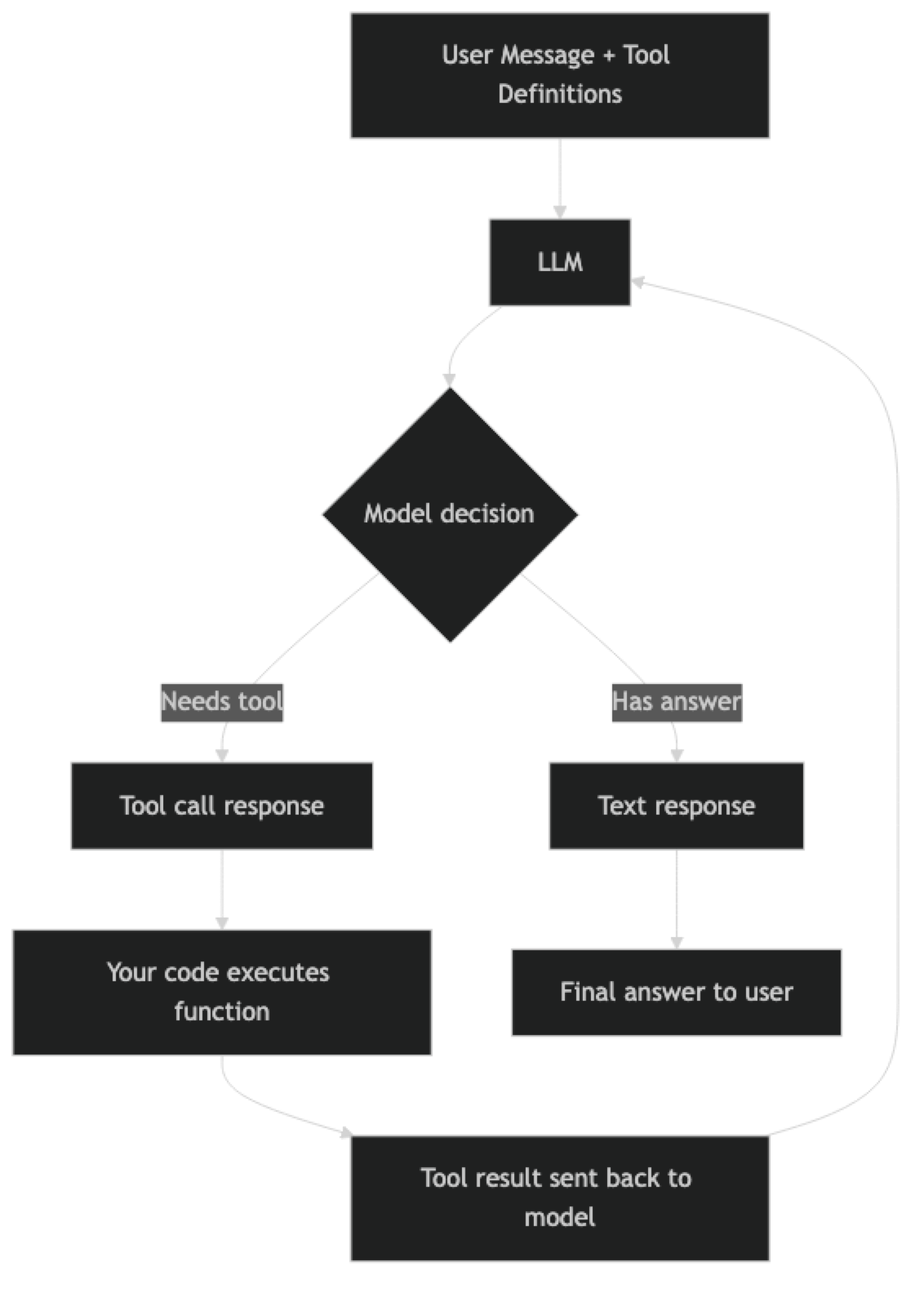
The loop can repeat multiple times — the model might call a tool, receive results, decide it needs another tool, call that, and only then generate a final answer. This is the foundation of agent behavior: a model that can plan, act, observe, and re-plan.
Implementation Example
Basic Tool Schema and Execution
import json
import requests
from openai import OpenAI

client = OpenAI()

# Define tools with JSON Schema
tools = [
    {
        "type": "function",
        "function": {
            "name": "get_weather",
            "description": (
                "Get current weather conditions for a given city. "
                "Returns temperature, humidity, conditions, and wind speed."
            ),
            "parameters": {
                "type": "object",
                "properties": {
                    "city": {
                        "type": "string",
                        "description": "City name, e.g. 'London', 'New York', 'Tokyo'"
                    },
                    "units": {
                        "type": "string",
                        "enum": ["celsius", "fahrenheit"],
                        "description": "Temperature units. Default: celsius"
                    }
                },
                "required": ["city"],
                "additionalProperties": False
            }
        }
    },
    {
        "type": "function",
        "function": {
            "name": "calculate",
            "description": (
                "Evaluate a mathematical expression. "
                "Supports +, -, *, /, **, sqrt, log, sin, cos. "
                "Use this for any numerical calculations."
            ),
            "parameters": {
                "type": "object",
                "properties": {
                    "expression": {
                        "type": "string",
                        "description": "Mathematical expression to evaluate, e.g. '(15 * 8) + 120'"
                    }
                },
                "required": ["expression"],
                "additionalProperties": False
            }
        }
    }
]


def get_weather(city: str, units: str = "celsius") -> dict:
    """Mock weather function — replace with OpenWeatherMap or similar."""
    mock_data = {
        "london": {"temp": 12, "conditions": "Overcast", "humidity": 78, "wind_kph": 15},
        "new york": {"temp": 18, "conditions": "Partly cloudy", "humidity": 65, "wind_kph": 20},
        "tokyo": {"temp": 22, "conditions": "Clear", "humidity": 55, "wind_kph": 8},
    }
    city_lower = city.lower()
    data = mock_data.get(city_lower, {"temp": 20, "conditions": "Unknown", "humidity": 60, "wind_kph": 10})

    temp = data["temp"]
    if units == "fahrenheit":
        temp = (temp * 9/5) + 32

    return {
        "city": city,
        "temperature": temp,
        "units": units,
        "conditions": data["conditions"],
        "humidity_pct": data["humidity"],
        "wind_kph": data["wind_kph"]
    }


def calculate(expression: str) -> dict:
    """Safe math expression evaluator."""
    import math
    safe_globals = {
        "__builtins__": {},
        "sqrt": math.sqrt,
        "log": math.log,
        "sin": math.sin,
        "cos": math.cos,
        "pi": math.pi,
        "e": math.e,
        "abs": abs,
        "round": round
    }
    try:
        result = eval(expression, safe_globals)
        return {"expression": expression, "result": result}
    except Exception as ex:
        return {"expression": expression, "error": str(ex)}


def execute_tool(name: str, arguments: dict) -> str:
    """Dispatch tool calls to the right function."""
    if name == "get_weather":
        result = get_weather(**arguments)
    elif name == "calculate":
        result = calculate(**arguments)
    else:
        result = {"error": f"Unknown tool: {name}"}

    return json.dumps(result)
The Tool Execution Loop
def run_agent(user_query: str) -> str:
    """Run the tool-calling loop until the model produces a final text response."""
    messages = [
        {
            "role": "system",
            "content": (
                "You are a helpful assistant with access to weather data and a calculator. "
                "Use tools when you need current information or calculations. "
                "Always provide a clear, complete answer after getting tool results."
            )
        },
        {"role": "user", "content": user_query}
    ]

    max_iterations = 10  # Safety limit to prevent infinite loops

    for iteration in range(max_iterations):
        response = client.chat.completions.create(
            model="gpt-4o-mini",
            messages=messages,
            tools=tools,
            tool_choice="auto",  # Model decides whether to use tools
            max_tokens=1024,
            temperature=0
        )

        choice = response.choices[0]

        # Model produced a text response — we are done
        if choice.finish_reason == "stop":
            return choice.message.content

        # Model wants to call tools
        if choice.finish_reason == "tool_calls":
            # Add assistant's response (with tool calls) to history
            messages.append(choice.message)

            # Execute each requested tool call
            for tool_call in choice.message.tool_calls:
                arguments = json.loads(tool_call.function.arguments)
                print(f"  Calling {tool_call.function.name}({arguments})")

                result = execute_tool(tool_call.function.name, arguments)
                print(f"  Result: {result}")

                # Add tool result to messages
                messages.append({
                    "role": "tool",
                    "tool_call_id": tool_call.id,
                    "content": result
                })

        else:
            # Unexpected finish reason
            break

    return "Maximum iterations reached without a final answer."


# Test it
print(run_agent("What's the weather in London right now?"))
print("---")
print(run_agent("If it's 12°C in London, what is that in Fahrenheit?"))
print("---")
print(run_agent("What's the weather in Tokyo, and what is the temperature difference from London?"))
Parallel Tool Calls
GPT-4o and GPT-4o-mini support parallel tool calls — the model can request multiple function executions in a single response when the calls are independent.
def run_parallel_tools(user_query: str) -> str:
    """Demonstrates parallel tool call execution."""
    messages = [
        {"role": "system", "content": "You are a helpful assistant with weather and calculator tools."},
        {"role": "user", "content": user_query}
    ]

    response = client.chat.completions.create(
        model="gpt-4o-mini",
        messages=messages,
        tools=tools,
        tool_choice="auto",
        parallel_tool_calls=True,  # Explicitly enable (default: True)
        max_tokens=1024,
        temperature=0
    )

    choice = response.choices[0]

    if choice.finish_reason == "tool_calls":
        # Multiple tool calls may be present — execute all
        messages.append(choice.message)

        print(f"Model requested {len(choice.message.tool_calls)} parallel tool calls:")

        for tool_call in choice.message.tool_calls:
            arguments = json.loads(tool_call.function.arguments)
            print(f"  -> {tool_call.function.name}({arguments})")

            result = execute_tool(tool_call.function.name, arguments)

            messages.append({
                "role": "tool",
                "tool_call_id": tool_call.id,
                "content": result
            })

        # Get final response after all tool results
        final_response = client.chat.completions.create(
            model="gpt-4o-mini",
            messages=messages,
            max_tokens=1024,
            temperature=0
        )
        return final_response.choices[0].message.content

    return choice.message.content


# This query benefits from parallel tool calls — weather for two cities fetched simultaneously
result = run_parallel_tools(
    "Compare the weather in London and Tokyo. Which city has higher humidity?"
)
print(result)
In practice, parallel tool calls significantly reduce latency when querying multiple independent data sources. A query that requires three sequential tool calls takes 3x longer than one that batches all three in parallel.
Controlling Tool Choice
# Force the model to always call a specific tool
response = client.chat.completions.create(
    model="gpt-4o-mini",
    messages=[{"role": "user", "content": "Tell me about the weather."}],
    tools=tools,
    tool_choice={"type": "function", "function": {"name": "get_weather"}}  # Force specific tool
)

# Prevent the model from calling any tools
response = client.chat.completions.create(
    model="gpt-4o-mini",
    messages=[{"role": "user", "content": "What is 2+2?"}],
    tools=tools,
    tool_choice="none"  # No tools — text only
)

# Let the model decide (default)
response = client.chat.completions.create(
    model="gpt-4o-mini",
    messages=[{"role": "user", "content": "What is 2+2?"}],
    tools=tools,
    tool_choice="auto"  # Model decides
)

# Force the model to call at least one tool (any tool)
response = client.chat.completions.create(
    model="gpt-4o-mini",
    messages=[{"role": "user", "content": "What is 2+2?"}],
    tools=tools,
    tool_choice="required"  # Must call at least one tool
)
Structured Data Extraction with Tool Calling
Function calling is excellent for reliable structured data extraction — more reliable than JSON mode because the schema is enforced at the model level.
extract_tools = [
    {
        "type": "function",
        "function": {
            "name": "extract_job_posting",
            "description": "Extract structured information from a job posting text.",
            "parameters": {
                "type": "object",
                "properties": {
                    "title": {"type": "string", "description": "Job title"},
                    "company": {"type": "string", "description": "Company name"},
                    "location": {
                        "type": "string",
                        "description": "Location or 'Remote' or 'Hybrid'"
                    },
                    "experience_years": {
                        "type": "integer",
                        "description": "Minimum years of experience required. 0 if not specified."
                    },
                    "salary_range": {
                        "type": "object",
                        "properties": {
                            "min": {"type": "number"},
                            "max": {"type": "number"},
                            "currency": {"type": "string"}
                        }
                    },
                    "required_skills": {
                        "type": "array",
                        "items": {"type": "string"},
                        "description": "List of required technical skills"
                    },
                    "seniority_level": {
                        "type": "string",
                        "enum": ["junior", "mid", "senior", "staff", "principal", "unknown"]
                    }
                },
                "required": ["title", "company", "location", "required_skills", "seniority_level"],
                "additionalProperties": False
            }
        }
    }
]

def extract_from_job_posting(posting_text: str) -> dict:
    """Extract structured data from unstructured job posting."""
    response = client.chat.completions.create(
        model="gpt-4o-mini",
        messages=[
            {
                "role": "system",
                "content": "Extract structured information from job postings accurately."
            },
            {
                "role": "user",
                "content": f"Extract information from this job posting:\n\n{posting_text}"
            }
        ],
        tools=extract_tools,
        tool_choice={"type": "function", "function": {"name": "extract_job_posting"}},
        temperature=0,
        max_tokens=512
    )

    tool_call = response.choices[0].message.tool_calls[0]
    return json.loads(tool_call.function.arguments)

# Example
sample_posting = """
Senior Backend Engineer at Acme Corp (Remote)
We're looking for a Senior Backend Engineer with 5+ years of Python experience.
Salary: $150,000 - $190,000 USD. Required: Python, PostgreSQL, Redis, Docker, Kubernetes.
"""

extracted = extract_from_job_posting(sample_posting)
print(json.dumps(extracted, indent=2))
Best Practices
Write detailed tool descriptions. The model uses your description field to decide when and how to call a tool. Vague descriptions lead to missed tool calls or incorrect argument usage. Include examples of when to use the tool, what data it returns, and any important limitations.
Add additionalProperties: False to schemas. This prevents the model from hallucinating extra parameters that do not exist in your function signature. It also makes schema enforcement strict, which reduces the risk of json.loads() argument parsing errors.
Set temperature=0 when using tools for extraction. Tool calling for structured data extraction should be deterministic. Temperature > 0 introduces unnecessary variability in how arguments are populated.
Implement a maximum iteration limit. Without a safety counter, a buggy tool or an unexpected model behavior could create an infinite loop. Cap tool call iterations at 10 for complex agents, 3–5 for simpler patterns.
Log every tool call and result. In production, every tool call should be logged with: tool name, arguments, result, and execution time. This is essential for debugging agent behavior and auditing AI decisions.
Common Mistakes
Not including tool results in the messages array. After calling a tool, you must add the result as a message with
role: tooland the matchingtool_call_id. Omitting this causes the model to either hallucinate the result or repeat the tool call.Using
eval()with model-generated expressions without sandboxing. If you implement a calculator tool using Pythoneval(), restrict the available globals to safe math functions. Never pass user-supplied or model-generated expressions to unrestrictedeval().Forgetting to add the assistant message before tool results. The conversation must include the assistant's message containing the tool calls before the tool result messages. Skipping this breaks the conversation structure and causes API errors.
Writing ambiguous tool descriptions. If you have a
get_weathertool and aget_forecasttool with similar descriptions, the model will use them inconsistently. Make descriptions unambiguous about the difference.Assuming the model will always call a tool when you expect it to. With
tool_choice="auto", the model decides. If it thinks it can answer from training data, it may not call the tool. Usetool_choice="required"when you need fresh data.
Key Takeaways
- Function calling is the mechanism that turns an LLM from a text generator into an agent that can interact with the real world
- The execution loop: declare tools → LLM produces tool calls → execute tools → send results as
toolmessages → repeat until final text response - Parallel tool calls (one LLM response with multiple tool calls) reduce latency for multi-source queries — handle all tool calls in a batch before the next LLM call
tool_choice="auto"lets the model decide;tool_choice="required"forces a tool call;tool_choice={"type": "function", "function": {"name": "..."}}forces a specific tool- Write tool descriptions for the model: what it does, when to use it, what inputs it expects, what it returns
- Always wrap tool execution in try/except and return descriptive error strings — exceptions that propagate to the LLM produce confusing behavior
- Function calling with no actual function execution is a valid pattern for structured extraction tasks
- Keep under 10-15 tools per request — more tools degrade selection accuracy even when the model supports more
FAQ
What is the difference between function calling and JSON mode?
JSON mode (response_format={"type": "json_object"}) tells the model to produce valid JSON text, but you define the structure through prompting — there is no schema enforcement. Function calling enforces a specific schema and produces the output as a structured object in the API response, not as raw text. Function calling is more reliable for complex schemas with required fields and nested objects.
Can I use function calling for structured output without calling any external function?
Yes, and this is a common pattern for extraction tasks. Define a "function" that describes the schema of the data you want to extract. Set tool_choice to force that function. Parse the arguments — that is your structured output. No actual function execution needed. This is more reliable than prompting for JSON output because the schema is enforced at the API level.
How do I handle tool calls in streaming mode?
Tool call arguments arrive as partial JSON strings across multiple chunks. You must accumulate all chunks for a given tool call index (using index in the delta) before parsing the complete JSON. The OpenAI SDK streaming helpers provide accumulation utilities. Only execute tool calls after the stream is complete and you have validated the full JSON.
Do all LLMs support function calling? Major commercial models (OpenAI GPT-4o, Anthropic Claude, Google Gemini, Mistral Large) support it natively. Many open-source models (Llama 3.1, Mistral 7B Instruct) support it with varying reliability. Smaller models tend to struggle with complex schemas or multi-step tool chains. Always test your specific model and schema combination before assuming compatibility.
How many tools can I define in a single request? OpenAI supports up to 128 tools per request. In practice, providing more than 10-15 tools degrades model performance — the model has to choose from a large namespace, leading to worse tool selection accuracy. Dynamically select which tools to include based on query context rather than sending all tools on every request.
What is the difference between OpenAI function calling and Anthropic tool use?
The concepts are identical — both send tool schemas to the model and receive structured tool calls back. The API formats differ: OpenAI uses tools with type: "function" objects; Anthropic uses tools with input_schema. The execution loop is the same: collect tool calls, execute them, return results as tool role messages (OpenAI) or tool_result blocks (Anthropic). LangChain abstracts both behind the same bind_tools() interface.
How do I test that my tool schemas produce correct tool selection? Build a test set with queries mapped to expected tool names and expected argument values. Run each query and assert that the actual tool call matches the expected tool and that the arguments are within expected ranges. Test edge cases: ambiguous queries that could map to multiple tools, queries that should not call any tool, and queries with unusual input types.