LLM Fine-Tuning: Data to Deployment Without the Guesswork (2026)
LLM Fine-Tuning Guide: LoRA, QLoRA, and Full Fine-Tuning
Most teams reach for fine-tuning too early. The pattern I see repeatedly: an engineer gets a general-purpose LLM, struggles to get consistent outputs through prompting, and concludes the model needs to be fine-tuned. Three weeks later they have a fine-tuned model that performs worse than the original — because the data quality was poor, the evaluation was informal, or the task was actually solvable with a better system prompt.
Fine-tuning is powerful. It is also the most expensive, slowest-to-iterate option in the LLM adaptation toolkit. This guide exists to help you make the right call about when to fine-tune, and when to stop short of it. When you do need to fine-tune, it covers the full pipeline — dataset preparation, method selection, training configuration, evaluation, and deployment — with real code that you can run.
The techniques covered here — LoRA, QLoRA, and full fine-tuning — reflect what production teams actually use in 2026. Unsloth, TRL, and PEFT are the dominant open-source toolchain, and that is what the code examples use.
Concept Overview
Fine-tuning is the process of continuing training on a pre-trained base model using a smaller, curated dataset. The model's weights — already shaped by training on hundreds of billions of tokens — shift to improve performance on your specific task.
Three strategies exist, with very different resource requirements:
Full fine-tuning updates every parameter in the model. A 7B model has 7 billion parameters, each stored as a float16 value. Full fine-tuning requires holding the model weights, gradients, and optimizer states simultaneously — roughly 14x the model size in VRAM. For a 7B model, that's ~98GB, requiring at least 2×A100 80GB GPUs.
LoRA (Low-Rank Adaptation) freezes the base model and adds small trainable adapter matrices to the attention layers. Only the adapter parameters — typically 0.1–1% of total parameters — are updated. A 7B model with LoRA fits in ~16GB VRAM.
QLoRA (Quantized LoRA) takes LoRA a step further by quantizing the frozen base model to 4-bit precision (NF4 format). The adapters train in 16-bit. A 7B model with QLoRA fits in ~10GB VRAM — accessible on a single RTX 3090 or even a free Colab T4.
When to Fine-Tune vs. Prompting vs. RAG
This decision matters more than any training hyperparameter:
| Approach | Use when | Time to deploy | Cost |
|---|---|---|---|
| Prompting | Task is achievable with clear instructions | Hours | Low |
| RAG | Domain knowledge is the gap, not behavior | Days | Medium |
| Fine-tuning | Consistent style/format, behavior not knowledge | Weeks | High |
| Full fine-tuning | Major domain shift or new capabilities | Months | Very high |
Fine-tuning wins when you need a specific output format to be consistent across thousands of calls, when the task requires a writing style or tone that cannot be injected reliably via system prompt, or when you need to deploy a smaller, faster, cheaper model than the frontier option.
Fine-tuning does not help when the model's knowledge is the gap. If your model hallucinates because it lacks domain facts, fine-tuning on examples will teach it to generate confidently — not accurately. Use RAG for knowledge gaps.
How It Works
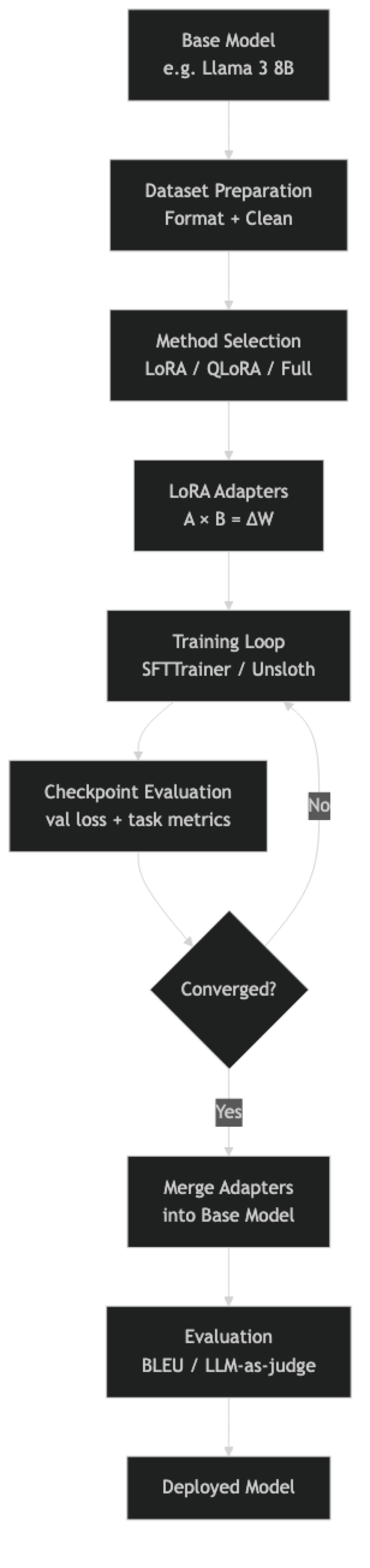
In practice, the dataset preparation and evaluation stages consume more engineering time than the training itself. A training run on a 7B model with LoRA takes 30–90 minutes for 1,000 examples. Preparing those 1,000 high-quality examples takes days.
Implementation Example
Install Dependencies
pip install unsloth trl peft transformers datasets accelerate bitsandbytesFull QLoRA Training Script
from unsloth import FastLanguageModel
from trl import SFTTrainer, SFTConfig
from datasets import load_dataset
import torch

# --- 1. Load Base Model with Unsloth (2-5x faster than standard PEFT) ---
model, tokenizer = FastLanguageModel.from_pretrained(
    model_name="unsloth/Meta-Llama-3-8B-Instruct",
    max_seq_length=2048,
    dtype=None,           # Auto-detect: bfloat16 on Ampere+, float16 otherwise
    load_in_4bit=True,    # QLoRA: 4-bit quantization
)

# --- 2. Add LoRA Adapters ---
model = FastLanguageModel.get_peft_model(
    model,
    r=16,                 # LoRA rank — start at 16, increase if underfitting
    target_modules=[
        "q_proj", "k_proj", "v_proj", "o_proj",
        "gate_proj", "up_proj", "down_proj",
    ],
    lora_alpha=16,        # Keep alpha == r for stable training
    lora_dropout=0.0,     # Unsloth recommends 0 for optimized kernels
    bias="none",
    use_gradient_checkpointing="unsloth",  # Saves 30% VRAM
    random_state=42,
)

model.print_trainable_parameters()
# trainable params: 41,943,040 || all params: 8,072,884,224 || trainable%: 0.52%

# --- 3. Prepare Dataset ---
dataset = load_dataset("json", data_files="train.jsonl", split="train")

def format_chat(example):
    """Apply the model's chat template."""
    messages = [
        {"role": "system", "content": example.get("system", "You are a helpful assistant.")},
        {"role": "user",   "content": example["instruction"]},
        {"role": "assistant", "content": example["output"]},
    ]
    return {
        "text": tokenizer.apply_chat_template(
            messages, tokenize=False, add_generation_prompt=False
        )
    }

dataset = dataset.map(format_chat)
train_ds = dataset.select(range(int(len(dataset) * 0.9)))
eval_ds  = dataset.select(range(int(len(dataset) * 0.9), len(dataset)))

print(f"Train: {len(train_ds)}, Eval: {len(eval_ds)}")
print(train_ds[0]["text"][:400])  # Always verify format before training

# --- 4. Configure Training ---
training_config = SFTConfig(
    output_dir="./llama3-finetuned",
    num_train_epochs=3,
    per_device_train_batch_size=2,
    per_device_eval_batch_size=2,
    gradient_accumulation_steps=8,   # Effective batch = 16
    warmup_steps=50,
    learning_rate=2e-4,
    fp16=not torch.cuda.is_bf16_supported(),
    bf16=torch.cuda.is_bf16_supported(),
    logging_steps=25,
    eval_strategy="steps",
    eval_steps=100,
    save_strategy="steps",
    save_steps=200,
    optim="adamw_8bit",              # 8-bit optimizer reduces memory
    weight_decay=0.01,
    lr_scheduler_type="cosine",
    max_seq_length=2048,
    dataset_text_field="text",
    report_to="none",
)

# --- 5. Train ---
trainer = SFTTrainer(
    model=model,
    tokenizer=tokenizer,
    train_dataset=train_ds,
    eval_dataset=eval_ds,
    args=training_config,
)

print("Starting training...")
trainer_stats = trainer.train()
print(f"Training complete. Loss: {trainer_stats.training_loss:.4f}")

# --- 6. Save Adapter ---
trainer.model.save_pretrained("./adapter")
tokenizer.save_pretrained("./adapter")
print("Adapter saved (50-200MB). Use merge step for production deployment.")
Merge Adapter for Production
from unsloth import FastLanguageModel

# Load base model + adapter and merge
model, tokenizer = FastLanguageModel.from_pretrained(
    model_name="./adapter",  # Points to adapter directory
    max_seq_length=2048,
    dtype=torch.bfloat16,
    load_in_4bit=False,       # Load in full precision for merge
)

# Merge LoRA weights into base model
model.save_pretrained_merged(
    "./merged-model",
    tokenizer,
    save_method="merged_16bit",  # Full precision merged model
)
print("Merged model saved. Ready for vLLM or Ollama deployment.")
Full Fine-Tuning (When You Have the Budget)
Full fine-tuning is appropriate when LoRA quality falls short after extensive tuning, or when making large-scale domain shifts. It requires significantly more VRAM:
from transformers import AutoModelForCausalLM, AutoTokenizer, TrainingArguments
from trl import SFTTrainer, SFTConfig

# Load in bfloat16 — no quantization for full fine-tuning
model = AutoModelForCausalLM.from_pretrained(
    "meta-llama/Meta-Llama-3-8B-Instruct",
    torch_dtype=torch.bfloat16,
    device_map="auto",
    attn_implementation="flash_attention_2",  # Required for long contexts
)

training_config = SFTConfig(
    output_dir="./full-finetuned",
    num_train_epochs=1,               # Usually 1-2 epochs for full FT
    per_device_train_batch_size=1,
    gradient_accumulation_steps=16,
    learning_rate=5e-6,               # Much lower LR for full fine-tuning
    bf16=True,
    gradient_checkpointing=True,      # Trades compute for VRAM
    optim="adamw_bnb_8bit",
    max_seq_length=2048,
    dataset_text_field="text",
)

# Full fine-tuning — no PEFT config needed
trainer = SFTTrainer(
    model=model,
    tokenizer=tokenizer,
    train_dataset=train_ds,
    eval_dataset=eval_ds,
    args=training_config,
)
trainer.train()
Best Practices
Start with QLoRA on a 7B model, not a 70B model. The quality gap between 7B and 70B fine-tuned models is often smaller than expected, and the iteration speed difference is enormous. Validate your dataset and training config on 7B before scaling up.
Use the model's official chat template. Every instruction-tuned model has a specific template format (Llama 3 uses <|begin_of_text|>, <|start_header_id|>, etc.). Applying the wrong template or a custom one degrades quality significantly. Always use tokenizer.apply_chat_template().
Separate training and evaluation data before writing a single line of training code. Hold out 10–15% of examples. If you only discover you need an eval set after training, the data has already been contaminated.
Monitor validation loss, not just training loss. Training loss always decreases — that is what gradient descent does. Validation loss tells you whether the model is generalizing. If validation loss starts rising while training loss falls, you are overfitting.
Run a sample generation every N steps. Quantitative metrics lag qualitative issues. Generating a few test examples during training reveals format collapse, repetition, and other problems that loss curves miss.
Use lora_alpha = r as the starting default. The effective learning rate for LoRA updates scales as lora_alpha / r. Keeping them equal normalizes this scaling. Increase r (and lora_alpha proportionally) if the model is underfitting.
Common Mistakes
Fine-tuning when prompting would solve the problem. Before starting a fine-tuning project, write 20 diverse test prompts and iterate on the system prompt for two hours. If you can hit 80% success rate with prompting, fine-tuning adds complexity without clear benefit.
Training on fewer than 200 examples. With very small datasets, the model memorizes examples rather than learning generalizable patterns. The validation loss will look good but real-world performance degrades. Aim for 500–2,000 examples for most tasks.
Using inconsistent prompt formats across training examples. If 60% of your examples use one format and 40% use another, the model learns a confused mixture. Every training example must use the exact same template.
Not setting
pad_tokenbefore training. Most causal language models have no pad token by default. Settingtokenizer.pad_token = tokenizer.eos_tokenis required for batched training to work correctly. Forgetting this causes silent errors.Choosing too high a learning rate. LoRA typically uses
2e-4as a starting point, but lower rates (1e-4,5e-5) often produce more stable training on small datasets. Full fine-tuning uses much lower rates (1e-5to5e-6). The loss spike pattern at the start of training often signals an LR that is too high.Skipping the merge step and serving the adapter directly in production. Serving an adapter on top of a quantized base model is slower than serving a merged model. Merge before production deployment unless adapter hot-swapping is architecturally required.
Evaluating only with perplexity. Perplexity measures how well the model predicts the next token in your eval set — but a model can have low perplexity while failing badly at the actual task. Always pair perplexity with task-specific evaluation (format adherence, accuracy on labeled examples, or LLM-as-judge scoring).
Key Takeaways
- Fine-tuning is the last resort in the LLM adaptation toolkit — exhaust prompt engineering and RAG before investing weeks in a fine-tuning project, as most behavioral issues are solvable with better prompts.
- QLoRA with Unsloth is the recommended starting point for single-GPU fine-tuning: a 7B model trains on 10GB VRAM with 2–5x faster training than standard PEFT.
- The decision framework is straightforward: prompting for style and format, RAG for private or dynamic knowledge, fine-tuning for consistent behavior or latency reduction, full fine-tuning for large-scale domain shifts.
- LoRA rank (
r) controls adapter capacity;lora_alphais a scaling factor — keepingalpha == rnormalizes the LoRA contribution to 1.0, which is a stable default for most tasks. - Validation loss is the correct training signal — training loss always decreases, but only validation loss reveals whether the model is generalizing or memorizing.
- With fewer than 200 examples, the model memorizes rather than learning generalizable patterns; 500–2,000 high-quality examples is the practical range for most task adaptation projects.
- Merging the LoRA adapter into the base model before production deployment eliminates inference overhead — but always preserve both the base model identifier and the adapter checkpoint before merging.
- Perplexity and validation loss are insufficient evaluation metrics alone — always pair them with task-specific evaluation (format adherence, accuracy on labeled examples, or LLM-as-judge scoring).
FAQ
How much data do I need to fine-tune an LLM? For task adaptation (teaching a specific output format or style), 500–2,000 high-quality examples is a good starting range. For domain adaptation with new vocabulary and concepts, 5,000–50,000 examples is more appropriate. Quality matters far more than quantity — 500 excellent examples outperform 5,000 mediocre ones consistently.
What is the difference between LoRA rank and LoRA alpha?
Rank (r) controls the size of the adapter matrices — higher rank means more trainable parameters and more capacity to learn. Alpha (lora_alpha) is a scaling factor that controls the magnitude of the LoRA updates. The effective contribution of LoRA is scaled by alpha / r. Keeping alpha == r normalizes this to 1.0, making the LoRA contribution equivalent to full weight updates at the given learning rate.
Can I fine-tune on a single GPU? Yes. With QLoRA, a 7B model trains on a single 16GB GPU (RTX 3090, RTX 4090, or free Colab T4). A 13B model needs approximately 24GB (A100 or RTX 3090 with QLoRA). A 70B model with QLoRA needs approximately 48GB, requiring an A100 80GB. Unsloth further reduces memory requirements by 30–50% compared to standard PEFT.
Does fine-tuning make models forget their general capabilities? Yes — this is called catastrophic forgetting and is a real risk, especially with full fine-tuning on small datasets. LoRA is more resistant to forgetting because the base model weights remain frozen. To mitigate it: use a diverse training set, keep epochs low (1–3), and always test the fine-tuned model on general benchmarks alongside your task-specific eval.
When should I use Unsloth vs. standard HuggingFace PEFT? Use Unsloth when training on a single GPU — it provides 2–5x speed improvement and significant memory savings through optimized CUDA kernels. Use standard PEFT/Accelerate when training across multiple GPUs, as Unsloth does not currently support multi-GPU distributed training.
How do I know when to stop training?
Stop when validation loss stops decreasing and starts to rise — this is the overfit point. Use load_best_model_at_end=True in SFTConfig to automatically restore the checkpoint with the lowest validation loss. For most small datasets (under 2,000 examples), 2–3 epochs is the practical limit before overfitting begins.
What should I check before launching a full training run?
Verify the formatted training example looks correct (print one and inspect the special tokens), confirm the token count distribution and set max_seq_length accordingly, separate your eval set before any training, and run 10–20 steps on a tiny subset to confirm no errors before starting the full job. These checks save hours of debugging after a flawed multi-hour run.