LLM APIs: OpenAI vs Anthropic vs Gemini Compared (2026)
LLM API Guide: Choosing and Using OpenAI, Anthropic & Gemini APIs (2026)
Last updated: March 2026
Most developers start with the OpenAI quickstart, get a response in five minutes, and then spend the next three weeks debugging production issues they didn't anticipate. Rate limit errors at scale. Token costs that doubled overnight. Streaming that works in development but breaks behind a reverse proxy. Context windows that silently truncate conversation history.
The LLM API layer looks simple from the outside. Under the hood, there is a lot of surface area — authentication, request structure, token counting, streaming protocols, function calling, error recovery, and cost management. Each major provider does things slightly differently, and the differences matter once you are building something real.
This guide covers everything you need to work confidently with LLM APIs in production. It draws from OpenAI, Anthropic Claude, and Google Gemini — the three APIs you will encounter most often in 2026. Whether you are building a chat feature, an AI pipeline, or an autonomous agent, this is the reference you will come back to.
Concept Overview
An LLM API (Large Language Model API) is a hosted inference endpoint that accepts text input and returns text output, abstracting away model hosting, GPU infrastructure, and scaling. You send structured requests over HTTPS; the provider runs your input through a massive model and returns the result.
The three dominant providers in 2026:
| Provider | Models | Strengths |
|---|---|---|
| OpenAI | GPT-4o, GPT-4o-mini, o1, o3-mini | Broadest ecosystem, best tooling |
| Anthropic | Claude 3.5 Sonnet, Claude 3 Opus, Claude 3 Haiku | Large context (200K), instruction following |
| Gemini 1.5 Pro, Gemini 1.5 Flash, Gemini 2.0 | Multimodal, 1M context window |
All three expose REST APIs and official Python SDKs. All three use some variant of the chat completion format — a list of messages with roles, a model selection, and optional parameters like temperature. The differences are in schema details, tool calling conventions, safety filters, and pricing.
Key concepts every developer needs to understand:
- Tokens — LLMs operate on tokens, not words or characters. A token is roughly 4 characters or ¾ of a word in English. Every API call is billed by token count (input + output combined).
- Context window — The maximum total tokens the model can process in one call (input + output). Exceeding it causes an error.
- Temperature — Controls output randomness. 0 = deterministic, 1 = creative. Use 0 for extraction/classification, 0.7 for creative generation.
- Streaming — Instead of waiting for the full response, receive tokens as they are generated. Critical for responsive UIs.
- Function calling / Tool use — Structured mechanism for the model to request execution of external code or data lookups.
How It Works
Understanding the full request lifecycle explains why certain problems occur where they do.
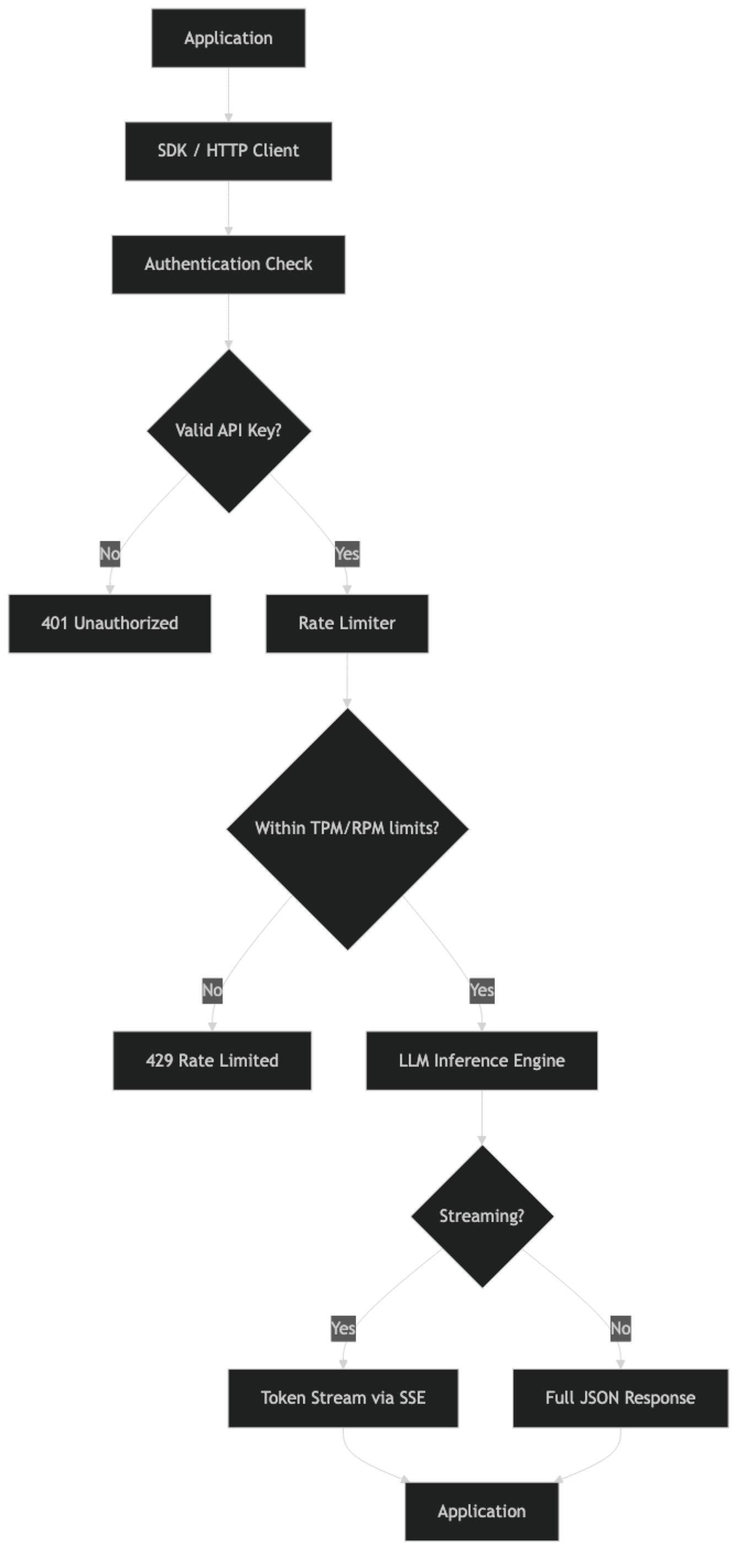
Step-by-step breakdown:
- Authentication — Your API key is sent in the
Authorization: Bearer <key>header. The provider validates it and identifies your account/organization for billing and rate limit tracking. - Rate limiter — Before routing your request to a model, the provider checks your current token-per-minute (TPM) and request-per-minute (RPM) usage. Exceed either limit and you get a 429 error.
- Inference — Your request enters the model's inference queue. GPU resources are allocated, the model processes your input tokens, and generates output tokens autoregressively (one token at a time).
- Response delivery — In non-streaming mode, the complete response is assembled and returned as a JSON object. In streaming mode, tokens are sent via Server-Sent Events as they are generated.
- Billing — After the call completes, the provider records input and output token counts against your account for billing.
One thing many developers overlook: rate limits are not just about the number of requests per minute. Token-per-minute limits are often the binding constraint for high-throughput applications. A single large context window request can consume more of your TPM budget than a hundred small requests.
Implementation Example
Setting Up All Three Providers
import os
from openai import OpenAI
import anthropic
import google.generativeai as genai

# OpenAI setup
openai_client = OpenAI(api_key=os.environ["OPENAI_API_KEY"])

# Anthropic setup
anthropic_client = anthropic.Anthropic(api_key=os.environ["ANTHROPIC_API_KEY"])

# Gemini setup
genai.configure(api_key=os.environ["GOOGLE_API_KEY"])
gemini_model = genai.GenerativeModel("gemini-1.5-flash")
Never hardcode API keys. Use environment variables in development, and a secrets manager (AWS Secrets Manager, GCP Secret Manager, HashiCorp Vault) in production.
Basic Completion — OpenAI
response = openai_client.chat.completions.create(
    model="gpt-4o-mini",
    messages=[
        {"role": "system", "content": "You are a concise technical assistant."},
        {"role": "user", "content": "Explain what a transformer is in 2 sentences."}
    ],
    temperature=0,
    max_tokens=200
)

print(response.choices[0].message.content)
print(f"Tokens: {response.usage.prompt_tokens} in, {response.usage.completion_tokens} out")
Basic Completion — Anthropic Claude
response = anthropic_client.messages.create(
    model="claude-3-5-sonnet-20241022",
    max_tokens=200,
    system="You are a concise technical assistant.",
    messages=[
        {"role": "user", "content": "Explain what a transformer is in 2 sentences."}
    ]
)

print(response.content[0].text)
print(f"Tokens: {response.usage.input_tokens} in, {response.usage.output_tokens} out")
Note the structural difference: Claude takes system as a top-level parameter, not as a message with role: system. This trips up developers migrating from OpenAI.
Basic Completion — Gemini
response = gemini_model.generate_content(
    "Explain what a transformer is in 2 sentences."
)

print(response.text)
Gemini's API surface is simpler for basic completions, but more configuration is required for system prompts and conversation history.
Token Counting
Knowing token counts before making a call helps you avoid context window errors and estimate costs.
import tiktoken

def count_tokens_openai(messages: list, model: str = "gpt-4o-mini") -> int:
    """Count tokens for an OpenAI chat completion request."""
    encoding = tiktoken.encoding_for_model(model)

    total = 0
    for message in messages:
        # 4 tokens per message (role, content, separators)
        total += 4
        for key, value in message.items():
            total += len(encoding.encode(str(value)))

    total += 2  # reply priming
    return total

messages = [
    {"role": "system", "content": "You are a helpful assistant."},
    {"role": "user", "content": "Write a function to parse JSON in Python."}
]

token_count = count_tokens_openai(messages)
print(f"Estimated input tokens: {token_count}")

# Anthropic provides token counting via their API
token_response = anthropic_client.messages.count_tokens(
    model="claude-3-5-sonnet-20241022",
    system="You are a helpful assistant.",
    messages=[{"role": "user", "content": "Write a function to parse JSON in Python."}]
)
print(f"Anthropic token count: {token_response.input_tokens}")
Streaming — Unified Pattern
def stream_openai(prompt: str):
    """Stream tokens from OpenAI."""
    with openai_client.chat.completions.stream(
        model="gpt-4o-mini",
        messages=[{"role": "user", "content": prompt}]
    ) as stream:
        for text in stream.text_stream:
            print(text, end="", flush=True)
    print()

def stream_anthropic(prompt: str):
    """Stream tokens from Anthropic."""
    with anthropic_client.messages.stream(
        model="claude-3-5-sonnet-20241022",
        max_tokens=1024,
        messages=[{"role": "user", "content": prompt}]
    ) as stream:
        for text in stream.text_stream:
            print(text, end="", flush=True)
    print()

def stream_gemini(prompt: str):
    """Stream tokens from Gemini."""
    response = gemini_model.generate_content(prompt, stream=True)
    for chunk in response:
        print(chunk.text, end="", flush=True)
    print()
Provider Comparison Table
| Feature | OpenAI GPT-4o | Claude 3.5 Sonnet | Gemini 1.5 Pro |
|---|---|---|---|
| Context window | 128K tokens | 200K tokens | 1M tokens |
| Input cost (per 1M tokens) | $2.50 | $3.00 | $1.25 |
| Output cost (per 1M tokens) | $10.00 | $15.00 | $5.00 |
| Function calling | Yes | Yes (tool use) | Yes |
| Vision | Yes | Yes | Yes |
| Streaming | Yes | Yes | Yes |
| JSON mode | Yes | Yes (structured output) | Yes |
| Prompt caching | Yes (Anthropic-style) | Yes | Yes |
Pricing as of early 2026. Check provider documentation for current rates.
Error Handling Across Providers
import time
from openai import RateLimitError, APIError
import anthropic

def robust_openai_call(messages: list, max_retries: int = 3) -> str:
    """OpenAI call with exponential backoff."""
    for attempt in range(max_retries):
        try:
            response = openai_client.chat.completions.create(
                model="gpt-4o-mini",
                messages=messages,
                timeout=30
            )
            return response.choices[0].message.content
        except RateLimitError:
            if attempt < max_retries - 1:
                wait = (2 ** attempt) + (0.1 * attempt)  # jitter
                print(f"Rate limited. Waiting {wait:.1f}s...")
                time.sleep(wait)
            else:
                raise
        except APIError as e:
            if e.status_code >= 500 and attempt < max_retries - 1:
                time.sleep(2 ** attempt)
            else:
                raise

def robust_anthropic_call(user_message: str, max_retries: int = 3) -> str:
    """Anthropic call with retry logic."""
    for attempt in range(max_retries):
        try:
            response = anthropic_client.messages.create(
                model="claude-3-5-sonnet-20241022",
                max_tokens=1024,
                messages=[{"role": "user", "content": user_message}]
            )
            return response.content[0].text
        except anthropic.RateLimitError:
            if attempt < max_retries - 1:
                time.sleep(2 ** attempt)
            else:
                raise
        except anthropic.APIStatusError as e:
            if e.status_code >= 500 and attempt < max_retries - 1:
                time.sleep(2 ** attempt)
            else:
                raise
Best Practices
Use the cheapest model that meets the bar. For most classification, extraction, and summarization tasks, GPT-4o-mini, Claude 3 Haiku, or Gemini Flash will perform well at a fraction of the cost of flagship models. Maintain a routing layer that sends simple tasks to cheap models and complex reasoning to expensive ones.
Always set max_tokens. Without an upper bound, the model can generate thousands of tokens on open-ended prompts. On a high-traffic endpoint, this can cause costs to spike unexpectedly. Set max_tokens based on the maximum reasonable output for your use case.
Implement prompt caching. Anthropic's prompt caching, OpenAI's caching, and Gemini's context caching can cut costs by 50–90% for prompts with long, repeated system instructions. This is often the single highest-ROI optimization for production systems.
Log every API call. In production, log: model name, input token count, output token count, latency, cost estimate, and any errors. Without this data, you cannot diagnose latency spikes, control costs, or debug prompt failures.
Set timeouts explicitly. Default SDK timeouts are often too long for interactive applications. Set a 15–30 second timeout for user-facing calls. Have a fallback message ready for timeouts rather than leaving the user hanging indefinitely.
Use structured output (JSON mode or function calling) for data extraction. Prompting for JSON in the text response is unreliable — models add explanations, use different key names, or return malformed JSON. Use the provider's structured output mechanism for reliable parsing.
Validate and sanitize user input. Before passing user-provided text to an LLM, check length (prevent context stuffing), strip known prompt injection patterns, and apply content moderation if your application is consumer-facing.
Common Mistakes
Putting API keys in source code or environment files committed to git. If a key hits a public repo, even for a moment, assume it is compromised. Rotate immediately. Use
.gitignoreand a secrets manager from day one.Not implementing retry logic. Every LLM API returns 429 rate limit errors under load. Without exponential backoff, these errors surface directly to users. This is table stakes for production.
Ignoring context window limits. Sending conversation history that grows unbounded will eventually hit the context limit and throw an error. Implement truncation or summarization strategies before you hit 70% of the context window.
Assuming the same prompt works across providers. Switching from GPT-4o to Claude 3.5 Sonnet with the same prompt often produces different output formatting, different handling of edge cases, and different tool-calling behavior. Test prompts against each provider independently.
Not tracking costs per feature. When you have multiple LLM-powered features in one application, aggregate cost reporting is not enough. Tag each API call with a feature name so you can identify which feature is responsible for cost spikes.
Using temperature > 0 for structured extraction. Temperature adds randomness. For tasks where you need consistent, parseable output, set
temperature=0. This is especially important for function calling and JSON extraction.Sending base64-encoded images when URLs work. For vision tasks, passing image URLs is cheaper on bandwidth and faster than encoding images as base64. Reserve base64 for local images that cannot be hosted publicly.
Key Takeaways
- OpenAI, Anthropic, and Gemini all expose the same fundamental API pattern — messages with roles, token-based billing, streaming via SSE, and structured tool use — but differ in schema details and pricing.
- Anthropic Claude takes
systemas a top-level parameter separate from the messages array; OpenAI and Gemini handle it differently — these schema differences cause the most migration bugs. - Tokens are the billing unit for all providers: roughly 4 characters or three-quarters of an English word; always count tokens before making calls to estimate cost and avoid context window errors.
- Streaming is essential for user-facing interfaces — it reduces perceived latency from seconds to under one second by delivering tokens as they are generated.
- The most impactful cost optimization is model routing: send simple classification and summarization tasks to cheaper models (GPT-4o-mini, Claude 3 Haiku, Gemini Flash) and reserve expensive frontier models for complex reasoning.
- Prompt caching (Anthropic, OpenAI, Gemini all support it) can reduce input token costs by 50–90% for applications that repeat large system prompts or static documents.
- Every production integration needs exponential backoff with jitter for 429 and 5xx errors; without it, rate limit errors surface directly to users.
- Log model name, input tokens, output tokens, latency, and cost estimate on every API call — without this data you cannot diagnose cost spikes or debug prompt failures.
FAQ
Which LLM API should I use for a new project?
Start with OpenAI GPT-4o-mini for most use cases — it has the most mature ecosystem, best documentation, and the widest range of integrations. Switch to Anthropic Claude when you need a larger context window (200K tokens) or better instruction following on complex tasks. Consider Gemini when cost is the primary constraint or when you need Gemini's 1M context window.
How do I avoid hitting rate limits?
Implement exponential backoff with jitter on 429 responses, use a queue to control request concurrency, and pre-count tokens to avoid requests you know will fail. For high-throughput applications, request a rate limit increase from the provider, or use Azure OpenAI's provisioned throughput (PTU) for guaranteed capacity.
Are LLM API responses deterministic at temperature=0?
Mostly, but not perfectly. At temperature=0, output is significantly more consistent, but not guaranteed identical across calls due to floating-point non-determinism during inference. For applications requiring identical outputs (like testing), store and replay cached responses rather than relying on determinism.
How do I manage conversation history without hitting the context limit?
Keep the system prompt and recent N turns. When the conversation exceeds 60–70% of the context limit, summarize older turns with a separate LLM call and replace them with the summary. This preserves important context without ballooning token usage.
Can I use multiple providers as fallbacks?
Yes, and it is a good pattern for production systems. Route to your primary provider; on failure (5xx errors or timeouts), fall back to a secondary provider. The main complexity is normalizing the different response schemas. A thin abstraction layer that wraps each provider behind a common interface makes this manageable.
How do I choose between streaming and non-streaming?
Use streaming for any user-facing interface where a human is waiting for the response — chat, code generation, summaries. Use non-streaming for background pipelines, batch processing, data extraction, and any case where a human is not watching in real time. Non-streaming is simpler to implement and easier to handle errors from.
What is the best way to get reliable structured JSON output from LLM APIs?
Use the provider's dedicated structured output mechanism: OpenAI response_format with a Pydantic model, Anthropic tool use with a matching schema, or Gemini function calling. Asking for JSON in plain text in the system prompt is unreliable — models add explanations, use different key names, or return malformed JSON under load.