LangChain Agents: Build Tool-Using LLMs That Do not Break (2026)
Building Agents with LangChain: Complete Tutorial
LangChain sits at an interesting position in the agent ecosystem. It is not the most opinionated framework (that is CrewAI) and not the most flexible at the graph level (that is LangGraph). What LangChain does well is providing a complete, well-documented toolkit: agent executors, tool integrations, prompt templates, memory abstractions, and callbacks. It is also the framework most production teams have already adopted, which makes it the right starting point for most developers.
Building a real agent with LangChain requires understanding how four things fit together: the agent (the model + prompt that decides what to do), the tools (the functions it can call), the executor (the loop that orchestrates everything), and the callbacks (observability into what is happening). Most tutorials stop at step two. This one covers all four.
By the end you will have a working research agent that uses DuckDuckGo search, Wikipedia, and a Python REPL to answer questions and perform calculations. Every code block runs.
Concept Overview
LangChain's agent architecture has three layers:
Agent — The combination of an LLM and a prompt template that produces either a tool call or a final answer. The agent itself is stateless — it just produces the next action given the current context.
AgentExecutor — The orchestration loop that wraps the agent. It calls the agent, executes tool calls, appends observations to context, and repeats until a final answer is produced or a limit is reached.
Tools — Functions with names, descriptions, and input schemas. The agent reads these to decide what actions are available.
LangChain supports two main agent types: ReAct (text-based reasoning traces) and OpenAI Functions (structured JSON tool calls). For new production systems, OpenAI Functions (or its Anthropic equivalent) is the right choice — it is more reliable and easier to parse.
How It Works
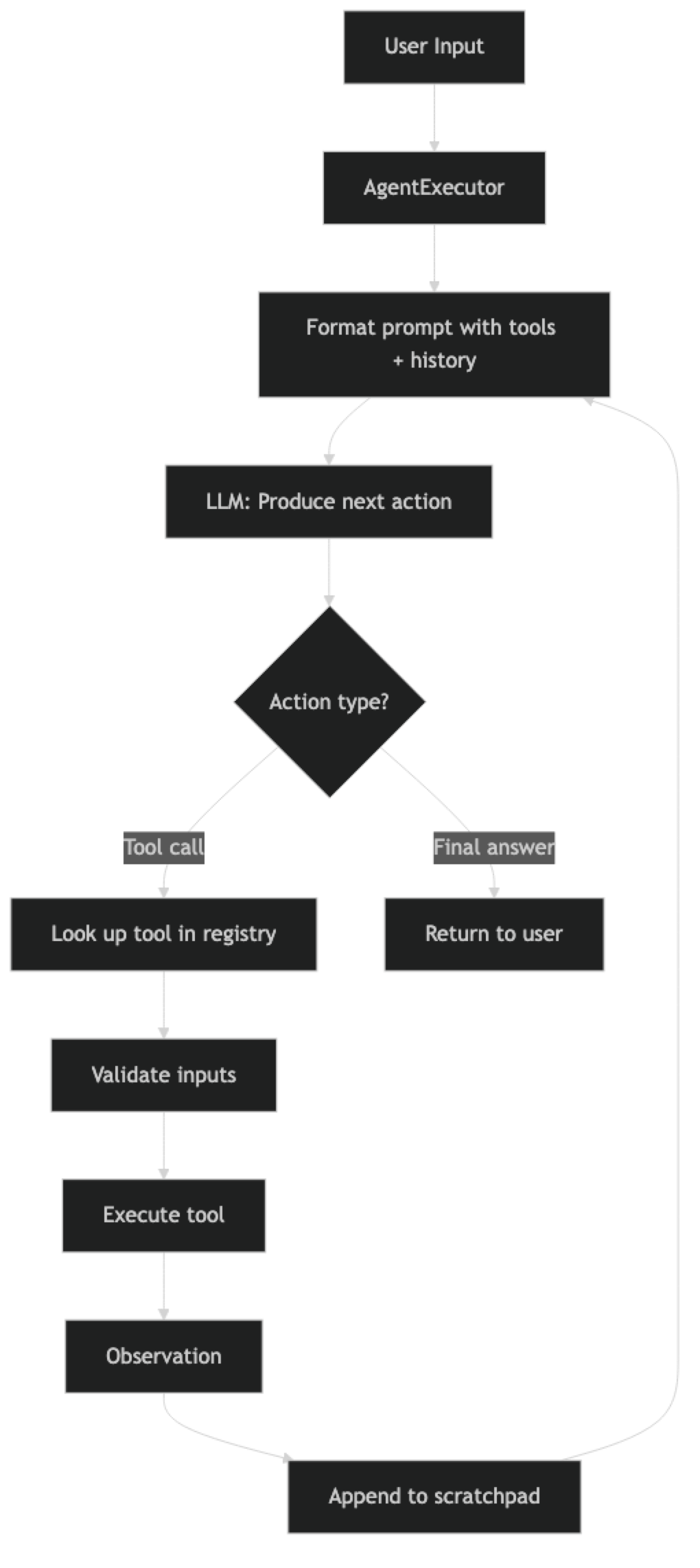
The scratchpad is the accumulated record of tool calls and observations. It is injected into the prompt on each iteration so the model can see what it has already done.
Implementation Example
Step 1: Install Dependencies
pip install langchain==0.3.x langchain-openai langchain-community \
    duckduckgo-search wikipedia langchain-experimental
Step 2: Set Up Tools
import os
from langchain_openai import ChatOpenAI
from langchain_community.tools import DuckDuckGoSearchRun, WikipediaQueryRun
from langchain_community.utilities import WikipediaAPIWrapper
from langchain_experimental.tools import PythonREPLTool
from langchain.tools import tool

os.environ["OPENAI_API_KEY"] = "your-api-key-here"

# Tool 1: DuckDuckGo web search
# Good for: current events, recent documentation, pricing, general queries
web_search = DuckDuckGoSearchRun(
    name="web_search",
    description="""Search the web for current information.
    Use for: recent news, current prices, post-2024 developments, live documentation.
    Input: a specific search query string.
    Returns: search result snippets with titles and URLs."""
)

# Tool 2: Wikipedia
# Good for: background concepts, historical facts, technical definitions
wikipedia = WikipediaQueryRun(
    api_wrapper=WikipediaAPIWrapper(
        top_k_results=3,
        doc_content_chars_max=3000
    ),
    name="wikipedia",
    description="""Look up established concepts, historical context, and technical definitions from Wikipedia.
    Use for: foundational concepts, background information, technical terminology.
    Input: a topic name or query.
    Returns: Wikipedia article content."""
)

# Tool 3: Python REPL
# Good for: calculations, data processing, testing logic
python_repl = PythonREPLTool(
    name="python_repl",
    description="""Execute Python code and return the output.
    Use for: calculations, data analysis, sorting/filtering lists, string processing.
    Input: valid Python 3 code as a string.
    Returns: stdout output from execution.
    WARNING: Only use for safe calculations. Do not attempt file system or network operations."""
)

# Tool 4: Custom tool example
@tool
def estimate_cost(
    model: str,
    input_tokens: int,
    output_tokens: int
) -> str:
    """
    Estimate the API cost for a given model and token counts.
    Use when the user asks about API pricing or cost estimation.

    Args:
        model: Model name (e.g., 'gpt-4o', 'gpt-4o-mini', 'claude-3-5-sonnet')
        input_tokens: Number of input/prompt tokens
        output_tokens: Number of output/completion tokens

    Returns:
        Estimated cost in USD
    """
    # Pricing as of March 2026 (always verify current pricing at platform docs)
    pricing = {
        "gpt-4o": {"input": 0.0025, "output": 0.01},
        "gpt-4o-mini": {"input": 0.00015, "output": 0.0006},
        "claude-3-5-sonnet": {"input": 0.003, "output": 0.015},
        "claude-3-haiku": {"input": 0.00025, "output": 0.00125},
    }

    model_lower = model.lower().replace("-2024", "").replace("-20241022", "")
    if model_lower not in pricing:
        available = ", ".join(pricing.keys())
        return f"Unknown model '{model}'. Available models: {available}"

    rates = pricing[model_lower]
    input_cost = (input_tokens / 1000) * rates["input"]
    output_cost = (output_tokens / 1000) * rates["output"]
    total = input_cost + output_cost

    return (
        f"Cost estimate for {model}:\n"
        f"  Input ({input_tokens:,} tokens): ${input_cost:.4f}\n"
        f"  Output ({output_tokens:,} tokens): ${output_cost:.4f}\n"
        f"  Total: ${total:.4f}"
    )

tools = [web_search, wikipedia, python_repl, estimate_cost]
Step 3: Build the Agent
from langchain.agents import AgentExecutor, create_tool_calling_agent
from langchain_core.prompts import ChatPromptTemplate, MessagesPlaceholder

llm = ChatOpenAI(
    model="gpt-4o",
    temperature=0,
    max_tokens=4096
)

system_prompt = """You are a research assistant with access to web search, Wikipedia, Python execution, and cost estimation tools.

When answering questions:
1. Use web_search for current, real-time information
2. Use wikipedia for established concepts and background knowledge
3. Use python_repl for any calculations or data processing
4. Use estimate_cost when asked about API pricing

Work through problems step by step. If your first search does not give enough information, search again with a more specific query. Always cite where information came from."""

prompt = ChatPromptTemplate.from_messages([
    ("system", system_prompt),
    MessagesPlaceholder("chat_history", optional=True),
    ("human", "{input}"),
    MessagesPlaceholder("agent_scratchpad"),
])

agent = create_tool_calling_agent(
    llm=llm,
    tools=tools,
    prompt=prompt
)

executor = AgentExecutor(
    agent=agent,
    tools=tools,
    verbose=True,
    max_iterations=10,
    max_execution_time=90,
    handle_parsing_errors=True,
    return_intermediate_steps=True
)
Step 4: Add Callbacks for Observability
from langchain.callbacks.base import BaseCallbackHandler
from datetime import datetime

class AgentLogger(BaseCallbackHandler):
    """Log agent actions for debugging and monitoring."""

    def __init__(self):
        self.steps = []
        self.start_time = None

    def on_agent_action(self, action, **kwargs):
        """Called when the agent decides to take an action."""
        self.steps.append({
            "type": "action",
            "tool": action.tool,
            "input": str(action.tool_input)[:200],
            "timestamp": datetime.now().isoformat()
        })
        print(f"\n[LOG] Tool call: {action.tool}")
        print(f"[LOG] Input: {str(action.tool_input)[:100]}...")

    def on_tool_end(self, output, **kwargs):
        """Called when a tool returns its result."""
        self.steps.append({
            "type": "observation",
            "output_length": len(str(output)),
            "timestamp": datetime.now().isoformat()
        })

    def on_agent_finish(self, finish, **kwargs):
        """Called when the agent produces a final answer."""
        elapsed = (datetime.now() - self.start_time).total_seconds() if self.start_time else 0
        print(f"\n[LOG] Agent completed in {elapsed:.1f}s with {len(self.steps)} steps")

logger = AgentLogger()
Step 5: Run Queries
from langchain_core.messages import HumanMessage, AIMessage

chat_history = []

def ask_agent(question: str, use_history: bool = True) -> str:
    """Run the agent with optional conversation history."""
    logger.start_time = datetime.now()

    result = executor.invoke(
        {
            "input": question,
            "chat_history": chat_history if use_history else []
        },
        config={"callbacks": [logger]}
    )

    if use_history:
        chat_history.append(HumanMessage(content=question))
        chat_history.append(AIMessage(content=result["output"]))

    # Print tool usage summary
    intermediate = result.get("intermediate_steps", [])
    if intermediate:
        print(f"\n--- Tool calls ({len(intermediate)} total) ---")
        for action, observation in intermediate:
            obs_preview = str(observation)[:100].replace("\n", " ")
            print(f"  {action.tool}: {obs_preview}...")

    return result["output"]

# Example queries
print("=== Query 1: Current information ===")
response1 = ask_agent(
    "What are the main differences between LangGraph 0.2 and 0.1? What new features were added?"
)
print(response1)

print("\n=== Query 2: Calculation ===")
response2 = ask_agent(
    "If I run 1000 agent tasks per day, each using GPT-4o with 2000 input tokens and 500 output tokens, what is my monthly API cost?"
)
print(response2)

print("\n=== Query 3: Follow-up using memory ===")
response3 = ask_agent(
    "Based on that cost, how much cheaper would GPT-4o-mini be for the same workload?"
)
print(response3)  # Uses chat_history to know what "that cost" refers to
Step 6: Streaming Responses
For user-facing applications, stream the agent's output so users see progress immediately.
from langchain.callbacks.streaming_stdout import StreamingStdOutCallbackHandler

streaming_llm = ChatOpenAI(
    model="gpt-4o",
    temperature=0,
    streaming=True
)

streaming_agent = create_tool_calling_agent(
    llm=streaming_llm,
    tools=tools,
    prompt=prompt
)

streaming_executor = AgentExecutor(
    agent=streaming_agent,
    tools=tools,
    max_iterations=10,
    handle_parsing_errors=True
)

# Stream the final answer
print("Streaming response:")
for chunk in streaming_executor.stream({"input": "What is the Fibonacci sequence?"}):
    if "output" in chunk:
        print(chunk["output"], end="", flush=True)
print()
Best Practices
Use create_tool_calling_agent over create_react_agent for production. Function-calling agents produce structured JSON tool calls that are more reliable than text-parsed ReAct traces. The only reason to use ReAct is if you need compatibility with models that do not support function calling.
Add callbacks from day one, not after problems arise. The AgentLogger pattern above gives you a timestamped record of every tool call. Add it before your first production deployment. Debugging without it is significantly harder.
Set max_execution_time alongside max_iterations. max_iterations limits loop count. max_execution_time is a wall-clock cap. You need both — a single slow tool call can exceed your time budget even with a low iteration count.
Test edge cases before deploying. Ask the agent questions where it cannot find an answer. Ask it something that requires more steps than max_iterations allows. Ask it something ambiguous. These scenarios reveal failure modes that never appear in the happy path.
Common Mistakes
Not specifying
handle_parsing_errors=True. Without it, a single malformed tool call crashes the executor. The model occasionally produces invalid JSON. This parameter tells the executor to recover gracefully and show the error to the agent.Using the same LLM for everything. Use GPT-4o for the main reasoning agent and GPT-4o-mini for simple sub-tasks (summarizing tool outputs, formatting responses). This can cut costs significantly without affecting quality.
Letting tool outputs grow unbounded. Web search can return 10,000 characters. Wikipedia articles are longer. Every observation goes into the context window. Truncate tool outputs at the tool level, not after they are already in context.
Not testing multi-turn conversations. Agents with chat history behave differently from single-turn agents. Conversations drift, references become ambiguous, and earlier context gets overshadowed. Test multi-turn scenarios explicitly.
Ignoring the
intermediate_stepsin the response.return_intermediate_steps=Trueexposes every tool call and observation. This is invaluable for debugging, evaluation, and billing attribution. Always enable it in development.
Key Takeaways
- Use
create_tool_calling_agent(not deprecatedcreate_openai_functions_agentorcreate_react_agent) for reliable structured JSON tool calls in production - Always set both
max_iterationsandmax_execution_time— one limits loop count, the other is the wall-clock cap - Set
handle_parsing_errors=Trueto recover from transient malformed tool call outputs without crashing the executor - Write tool descriptions as if writing API docs — the LLM uses them to decide which tool to call and what inputs to provide
- Enable
return_intermediate_steps=Trueduring development to inspect every tool call and observation - Use
AgentLoggercallbacks from day one — debugging without traces is significantly harder - Truncate tool outputs at the tool level (not after injection) to control context window growth
- Multi-turn agents need explicit
chat_historyhandling — test multi-turn scenarios, not just single-turn queries
FAQ
What is the difference between create_react_agent and create_tool_calling_agent?
create_react_agent uses a text-based format where the model writes out "Thought:", "Action:", and "Observation:" lines. create_tool_calling_agent uses the provider's native function-calling feature, which returns structured JSON. Function-calling is more reliable, easier to parse, and should be the default for any production system.
Can I use LangChain agents with Anthropic Claude?
Yes. Install langchain-anthropic and replace ChatOpenAI with ChatAnthropic(model="claude-sonnet-4-6"). Use create_tool_calling_agent — it works with any model that supports tool calling, including Claude. The prompt template and AgentExecutor configuration are identical.
How do I add memory to a LangChain agent?
Pass a chat_history variable to the prompt via MessagesPlaceholder and maintain the history list in your application code, appending HumanMessage and AIMessage after each turn. For persistent memory across sessions, use a vector store and retrieve relevant context at the start of each session, or wrap the executor with RunnableWithMessageHistory.
What does handle_parsing_errors=True actually do?
When the LLM produces a tool call that LangChain cannot parse (invalid JSON, missing required fields), instead of raising an exception it returns the parse error as an observation and lets the agent try again. This prevents hard crashes from transient model output errors, which occur occasionally even with capable models.
How do I debug an agent that is producing wrong answers?
Enable verbose=True and return_intermediate_steps=True. Read through every tool call and observation in the trace. Find the step where the agent's reasoning diverged from correct — usually either a tool returned misleading information, the agent misread the observation, or the tool description was ambiguous enough to cause wrong tool selection.
How do I prevent tool outputs from filling the context window?
Truncate tool outputs inside the tool function before returning — not after they are already in the context. For web search, limit to 500–1000 characters. For Wikipedia, use doc_content_chars_max=3000. For database queries, return only the rows relevant to the query rather than the full result set.
When should I use LangGraph instead of AgentExecutor?
Use AgentExecutor for straightforward single-agent workflows where the loop is linear: call tool, observe, repeat. Switch to LangGraph when you need explicit state that persists across nodes, human-in-the-loop pause points, conditional branching based on tool results, or coordination between multiple specialized agents. LangGraph requires more setup but gives you full control over agent state and transitions.
What to Learn Next
- AI Agents Guide: Architecture and Design Patterns
- Build AI Agents Step-by-Step
- AI Agent Tool Use: APIs, Search, and Code Execution
- Agent Memory Systems: Short-Term, Long-Term and Episodic
- How to Evaluate AI Agents: Metrics, Frameworks and Testing
- LangGraph vs AutoGen vs CrewAI: Agent Framework Comparison