HuggingFace Trainer: Fine-Tune Any Model in 50 Lines (2026)
Last updated: March 2026
Fine-Tuning LLMs with HuggingFace Transformers: Complete Guide (2026)
The HuggingFace ecosystem is the de facto standard for open-source LLM training. When a new model architecture is released, the HuggingFace implementations appear within days. When a new training technique becomes popular, TRL adds a trainer for it within weeks. For practitioners, this means you spend time on your specific problem rather than reimplementing standard training loops.
The ecosystem has multiple layers that are not always clearly explained in documentation. There is the base Trainer class, then TRL which extends it for language model training (SFTTrainer, DPOTrainer, PPOTrainer), then Accelerate for multi-GPU distribution, then PEFT for parameter-efficient methods. These are distinct libraries that compose together, and understanding how they fit is essential for building reliable training pipelines.
One thing many developers overlook is the difference between Trainer and SFTTrainer. Trainer is a general-purpose training loop for any PyTorch model. SFTTrainer is specifically designed for causal language model fine-tuning with chat templates, packing, and completion-only training built in. For LLM fine-tuning, always use SFTTrainer.
Concept Overview
transformers.Trainer — Base training class. Handles gradient accumulation, mixed precision, evaluation loops, checkpointing, and logging. Works with any PyTorch model and any task. Requires you to set up the data collator, model, and loss computation manually for LLM training.
trl.SFTTrainer — Built on top of Trainer, specialized for supervised fine-tuning of language models. Handles chat template application, sequence packing (for efficiency), and completion-only training (loss computed only on assistant tokens). The right choice for all SFT workflows.
trl.DPOTrainer — Direct Preference Optimization trainer. Trains on preference pairs (chosen vs rejected) without a reward model. Used for alignment fine-tuning after SFT.
trl.PPOTrainer — Proximal Policy Optimization trainer for RLHF. More complex than DPO; requires a reward model. Used when DPO is insufficient.
accelerate — Distribution layer. Enables training across multiple GPUs with minimal code changes. Handles FSDP (Fully Sharded Data Parallel) and DeepSpeed integration.
peft — Parameter-Efficient Fine-Tuning library. Provides LoRA, QLoRA (via BitsAndBytes integration), prefix tuning, and other adapter methods. Composes with any Trainer.
How It Works
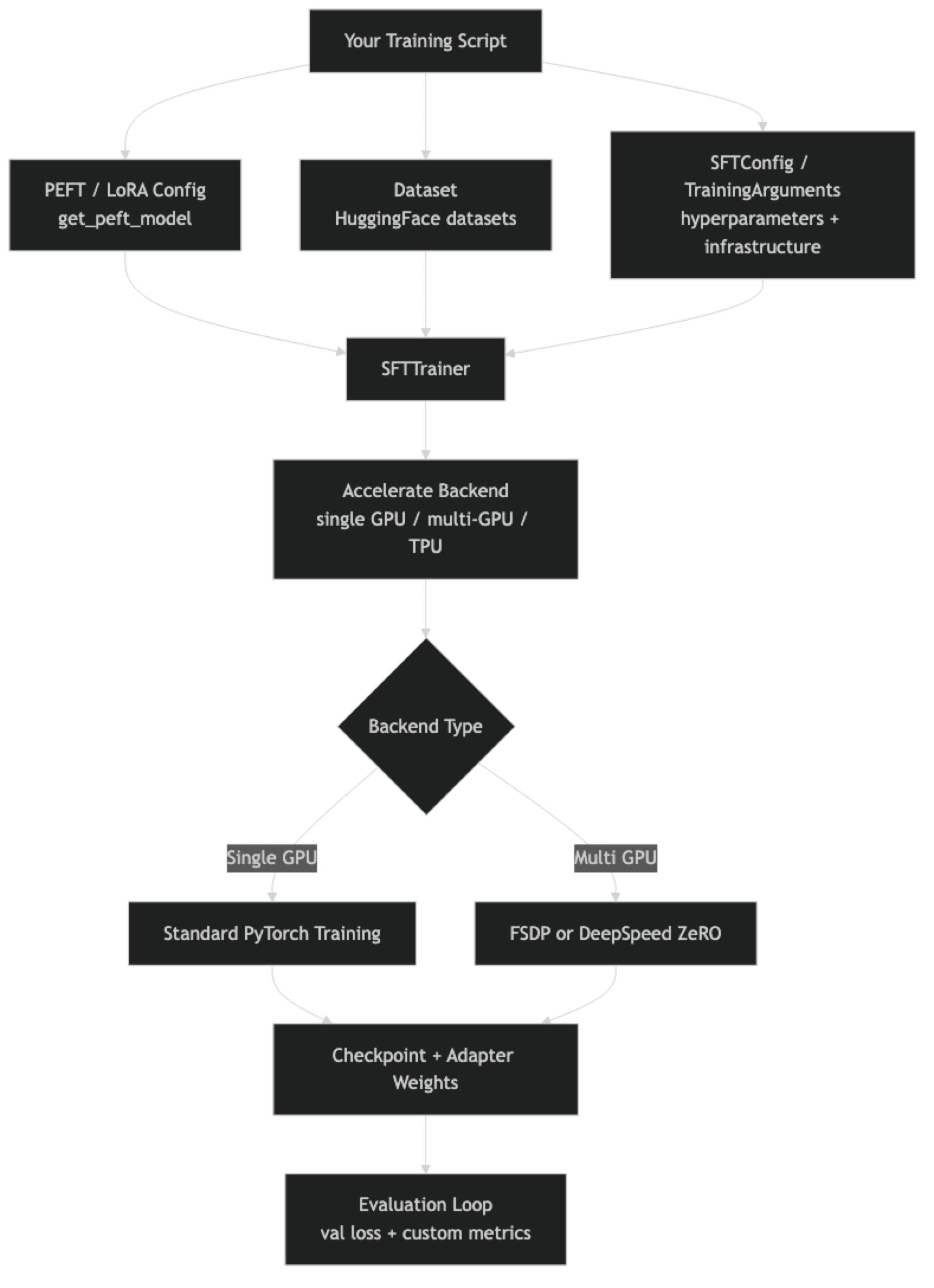
In practice, switching from single-GPU to multi-GPU training requires almost no code changes — just an Accelerate configuration file and launching with accelerate launch instead of python.
Implementation Example
Complete SFT Training Script
"""
complete_sft_training.py
Full supervised fine-tuning script with evaluation, checkpointing, and logging.
Run: accelerate launch complete_sft_training.py
     (single GPU: python complete_sft_training.py)
"""

import torch
from transformers import AutoModelForCausalLM, AutoTokenizer
from peft import LoraConfig, get_peft_model, prepare_model_for_kbit_training, TaskType
from trl import SFTTrainer, SFTConfig
from datasets import load_dataset, Dataset
import json
import os
from datetime import datetime

# --- Configuration ---
MODEL_ID      = "meta-llama/Meta-Llama-3.1-8B-Instruct"
OUTPUT_DIR    = f"./runs/{datetime.now().strftime('%Y%m%d_%H%M%S')}"
DATA_PATH     = "./data/train.jsonl"
MAX_SEQ_LEN   = 2048
LOAD_IN_4BIT  = True    # Set False for pure LoRA (needs ~16GB VRAM)

# --- Load Tokenizer ---
tokenizer = AutoTokenizer.from_pretrained(MODEL_ID, trust_remote_code=True)
tokenizer.pad_token = tokenizer.eos_token
tokenizer.padding_side = "right"   # Required for causal LM training

# --- Load Model ---
if LOAD_IN_4BIT:
    from transformers import BitsAndBytesConfig
    bnb_config = BitsAndBytesConfig(
        load_in_4bit=True,
        bnb_4bit_quant_type="nf4",
        bnb_4bit_compute_dtype=torch.bfloat16,
        bnb_4bit_use_double_quant=True,
    )
    model = AutoModelForCausalLM.from_pretrained(
        MODEL_ID,
        quantization_config=bnb_config,
        device_map="auto",
        trust_remote_code=True,
    )
    model = prepare_model_for_kbit_training(model)
else:
    model = AutoModelForCausalLM.from_pretrained(
        MODEL_ID,
        torch_dtype=torch.bfloat16,
        device_map="auto",
        trust_remote_code=True,
    )

# --- LoRA Config ---
lora_config = LoraConfig(
    task_type=TaskType.CAUSAL_LM,
    r=16,
    lora_alpha=16,
    target_modules=[
        "q_proj", "k_proj", "v_proj", "o_proj",
        "gate_proj", "up_proj", "down_proj",
    ],
    lora_dropout=0.05,
    bias="none",
    inference_mode=False,
)
model = get_peft_model(model, lora_config)
model.print_trainable_parameters()

# --- Load and Format Dataset ---
raw_data = []
with open(DATA_PATH) as f:
    for line in f:
        raw_data.append(json.loads(line.strip()))

dataset = Dataset.from_list(raw_data)

def format_example(example):
    messages = example.get("messages", [])
    if not messages:
        # Convert from alpaca format if needed
        messages = [
            {"role": "user",      "content": example.get("instruction", "")},
            {"role": "assistant", "content": example.get("output", "")},
        ]
    text = tokenizer.apply_chat_template(
        messages, tokenize=False, add_generation_prompt=False
    )
    return {"text": text}

dataset = dataset.map(format_example)
split = dataset.train_test_split(test_size=0.1, seed=42)

# --- Training Config ---
training_config = SFTConfig(
    output_dir=OUTPUT_DIR,

    # Training schedule
    num_train_epochs=3,
    warmup_ratio=0.05,
    lr_scheduler_type="cosine",

    # Batch configuration
    per_device_train_batch_size=2,
    per_device_eval_batch_size=2,
    gradient_accumulation_steps=8,   # Effective batch = 16

    # Learning rate
    learning_rate=2e-4,
    weight_decay=0.01,
    max_grad_norm=1.0,

    # Precision
    bf16=torch.cuda.is_bf16_supported(),
    fp16=not torch.cuda.is_bf16_supported(),

    # Optimizer
    optim="paged_adamw_32bit" if LOAD_IN_4BIT else "adamw_torch",

    # Evaluation
    eval_strategy="steps",
    eval_steps=100,
    load_best_model_at_end=True,
    metric_for_best_model="eval_loss",
    greater_is_better=False,

    # Saving
    save_strategy="steps",
    save_steps=200,
    save_total_limit=3,

    # Dataset
    max_seq_length=MAX_SEQ_LEN,
    dataset_text_field="text",

    # Logging
    logging_steps=10,
    logging_dir=f"{OUTPUT_DIR}/logs",
    report_to="none",   # Replace with "wandb" for experiment tracking
)

# --- Trainer ---
trainer = SFTTrainer(
    model=model,
    tokenizer=tokenizer,
    train_dataset=split["train"],
    eval_dataset=split["test"],
    args=training_config,
)

# --- Train ---
print(f"Starting training. Output: {OUTPUT_DIR}")
print(f"Train examples: {len(split['train'])}, Eval: {len(split['test'])}")

trainer_stats = trainer.train()

# --- Save Adapter ---
final_adapter_path = f"{OUTPUT_DIR}/final_adapter"
trainer.model.save_pretrained(final_adapter_path)
tokenizer.save_pretrained(final_adapter_path)

print(f"\nTraining complete.")
print(f"Final train loss: {trainer_stats.training_loss:.4f}")
print(f"Adapter saved to: {final_adapter_path}")
DPO Training (Alignment After SFT)
from trl import DPOTrainer, DPOConfig
from datasets import load_dataset

# DPO expects a dataset with: prompt, chosen (good response), rejected (bad response)
# Each field is a LIST of messages
dpo_dataset = load_dataset("json", data_files="preference_data.jsonl", split="train")

# Example structure:
# {
#   "prompt": [{"role": "user", "content": "How do I sort a list?"}],
#   "chosen": [{"role": "assistant", "content": "Use sorted() or list.sort()..."}],
#   "rejected": [{"role": "assistant", "content": "You can use the sort method..."}]  # lower quality
# }

dpo_config = DPOConfig(
    output_dir="./dpo-output",
    num_train_epochs=1,
    per_device_train_batch_size=1,
    gradient_accumulation_steps=8,
    learning_rate=5e-7,          # Very low LR for DPO — preserve SFT capabilities
    bf16=True,
    beta=0.1,                    # DPO temperature — higher = closer to reference model
    max_length=2048,
    max_prompt_length=512,
    report_to="none",
)

# Load the SFT-trained model as starting point
# (Assumes you have an SFT adapter merged into a base model)
sft_model = AutoModelForCausalLM.from_pretrained(
    "./merged-sft-model",
    torch_dtype=torch.bfloat16,
    device_map="auto",
)

dpo_trainer = DPOTrainer(
    model=sft_model,
    ref_model=None,   # None = auto-create reference from current weights
    tokenizer=tokenizer,
    train_dataset=dpo_dataset,
    args=dpo_config,
)

dpo_trainer.train()
dpo_trainer.model.save_pretrained("./dpo-adapter")
Multi-GPU Training with Accelerate
# accelerate_config.yaml — run: accelerate config to generate interactively
# Or create manually:
"""
compute_environment: LOCAL_MACHINE
distributed_type: MULTI_GPU
num_processes: 2
gpu_ids: all
mixed_precision: bf16
"""

# Your training script needs almost NO changes for multi-GPU
# Just launch with:
# accelerate launch --config_file accelerate_config.yaml complete_sft_training.py

# For FSDP (Fully Sharded Data Parallel) — needed for models > 13B on consumer GPUs:
"""
compute_environment: LOCAL_MACHINE
distributed_type: FSDP
fsdp_config:
  fsdp_auto_wrap_policy: TRANSFORMER_BASED_WRAP
  fsdp_backward_prefetch_policy: BACKWARD_PRE
  fsdp_sharding_strategy: FULL_SHARD
  fsdp_state_dict_type: FULL_STATE_DICT
num_processes: 4
mixed_precision: bf16
"""
Custom Evaluation Metrics
import numpy as np
from transformers import EvalPrediction

def compute_metrics(eval_pred: EvalPrediction):
    """
    Custom evaluation metrics beyond loss.
    Note: SFTTrainer uses next-token prediction loss by default.
    For task-specific metrics, implement a custom evaluation loop.
    """
    logits, labels = eval_pred

    # Compute perplexity from eval loss
    # (loss is returned as the mean log-likelihood per token)
    # Perplexity = exp(mean cross-entropy loss)
    loss = np.mean([-np.sum(l * np.log(np.exp(l) / np.sum(np.exp(l))))
                    for l in logits[:10]])  # Approximate
    perplexity = np.exp(loss)

    return {"perplexity": perplexity}

# For task-specific eval (accuracy, F1, format adherence), write a separate
# evaluation script that generates outputs and scores them:
def evaluate_task_specific(model, tokenizer, test_examples, scorer_fn):
    """Generate and score model outputs on test examples."""
    results = []
    for example in test_examples:
        inputs = tokenizer.apply_chat_template(
            example["messages"][:-1],  # All turns except last assistant response
            tokenize=True,
            add_generation_prompt=True,
            return_tensors="pt",
        ).to(model.device)

        with torch.no_grad():
            output = model.generate(inputs, max_new_tokens=256, temperature=0.0)

        generated = tokenizer.decode(
            output[0][inputs.shape[1]:], skip_special_tokens=True
        )
        expected = example["messages"][-1]["content"]

        results.append({
            "generated": generated,
            "expected": expected,
            "score": scorer_fn(generated, expected),
        })

    scores = [r["score"] for r in results]
    return {"mean_score": np.mean(scores), "results": results}
Best Practices
Use SFTConfig instead of TrainingArguments for LLM training. SFTConfig is a subclass of TrainingArguments with additional fields specific to language model training (max_seq_length, dataset_text_field, packing, etc.). It is the correct abstraction for SFT workflows.
Enable packing for short-sequence datasets. If your training examples average under 512 tokens and you are training with max_seq_length=2048, most of each batch is padding. Setting packing=True in SFTConfig concatenates short examples to fill the sequence length, improving GPU utilization by 2–4x at no quality cost.
Use Weights & Biases for experiment tracking on serious runs. Set report_to="wandb" and export WANDB_PROJECT=your-project-name. Loss curves, learning rate schedules, and GPU metrics are automatically logged. Without tracking, understanding why one run outperformed another is guesswork.
Set save_total_limit=3 to avoid filling your disk. A single 7B model checkpoint is 15GB. Without a limit, saving every 200 steps on a long training run fills storage quickly. Keep the 3 most recent checkpoints plus the best checkpoint.
Common Mistakes
Using
Trainerinstead ofSFTTrainerfor LLM fine-tuning.Trainerrequires manual setup of the data collator and loss masking.SFTTrainerhandles these correctly by default. UsingTrainerwithout proper loss masking trains the model to predict the instruction tokens, not just the response.Not setting
padding_side="right". Causal language models require right-padding for correct batch training. Left-padding (the default in some tokenizers) causes incorrect attention masking. Always explicitly settokenizer.padding_side = "right"before training.Forgetting to set
inference_mode=Falsein LoraConfig. The default isTrue, which disables gradient computation for the adapter. Training withinference_mode=Trueproduces zero gradients — the adapter will not learn anything. Always explicitly setinference_mode=False.Using
report_to="tensorboard"without Tensorboard installed. This silently fails in some environments. If you don't have Tensorboard installed, setreport_to="none"or install it explicitly.Not reading training logs during the run. The first sign of a training problem — loss spikes, NaN values, gradient explosions — appears in the step logs. Check the first 50 steps before walking away from a training job.
Key Takeaways
- Use
SFTTrainerfrom TRL, not the baseTrainer, for all LLM fine-tuning — it handles chat template formatting, completion-only loss masking, and PEFT integration automatically. SFTConfigis the correct configuration class for supervised fine-tuning; it addsmax_seq_length,dataset_text_field, andpackingfields thatTrainingArgumentslacks.- Always set
tokenizer.padding_side = "right"before training — causal language models require right-padding, and using the wrong side corrupts attention masking silently. - Set
inference_mode=Falseexplicitly inLoraConfigwhen training — the default isTrue, which disables gradient computation and causes the adapter to learn nothing. - Enable sequence packing (
packing=True) when training examples average under 512 tokens — it fills each batch window with concatenated short examples and improves GPU utilization by 2–4x. - DPOTrainer is the recommended tool for alignment fine-tuning after SFT; it requires preference pairs (chosen/rejected) and no separate reward model, making it far more practical than full RLHF.
- Accelerate handles multi-GPU training with minimal code changes — just add a config file and launch with
accelerate launchinstead ofpython; your SFTTrainer script requires no other modifications. - Set
save_total_limit=3to prevent storage overflow — a single 7B model checkpoint is 15GB and without a limit, long training runs fill disks quickly.
FAQ
What is the difference between TRL and the base transformers Trainer?
The base Trainer is a general-purpose training loop for any PyTorch model. TRL's SFTTrainer is specifically designed for supervised fine-tuning of causal language models — it handles chat template formatting, sequence packing, completion-only loss masking, and integrates with PEFT out of the box. For LLM fine-tuning, always use SFTTrainer.
How do I add custom callbacks to SFTTrainer?
Pass a list of TrainerCallback instances to the callbacks parameter. Common uses include early stopping (EarlyStoppingCallback), custom logging, and sample generation at checkpoints. You can also override SFTTrainer methods for more complex customization.
How does Accelerate handle gradient accumulation in multi-GPU training?
Accelerate synchronizes gradients across GPUs at the gradient accumulation boundary, not at each step. This means with gradient_accumulation_steps=8 across 4 GPUs, each GPU processes 8 steps locally before a gradient sync — an effective batch of batch_size x 8 x 4 = 32x the per-device batch. The accumulate() context manager handles this correctly.
Can I train on cloud GPUs using HuggingFace tooling? Yes. HuggingFace has its own cloud training service (AutoTrain), but most practitioners use cloud GPU providers (Lambda Labs, RunPod, Vast.ai, Modal) and run standard Accelerate-based scripts. The HuggingFace ecosystem works identically on any CUDA-capable machine.
When should I use DPO vs full RLHF? Use DPO for almost all practical alignment objectives: improving tone, format, helpfulness, and reducing specific undesirable behaviors. DPO requires one training stage, no reward model, and is significantly more stable than PPO-based RLHF. Full RLHF is only worth the infrastructure investment when you need a nuanced reward model for complex multi-step reasoning alignment that DPO cannot capture.
What is the correct way to evaluate a fine-tuned model with SFTTrainer? Validation loss during training tells you whether the model is overfitting, but it does not tell you whether the model is actually good at your task. Run a separate task-specific evaluation: generate outputs on 50–100 held-out test examples and score them on your metric (format compliance, accuracy, output length). Validation loss and task quality can diverge significantly.
How do I resume training from a checkpoint with SFTTrainer?
Pass resume_from_checkpoint=True (or a specific checkpoint path) to trainer.train(). Accelerate and HuggingFace Trainer save all necessary state in the checkpoint directory, including optimizer states, scheduler state, and random number generator state. The training will resume from exactly the step where it left off.