GGUF Models: Run 70B LLMs on a Laptop (2026)
Last updated: March 2026
GGUF Models Explained: Run Quantized LLMs Locally with Ollama & llama.cpp
When you run a model with Ollama, pull a quantized checkpoint from HuggingFace, or download from a source like bartowski or TheBloke's repos, you are almost certainly working with a GGUF file. It is the de facto standard format for local LLM inference, but most tutorials treat it as a black box — "download the GGUF file and run it" without explaining what the file actually contains or why the quantization suffix matters.
Understanding GGUF matters more than it initially seems. The difference between Q4_K_M and Q5_K_M is not just quality — it determines whether your model fits in 24GB VRAM or requires 32GB. Choosing the wrong quantization level for your hardware can mean falling back to CPU inference without realizing it. And knowing where to find reliable GGUF files and what to look for in a model card prevents a class of frustrating inference quality issues.
This guide demystifies the format: what GGUF contains, how llama.cpp uses it, a practical breakdown of quantization levels with size and quality trade-offs, and working Python code to load and run GGUF models.
Concept Overview
GGML was the original binary format created by Georgi Gerganov (hence "GG") for the llama.cpp project. As the project grew and the format needed more metadata, versioning, and extensibility, GGUF (GGML Unified Format) replaced it in August 2023.
GGUF is a self-contained binary format that stores:
- Model architecture metadata (number of layers, attention heads, context length, vocabulary size)
- Tokenizer data (vocabulary, special tokens, merge rules)
- Model weights in the specified quantization format
- Quantization hyperparameters per layer
The "unified" in GGUF means everything needed to run the model — including the tokenizer — is in one file. GGML required separate tokenizer files. This makes GGUF files genuinely portable: download one file, run it. No config.json, no tokenizer.json, no separate safetensors shards.
How It Works
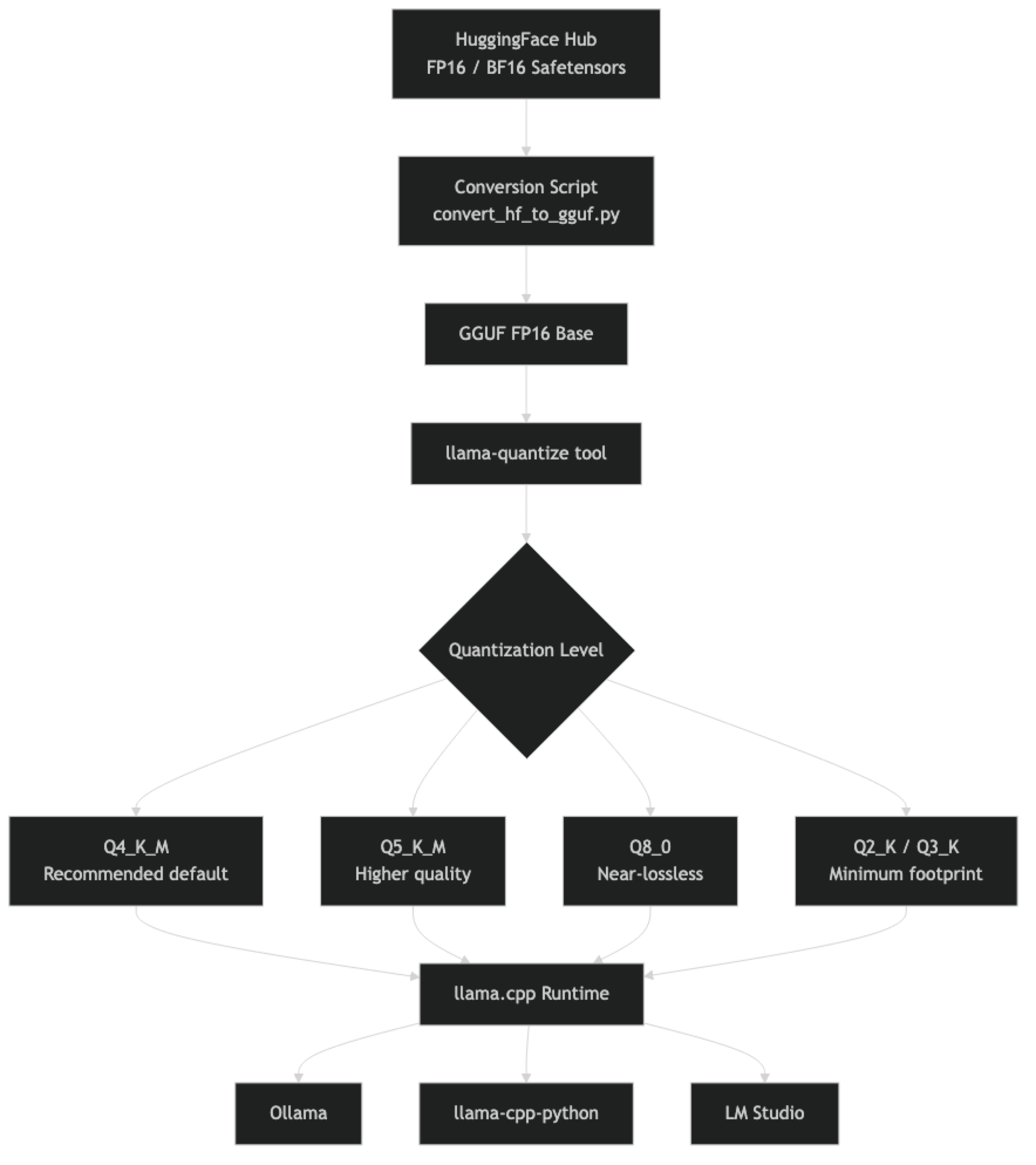
The K-quant variants (Q4_K_M, Q5_K_M, Q6_K) use a more sophisticated quantization algorithm than the older non-K variants. In K-quants, different layers use different quantization parameters, and the quantization is applied in groups with shared scale factors. The _M suffix means "medium" — a balance between quality and size within that bit depth. _S is smaller/lower quality, _L is larger/higher quality.
Implementation Example
Finding GGUF Models on HuggingFace
The most reliable GGUF repositories as of 2026:
- bartowski — High-quality quantizations of major models, well-maintained
- lmstudio-community — LM Studio's official quantization releases
- QuantFactory — Broad coverage of less-common models
- TheBloke — The original major GGUF provider (less active now but archives remain useful)
# Search via Hugging Face CLI
pip install huggingface_hub

python -c "
from huggingface_hub import list_models
models = list_models(
    search='llama-3.1-8b-instruct gguf',
    library='gguf',
    sort='downloads',
    limit=5
)
for m in models:
    print(m.id, m.downloads)
"

# Direct download of a specific GGUF file
from huggingface_hub import hf_hub_download

# Download Llama 3.1 8B Q4_K_M from bartowski
path = hf_hub_download(
    repo_id="bartowski/Meta-Llama-3.1-8B-Instruct-GGUF",
    filename="Meta-Llama-3.1-8B-Instruct-Q4_K_M.gguf",
    local_dir="./models"
)
print(f"Downloaded to: {path}")
Loading with llama-cpp-python
from llama_cpp import Llama

# Basic loading
llm = Llama(
    model_path="./models/Meta-Llama-3.1-8B-Instruct-Q4_K_M.gguf",
    n_gpu_layers=-1,    # -1 = offload all layers to GPU
    n_ctx=8192,         # Context window (model supports up to 131072)
    n_threads=None,     # None = auto-detect CPU threads
    verbose=False,      # Suppress loading logs
)

# Chat completion (OpenAI-compatible interface)
response = llm.create_chat_completion(
    messages=[
        {
            "role": "system",
            "content": "You are a precise technical assistant."
        },
        {
            "role": "user",
            "content": "Explain GGUF format in 4 bullet points."
        }
    ],
    temperature=0.3,
    max_tokens=512,
    stop=["<|eot_id|>"],  # Llama 3 end-of-turn token
)
print(response["choices"][0]["message"]["content"])

# Raw text completion
output = llm(
    prompt="The three main advantages of GGUF over GGML are:",
    max_tokens=200,
    temperature=0.5,
    echo=False,
)
print(output["choices"][0]["text"])
Comparing Quantization Levels Programmatically
from llama_cpp import Llama
import time
import os

def benchmark_gguf(model_path: str, prompt: str, n_runs: int = 3) -> dict:
    """Benchmark a GGUF model on a given prompt."""
    llm = Llama(model_path=model_path, n_gpu_layers=-1, n_ctx=2048, verbose=False)

    timings = []
    responses = []

    for _ in range(n_runs):
        start = time.time()
        response = llm.create_chat_completion(
            messages=[{"role": "user", "content": prompt}],
            max_tokens=256,
            temperature=0.1,  # Low temp for consistency
        )
        elapsed = time.time() - start
        timings.append(elapsed)
        responses.append(response["choices"][0]["message"]["content"])

    return {
        "model": os.path.basename(model_path),
        "file_size_gb": round(os.path.getsize(model_path) / (1024**3), 2),
        "avg_latency": round(sum(timings) / len(timings), 2),
        "response_sample": responses[0][:200],
    }

# Benchmark multiple quantization levels
models = [
    "./models/Llama-3.1-8B-Q4_K_M.gguf",
    "./models/Llama-3.1-8B-Q5_K_M.gguf",
    "./models/Llama-3.1-8B-Q8_0.gguf",
]

prompt = "What is the capital of France and why is it significant?"

for model_path in models:
    result = benchmark_gguf(model_path, prompt)
    print(f"\n{result['model']}")
    print(f"  Size: {result['file_size_gb']}GB")
    print(f"  Avg latency: {result['avg_latency']}s")
    print(f"  Response: {result['response_sample']}...")
Using Ollama with GGUF Modelfiles
You can load custom GGUF files directly into Ollama without going through the registry:
# Modelfile.custom
FROM ./models/Meta-Llama-3.1-8B-Instruct-Q4_K_M.gguf

SYSTEM "You are a helpful coding assistant specializing in Python."

PARAMETER temperature 0.3
PARAMETER num_ctx 8192ollama create my-llama -f Modelfile.custom
ollama run my-llama "Write a Python decorator that retries on exception"Quantization Level Guide
Choosing Your Quantization Level
The practical decision tree is simple. Start with Q4_K_M. Move to Q5_K_M only if you have VRAM to spare and your eval shows a meaningful quality difference for your specific task. Use Q8_0 for applications where quality is critical and you have the VRAM budget.
| Level | Description | When to Use |
|---|---|---|
| Q2_K | 2-bit mixed | Hardware is severely constrained; accept significant quality loss |
| Q3_K_M | 3-bit mixed | Embedded, edge devices; moderate quality |
| Q4_K_S | 4-bit, small | Smaller footprint than Q4_K_M, slightly lower quality |
| Q4_K_M | 4-bit, medium | Default recommendation for most use cases |
| Q5_K_M | 5-bit, medium | When you have headroom and task requires higher quality |
| Q6_K | 6-bit | Very close to lossless, diminishing returns vs Q8 |
| Q8_0 | 8-bit | Near-lossless; use for critical tasks, benchmarking, eval |
| F16 | 16-bit FP | Full precision; only for fine-tuning, not for inference economy |
Size Reference Table
| Model | Q4_K_M | Q5_K_M | Q8_0 |
|---|---|---|---|
| 7B / 8B | ~4.9GB | ~5.7GB | ~8.6GB |
| 13B | ~8.1GB | ~9.5GB | ~14.3GB |
| 32B | ~20.0GB | ~23.2GB | ~35.0GB |
| 70B | ~42.5GB | ~49.0GB | ~74.0GB |
One thing many developers overlook is that these sizes assume the weights only. Add 1–3GB for KV cache at modest context lengths, scaling up significantly for long-context workloads.
Best Practices
Download from verified sources. GGUF files from untrusted sources could theoretically contain malicious code embedded in the model loading process. Stick to bartowski, lmstudio-community, QuantFactory, or convert from official HuggingFace checkpoints yourself.
Verify file integrity. Major GGUF repositories publish SHA256 checksums. Verify large model downloads before use — a corrupted 40GB file produces subtle, hard-to-debug inference errors.
Match the stop token to the model family. Different model families use different end-of-turn tokens. Llama 3 uses <|eot_id|>, Mistral uses [/INST], Qwen uses <|im_end|>. Setting the wrong stop token causes the model to generate beyond the intended end of response.
Use n_gpu_layers=-1 to offload everything to GPU. The default is 0 (CPU only). Always set -1 to offload all layers when you have a compatible GPU, unless you are intentionally splitting between GPU and CPU.
Common Mistakes
Downloading Q4_K_S thinking it is the same as Q4_K_M. The
_S(small) variant is lower quality than_M(medium) at the same bit depth. Q4_K_M is the standard recommendation; Q4_K_S trades quality for a slightly smaller file.Ignoring the model's native context window. GGUF metadata stores the original model's context length. Setting
n_ctxlarger than this in llama-cpp-python works but produces undefined behavior — the model was not trained for those positions.Not setting stop tokens. Without appropriate stop tokens, models continue generating past the natural end of their response. This wastes inference time and produces garbled output.
Assuming all GGUF files are interchangeable. GGUF from different quantization tools (llama.cpp's native tool vs third-party converters) can have subtle differences. Prefer files from the llama.cpp ecosystem for best compatibility.
Running inference with
verbose=Truein production. The default verbose mode prints detailed loading logs to stdout. Setverbose=Falsein any code that runs in production or batch processing.
Key Takeaways
- GGUF is a self-contained binary format that stores model weights, tokenizer data, and architecture metadata in a single portable file
- GGUF replaced GGML in August 2023 — all modern Ollama and llama.cpp versions use GGUF exclusively; GGML files are no longer supported
- Q4_K_M is the recommended default quantization — it provides a 4× size reduction versus FP16 with quality loss that is imperceptible for most production tasks
- K-quant variants (Q4_K_M, Q5_K_M, Q6_K) use mixed precision across layers and produce better quality than naive uniform quantization at the same bit depth
- Add 20% VRAM headroom beyond the model file size to account for KV cache — a 4.9GB Q4_K_M 7B model needs roughly 6GB VRAM in practice
- Always set
n_gpu_layers=-1in llama-cpp-python to offload all layers to GPU — the default is CPU-only inference - Download GGUF files from verified sources (bartowski, lmstudio-community, QuantFactory) and verify SHA256 checksums for large downloads
- Match the stop token to the model family — wrong stop tokens cause the model to generate past the intended end of its response
FAQ
What is the difference between GGUF and GGML? GGML was the original format. GGUF replaced it in August 2023 with better metadata support, self-contained tokenizer data, and forward compatibility. All modern llama.cpp and Ollama releases use GGUF. GGML files are no longer supported in recent versions.
Can I convert any HuggingFace model to GGUF?
Any model with a supported architecture (Llama, Mistral, Qwen, Phi, Gemma, and many others) can be converted using llama.cpp's convert_hf_to_gguf.py. Architectures not supported by llama.cpp cannot be converted.
Is Q4_K_M the same as INT4 quantization? They are similar but not identical. Q4_K_M uses 4 bits per weight with K-quant mixed-precision grouping. INT4 generally refers to straight uniform 4-bit quantization used in GPTQ/AWQ GPU formats. Q4_K_M typically produces slightly better quality than naive INT4 at equivalent size.
How do I know which GGUF variant is best for my GPU? Match the file size to your available VRAM with 20% headroom for KV cache. An 8GB VRAM GPU fits Q4_K_M of a 7B model (4.9GB) comfortably. An RTX 3090 (24GB) fits Q4_K_M of a 13B model (8.1GB) with substantial headroom, or Q5_K_M of a 13B model (9.5GB).
What does the _M and _S suffix mean in GGUF file names? Within a K-quant level, _M means "medium" quality and _S means "small" (lower quality, smaller file). Q4_K_M is always better than Q4_K_S at the same bit depth. The standard recommendation is always to use _M unless you have severe storage constraints.
How do I load a GGUF file into Ollama without going through the registry?
Create a Modelfile with FROM ./path/to/model.gguf and run ollama create my-model-name -f Modelfile. This registers the local GGUF file as an Ollama model you can run with ollama run my-model-name.
Why does my model keep generating after it should have stopped?
You are missing or have an incorrect stop token. Different model families use different end-of-turn tokens: Llama 3 uses <|eot_id|>, Mistral uses [/INST], Qwen uses <|im_end|>. Pass the correct token in the stop parameter when calling create_chat_completion.