Gemini API: Build Multimodal Apps Without the Hassle (2026)
Last updated: March 2026
Google Gemini API Tutorial: Build AI Apps with Python (2026)
Google's Gemini API has a feature that neither OpenAI nor Anthropic can match: a 1 million token context window in Gemini 1.5 Pro. That is not a typo. You can pass an entire codebase, a book-length document, or hours of video frames and ask questions about the whole thing in a single API call. For certain use cases, this changes the architecture entirely — you skip RAG, skip chunking, skip vector databases, and just pass the whole thing.
Beyond the context window, Gemini is genuinely competitive on price, particularly with Gemini Flash — the fast, cheap variant that handles the majority of production workloads. If cost efficiency is a constraint, Gemini Flash is worth benchmarking against GPT-4o-mini.
This tutorial covers the practical Gemini API surface: setup, text generation, streaming, multimodal inputs, function calling, and safety configuration. The SDK has evolved significantly in 2025–2026, and some older tutorials reference deprecated patterns.
Concept Overview
The Google Generative AI API (commonly called the Gemini API) is accessed via the google-generativeai Python SDK or directly via REST. In 2026, Google has also released the google-genai SDK as a replacement — both work, but the newer SDK has a cleaner interface.
Available models:
| Model | Context | Speed | Cost |
|---|---|---|---|
gemini-1.5-pro |
1M tokens | Medium | $1.25/$5.00 per 1M in/out |
gemini-1.5-flash |
1M tokens | Fast | $0.075/$0.30 per 1M in/out |
gemini-2.0-flash |
1M tokens | Very fast | Competitive |
gemini-1.0-pro |
32K tokens | Fast | Legacy |
Check ai.google.dev for current pricing.
Key API differences from OpenAI/Claude:
- Uses
generate_content()instead ofchat.completions.create() - System instructions passed via
system_instructionparameter on model init - Parts-based content format (list of
Partobjects) - Safety settings configurable per category with thresholds
- Multimodal inputs (text + image + video + audio + PDF) in the same call
How It Works
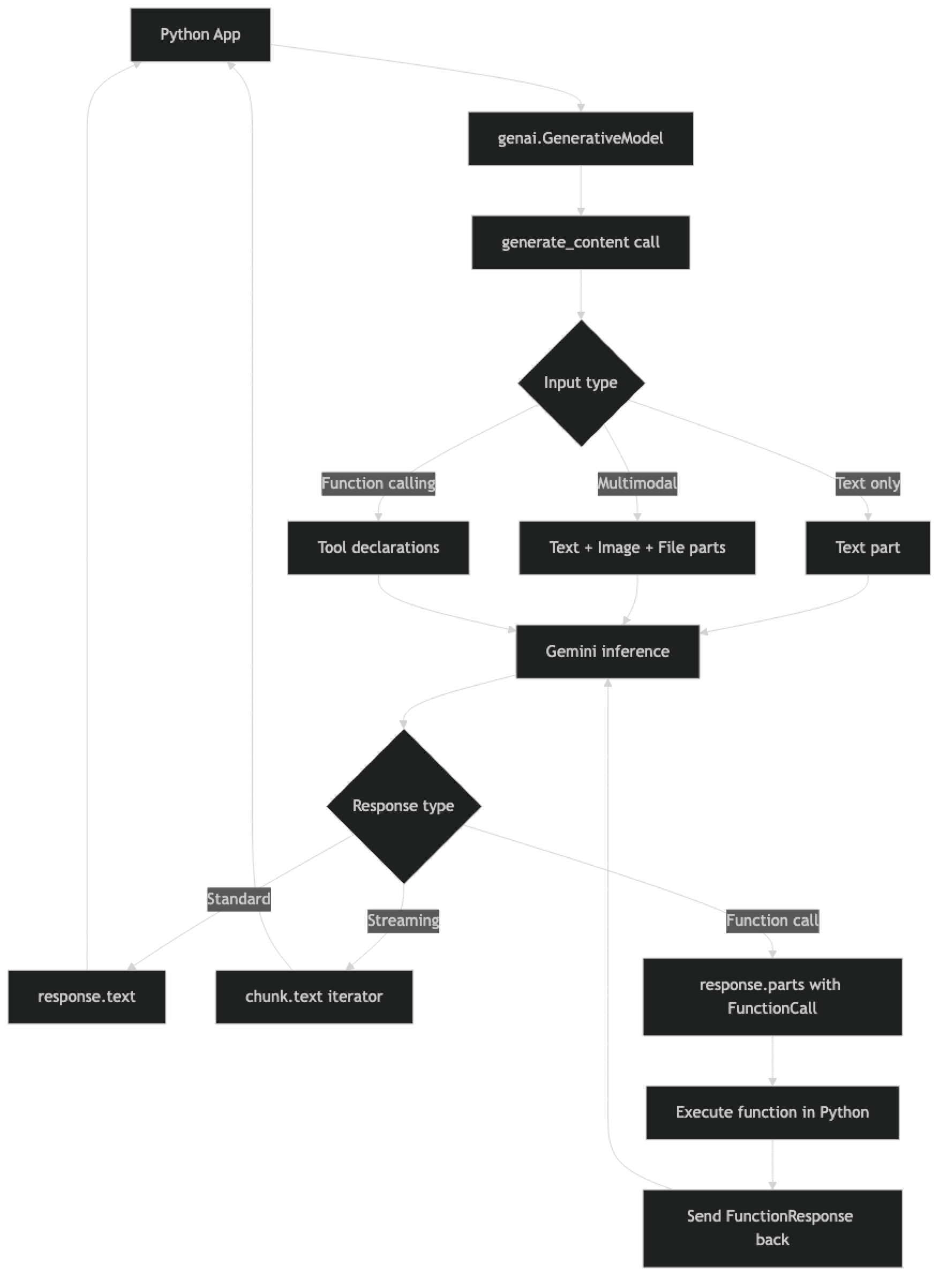
One structural difference from OpenAI: Gemini models are initialized with the system instruction baked in, not passed per-request. This means if you need different system behaviors, you initialize different model instances — a pattern that is odd at first but makes sense for applications with a fixed persona.
Implementation Example
Installation and Setup
pip install google-generativeai
# Or for the newer SDK:
pip install google-genaiimport google.generativeai as genai
import os
genai.configure(api_key=os.environ["GOOGLE_API_KEY"])Get your API key from Google AI Studio. Free tier is available with rate limits; production use requires billing enabled.
Basic Text Generation
# Initialize model with system instruction
model = genai.GenerativeModel(
    model_name="gemini-1.5-flash",
    system_instruction="You are a concise technical assistant. Respond without preamble."
)

response = model.generate_content("Explain the difference between TCP and UDP in 2 sentences.")

print(response.text)
print(f"Finish reason: {response.candidates[0].finish_reason}")
Configuration — Controlling Output
from google.generativeai.types import GenerationConfig

model = genai.GenerativeModel(
    model_name="gemini-1.5-flash",
    generation_config=GenerationConfig(
        temperature=0,          # Deterministic output
        max_output_tokens=512,  # Limit response length
        top_p=0.95,             # Nucleus sampling
        top_k=40                # Top-k sampling
    ),
    system_instruction="You are a precise technical writer."
)

response = model.generate_content(
    "List the 5 HTTP methods and what each is used for."
)
print(response.text)
Multi-Turn Conversations (Chat Session)
# Start a chat session — maintains history automatically
chat = model.start_chat(history=[])

def send_message(user_message: str) -> str:
    response = chat.send_message(user_message)
    return response.text

# Conversation maintains context across turns
print(send_message("I'm building a REST API in Python. What framework would you recommend?"))
print(send_message("What are the main trade-offs between those options?"))
print(send_message("Show me a minimal FastAPI example with one endpoint."))

# Inspect conversation history
for message in chat.history:
    print(f"{message.role}: {message.parts[0].text[:50]}...")
In practice, Gemini's ChatSession handles history management automatically. This is more convenient than OpenAI's approach where you maintain the history list yourself. The trade-off: less control over truncation strategy when history grows large.
Streaming
def stream_response(prompt: str) -> str:
    """Stream Gemini response token by token."""
    full_text = ""
    response = model.generate_content(prompt, stream=True)

    for chunk in response:
        if chunk.text:
            print(chunk.text, end="", flush=True)
            full_text += chunk.text

    print()  # newline
    return full_text

result = stream_response(
    "Write a Python function to read a CSV file and compute column statistics."
)
Multimodal — Text + Image
import PIL.Image
from pathlib import Path

# Initialize vision-capable model
vision_model = genai.GenerativeModel("gemini-1.5-flash")

def analyze_local_image(image_path: str, question: str) -> str:
    """Analyze a local image file."""
    image = PIL.Image.open(image_path)
    response = vision_model.generate_content([question, image])
    return response.text

def analyze_image_url(image_url: str, question: str) -> str:
    """Analyze an image from URL using File API or inline."""
    import httpx
    import base64

    # Download image
    image_data = httpx.get(image_url).content
    image_b64 = base64.b64encode(image_data).decode()

    response = vision_model.generate_content([
        question,
        {
            "inline_data": {
                "mime_type": "image/jpeg",
                "data": image_b64
            }
        }
    ])
    return response.text

# Example: analyze a chart
result = analyze_local_image(
    "./sales_chart.png",
    "Describe the trend shown in this chart. What period shows the strongest growth?"
)
print(result)
PDF and Document Analysis
One of Gemini's unique strengths is native PDF handling. You can pass a PDF directly and ask questions about it — no chunking, no embeddings required for moderate-size documents.
def analyze_pdf(pdf_path: str, question: str) -> str:
    """Analyze a PDF document with Gemini."""
    pdf_model = genai.GenerativeModel("gemini-1.5-pro")  # Pro for large docs

    # Upload file to Gemini File API
    uploaded_file = genai.upload_file(
        path=pdf_path,
        mime_type="application/pdf"
    )

    response = pdf_model.generate_content([
        uploaded_file,
        question
    ])

    return response.text

# Example
answer = analyze_pdf(
    "./technical_spec.pdf",
    "Summarize the key architectural decisions described in this document."
)
print(answer)
Function Calling
import json

# Define tools using FunctionDeclaration
get_stock_price_fn = genai.protos.FunctionDeclaration(
    name="get_stock_price",
    description="Get the current stock price for a given ticker symbol.",
    parameters=genai.protos.Schema(
        type=genai.protos.Type.OBJECT,
        properties={
            "ticker": genai.protos.Schema(
                type=genai.protos.Type.STRING,
                description="Stock ticker symbol, e.g. AAPL, MSFT, GOOGL"
            ),
            "currency": genai.protos.Schema(
                type=genai.protos.Type.STRING,
                description="Currency code, e.g. USD, EUR"
            )
        },
        required=["ticker"]
    )
)

tool = genai.protos.Tool(function_declarations=[get_stock_price_fn])

fn_model = genai.GenerativeModel(
    model_name="gemini-1.5-flash",
    tools=[tool]
)

def get_stock_price(ticker: str, currency: str = "USD") -> dict:
    """Mock function — replace with real market data API."""
    prices = {"AAPL": 185.50, "MSFT": 415.20, "GOOGL": 175.80}
    price = prices.get(ticker.upper(), 100.00)
    return {"ticker": ticker, "price": price, "currency": currency}

def run_with_tools(user_query: str) -> str:
    """Run Gemini query with function calling support."""
    chat = fn_model.start_chat()
    response = chat.send_message(user_query)

    # Check if model wants to call a function
    while response.candidates[0].finish_reason.name == "STOP":
        # Check for function calls in parts
        function_called = False
        for part in response.parts:
            if fn := part.function_call:
                function_called = True
                args = dict(fn.args)

                # Execute the function
                if fn.name == "get_stock_price":
                    result = get_stock_price(**args)
                else:
                    result = {"error": f"Unknown function: {fn.name}"}

                # Send function response back
                response = chat.send_message(
                    genai.protos.Part(
                        function_response=genai.protos.FunctionResponse(
                            name=fn.name,
                            response={"result": result}
                        )
                    )
                )

        if not function_called:
            break

    return response.text

answer = run_with_tools("What's the current price of Apple stock?")
print(answer)
Safety Settings
Gemini has configurable content safety filters. By default they block potentially harmful content; you can adjust thresholds for specific categories in appropriate contexts.
from google.generativeai.types import HarmCategory, HarmBlockThreshold

safe_model = genai.GenerativeModel(
    model_name="gemini-1.5-flash",
    safety_settings={
        HarmCategory.HARM_CATEGORY_HARASSMENT: HarmBlockThreshold.BLOCK_MEDIUM_AND_ABOVE,
        HarmCategory.HARM_CATEGORY_HATE_SPEECH: HarmBlockThreshold.BLOCK_MEDIUM_AND_ABOVE,
        HarmCategory.HARM_CATEGORY_SEXUALLY_EXPLICIT: HarmBlockThreshold.BLOCK_LOW_AND_ABOVE,
        HarmCategory.HARM_CATEGORY_DANGEROUS_CONTENT: HarmBlockThreshold.BLOCK_MEDIUM_AND_ABOVE
    }
)

response = safe_model.generate_content("Tell me about cybersecurity vulnerabilities.")

# Check if response was blocked by safety filters
if response.candidates[0].finish_reason.name == "SAFETY":
    print("Response blocked by safety filters")
    for rating in response.candidates[0].safety_ratings:
        print(f"  {rating.category.name}: {rating.probability.name}")
else:
    print(response.text)
Best Practices
Default to Gemini Flash, not Pro. Gemini Flash handles the vast majority of tasks — summarization, Q&A, classification, code generation — at a fraction of Pro's cost and with significantly faster latency. Use Pro only for tasks that genuinely need deep reasoning over large contexts.
Exploit the 1M context window deliberately. For document analysis or code review tasks, test whether simply sending the full document produces better results than a chunked RAG approach. In many cases it does, and eliminates significant system complexity.
Cache large files using the File API. For repeated analysis of the same document or image, upload it once via genai.upload_file() and reference the uploaded file object across multiple calls. Files are cached for 48 hours by default.
Check finish_reason before reading response.text. If the model hit a safety filter or max token limit, accessing response.text raises an exception. Always check candidates[0].finish_reason before reading content.
Use GenerationConfig for consistent output. Set temperature=0 for deterministic tasks, and always set max_output_tokens to bound response costs.
Common Mistakes
Accessing
response.textwhen the response was safety-blocked. This raises aValueError. Checkfinish_reasonfirst and handle the safety-blocked case explicitly.Using
gemini-1.0-profor new projects. This is a legacy model. Default togemini-1.5-flashfor new work — better capabilities, larger context, lower cost.Not setting
max_output_tokens. Gemini can generate very long responses on open-ended prompts. Always cap output length for cost predictability.Ignoring the File API for large inputs. Sending a 100-page PDF as base64 inline is inefficient. Use
genai.upload_file()and reuse the file reference.Assuming safety settings persist across sessions. Safety settings are set on the model object, not per-call. Initialize model instances with the right safety settings for your use case and reuse them.
Key Takeaways
- Gemini's 1M token context window is the standout feature — for documents up to 100–200K tokens, passing the full document often outperforms RAG pipelines and eliminates indexing complexity.
- Gemini Flash is the right default model for production: it handles summarization, Q&A, classification, and code generation at costs lower than GPT-4o-mini with fast latency.
- System instructions are set at model initialization via
system_instruction, not per-request — initialize separate model instances for different system behaviors. - Always check
candidates[0].finish_reasonbefore readingresponse.text; accessing.texton a safety-blocked response raises aValueError. - The File API (
genai.upload_file()) allows uploading documents once and reusing the reference across multiple calls — essential for efficient document analysis workflows. - Safety settings are configured per model instance, not per call — set them once at initialization and reuse the model object.
- Gemini uses
FunctionDeclarationandFunctionResponseproto objects for function calling, which is more verbose than OpenAI's dict-based approach but functionally equivalent. - Gemini native multimodal inputs (text + image + PDF + audio + video in the same call) reduce architecture complexity for applications that process mixed content types.
FAQ
Is Gemini Flash good enough for production use?
Yes, for most use cases. Gemini Flash handles text generation, summarization, classification, and Q&A with quality comparable to GPT-4o-mini at lower cost. Teams using Gemini in production typically start with Flash and only route to Pro for tasks requiring deep reasoning over very large contexts.
How does Gemini's 1M context window actually work in practice?
It works, but with caveats. Latency increases significantly with very long contexts — a 500K token request will take noticeably longer than a 10K token request. Costs scale linearly with input tokens. The sweet spot for most applications is using the large context window for documents up to 100–200K tokens where it replaces the need for a RAG pipeline.
Does Gemini support system prompts?
Yes, via the system_instruction parameter when initializing the GenerativeModel. Unlike OpenAI and Claude where system prompts are per-request, Gemini's system instruction is set at model initialization time and applies to all requests from that model instance.
How does Gemini function calling compare to OpenAI function calling?
The concepts are the same — the model requests tool execution, you execute the function, then send results back. Gemini uses FunctionDeclaration and FunctionResponse objects rather than the JSON schema dict format used by OpenAI. The loop pattern is similar but the SDK types are different.
What types of files can I upload to the Gemini File API?
The File API supports images (JPEG, PNG, WebP, GIF), audio (MP3, WAV, FLAC), video (MP4, MOV, AVI), PDF, and plain text. Maximum file size is 2GB. Files are stored for 48 hours and can be reused across multiple API calls — useful for caching large documents.
How do I handle safety filter blocks in production?
Check response.candidates[0].finish_reason.name before accessing response.text. If it equals "SAFETY", the response was blocked — log the safety ratings from candidates[0].safety_ratings to understand which category triggered the block. Return a user-friendly fallback message and, if the block is on legitimate content, adjust safety thresholds for the relevant category.
When should I use Gemini Pro vs Gemini Flash?
Use Flash as the default for everything. Switch to Pro only when you need reasoning over very large contexts (100K+ tokens), complex multi-step analysis, or when you measure a quality gap on a specific task. Pro is roughly 16x more expensive per token than Flash on output — the cost difference is significant at scale.