Embeddings Explained: How Text Becomes Searchable Vectors (2026)
A support team at a SaaS company had thousands of customer tickets and wanted to automatically route new tickets to the right team. They tried keyword matching — too many edge cases. They tried classification with predefined categories — too brittle when customers described the same issue in unexpected ways. Then they embedded every historical ticket and used a simple nearest-neighbor lookup against the embeddings. Accuracy jumped from 67% to 91%.
The model did not learn new rules. It learned the geometry of meaning. Tickets that described the same underlying problem ended up near each other in vector space, regardless of how they were worded.
Understanding how embeddings actually work — not just how to call the API — lets you debug poor search quality, choose the right model for your domain, and make informed decisions about dimensionality, normalization, and fine-tuning.
Concept Overview
An embedding is the output of a neural network encoder: a fixed-length float vector that represents the meaning of an input. For text, that input can be a word, sentence, paragraph, or document. The encoder is trained so that inputs with similar semantic content produce vectors that are geometrically close to each other.
Modern text embedding models are transformer-based. The transformer processes the input token by token, with each attention layer allowing tokens to influence each other's representations. The final [CLS] token representation — or a mean-pooled average of all token representations — becomes the embedding vector.
The key insight is that these models are not lookup tables. They generalize. A model that has never seen the phrase "GPU compute budget" can still produce a vector for it that is close to "training cost" because it has learned the semantic relationships between those concepts from its training data.
One thing many developers overlook is the distinction between biencoder and cross-encoder models. Biencoders (sentence transformers, OpenAI embed) encode each input independently — suitable for indexing and ANN search. Cross-encoders take a (query, document) pair as input and compute a relevance score — too slow for retrieval but highly accurate for re-ranking.
How It Works
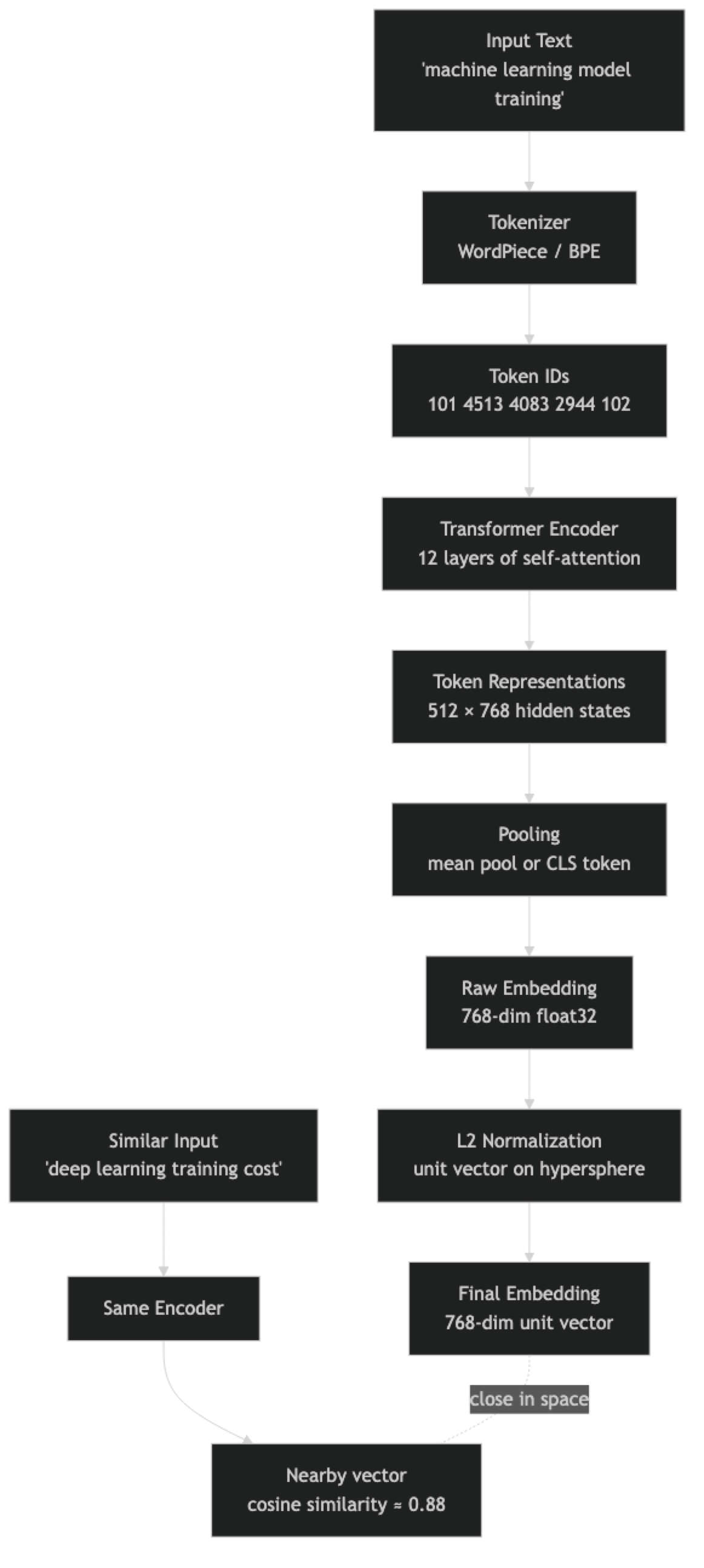
The normalization step is important. Most sentence transformers produce embeddings on the surface of a unit hypersphere — all vectors have the same magnitude. This makes cosine similarity and dot product equivalent, and removes magnitude as a confounding factor when comparing document embeddings of different lengths.
Training an embedding model uses contrastive learning. Pairs of semantically similar texts (positive pairs) are pushed close together; pairs of dissimilar texts (negative pairs) are pushed apart. Models like BGE and E5 were trained on large corpora of curated positive pairs — question-answer pairs, paraphrase pairs, and synthetically generated pairs.
Implementation Example
pip install sentence-transformers openai numpyGenerating and Comparing Embeddings
from sentence_transformers import SentenceTransformer
import numpy as np

model = SentenceTransformer("BAAI/bge-small-en-v1.5")

texts = [
    "machine learning model training cost",
    "deep learning GPU compute budget",       # semantically close
    "Python web framework for APIs",          # different domain
    "sourdough bread recipe with starter",    # completely different
]

# normalize_embeddings=True ensures cosine similarity = dot product
embeddings = model.encode(texts, normalize_embeddings=True)
print(f"Shape: {embeddings.shape}")           # (4, 384)

# Compute all pairwise cosine similarities
similarity_matrix = embeddings @ embeddings.T

print("\nSimilarity matrix:")
for i, t1 in enumerate(texts):
    for j, t2 in enumerate(texts):
        if j > i:
            sim = similarity_matrix[i, j]
            print(f"  {t1[:35]!r:38} vs {t2[:35]!r:38}: {sim:.3f}")
Output will show that "machine learning model training cost" and "deep learning GPU compute budget" have similarity ~0.82, while the sourdough pair scores ~0.18.
OpenAI Embeddings with Batching
from openai import OpenAI
import numpy as np

client = OpenAI()

def embed_batch(texts: list[str], model: str = "text-embedding-3-small") -> np.ndarray:
    """Embed up to 2048 texts in a single API call."""
    if not texts:
        return np.array([])
    response = client.embeddings.create(model=model, input=texts)
    # API returns embeddings in the same order as input
    return np.array([r.embedding for r in response.data], dtype=np.float32)

# Single API call for all texts (much cheaper than per-text calls)
corpus = [
    "GPU compute budget for model training",
    "Training deep learning models costs money",
    "React hooks for state management",
    "PostgreSQL query optimization",
]
query = "how expensive is training AI models?"

corpus_embeddings = embed_batch(corpus)
query_embedding = embed_batch([query])[0]

# Normalize for cosine similarity
corpus_norm = corpus_embeddings / np.linalg.norm(corpus_embeddings, axis=1, keepdims=True)
query_norm  = query_embedding  / np.linalg.norm(query_embedding)

similarities = corpus_norm @ query_norm
ranked = sorted(enumerate(similarities), key=lambda x: x[1], reverse=True)

print("Results:")
for idx, score in ranked:
    print(f"  [{score:.3f}] {corpus[idx]}")
Caching Embeddings to Avoid Redundant API Calls
import hashlib
import json
import numpy as np
from pathlib import Path

class EmbeddingCache:
    def __init__(self, cache_dir: str = ".embedding_cache", model: str = "text-embedding-3-small"):
        self.cache_dir = Path(cache_dir)
        self.cache_dir.mkdir(exist_ok=True)
        self.model = model
        self.client = OpenAI()

    def _key(self, text: str) -> str:
        return hashlib.sha256(f"{self.model}::{text}".encode()).hexdigest()

    def get(self, text: str) -> np.ndarray | None:
        path = self.cache_dir / f"{self._key(text)}.npy"
        return np.load(path) if path.exists() else None

    def set(self, text: str, embedding: np.ndarray) -> None:
        np.save(self.cache_dir / f"{self._key(text)}.npy", embedding)

    def embed(self, texts: list[str]) -> np.ndarray:
        results = {}
        to_fetch = []
        for t in texts:
            cached = self.get(t)
            if cached is not None:
                results[t] = cached
            else:
                to_fetch.append(t)

        if to_fetch:
            response = self.client.embeddings.create(model=self.model, input=to_fetch)
            for text, item in zip(to_fetch, response.data):
                emb = np.array(item.embedding, dtype=np.float32)
                self.set(text, emb)
                results[text] = emb

        return np.array([results[t] for t in texts])


cache = EmbeddingCache()
# First call: hits the API
vecs = cache.embed(["machine learning", "deep learning"])
# Second call: returns from disk cache instantly
vecs = cache.embed(["machine learning", "deep learning"])
Fine-Tuning Embeddings for Domain-Specific Retrieval
from sentence_transformers import SentenceTransformer, InputExample, losses, evaluation
from torch.utils.data import DataLoader

# Domain-specific training pairs: (query, positive_doc, negative_doc)
train_examples = [
    InputExample(texts=[
        "training cost for large language model",
        "GPU compute budget scales with model parameter count",
        "sourdough bread hydration ratio for beginners",
    ]),
    InputExample(texts=[
        "how to reduce embedding API costs",
        "cache embeddings and batch API requests to minimize spend",
        "Mediterranean diet meal plan for weight loss",
    ]),
    InputExample(texts=[
        "vector database for RAG pipeline",
        "ChromaDB and Pinecone store embeddings for similarity search",
        "React component lifecycle methods explained",
    ]),
]

model = SentenceTransformer("BAAI/bge-small-en-v1.5")
loader = DataLoader(train_examples, shuffle=True, batch_size=8)
loss   = losses.TripletLoss(model)

model.fit(
    train_objectives=[(loader, loss)],
    epochs=5,
    warmup_steps=50,
    output_path="./fine-tuned-domain-embeddings",
    show_progress_bar=True,
)

# Evaluate on a held-out set
fine_tuned = SentenceTransformer("./fine-tuned-domain-embeddings")
Best Practices
Embed complete semantic units, not fragments. A single sentence or a coherent paragraph embeds much better than a half-sentence split at an arbitrary character boundary. Use semantic chunking or sentence-boundary splitting rather than fixed-character splits.
Always normalize embeddings before computing cosine similarity. If you skip normalization, dot product is not equivalent to cosine similarity. Most sentence transformers produce normalized embeddings by default when you pass normalize_embeddings=True, but verify for your specific model.
Cache embeddings persistently. If the same document chunk will be embedded more than once across application restarts, store the embedding on disk or in your vector database. Re-embedding is pure cost with no quality benefit.
For multilingual content, use a multilingual model from the start. Retrofitting multilingual support to a system built on an English-only embedding model requires reindexing everything. intfloat/multilingual-e5-large and Cohere's multilingual model are solid defaults.
Benchmark embedding models on your domain before committing. The MTEB leaderboard (huggingface.co/spaces/mteb/leaderboard) shows model quality across tasks, but scores on web text benchmarks do not always generalize to specialized domains like medical, legal, or code. Run a small evaluation with 50–100 labeled query-document pairs from your data.
Common Mistakes
Using text-embedding-ada-002 in 2026. OpenAI's ada-002 is significantly outperformed by text-embedding-3-small at lower cost. There is no reason to use it for new systems.
Embedding very short texts like single words or product IDs. Embedding models need context to produce meaningful vectors. Single words produce embeddings dominated by polysemy (the word "bank" near financial content vs. near river content). Embed phrases or sentences whenever possible.
Not batching embedding API calls. The OpenAI embedding API accepts up to 2048 texts per call. Sending 2048 individual calls is 2048x the HTTP overhead and network latency for the same cost. Always batch.
Assuming higher dimensions always means better quality. text-embedding-3-large at 3072 dims is not always better than text-embedding-3-small at 1536 dims for your use case. The marginal quality improvement may not justify 4x the storage and compute cost.
Mixing embedding models within the same index. If you embed your corpus with model A but query with model B (even a different version of the same model family), the vector spaces do not align and similarity scores become meaningless. Lock the model version in your deployment config.
Key Takeaways
- Embeddings are fixed-length float vectors produced by transformer encoders that map semantically similar text to geometrically nearby points in high-dimensional space
- Biencoder models (sentence transformers, OpenAI embed) encode inputs independently and are suitable for indexing; cross-encoders are more accurate but too slow for retrieval
- Contrastive learning trains embedding models by pushing similar text pairs together and dissimilar pairs apart in vector space
- Always normalize embeddings before computing cosine similarity to ensure magnitude does not interfere with semantic similarity scores
- Batch embedding API calls — the OpenAI API accepts up to 2048 texts per call, making individual calls wasteful and expensive
- Cache embeddings by content hash to avoid re-embedding the same text across restarts or pipeline runs
- The MTEB leaderboard is a useful starting filter but does not replace evaluation on your own domain-specific data
BAAI/bge-small-en-v1.5(free, 384 dims) andtext-embedding-3-small(managed, 1536 dims) are the correct defaults for most English use cases
FAQ
Are embeddings the same as word2vec? Related concept, different technology. Word2vec produces one fixed vector per word, ignoring context. Transformer-based sentence embeddings produce one vector per input sequence, incorporating full context. "Bank" in "river bank" and "bank account" get different vectors from a transformer encoder.
How many dimensions do I need? 384 dimensions (BGE-small, MiniLM) handles most retrieval tasks well. 1536 dimensions (OpenAI 3-small) captures more nuance. 3072 dimensions (OpenAI 3-large) is overkill for most applications. More dimensions means more storage, higher compute cost, and longer ANN search time.
Can I reduce embedding dimensions without losing quality?
OpenAI's text-embedding-3 models support Matryoshka Representation Learning — you can truncate the embedding to any lower dimension and it retains most quality. Truncating to 256 dims gives you 6x memory savings with ~5% quality loss on standard benchmarks.
How do I evaluate embedding quality for my use case? Create a labeled test set: 50–100 queries, each paired with the documents that are correct answers. Measure recall@K — what fraction of the time does the correct document appear in the top K results? Compare models on this metric, not on generic benchmarks.
What is the token limit for embedding models?
text-embedding-3-small and text-embedding-3-large support up to 8191 tokens. BGE models typically support 512 tokens. Content beyond the limit is silently truncated — always chunk long documents before embedding.
What is the difference between an embedding model and a language model? A language model (GPT-4, Claude) generates text autoregressively by predicting the next token. An embedding model is an encoder-only transformer that produces a single dense vector summarizing the input. Embedding models are not used for text generation — they are used for similarity search, classification, and clustering.
When should I fine-tune an embedding model vs. using a general-purpose one? Fine-tune when you have labeled query-document pairs specific to your domain and your general model recall is below 80%. The improvement from fine-tuning is most visible on specialized vocabulary — legal terminology, medical jargon, code syntax — that general web-trained models have seen rarely.