Distributed LLM Training: Scale Across GPUs Efficiently (2026)
Last updated: March 2026
Distributed LLM Training: Data Parallelism, Model Sharding & ZeRO (2026)
Most practitioners encounter distributed training for the first time not because they planned for it, but because their model does not fit on a single GPU. You start with a fine-tuning job on a 7B model, discover you need a 13B model for the task, and now you need two GPUs. Or you want to scale your dataset from 1,000 to 100,000 examples without waiting a week for a single-GPU run to complete.
Distributed training is a family of techniques, not a single solution. Data parallelism, model parallelism, tensor parallelism, and pipeline parallelism solve different problems and have different tradeoffs. DeepSpeed ZeRO stages and FSDP offer varying levels of memory optimization. Understanding which technique applies to your situation prevents days of debugging misconfigured distributed jobs.
One thing many developers overlook: in 2026, for most fine-tuning workflows, FSDP with HuggingFace Accelerate handles 90% of use cases with minimal configuration. DeepSpeed is still the right choice for extreme scale or when you need ZeRO-Infinity (NVMe offloading). Understanding both is valuable.
Concept Overview
Data Parallelism (DP) replicates the full model on each GPU. Each GPU processes a different mini-batch. Gradients are averaged across GPUs at each step. This scales throughput linearly with the number of GPUs but does not help if the model does not fit on a single GPU — you need one full copy per GPU.
Model Parallelism (MP) splits the model across GPUs. Different layers live on different GPUs. Activation tensors are passed between GPUs sequentially. Simple model parallelism has low GPU utilization because only one GPU runs at any given moment — the others wait for the activation to arrive.
Pipeline Parallelism improves on model parallelism by splitting the model into stages and processing multiple micro-batches simultaneously (pipeline filling). GPU 0 processes batch 0 through its layers, hands off to GPU 1, then immediately starts processing batch 1. More complex to implement but much higher GPU utilization.
Tensor Parallelism splits individual weight matrices across GPUs. Each GPU holds a horizontal slice of each matrix, processes it, and communicates the partial results. Used in systems like Megatron-LM. Very high communication overhead but extremely memory-efficient.
ZeRO (Zero Redundancy Optimizer) from DeepSpeed eliminates memory redundancy in data-parallel training:
- ZeRO-1: Shards optimizer states across GPUs. 4x memory reduction on optimizer states.
- ZeRO-2: Shards optimizer states AND gradients. Further reduction.
- ZeRO-3: Shards optimizer states, gradients, AND model parameters. Full elimination of redundancy. Requires more communication but enables training very large models.
FSDP (Fully Sharded Data Parallel) is PyTorch's native implementation of ZeRO-3. Integrated directly with PyTorch and HuggingFace Accelerate. Less feature-complete than DeepSpeed but easier to configure.
How It Works
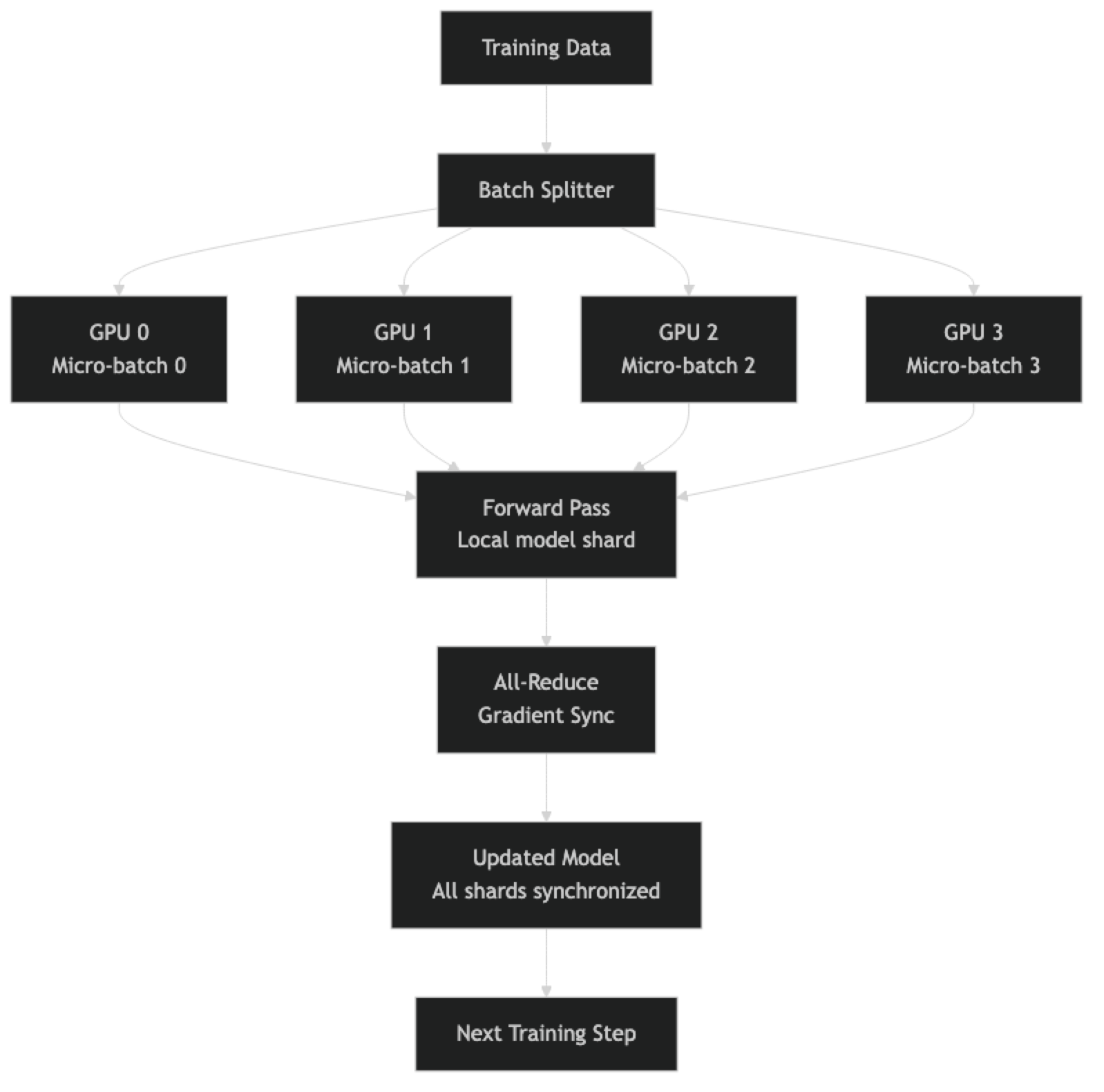
For FSDP, each GPU holds a shard of the model parameters. During the forward pass, each GPU gathers the full layer weights needed for its computation (all-gather operation), computes, then discards those weights. This is what makes FSDP memory-efficient while staying relatively simple to implement.
Implementation Example
Option 1: FSDP with HuggingFace Accelerate (Recommended)
Accelerate handles FSDP configuration through a config file, with minimal changes to your training script:
# Step 1: Configure Accelerate for FSDP
accelerate config

# Or create the config directly:
cat > accelerate_fsdp_config.yaml << 'EOF'
compute_environment: LOCAL_MACHINE
distributed_type: FSDP
fsdp_config:
  fsdp_auto_wrap_policy: TRANSFORMER_BASED_WRAP
  fsdp_backward_prefetch_policy: BACKWARD_PRE
  fsdp_sharding_strategy: FULL_SHARD         # ZeRO-3 equivalent
  fsdp_state_dict_type: FULL_STATE_DICT       # Saves full model for checkpoints
  fsdp_offload_params: false                  # Set true to offload to CPU (slower)
  fsdp_forward_prefetch: false
  fsdp_use_orig_params: true                  # Required for LoRA + FSDP
num_processes: 4                              # Number of GPUs
gpu_ids: all
mixed_precision: bf16
EOF

# Step 2: Launch training
accelerate launch --config_file accelerate_fsdp_config.yaml train.py# train.py — almost identical to single-GPU code
from accelerate import Accelerator
from transformers import AutoModelForCausalLM, AutoTokenizer
from trl import SFTTrainer, SFTConfig
from datasets import load_dataset
import torch
accelerator = Accelerator()
# Model loads on the correct device automatically with Accelerate
model = AutoModelForCausalLM.from_pretrained(
"meta-llama/Meta-Llama-3.1-70B-Instruct",
torch_dtype=torch.bfloat16,
# Do NOT use device_map="auto" with FSDP — Accelerate handles device placement
)
tokenizer = AutoTokenizer.from_pretrained("meta-llama/Meta-Llama-3.1-70B-Instruct")
tokenizer.pad_token = tokenizer.eos_token
dataset = load_dataset("json", data_files="train.jsonl", split="train")
def format_example(ex):
text = tokenizer.apply_chat_template(
ex["messages"], tokenize=False, add_generation_prompt=False
)
return {"text": text}
dataset = dataset.map(format_example)
training_config = SFTConfig(
output_dir="./70b-fsdp-output",
num_train_epochs=1,
per_device_train_batch_size=1, # Per GPU batch size — effective = 1×4 GPUs=4
gradient_accumulation_steps=16, # Effective batch = 64 examples
learning_rate=2e-5,
bf16=True,
gradient_checkpointing=True,
max_seq_length=2048,
dataset_text_field="text",
save_strategy="steps",
save_steps=500,
logging_steps=10,
report_to="none",
)
trainer = SFTTrainer(
model=model,
tokenizer=tokenizer,
train_dataset=dataset,
args=training_config,
)
trainer.train()Option 2: DeepSpeed ZeRO-3 Configuration
DeepSpeed provides more granular control and is the choice for extreme scale or when FSDP lacks a feature you need:
// ds_zero3_config.json
{
  "zero_optimization": {
    "stage": 3,
    "overlap_comm": true,
    "contiguous_gradients": true,
    "sub_group_size": 1e9,
    "reduce_bucket_size": "auto",
    "stage3_prefetch_bucket_size": "auto",
    "stage3_param_persistence_threshold": "auto",
    "stage3_max_live_parameters": 1e9,
    "stage3_max_reuse_distance": 1e9,
    "stage3_gather_16bit_weights_on_model_save": true
  },
  "bf16": {
    "enabled": true
  },
  "gradient_accumulation_steps": "auto",
  "gradient_clipping": "auto",
  "steps_per_print": 10,
  "train_batch_size": "auto",
  "train_micro_batch_size_per_gpu": "auto",
  "wall_clock_breakdown": false
}# DeepSpeed launch (4 GPUs)
deepspeed --num_gpus=4 train_deepspeed.py \
--deepspeed ds_zero3_config.json# train_deepspeed.py — same SFTConfig, add deepspeed argument
training_config = SFTConfig(
output_dir="./70b-deepspeed-output",
num_train_epochs=1,
per_device_train_batch_size=1,
gradient_accumulation_steps=16,
learning_rate=2e-5,
bf16=True,
gradient_checkpointing=True,
deepspeed="ds_zero3_config.json", # Point to your config file
max_seq_length=2048,
dataset_text_field="text",
logging_steps=10,
report_to="none",
)ZeRO-2 for Moderate Scale (More Memory-Efficient Than DDP, Less Than ZeRO-3)
// ds_zero2_config.json — good for 13B-30B models on 4×A100 80GB
{
  "zero_optimization": {
    "stage": 2,
    "overlap_comm": true,
    "contiguous_gradients": true,
    "allgather_bucket_size": 5e8,
    "reduce_scatter": true,
    "reduce_bucket_size": 5e8
  },
  "bf16": {
    "enabled": true
  },
  "gradient_accumulation_steps": "auto",
  "train_batch_size": "auto",
  "train_micro_batch_size_per_gpu": "auto"
}
CPU Offloading for Maximum Memory Efficiency
When you need to train a model that does not fit even with ZeRO-3 sharding across all available GPUs:
// ds_zero3_offload.json — enables NVMe/CPU parameter offloading
{
  "zero_optimization": {
    "stage": 3,
    "offload_optimizer": {
      "device": "cpu",
      "pin_memory": true
    },
    "offload_param": {
      "device": "cpu",
      "pin_memory": true
    },
    "overlap_comm": true,
    "contiguous_gradients": true,
    "stage3_prefetch_bucket_size": 0,
    "stage3_param_persistence_threshold": 0,
    "sub_group_size": 1e9,
    "stage3_max_live_parameters": 1e9
  },
  "bf16": {
    "enabled": true
  }
}
Monitoring Distributed Training
# Add this to your training script to verify distributed setup
import torch.distributed as dist
from accelerate import Accelerator

accelerator = Accelerator()

if accelerator.is_main_process:  # Only log from rank 0
    print(f"Distributed training setup:")
    print(f"  Number of processes: {accelerator.num_processes}")
    print(f"  Process index: {accelerator.process_index}")
    print(f"  Local process index: {accelerator.local_process_index}")
    print(f"  Mixed precision: {accelerator.mixed_precision}")
    print(f"  Distributed type: {accelerator.distributed_type}")
    print(f"  Device: {accelerator.device}")

    # Memory per GPU
    for i in range(torch.cuda.device_count()):
        props = torch.cuda.get_device_properties(i)
        print(f"  GPU {i}: {props.name} — {props.total_memory / 1e9:.1f} GB")
When to Use What: Decision Matrix
"""
Decision guide for distributed training configuration:

Model Size    | # GPUs    | Recommended Setup
7B            | 1         | Single GPU with QLoRA (no distributed needed)
7B            | 2–4       | DDP or FSDP ZeRO-1/2
13B           | 1         | QLoRA, single GPU (fits in 16GB)
13B           | 2–4       | FSDP ZeRO-2 or DeepSpeed ZeRO-2
30B–34B       | 4×A100    | FSDP ZeRO-3 or DeepSpeed ZeRO-3
70B           | 4×A100    | DeepSpeed ZeRO-3 (with or without CPU offload)
70B           | 8×A100    | DeepSpeed ZeRO-3 or Megatron-style TP+PP
"""

def recommend_distributed_config(model_size_b: float, num_gpus: int, vram_per_gpu_gb: int):
    """Simple heuristic for distributed training config selection."""
    total_vram = num_gpus * vram_per_gpu_gb

    # Rough memory estimate: model + optimizer + activations ≈ 20x params in GB (full FT)
    full_ft_memory = model_size_b * 20
    qlora_memory = model_size_b * 0.5 + 10  # ~10GB for activations/adapter

    if qlora_memory <= vram_per_gpu_gb:
        return "Single GPU with QLoRA — no distributed training needed"
    elif full_ft_memory <= total_vram * 0.9:
        if num_gpus <= 2:
            return "FSDP ZeRO-2 or DeepSpeed ZeRO-2"
        else:
            return "FSDP ZeRO-3 or DeepSpeed ZeRO-3"
    else:
        return "DeepSpeed ZeRO-3 with CPU offloading or QLoRA across GPUs"

# Examples
print(recommend_distributed_config(7, 1, 24))    # → Single GPU QLoRA
print(recommend_distributed_config(13, 2, 80))   # → FSDP ZeRO-2
print(recommend_distributed_config(70, 4, 80))   # → DeepSpeed ZeRO-3
print(recommend_distributed_config(70, 2, 80))   # → ZeRO-3 with CPU offloading
Best Practices
Always validate on a single GPU first. Run 10–20 training steps on a single GPU with a tiny dataset before launching a multi-GPU run. This catches data formatting issues, model loading errors, and config problems without wasting GPU time at scale.
Use gradient accumulation to simulate large batch sizes. With 4 GPUs and per_device_train_batch_size=2 and gradient_accumulation_steps=8, you have an effective batch size of 64. Larger effective batch sizes often allow a higher learning rate and produce more stable training. The optimal batch size for most LLM fine-tuning is in the range of 32–128.
Set save_total_limit when saving FSDP checkpoints. Full model checkpoints from FSDP are large (15GB for a 7B model, 140GB for a 70B). Without a limit, filling storage is a real risk on long runs. Keep 2–3 checkpoints maximum.
Use fsdp_state_dict_type: FULL_STATE_DICT for portability. This consolidates sharded weights into a single checkpoint at save time. The alternative (SHARDED_STATE_DICT) saves each GPU's shard separately — faster to save but requires the same number of GPUs to load, which is limiting.
Monitor GPU memory and utilization with nvidia-smi dmon. Run nvidia-smi dmon -s mu -d 5 in a separate terminal during training to track VRAM usage and GPU compute utilization per device. If any GPU shows consistently low utilization (< 80%), there is a bottleneck — usually data loading, communication, or load imbalance.
Common Mistakes
Using
device_map="auto"with FSDP or DeepSpeed.device_map="auto"tells HuggingFace to handle device placement automatically — this conflicts with FSDP's own device placement logic. Removedevice_mapentirely when using FSDP or DeepSpeed.Not setting
fsdp_use_orig_params: truewhen using LoRA + FSDP. LoRA wraps model parameters in custom module classes. FSDP needsuse_orig_params=Trueto correctly handle these wrapped parameters during sharding. Without it, gradient computation fails silently or produces NaN values.Forgetting that effective batch size changes with multi-GPU. With 4 GPUs and the same
per_device_train_batch_size, your effective batch is 4x larger. You may need to adjust the learning rate proportionally (linear scaling rule:lr_new = lr_base * n_gpus) or reducegradient_accumulation_stepsto maintain the same effective batch size.Running without
torch.distributed.barrier()between save operations. When checkpoint saving is not properly synchronized, GPUs may write checkpoints concurrently, causing file corruption. Accelerate handles this automatically — but custom checkpoint logic needs explicit barrier calls.Not handling CPU offloading's throughput impact. CPU offloading (ZeRO-3 with
offload_optimizerandoffload_param) dramatically reduces VRAM requirements but also reduces training throughput by 30–70% due to PCIe bandwidth limitations. Use it only when the model truly cannot fit without it, not as a default configuration.
Key Takeaways
- For most LoRA fine-tuning workflows, no distributed training is needed: QLoRA fits a 7B model on a single 16GB GPU and a 13B model on 24GB — reach for multi-GPU only when a model cannot fit on one GPU or you need to scale throughput significantly.
- Data parallelism replicates the full model on each GPU and requires one full copy per GPU — useful for throughput scaling but does not solve the memory problem for large models.
- ZeRO-3 (and its PyTorch equivalent FSDP with full sharding) shards model parameters, gradients, and optimizer states across all GPUs, enabling training of models much larger than per-GPU VRAM.
- HuggingFace Accelerate with FSDP is the recommended starting point for multi-GPU training: it requires minimal code changes from a single-GPU SFTTrainer script and handles 90% of use cases.
- Do not use
device_map="auto"with FSDP or DeepSpeed — this conflicts with their own device placement logic and causes errors or incorrect behavior. - Set
fsdp_use_orig_params: truewhen combining LoRA with FSDP — without it, FSDP's sharding conflicts with LoRA's parameter wrapping and produces silent gradient failures. - CPU offloading with ZeRO-3 reduces VRAM requirements to almost nothing but reduces training throughput by 30–70% due to PCIe bandwidth — use it only when the model cannot fit in GPU memory without it.
- Always validate your training setup on a single GPU with a tiny dataset for 10–20 steps before launching a multi-GPU distributed run — this catches data formatting and configuration issues without wasting GPU time.
FAQ
Do I need distributed training for LoRA fine-tuning of a 7B model? No. With QLoRA, a 7B model fine-tunes on a single 16GB GPU. Distributed training is necessary when the model does not fit on one GPU for your training mode (full fine-tuning), or when you want to scale throughput significantly (process 4x more data per hour). For most LoRA fine-tuning projects, single-GPU with Unsloth is sufficient.
What is the practical difference between ZeRO-2 and ZeRO-3? ZeRO-2 shards optimizer states and gradients, keeping the full model parameters on each GPU. ZeRO-3 shards everything including model parameters — each GPU holds only a fraction of the weights. ZeRO-3 has higher communication overhead (all-gather operations every forward pass) but enables training models that are larger than your per-GPU VRAM.
How do I know if my distributed training is bottlenecked by communication?
Run nvidia-smi dmon during training and check GPU compute utilization. If GPUs are at 70–80% utilization with frequent drops to 0%, communication is the bottleneck. Increasing per_device_train_batch_size (to amortize communication overhead) or enabling overlap_comm: true in DeepSpeed reduces the communication fraction of wall time.
Can I use LoRA with FSDP?
Yes, with the caveat of setting fsdp_use_orig_params: true in your Accelerate config. Without it, FSDP's parameter sharding conflicts with LoRA's parameter wrapping. Unsloth does not currently support FSDP — use standard PEFT with Accelerate for multi-GPU LoRA training.
What is the fastest path to train a 70B model? If fitting in memory: 4xA100 80GB with FSDP ZeRO-3 or DeepSpeed ZeRO-3, using QLoRA and LoRA for memory efficiency. If not fitting: add CPU offloading with DeepSpeed ZeRO-3 (slower due to PCIe transfer) or use tensor parallelism with Megatron-LM (more complex setup but highest throughput).
How do I choose between FSDP and DeepSpeed? Start with FSDP via HuggingFace Accelerate — it integrates seamlessly with TRL and SFTTrainer with minimal configuration. Move to DeepSpeed when you need CPU or NVMe offloading (ZeRO-Infinity), more granular memory optimization tuning, or Mixture-of-Experts model support. DeepSpeed has a steeper configuration curve but more features at extreme scale.
What effective batch size should I target for distributed LLM fine-tuning?
Most LLM fine-tuning benefits from effective batch sizes in the range of 32 to 128. With 4 GPUs and per_device_train_batch_size=2 and gradient_accumulation_steps=8, the effective batch is 64. When moving from single-GPU to multi-GPU, you may need to adjust the learning rate upward proportionally (linear scaling rule: multiply LR by the number of GPUs) or reduce gradient accumulation steps to maintain the same effective batch size.