Autonomous Agents: Build Systems That Do not Get Stuck (2026)
Last updated: March 2026
Autonomous AI Agents: How They Work and How to Build One (2026)
The appeal of a fully autonomous agent is obvious: give it a goal and walk away. The reality is more complicated. Autonomous agents that take actions without human oversight introduce a category of failure mode that simply does not exist in interactive systems — the agent does something irreversible before you realize it was on the wrong track.
This is not a reason to avoid autonomous agents. It is a reason to design them carefully. The engineering challenge is not making the agent capable — modern LLMs are capable enough. The challenge is building a loop architecture that handles errors gracefully, knows when to stop and ask for clarification, limits the blast radius of mistakes, and produces outputs you can audit.
This post covers the architecture of production autonomous agents: the execution loop, error recovery patterns, self-correction mechanisms, and the safety controls that separate autonomous systems that are safe to deploy from those that are not.
Concept Overview
Autonomous task execution means the agent runs a multi-step workflow to completion without human input at each step. The defining characteristics are:
Goal-directed — The agent receives a high-level goal and determines the steps to achieve it, rather than following a human-specified sequence.
Self-directing — The agent decides what to do next based on the current state and what it has learned from prior steps. No step-by-step instructions from a human.
Error-recovering — When a step fails, the agent does not crash. It detects the failure, diagnoses the cause if possible, and tries an alternative approach.
Bounded — Autonomy is not unlimited. Production autonomous agents have iteration limits, time limits, cost limits, and checkpoints where human approval may be required.
How It Works
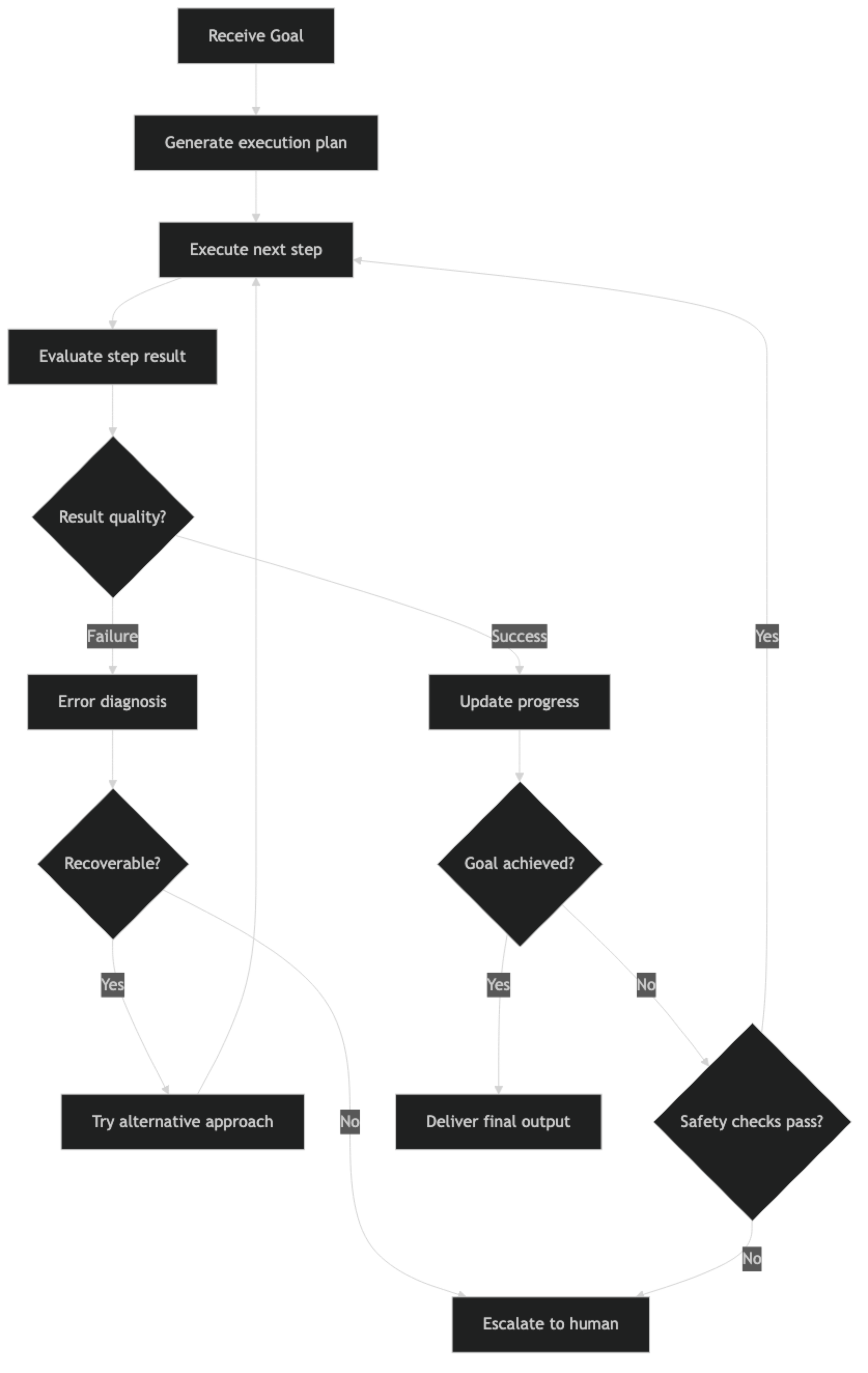
The loop runs until either the goal is achieved, a safety check fails, an unrecoverable error occurs, or a resource limit is hit. Every branch should have a defined outcome — the agent should never be in a state where it has no path forward.
Implementation Example
Core Autonomous Agent Loop
from langchain_openai import ChatOpenAI
from langchain.agents import AgentExecutor, create_tool_calling_agent
from langchain_core.prompts import ChatPromptTemplate, MessagesPlaceholder
from langchain_community.tools import DuckDuckGoSearchRun
from langchain.tools import tool
from dataclasses import dataclass, field
from typing import Optional
from datetime import datetime
import json

llm = ChatOpenAI(model="gpt-4o", temperature=0)

@dataclass
class AgentRunContext:
    """Tracks the state of an autonomous agent run."""
    goal: str
    start_time: datetime = field(default_factory=datetime.now)
    steps_taken: int = 0
    errors_encountered: int = 0
    cost_estimate_usd: float = 0.0
    plan: list[str] = field(default_factory=list)
    completed_steps: list[dict] = field(default_factory=list)
    status: str = "running"  # running | paused | completed | failed | escalated

    # Safety limits
    max_steps: int = 20
    max_errors: int = 3
    max_cost_usd: float = 2.00
    max_runtime_seconds: int = 300  # 5 minutes

    def is_within_limits(self) -> tuple[bool, str]:
        """Check if the run is within safety limits."""
        elapsed = (datetime.now() - self.start_time).total_seconds()

        if self.steps_taken >= self.max_steps:
            return False, f"Step limit reached ({self.max_steps} steps)"
        if self.errors_encountered >= self.max_errors:
            return False, f"Error limit reached ({self.max_errors} errors)"
        if self.cost_estimate_usd >= self.max_cost_usd:
            return False, f"Cost limit reached (${self.cost_estimate_usd:.2f})"
        if elapsed >= self.max_runtime_seconds:
            return False, f"Time limit reached ({elapsed:.0f}s)"

        return True, "Within limits"

    def record_step(self, action: str, result: str, success: bool, tokens_used: int = 0):
        """Record a completed step."""
        self.steps_taken += 1
        if not success:
            self.errors_encountered += 1

        # Rough cost estimate: GPT-4o at $0.0025/1K input, $0.01/1K output
        self.cost_estimate_usd += (tokens_used / 1000) * 0.005

        self.completed_steps.append({
            "step": self.steps_taken,
            "action": action,
            "result": result[:300],
            "success": success,
            "timestamp": datetime.now().isoformat()
        })
Self-Correction Pattern
Self-correction is what separates brittle autonomous agents from robust ones. When a step produces unexpected output or fails, the agent should reason about why and try a different approach.
def create_self_correcting_executor(tools: list) -> AgentExecutor:
    """Create an agent executor with self-correction built into the prompt."""

    system_prompt = """You are an autonomous task executor. Your job is to complete complex tasks independently.

Self-correction protocol:
1. If a tool call fails, analyze the error message and try a different approach
2. If search results are irrelevant, refine your query and try again
3. If you have tried the same approach 2+ times without success, try a fundamentally different strategy
4. If you cannot make progress after 3 different approaches, stop and report why

Quality standards:
- Verify important facts with at least 2 sources before using them
- If a step's output seems incomplete or wrong, say so and try to fix it
- Never assume a tool call succeeded without checking the output

Progress tracking:
- Before each action, state what step you are on and what you expect to get
- After each observation, state what you learned and what you will do next

Escalation conditions (stop and report, do not continue):
- You need information that requires human access (login credentials, internal documents)
- You are about to take an irreversible action (delete, send email, submit form)
- You are uncertain whether completing the task would cause harm
"""

    prompt = ChatPromptTemplate.from_messages([
        ("system", system_prompt),
        ("human", "{input}"),
        MessagesPlaceholder("agent_scratchpad"),
    ])

    agent = create_tool_calling_agent(llm=llm, tools=tools, prompt=prompt)

    return AgentExecutor(
        agent=agent,
        tools=tools,
        verbose=True,
        max_iterations=15,
        max_execution_time=180,
        handle_parsing_errors=True,
        return_intermediate_steps=True
    )


class AutonomousTaskRunner:
    """
    Orchestrates an autonomous agent with safety controls,
    error recovery, and progress tracking.
    """

    def __init__(self, tools: list, max_steps: int = 20, max_cost: float = 2.00):
        self.executor = create_self_correcting_executor(tools)
        self.max_steps = max_steps
        self.max_cost = max_cost

    def run(self, goal: str, require_confirmation_for: list[str] = None) -> dict:
        """
        Execute an autonomous task with safety controls.

        Args:
            goal: High-level goal description
            require_confirmation_for: List of action patterns requiring human OK
                                      (e.g., ["send email", "delete file"])
        """
        ctx = AgentRunContext(
            goal=goal,
            max_steps=self.max_steps,
            max_cost_usd=self.max_cost
        )
        require_confirmation_for = require_confirmation_for or []

        print(f"\n{'='*60}")
        print(f"Starting autonomous task: {goal}")
        print(f"Safety limits: {ctx.max_steps} steps, ${ctx.max_cost_usd:.2f}, {ctx.max_runtime_seconds}s")
        print(f"{'='*60}\n")

        try:
            # Check if any confirmation patterns match the goal
            if require_confirmation_for:
                for pattern in require_confirmation_for:
                    if pattern.lower() in goal.lower():
                        print(f"[SAFETY] Task matches confirmation pattern: '{pattern}'")
                        user_ok = input(f"Confirm execution? (yes/no): ").strip().lower()
                        if user_ok != "yes":
                            ctx.status = "cancelled"
                            return self._build_result(ctx, "Cancelled by user before execution")

            # Run the agent
            result = self.executor.invoke({"input": goal})

            # Check limits after completion
            within_limits, limit_reason = ctx.is_within_limits()

            # Record all intermediate steps
            for action, observation in result.get("intermediate_steps", []):
                success = not observation.startswith("Error")
                ctx.record_step(
                    action=f"{action.tool}({str(action.tool_input)[:100]})",
                    result=str(observation),
                    success=success
                )

            ctx.status = "completed"
            return self._build_result(ctx, result["output"])

        except Exception as e:
            ctx.status = "failed"
            ctx.errors_encountered += 1
            error_msg = f"Agent failed with exception: {str(e)}"
            print(f"[ERROR] {error_msg}")
            return self._build_result(ctx, error_msg)

    def _build_result(self, ctx: AgentRunContext, output: str) -> dict:
        """Build a structured result from the run context."""
        elapsed = (datetime.now() - ctx.start_time).total_seconds()

        return {
            "status": ctx.status,
            "goal": ctx.goal,
            "output": output,
            "metrics": {
                "steps_taken": ctx.steps_taken,
                "errors": ctx.errors_encountered,
                "elapsed_seconds": round(elapsed, 1),
                "estimated_cost_usd": round(ctx.cost_estimate_usd, 4)
            },
            "completed_steps": ctx.completed_steps
        }


# Usage
search_tool = DuckDuckGoSearchRun()

runner = AutonomousTaskRunner(
    tools=[search_tool],
    max_steps=15,
    max_cost=1.50
)

result = runner.run(
    goal="""Research the top 5 Python libraries for building AI agents released or updated in 2025-2026.
    For each library: find the GitHub repository, latest version, key features, and typical use case.
    Summarize your findings in a structured format.""",
    require_confirmation_for=[]  # No dangerous actions in this task
)

print(f"\nStatus: {result['status']}")
print(f"Steps: {result['metrics']['steps_taken']}")
print(f"Cost estimate: ${result['metrics']['estimated_cost_usd']}")
print(f"\nOutput:\n{result['output']}")
Error Recovery with Retry Logic
from tenacity import retry, stop_after_attempt, wait_exponential, RetryError

class ResilientTool:
    """Wraps a tool function with retry logic and exponential backoff."""

    def __init__(self, tool_fn, max_attempts: int = 3):
        self.tool_fn = tool_fn
        self.max_attempts = max_attempts

    @retry(
        stop=stop_after_attempt(3),
        wait=wait_exponential(multiplier=1, min=2, max=30),
        reraise=False
    )
    def _call_with_retry(self, *args, **kwargs):
        return self.tool_fn(*args, **kwargs)

    def __call__(self, *args, **kwargs):
        try:
            return self._call_with_retry(*args, **kwargs)
        except RetryError as e:
            return f"Tool failed after {self.max_attempts} attempts: {str(e.last_attempt.exception())}"
        except Exception as e:
            return f"Tool error: {str(e)}"
Best Practices
Design for failure, not just success. Every autonomous agent will encounter unexpected situations — APIs that return nothing, search results that are irrelevant, observations that contradict the plan. The agent's behavior in failure cases is more important than its behavior in happy cases.
Make irreversible actions explicit gating points. Sending emails, deleting records, submitting forms, making payments — these actions cannot be undone. Build explicit checkpoints that require human confirmation before executing them, even in otherwise autonomous workflows.
Log every action before you execute it. In production, write a record of every planned action to your observability platform before executing it. If something goes wrong, you want a complete audit trail of what the agent did and in what order.
Set conservative limits for the first deployment. Start with a low max_steps (10-12), a short time limit (60 seconds), and no dangerous tools. Increase limits gradually as you gain confidence in the agent's behavior. It is easier to relax constraints than to recover from an incident.
Common Mistakes
No human-in-the-loop for irreversible actions. Fully autonomous agents should not send emails, delete data, or make payments without a confirmation step. The cost of a human approval checkpoint is trivial compared to the cost of an unrecoverable mistake.
Trusting the agent's self-assessment. Agents sometimes report success when they have not completed the task. Build independent verification: check that output files exist, that API calls returned 200, that generated content passes basic quality checks.
Not setting a maximum cost limit. Autonomous agents can burn through API budget quickly if they loop or call expensive tools repeatedly. Set a hard dollar limit and stop the agent when it is reached.
Designing the recovery path after a limit is hit. What happens when the agent hits
max_iterations? What happens when it hits the cost limit? Define these outcomes explicitly. The default behavior (silent termination with partial output) is rarely what you want.Running autonomous agents in production without dry-run mode. Build a
dry_run=Trueparameter that substitutes real tool calls with mock responses. Use it during development and for previewing what an agent will do before it does it.
Key Takeaways
- Use
create_tool_calling_agent(not deprecatedcreate_openai_functions_agent) for reliable structured tool calls - Set both
max_iterationsandmax_execution_time— runaway autonomous agents are the most expensive and hardest-to-debug production failure mode - Implement progress tracking in state to detect loops: if the agent calls the same tool with similar arguments 3 times with no new results, redirect or escalate
- Build access controls inside every tool with side effects — allowlists for paths, tables, and endpoints — not just in the system prompt
- Require human confirmation checkpoints before irreversible actions (delete, send, publish, charge) regardless of how confident the agent appears
- Set cost caps at the infrastructure level in addition to
max_iterations— a single bug in iteration logic can bypass the iteration limit - Autonomy is bounded in production: define what happens when the agent hits each limit before you ship
- Test the failure path explicitly — test what happens when the agent reaches
max_iterationswithout completing the task
FAQ
How do I prevent an autonomous agent from taking harmful actions? Build access controls into every tool that can cause harm. Use allowlists for file paths, database tables, and API endpoints. Require explicit human confirmation for irreversible actions (delete, send, charge). Set hard limits on execution time and API cost at the infrastructure level. Treat security at the tool layer as the primary defense — the system prompt is not a reliable safety control.
What is the right max_iterations for an autonomous agent?
It depends on task complexity. A research and report task might need 15-20 iterations. A simple lookup task needs 3-5. Start conservative, monitor actual usage per task type in production, and increase limits only when you have data showing the agent uses the extra iterations productively. Never guess — measure.
How do I handle the case where the agent loops without making progress? Track progress explicitly in state: record what has been completed and compare against the plan. If the agent has called the same tool with similar arguments three times without new results, that is a loop signal. Add logic that detects this pattern and either reformulates the approach (inject a new instruction into context) or escalates to a human with a summary of what was tried.
Should autonomous agents have access to the internet by default? No. Network access should be granted based on the task requirements. An agent that only processes local files does not need web search tools. Minimizing tool access reduces the agent's ability to cause unintended side effects and limits the attack surface for prompt injection via tool outputs.
How do I evaluate whether my autonomous agent is actually completing tasks correctly? Build a test harness with known-correct tasks and expected outputs. Run the agent on each test case and check against criteria — did it produce the required output? Does the output contain required sections? Are factual claims verifiable? Never rely solely on the agent's own report of success — agents frequently declare success when they have only partially completed the task.
What is self-correction and how do I implement it? Self-correction is when the agent recognizes that a step failed or produced an unexpected result and adjusts its approach without human intervention. Implement it by injecting a reflection step into the loop: after each tool call, evaluate whether the result moves toward the goal. If not, the agent generates an alternative approach. A simple implementation prompts the model: "The previous step returned [error]. What should you try instead?"
When is autonomous execution inappropriate and human-in-the-loop required? Human-in-the-loop is required for: irreversible actions (deleting data, sending communications, making purchases), actions with large blast radius (modifying production systems, bulk operations), and tasks where the agent has expressed uncertainty. The practical rule: if a mistake would take more than 15 minutes to reverse or apologize for, require human approval before proceeding.