Anthropic API: Build with Claude in Python, No Guesswork (2026)
Last updated: March 2026
Anthropic Claude API Tutorial: Complete Developer Guide (2026)
The first thing developers notice when switching from OpenAI to Claude is that the output feels different — more thorough, less likely to refuse edge cases, and notably better at following nuanced formatting instructions. The second thing they notice is that the API schema is slightly different, and a direct copy-paste of their OpenAI code does not work.
Claude is not a drop-in replacement. The schema differences are small but consequential: system prompts are top-level parameters, not messages; tool use has a different structure; and streaming chunks contain different event types. Once you understand the pattern, it clicks quickly. Claude's 200K context window and strong instruction-following make it a compelling choice for document processing, long-context analysis, and complex multi-step tasks.
This tutorial walks through the Claude API from setup to production patterns. Every code example is runnable.
Concept Overview
The Anthropic Messages API is the primary interface for Claude. Unlike OpenAI's API where system instructions go into the messages array with role: system, Claude treats the system prompt as a separate, top-level parameter.
Available models (2026):
| Model | Context | Best For |
|---|---|---|
claude-3-5-sonnet-20241022 |
200K | Complex reasoning, coding, instruction following |
claude-3-opus-20240229 |
200K | Highest capability tasks, nuanced analysis |
claude-3-haiku-20240307 |
200K | High speed, cost-sensitive tasks |
Key API concepts:
systemparameter — Top-level system prompt, not a message in the arraymessagesarray — Alternatinguser/assistantturns (must start withuser)max_tokens— Required parameter (unlike OpenAI where it is optional)- Tool use — Claude's equivalent of OpenAI function calling
- Prompt caching — Cache control directives on large, repeated context blocks
How It Works
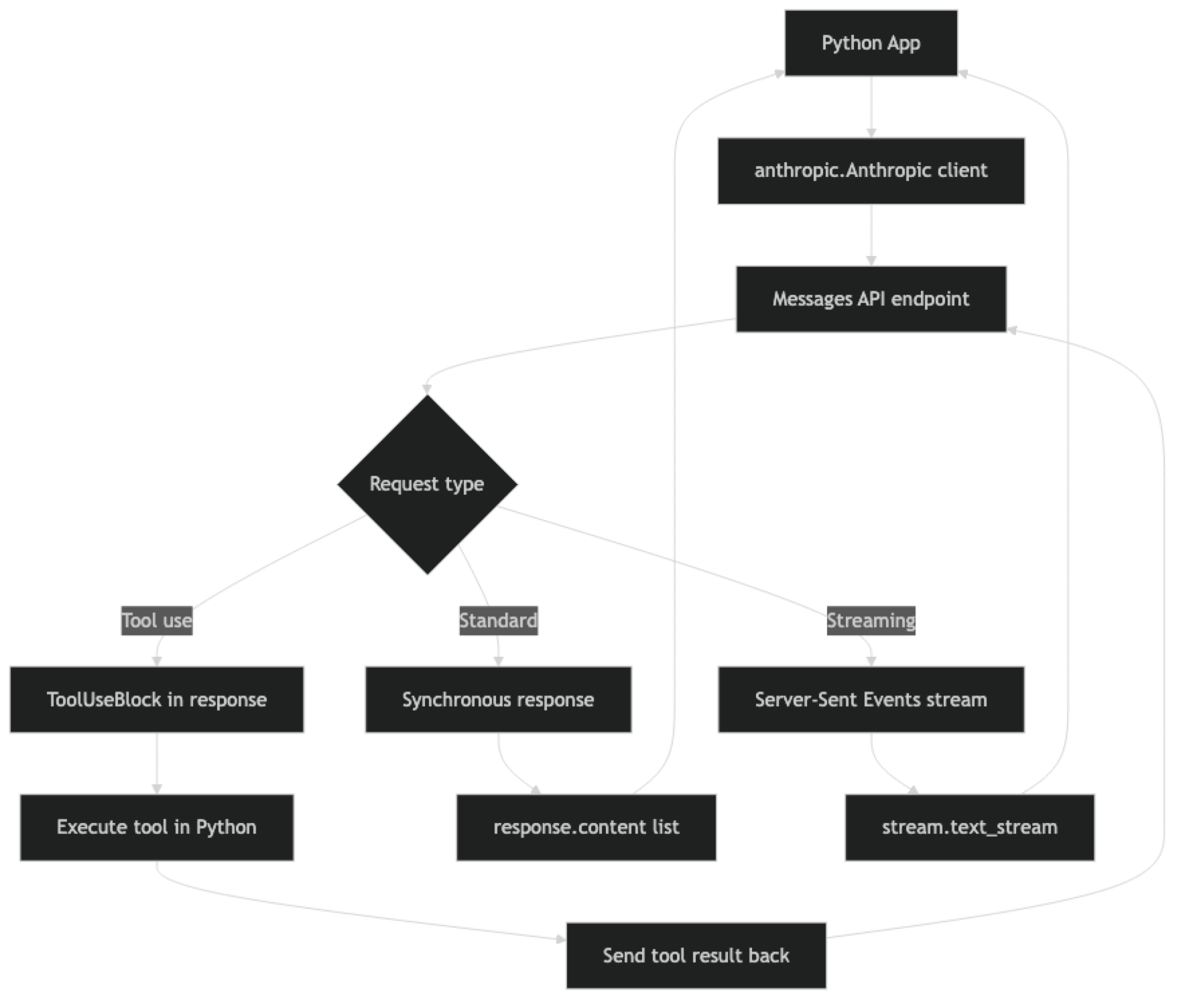
One key structural difference from OpenAI: Claude's response content is a list, not a single string. response.content contains one or more content blocks — TextBlock, ToolUseBlock, etc. For simple completions you access response.content[0].text. For tool-using responses you iterate to find the ToolUseBlock.
Implementation Example
Installation and Setup
pip install anthropic
export ANTHROPIC_API_KEY="sk-ant-..."import anthropic
import os
client = anthropic.Anthropic()
# Reads ANTHROPIC_API_KEY from environment automaticallyBasic Completion
response = client.messages.create(
    model="claude-3-5-sonnet-20241022",
    max_tokens=512,
    system="You are a concise technical writer. Respond in plain text without markdown.",
    messages=[
        {"role": "user", "content": "Explain what a context window is in 2 sentences."}
    ]
)

print(response.content[0].text)
print(f"\nUsage: {response.usage.input_tokens} in / {response.usage.output_tokens} out")
The max_tokens parameter is required in Claude's API. OpenAI makes it optional with a default; Claude does not. Forgetting this throws a validation error.
Multi-Turn Conversations
conversation = []

def chat(user_message: str, system: str = None) -> str:
    conversation.append({"role": "user", "content": user_message})

    kwargs = {
        "model": "claude-3-5-sonnet-20241022",
        "max_tokens": 1024,
        "messages": conversation
    }
    if system:
        kwargs["system"] = system

    response = client.messages.create(**kwargs)
    assistant_text = response.content[0].text
    conversation.append({"role": "assistant", "content": assistant_text})
    return assistant_text

system_prompt = "You are an expert Python engineer. Give concise, accurate answers."

print(chat("What is the difference between @staticmethod and @classmethod?", system_prompt))
print(chat("Can you show a practical example where classmethod is the right choice?"))
Unlike OpenAI, the system prompt stays constant across turns — it is not part of the conversation array. This makes it cleaner to separate persistent instructions from conversation state.
Streaming
def stream_response(user_message: str, system: str = "") -> str:
    """Stream Claude response and return full text."""
    full_text = ""

    with client.messages.stream(
        model="claude-3-5-sonnet-20241022",
        max_tokens=1024,
        system=system,
        messages=[{"role": "user", "content": user_message}]
    ) as stream:
        for text in stream.text_stream:
            print(text, end="", flush=True)
            full_text += text

    print()  # newline after streaming completes
    return full_text

result = stream_response(
    "Write a Python function to validate an email address using regex.",
    system="You are a Python expert. Include type hints and a docstring."
)
In practice, streaming with Claude uses the same SSE-based pattern as OpenAI. The stream.text_stream iterator handles the event parsing and yields only the text delta content, which is convenient for most use cases.
Tool Use (Function Calling)
Claude's tool use is Claude's equivalent of OpenAI function calling. The schema is similar but uses the term "tools" and "tool_use" blocks.
import json

# Define tools with JSON Schema
tools = [
    {
        "name": "get_weather",
        "description": "Get current weather for a city. Returns temperature and conditions.",
        "input_schema": {
            "type": "object",
            "properties": {
                "city": {
                    "type": "string",
                    "description": "City name, e.g. 'San Francisco'"
                },
                "units": {
                    "type": "string",
                    "enum": ["celsius", "fahrenheit"],
                    "description": "Temperature units"
                }
            },
            "required": ["city"]
        }
    }
]

def get_weather(city: str, units: str = "celsius") -> dict:
    """Mock weather function — replace with real API call."""
    return {"city": city, "temperature": 22, "units": units, "conditions": "Partly cloudy"}

def run_tool_loop(user_query: str) -> str:
    """Run Claude with tools until it returns a final text response."""
    messages = [{"role": "user", "content": user_query}]

    while True:
        response = client.messages.create(
            model="claude-3-5-sonnet-20241022",
            max_tokens=1024,
            tools=tools,
            messages=messages
        )

        # Check stop reason
        if response.stop_reason == "end_turn":
            # Claude is done — extract final text
            for block in response.content:
                if hasattr(block, "text"):
                    return block.text

        if response.stop_reason == "tool_use":
            # Claude wants to call a tool
            messages.append({"role": "assistant", "content": response.content})

            tool_results = []
            for block in response.content:
                if block.type == "tool_use":
                    # Execute the tool
                    if block.name == "get_weather":
                        result = get_weather(**block.input)
                    else:
                        result = {"error": f"Unknown tool: {block.name}"}

                    tool_results.append({
                        "type": "tool_result",
                        "tool_use_id": block.id,
                        "content": json.dumps(result)
                    })

            # Send tool results back to Claude
            messages.append({"role": "user", "content": tool_results})
        else:
            break

    return "No response generated"

answer = run_tool_loop("What's the weather like in Tokyo right now?")
print(answer)
A common mistake: forgetting to add Claude's assistant response to the messages list before sending tool results. Claude needs to see its own tool use request in the history to understand the context of the results.
Vision — Analyzing Images
import base64
from pathlib import Path

def analyze_image_file(image_path: str, question: str) -> str:
    """Analyze a local image file with Claude."""
    image_data = Path(image_path).read_bytes()
    b64_data = base64.b64encode(image_data).decode("utf-8")

    # Detect media type from extension
    ext = Path(image_path).suffix.lower()
    media_types = {".jpg": "image/jpeg", ".jpeg": "image/jpeg",
                   ".png": "image/png", ".gif": "image/gif", ".webp": "image/webp"}
    media_type = media_types.get(ext, "image/jpeg")

    response = client.messages.create(
        model="claude-3-5-sonnet-20241022",
        max_tokens=1024,
        messages=[
            {
                "role": "user",
                "content": [
                    {
                        "type": "image",
                        "source": {
                            "type": "base64",
                            "media_type": media_type,
                            "data": b64_data
                        }
                    },
                    {
                        "type": "text",
                        "text": question
                    }
                ]
            }
        ]
    )
    return response.content[0].text

def analyze_image_url(image_url: str, question: str) -> str:
    """Analyze an image from URL with Claude."""
    response = client.messages.create(
        model="claude-3-5-sonnet-20241022",
        max_tokens=1024,
        messages=[
            {
                "role": "user",
                "content": [
                    {
                        "type": "image",
                        "source": {
                            "type": "url",
                            "url": image_url
                        }
                    },
                    {"type": "text", "text": question}
                ]
            }
        ]
    )
    return response.content[0].text

# Example usage
result = analyze_image_url(
    "https://example.com/architecture-diagram.png",
    "Describe this system architecture diagram and identify any potential bottlenecks."
)
print(result)
Prompt Caching
Prompt caching is one of Claude's most impactful cost optimization features. For prompts with long, repeated system instructions (documents, code bases, knowledge bases), caching reduces input token costs by up to 90%.
# Long document that stays the same across requests
LARGE_DOCUMENT = """
[Your 50,000-word technical specification here...]
""" * 100  # Simulating a large document

def ask_about_document(question: str) -> str:
    """Query a large document with prompt caching enabled."""
    response = client.messages.create(
        model="claude-3-5-sonnet-20241022",
        max_tokens=1024,
        system=[
            {
                "type": "text",
                "text": "You are a helpful assistant analyzing a technical document.",
                "cache_control": {"type": "ephemeral"}
            }
        ],
        messages=[
            {
                "role": "user",
                "content": [
                    {
                        "type": "text",
                        "text": LARGE_DOCUMENT,
                        "cache_control": {"type": "ephemeral"}  # Cache this block
                    },
                    {
                        "type": "text",
                        "text": question
                    }
                ]
            }
        ]
    )

    # Check cache performance
    usage = response.usage
    print(f"Cache read tokens: {getattr(usage, 'cache_read_input_tokens', 0)}")
    print(f"Cache creation tokens: {getattr(usage, 'cache_creation_input_tokens', 0)}")

    return response.content[0].text
The first call writes to the cache (slightly more expensive). Subsequent calls with the same cached content pay only 10% of the normal input token cost — a dramatic saving for document analysis workflows.
Best Practices
Use Claude 3 Haiku for high-frequency simple tasks. It is significantly faster and cheaper than Sonnet while being more than capable for classification, extraction, and summarization. Reserve Sonnet and Opus for tasks that actually require advanced reasoning.
Make the most of the 200K context window. Claude handles long contexts better than most models. For document analysis workflows, send the full document rather than chunking and embedding — sometimes simpler beats complex RAG architecture when the document fits in context.
Structure system prompts carefully. Claude is particularly responsive to well-structured system prompts with clear sections. Use XML-style tags (<instructions>, <context>, <format>) to separate different types of instructions — Claude has been trained to recognize and follow this pattern.
Enable prompt caching for repeated context. Any system with a large, static system prompt or documents that are queried repeatedly will see significant cost reduction from caching. It is one of the first optimizations to implement in production.
Test tool definitions thoroughly. Claude is good at tool use but will occasionally call tools with missing parameters or misinterpret ambiguous tool descriptions. Write detailed description fields and explicit required arrays in your tool schemas.
Common Mistakes
Forgetting that
max_tokensis required. Unlike OpenAI, Claude will throw a validation error if you omitmax_tokens. Set a reasonable default in your wrapper function.Putting the system prompt in the messages array. Claude's
systemparameter is separate frommessages. Including a{"role": "system", ...}message will cause an API error.Not handling
tool_usestop reason in the response loop. When Claude calls a tool, the stop reason istool_use, notend_turn. If you only check for text content, you will miss tool calls entirely.Starting the messages array with an assistant turn. Claude requires the messages array to start with a
userturn. Starting withassistantthrows a validation error.Using the same retry delays as OpenAI. Anthropic's rate limits and backoff behavior differ from OpenAI's. Test retry behavior specifically against Anthropic's API under load.
Key Takeaways
- Claude's
systemparameter is a top-level field separate from the messages array — unlike OpenAI where system instructions go inside the messages list as arole: systementry. max_tokensis required in every Claude API call; omitting it throws a validation error, unlike OpenAI where it is optional with a default.- Claude's response content is a list of blocks (
TextBlock,ToolUseBlock), not a single string — access text viaresponse.content[0].text. - Tool use stop reason is
"tool_use", not"end_turn"— if you only check for text content you will silently miss all tool calls. - The 200K context window and strong instruction following make Claude particularly effective for document-heavy workflows and complex multi-step tasks where full context matters.
- Prompt caching with
cache_control: {"type": "ephemeral"}reduces input token costs by up to 90% for applications that repeatedly send large system prompts or static documents. - Messages must start with a
userturn — starting the array with anassistantturn throws a validation error. - Claude 3 Haiku is the right default for high-frequency, cost-sensitive tasks; Claude 3.5 Sonnet for complex reasoning; Opus has been largely superseded by Sonnet on quality-to-cost ratio.
FAQ
Is Claude better than GPT-4o?
It depends on the task. Claude tends to outperform GPT-4o on long-context tasks, nuanced instruction following, and avoiding refusals on legitimate edge cases. GPT-4o has a larger ecosystem, better function calling tooling, and more integrations. Most production systems use both — routing based on task type and cost.
How do I migrate OpenAI code to use Claude?
The main changes: move your system message content to the system parameter, add max_tokens as a required field, update the response access from response.choices[0].message.content to response.content[0].text, and update tool schemas to use input_schema instead of parameters.
Does Claude support JSON mode like OpenAI?
Claude does not have a dedicated JSON mode flag, but you can reliably get JSON output by instructing Claude in the system prompt to respond only with valid JSON and using tool use with a schema that matches your desired output structure. The tool use approach is more reliable for complex schemas.
What is the difference between claude-3-5-sonnet and claude-3-opus?
Claude 3.5 Sonnet outperforms Claude 3 Opus on most benchmarks while being significantly cheaper and faster. Opus has been largely superseded for most tasks. Sonnet is the right default choice in 2026; Haiku for cost-sensitive high-volume tasks.
How does Claude handle rate limits?
Like OpenAI, Claude returns 429 errors when you exceed token-per-minute or request-per-minute limits. Implement exponential backoff with jitter. Anthropic provides headers (x-ratelimit-remaining-requests, x-ratelimit-remaining-tokens) that you can use to proactively throttle before hitting limits.
When does prompt caching actually save money with Claude?
Prompt caching is most valuable when 80% or more of your input tokens come from a repeated system prompt or static document. A document Q&A system that queries the same knowledge base repeatedly can see 80–90% cost reduction on input tokens. If every request has mostly unique content, caching provides little benefit — the cache write cost (25% more than normal input) may exceed the savings.
How do I handle tool use in Claude streaming?
When streaming with tool use enabled, accumulate chunks until you see a content_block_stop event on a tool_use block. The input field of tool use blocks arrives as partial JSON across multiple stream events — do not attempt to parse it until the block is complete. Use the Anthropic SDK streaming context manager which handles this accumulation automatically.