AI Agents: Build Autonomous Systems That Actually Work (2026)
AI Agents Guide: Architecture and Design Patterns
Most LLM integrations hit a ceiling around the same point. The model can answer questions well, summarize text, and generate content — but the moment your product needs to take an action, retrieve live data, or chain multiple steps together, the simple prompt-response loop breaks down. That is the inflection point where engineers start building agents.
An AI agent is not a chatbot with extra steps. It is a fundamentally different architecture: a loop where the language model drives its own behavior, decides what tools to call, observes results, and repeats until a task is complete. The model is no longer just producing output — it is acting as a controller for a workflow.
This guide covers what you actually need to know to build agents that work in production: the core components, the design patterns that matter, the trade-offs between different approaches, and the failure modes engineers encounter when they move from prototype to production. This is not an academic survey. It is what a year of building and shipping agents looks like when you write it down.
Concept Overview
An AI agent consists of five fundamental components working together:
1. Perception / Input Layer — What the agent receives. This includes the user's task, any documents or data provided, system instructions, and the current state of the conversation or task.
2. LLM Reasoning Core — The language model that decides what to do next. It reads the input, the available tools, and any prior observations, then produces either a tool call or a final response.
3. Memory — Context that persists across steps. Short-term memory is the current context window. Long-term memory is a vector store or database that the agent can query for past information.
4. Tool Registry — A set of functions the model can call. Tools can be anything: web search, code execution, database queries, file I/O, external APIs, or other agents.
5. Execution Engine — The runtime loop that orchestrates everything. It sends prompts to the LLM, parses tool calls, executes them, feeds results back, and decides when to stop.
These five components are present in every serious agent system, regardless of what framework you use.
How It Works
The Core Execution Loop
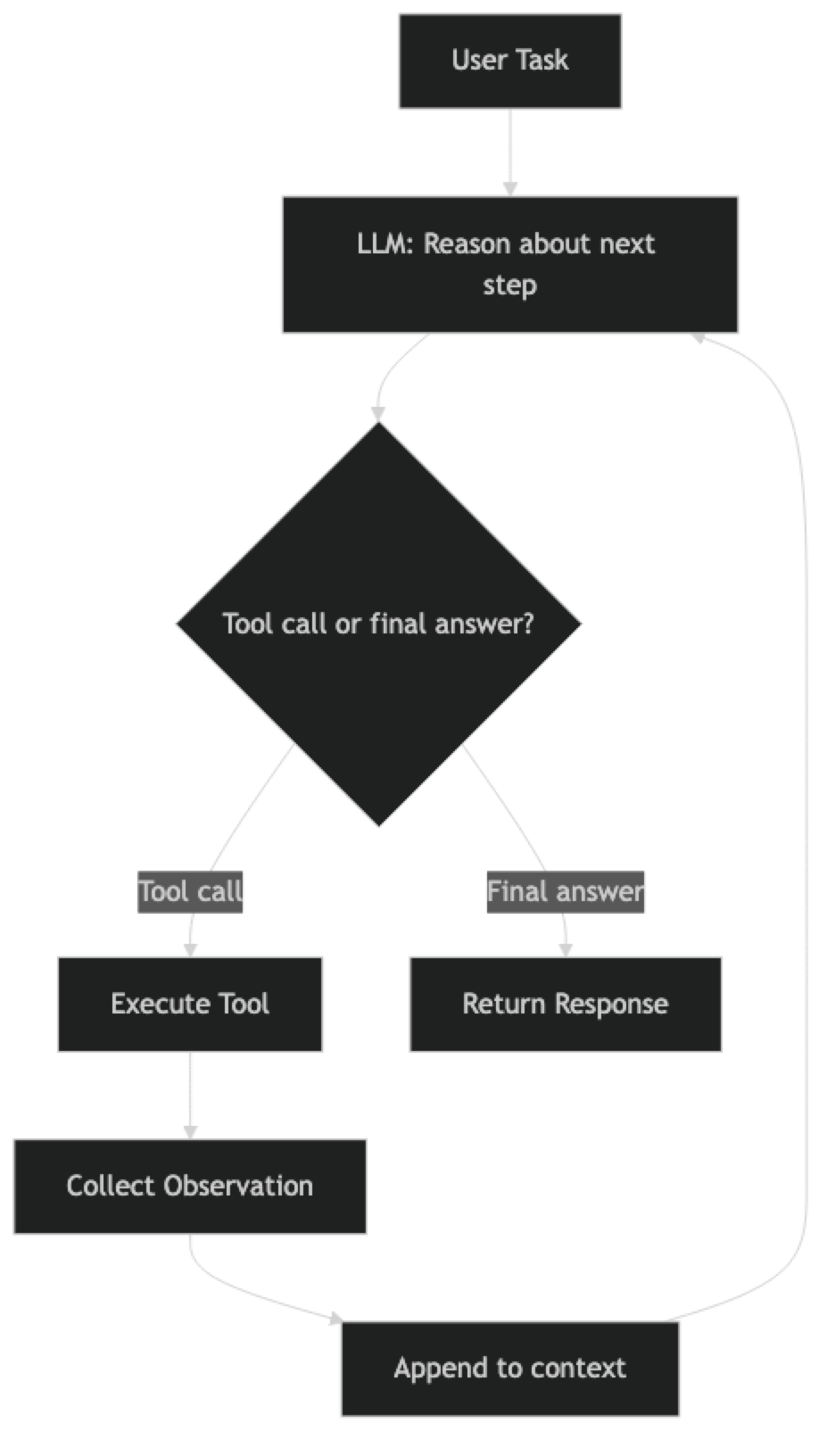
Every agent runs on some variant of this loop:
1. Receive task
2. LLM produces next action (tool call or final answer)
3. If tool call: execute tool, collect observation
4. Append observation to context
5. Go to step 2
6. If final answer: return result, stop
This loop has a name in the research literature: ReAct (Reason + Act). The model alternates between reasoning about what it should do and taking an action. The observations from actions feed back into the next reasoning step.
The ReAct Pattern in Detail
ReAct works because it forces the model to be explicit about its reasoning before it acts. A typical ReAct turn looks like:
Thought: The user wants to know the current price of AAPL. I should search for this.
Action: web_search
Action Input: "AAPL stock price today"
Observation: AAPL is trading at $187.43 as of March 15, 2026.
Thought: I now have the price. I can answer the user.
Final Answer: Apple (AAPL) is currently trading at $187.43.
Each step is visible, which makes debugging significantly easier than opaque chain-of-thought inside a single generation.
Chain-of-Thought Agents
Chain-of-thought (CoT) agents differ from ReAct in that they reason internally before committing to a tool call, rather than exposing each reasoning step as a distinct output. This produces cleaner outputs but makes debugging harder because the reasoning is less visible.
In practice, modern function-calling APIs (OpenAI, Anthropic) blend these approaches. The model reasons internally, then emits a structured tool call. You get the benefits of both patterns.
Tool-Calling Agents
Tool-calling agents use the provider's native function-calling feature rather than parsing text-based action/observation strings. The model returns a structured JSON object describing the tool call. This is more reliable than text parsing and is the pattern you should use in production.
Plan-and-Execute Agents
For complex, multi-step tasks, a single-loop ReAct agent can get lost. Plan-and-execute splits the problem into two phases: a planning phase where the model creates a step-by-step plan, and an execution phase where a simpler agent works through each step. This gives you more control over long-horizon tasks.
Implementation Example
Basic ReAct Agent with LangChain
from langchain_openai import ChatOpenAI
from langchain.agents import AgentExecutor, create_react_agent
from langchain_community.tools import DuckDuckGoSearchRun
from langchain_community.tools import WikipediaQueryRun
from langchain_community.utilities import WikipediaAPIWrapper
from langchain import hub

# Initialize the LLM
llm = ChatOpenAI(model="gpt-4o", temperature=0)

# Define tools the agent can use
search_tool = DuckDuckGoSearchRun(name="web_search")
wiki_tool = WikipediaQueryRun(
    api_wrapper=WikipediaAPIWrapper(top_k_results=2),
    name="wikipedia"
)

tools = [search_tool, wiki_tool]

# Pull the ReAct prompt template from LangChain Hub
prompt = hub.pull("hwchase17/react")

# Create the agent
agent = create_react_agent(llm=llm, tools=tools, prompt=prompt)

# Wrap in executor with safety limits
agent_executor = AgentExecutor(
    agent=agent,
    tools=tools,
    verbose=True,           # Show reasoning steps
    max_iterations=10,      # Prevent infinite loops
    handle_parsing_errors=True  # Recover from malformed outputs
)

# Run the agent
result = agent_executor.invoke({
    "input": "What are the key differences between GPT-4o and Claude 3.5 Sonnet?"
})

print(result["output"])
The AgentExecutor handles the loop for you. max_iterations is critical — without it, a confused agent can loop indefinitely, burning tokens and money. handle_parsing_errors=True is equally important in production; models occasionally produce malformed tool calls.
Adding Custom Tools
from langchain.tools import tool

@tool
def calculate_roi(investment: float, returns: float, period_years: float) -> str:
    """
    Calculate return on investment (ROI) as an annualized percentage.

    Args:
        investment: Initial investment amount in dollars
        returns: Total returns in dollars
        period_years: Investment period in years
    """
    if investment <= 0 or period_years <= 0:
        return "Error: investment and period must be positive numbers"

    total_roi = (returns - investment) / investment
    annualized_roi = ((1 + total_roi) ** (1 / period_years) - 1) * 100

    return f"Total ROI: {total_roi:.1%}, Annualized ROI: {annualized_roi:.2f}%"

# Add to tools list
tools = [search_tool, wiki_tool, calculate_roi]
Tool docstrings matter more than you might expect. The LLM reads the docstring to decide when and how to call the tool. A vague docstring leads to incorrect tool selection. Be specific about what the tool does, what inputs it expects, and what it returns.
Function-Calling Agent (Production Pattern)
from langchain_openai import ChatOpenAI
from langchain.agents import AgentExecutor, create_tool_calling_agent
from langchain_core.prompts import ChatPromptTemplate, MessagesPlaceholder

llm = ChatOpenAI(model="gpt-4o", temperature=0)

prompt = ChatPromptTemplate.from_messages([
    ("system", "You are a helpful research assistant. Use tools to find accurate, up-to-date information."),
    MessagesPlaceholder("chat_history", optional=True),
    ("human", "{input}"),
    MessagesPlaceholder("agent_scratchpad"),
])

# create_tool_calling_agent works with any model that supports tool calling
agent = create_tool_calling_agent(llm=llm, tools=tools, prompt=prompt)

agent_executor = AgentExecutor(
    agent=agent,
    tools=tools,
    verbose=True,
    max_iterations=8,
    return_intermediate_steps=True  # Useful for debugging and evaluation
)

response = agent_executor.invoke({
    "input": "Research the latest developments in AI agent frameworks"
})

# Access intermediate steps for debugging
for step in response["intermediate_steps"]:
    tool_call, observation = step
    print(f"Tool: {tool_call.tool}")
    print(f"Input: {tool_call.tool_input}")
    print(f"Output: {observation[:200]}...")
    print("---")
return_intermediate_steps=True is invaluable during development. It exposes every tool call and observation, which makes debugging a misbehaving agent much faster than reading logs.
Best Practices
Set explicit iteration limits. Every agent executor should have a max_iterations cap. In production, also set a max_execution_time in seconds. Runaway agents are expensive and can block resources.
Choose your model tier deliberately. A GPT-4o or Claude 3.5 Sonnet level model is required for reliable multi-step reasoning. Smaller models (GPT-4o-mini) work for simple single-tool agents but struggle with complex planning. The cost difference is real — profile your tasks before defaulting to the most capable model.
Design tools with clear boundaries. Each tool should do exactly one thing. A tool that does too much forces the model to guess at behavior. A tool that does too little creates unnecessary chaining overhead. Aim for tools that return clean, structured data the model can reason about directly.
Manage context window size. Every tool observation gets appended to the context. Long conversations and large tool outputs can push you past the model's context limit. Truncate or summarize observations when they exceed a threshold. LangChain's trim_messages utility helps here.
Use structured output for tool calls. JSON-mode or structured output APIs produce more reliable tool invocations than text-parsed ReAct patterns. Prefer the provider's native function-calling feature over home-grown parsing.
Implement observability from day one. Use LangSmith, Langfuse, or a similar tool to trace agent runs in production. You need to see every tool call, every reasoning step, and every token count to debug failures and optimize costs.
Common Mistakes
No iteration limit. The single most common production incident with agents is a loop that runs until it hits a rate limit or costs hundreds of dollars. Always set
max_iterationsandmax_execution_time.Vague tool descriptions. The model uses tool names and docstrings to decide which tool to call. Ambiguous descriptions lead to wrong tool selection. Treat tool docs with the same care as an API contract.
Ignoring error handling. Tool calls fail. External APIs time out, return empty results, or throw exceptions. Agents need to handle these cases gracefully. Define what happens when a tool fails — retry, skip, or escalate.
Using a single agent for everything. Complex tasks that require dozens of steps benefit from specialized sub-agents rather than one giant agent. Multi-agent architectures distribute complexity and are easier to debug.
Not testing with adversarial inputs. Agents that work perfectly in development often fail when users provide ambiguous, incomplete, or contradictory instructions. Test with bad inputs early.
Over-trusting the agent's output. Agents can hallucinate tool call parameters, misread observations, or reach incorrect conclusions. Build validation into critical workflows. Do not let an agent take irreversible actions without a human checkpoint.
Ignoring cost. A 10-step agent run with GPT-4o can cost $0.10–$0.50 per execution at current pricing. At scale, this matters. Profile token usage per task and optimize tool outputs to be as concise as possible.
Frequently Asked Questions
What is the difference between an AI agent and a chatbot? A chatbot produces a single response to each user message. An AI agent pursues a goal across multiple steps — calling tools, observing results, and adapting its approach — until the task is complete. The key difference is the execution loop and the ability to take actions.
Which framework should I use to build AI agents?
LangChain + AgentExecutor for standard single-agent workflows. LangGraph for complex state-machine-style agents or multi-agent systems needing fine-grained control. CrewAI for role-based multi-agent workflows with minimal boilerplate. Start with LangChain and move to LangGraph only when you need the extra control.
How do I prevent an agent from looping indefinitely?
Set max_iterations (typically 8–12) and max_execution_time in your executor. For production, add monitoring that alerts when a run exceeds a token or time budget. LangGraph has a built-in recursion_limit parameter for graph-based agents.
How much does running an AI agent cost? A simple 3–5 step agent with GPT-4o-mini costs ~$0.001–$0.01 per run. Complex research agents with 10+ tool calls using GPT-4o cost $0.10–$0.50. Profile token usage per task and use smaller models (GPT-4o-mini, Claude Haiku) for sub-tasks where full reasoning is not needed.
Can AI agents take irreversible actions? Yes — agents can delete files, send emails, modify databases, or call APIs with side effects. Always build a human-in-the-loop checkpoint before irreversible actions. Use a dry-run mode during development. Log every action with its inputs before executing so you have a complete audit trail.
What is return_intermediate_steps=True and when should I use it?
This flag makes AgentExecutor return every tool call and observation alongside the final answer. Use it during development and evaluation to see exactly what the agent did. In production, disable it to reduce response payload size but keep a logging hook to capture the same data for debugging.
When should I use agents versus a simple LLM chain? Use a chain when the steps are fixed and known in advance. Use an agent when the steps depend on the results of previous steps, when the user's task could require different tools depending on context, or when you need multi-step planning. Agents add latency from multiple LLM calls — do not use them for tasks a single prompt can handle.
Key Takeaways
- An AI agent has five components: perception, LLM reasoning core, memory, tool registry, and execution loop
- The ReAct pattern (Reason → Act → Observe) is the foundation of most production agents
- Use
create_tool_calling_agent(not deprecatedcreate_openai_functions_agent) for reliable structured tool calling - Always set
max_iterationsandmax_execution_time— runaway agents are the most common production incident - Write precise, specific tool docstrings — the model selects tools based on descriptions, not implementation
- Use
return_intermediate_steps=Trueduring development to trace every tool call and observation - Build human-in-the-loop checkpoints for irreversible actions (delete, send, modify)
- Use LangSmith or Langfuse from day one — agent behavior is nearly impossible to debug without full traces
- Start with 2–3 tools and a single-agent ReAct loop; add multi-agent complexity only where needed
What to Learn Next
- Build agents step by step → Build AI Agents Tutorial
- LangChain agents deep dive → LangChain Agents
- Multi-agent coordination → Multi-Agent Systems
- Agent memory systems → Agent Memory