AI Agent Architecture: Patterns That Survive Production (2026)
Last updated: March 2026
AI Agent Architecture: Design Patterns for Production LLM Agents (2026)
The first agent most developers build is essentially a wrapper: put a system prompt on a model, give it some tools, run a loop. It works well enough for demos. Then something unexpected happens in production — the agent forgets context from three steps ago, calls the wrong tool with garbled parameters, or loops on a task it cannot complete — and you realize the wrapper was hiding a lot of architectural decisions you had not yet made.
Understanding agent architecture at the component level is what separates systems that hold up under real usage from those that fall apart when the task gets complex. Each component has its own failure modes, its own performance characteristics, and its own trade-offs. This post covers each one systematically.
The goal here is not taxonomy for its own sake. Each section ends with the practical decisions you face when implementing that component.
Concept Overview
A production AI agent has five distinct layers:
Perception — How the agent receives input. This includes the user's task, attached files or data, and any context injected from external systems.
LLM Reasoning Core — The language model that interprets input and decides what to do next. This is the only component you do not implement yourself; you choose and configure it.
Memory — State that persists across agent steps or sessions. Without memory, every step starts from scratch.
Tool Registry — The set of functions the agent can call. Each tool has a name, description, and input schema.
Execution Engine — The orchestration layer that runs the loop: prompt the LLM, parse its output, call tools, collect observations, and decide when to stop.
These five layers are present in every serious agent system. The differences between frameworks are mostly about how they implement and expose each layer.
How It Works
The agent loop moves through all five components on each iteration:
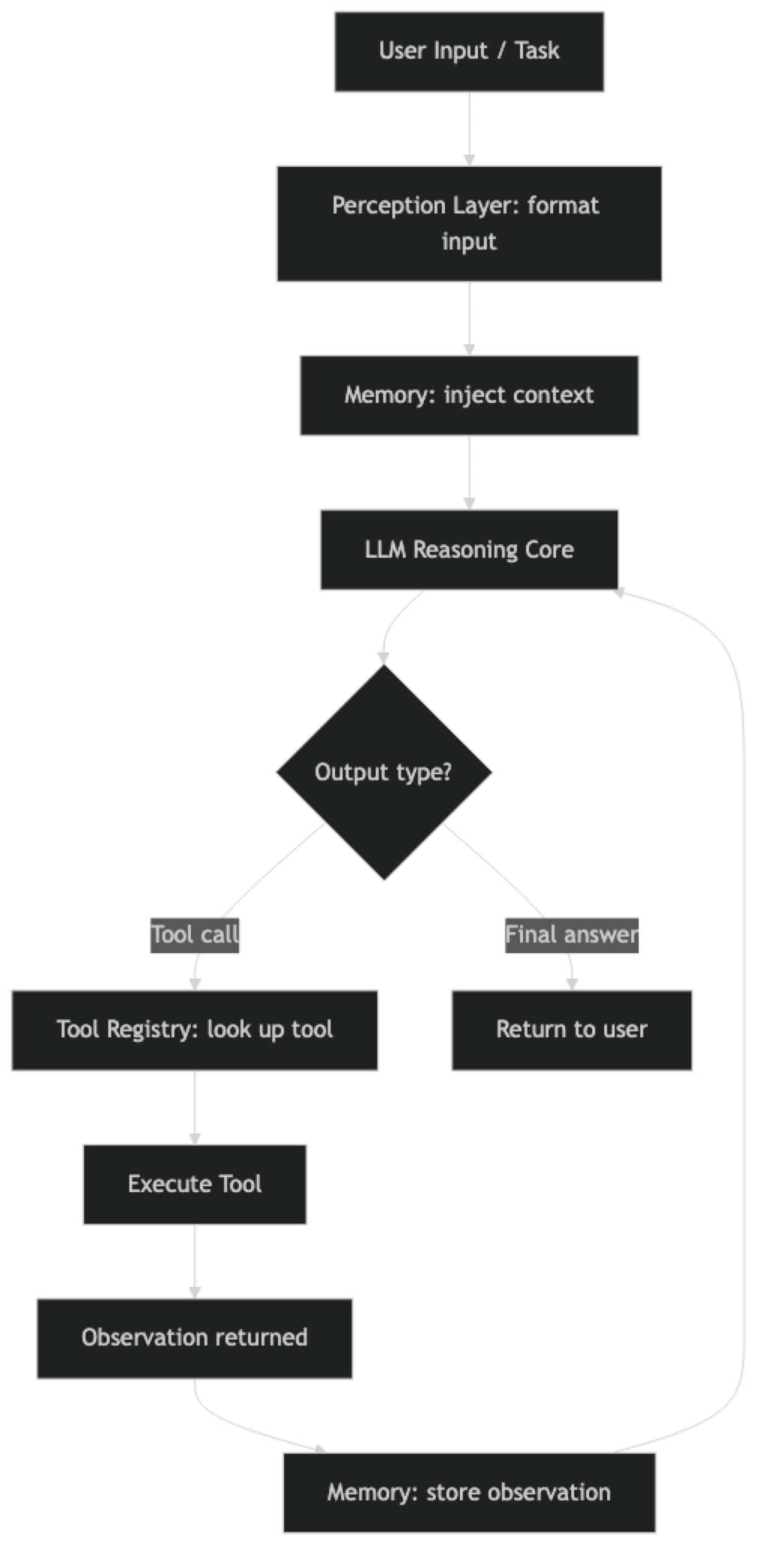
Each component contributes to every iteration of the loop, not just at initialization.
Implementation Example
Component 1: Perception Layer
The perception layer is responsible for transforming raw input into a format the LLM can act on. This includes:
- Formatting the user's task as a system + human message pair
- Injecting relevant memory (prior conversation, retrieved documents)
- Attaching tool schemas so the model knows what it can call
- Adding any domain-specific context (date, user preferences, system state)
from langchain_core.prompts import ChatPromptTemplate, MessagesPlaceholder
from datetime import datetime

def build_agent_prompt(domain_context: str = "") -> ChatPromptTemplate:
    """Build the perception layer prompt for an agent."""

    system_message = f"""You are an AI assistant with access to tools.

Current date and time: {datetime.now().strftime("%Y-%m-%d %H:%M UTC")}
{f"Domain context: {domain_context}" if domain_context else ""}

When responding:
- Reason step by step before taking action
- Use tools when you need external information or to take actions
- Be explicit about what you know vs. what you are inferring
- If you cannot complete a task, explain why clearly
"""

    return ChatPromptTemplate.from_messages([
        ("system", system_message),
        MessagesPlaceholder("memory_context", optional=True),
        ("human", "{input}"),
        MessagesPlaceholder("agent_scratchpad"),
    ])
One thing many developers overlook: the date and time injected into the system prompt matters more than it seems. Language models have training cutoffs. Without a current date, an agent reasoning about "recent" events will anchor to its training data.
Component 2: LLM Reasoning Core
Choosing the right model for the reasoning core affects every other component. Stronger models produce more reliable tool calls, better multi-step reasoning, and fewer hallucinated parameters.
from langchain_openai import ChatOpenAI
from langchain_anthropic import ChatAnthropic

def create_reasoning_core(
    provider: str = "openai",
    task_complexity: str = "high"
) -> object:
    """
    Create the LLM reasoning core based on provider and task requirements.

    task_complexity: "high" = GPT-4o/Claude 3.5 Sonnet
                    "medium" = GPT-4o-mini/Claude 3 Haiku
    """
    model_map = {
        "openai": {
            "high": "gpt-4o",
            "medium": "gpt-4o-mini"
        },
        "anthropic": {
            "high": "claude-3-5-sonnet-20241022",
            "medium": "claude-3-haiku-20240307"
        }
    }

    if provider == "openai":
        return ChatOpenAI(
            model=model_map["openai"][task_complexity],
            temperature=0,
            max_tokens=4096,
            timeout=30,
            max_retries=2
        )
    elif provider == "anthropic":
        return ChatAnthropic(
            model=model_map["anthropic"][task_complexity],
            temperature=0,
            max_tokens=4096,
            timeout=30,
            max_retries=2
        )
    else:
        raise ValueError(f"Unknown provider: {provider}")
Component 3: Memory Systems
Memory is the most architecturally complex component because it has multiple types with different trade-offs. Short-term memory is the simplest — it is just the conversation history in the context window.
from langchain_core.messages import HumanMessage, AIMessage, SystemMessage
from langchain_chroma import Chroma
from langchain_openai import OpenAIEmbeddings

class AgentMemory:
    """Manages both short-term and long-term memory for an agent."""

    def __init__(self, max_short_term_messages: int = 20):
        self.short_term: list = []
        self.max_messages = max_short_term_messages

        # Long-term memory: vector store for semantic retrieval
        self.long_term = Chroma(
            collection_name="agent_memory",
            embedding_function=OpenAIEmbeddings(),
            persist_directory="./agent_memory_store"
        )

    def add_to_short_term(self, human_msg: str, ai_msg: str):
        """Add a conversation turn to short-term memory."""
        self.short_term.append(HumanMessage(content=human_msg))
        self.short_term.append(AIMessage(content=ai_msg))

        # Trim to limit — keep most recent messages
        if len(self.short_term) > self.max_messages:
            self.short_term = self.short_term[-self.max_messages:]

    def store_in_long_term(self, content: str, metadata: dict = None):
        """Store important information in long-term vector memory."""
        self.long_term.add_texts(
            texts=[content],
            metadatas=[metadata or {}]
        )

    def retrieve_relevant(self, query: str, k: int = 3) -> list[str]:
        """Retrieve relevant memories from long-term store."""
        results = self.long_term.similarity_search(query, k=k)
        return [doc.page_content for doc in results]

    def get_context_for_task(self, task: str) -> list:
        """Build memory context for a new task."""
        relevant = self.retrieve_relevant(task)
        context = []

        if relevant:
            memory_text = "Relevant context from previous interactions:\n" + "\n---\n".join(relevant)
            context.append(SystemMessage(content=memory_text))

        context.extend(self.short_term)
        return context
Component 4: Tool Registry
The tool registry is a collection of callable functions with metadata that tells the LLM when and how to call them.
from langchain.tools import StructuredTool
from pydantic import BaseModel, Field

class WebSearchInput(BaseModel):
    query: str = Field(description="The search query. Be specific for better results.")
    num_results: int = Field(default=5, ge=1, le=10, description="Number of results to return")

class DatabaseQueryInput(BaseModel):
    table: str = Field(description="Table name to query")
    filters: dict = Field(default={}, description="Key-value filters to apply")
    limit: int = Field(default=10, ge=1, le=100, description="Maximum rows to return")

def web_search_fn(query: str, num_results: int = 5) -> str:
    """Execute web search and return formatted results."""
    # In production, use a real search API (Tavily, SerpAPI, etc.)
    return f"Search results for '{query}': [results would appear here]"

def database_query_fn(table: str, filters: dict = {}, limit: int = 10) -> str:
    """Query the application database safely."""
    # In production, validate table name against allowlist
    allowed_tables = {"users", "orders", "products"}
    if table not in allowed_tables:
        return f"Error: Table '{table}' is not accessible"
    return f"Query results from {table}: [results would appear here]"

def build_tool_registry() -> list:
    """Build and return the agent's tool registry."""
    search_tool = StructuredTool.from_function(
        func=web_search_fn,
        name="web_search",
        description="Search the web for current information. Use when you need up-to-date facts, news, or external data.",
        args_schema=WebSearchInput
    )

    db_tool = StructuredTool.from_function(
        func=database_query_fn,
        name="database_query",
        description="Query the application database. Use when you need user data, order information, or product details.",
        args_schema=DatabaseQueryInput
    )

    return [search_tool, db_tool]
Structured input schemas (Pydantic models) are better than free-form string inputs for production tools. They enforce type validation, provide the model with exact field descriptions, and catch parameter errors before the tool executes.
Stateless vs. Stateful Agents
Stateless agents rebuild context from scratch on every invocation. They have no memory of prior interactions. This makes them simple to scale — any server can handle any request — but they cannot maintain context across a conversation or learn from prior tasks.
Stateful agents maintain state across invocations. This state can live in-memory (short-lived), in a database (persistent), or in a vector store (semantic retrieval). Stateful agents can handle multi-turn conversations, remember user preferences, and build on prior work.
# Stateless agent — simple, scalable
def run_stateless_agent(task: str, context: dict = {}) -> str:
    """Run a stateless agent. All context must be provided explicitly."""
    agent_executor = AgentExecutor(agent=agent, tools=tools)
    result = agent_executor.invoke({"input": task})
    return result["output"]

# Stateful agent — maintains conversation history
class StatefulAgent:
    def __init__(self):
        self.memory = AgentMemory()
        self.agent_executor = AgentExecutor(
            agent=agent,
            tools=tools,
            max_iterations=10
        )

    def run(self, task: str) -> str:
        memory_context = self.memory.get_context_for_task(task)
        result = self.agent_executor.invoke({
            "input": task,
            "memory_context": memory_context
        })
        self.memory.add_to_short_term(task, result["output"])
        return result["output"]
In practice, most production systems use stateful agents for user-facing features and stateless agents for batch processing pipelines.
Best Practices
Layer your memory architecture. Use in-context short-term memory for the current session, a vector store for long-term semantic recall, and a structured database for exact lookup (user ID, order number, etc.). Each type covers different access patterns.
Validate tool outputs before feeding them back. Tool observations go directly into the model's context. A malformed API response, an error stack trace, or an unexpectedly large JSON blob can derail the reasoning core. Sanitize and truncate at the tool boundary.
Separate planning from execution in the reasoning core. For complex tasks, use a higher-capability model for the initial planning step and a faster model for execution sub-steps. This reduces cost without sacrificing planning quality.
Make your tool registry explicit. Keep tool definitions in a single registry module rather than scattered across the codebase. This makes it easy to see what capabilities the agent has and to add or remove tools without touching agent logic.
Common Mistakes
Conflating the execution engine with the agent logic. The execution engine (LangChain's
AgentExecutor, LangGraph's compiled graph) is separate from the agent itself. Mixing them makes both harder to test and modify.Ignoring the context budget. Every component — memory, tool outputs, reasoning traces — consumes tokens. Build a token budget tracker and enforce limits at each component boundary.
Making all agents stateful by default. Statefulness adds complexity. Start stateless and add state only when the task requires it. The simpler architecture is easier to debug and scale.
Skipping schema validation on tool inputs. The LLM occasionally produces tool calls with wrong types or missing required fields. Pydantic schemas catch these before execution. Without schemas, you debug weird runtime errors instead.
Not logging component-level metrics. Track latency and token usage per component. When an agent is slow or expensive, you need to know whether the bottleneck is the reasoning core, the memory retrieval, or a specific tool.
Key Takeaways
- An AI agent has five components: perception layer, LLM reasoning core, memory, tool registry, and execution engine — each with distinct failure modes
- Inject the current date and time into the system prompt; models anchor to their training cutoff without it
- Use Pydantic schemas (
StructuredTool) for tool inputs — they enforce type validation and catch parameter errors before execution - Layer your memory: in-context short-term, vector store for semantic recall, structured DB for exact lookup — each covers different access patterns
- Start stateless; add statefulness only when the task genuinely requires memory across sessions or users
- Keep the tool registry in a single module — scattered tool definitions are hard to audit and harder to remove
- Track token usage per component in production — when an agent is slow or expensive, you need to know whether the bottleneck is the reasoning core, memory retrieval, or a specific tool
- For agents serving multiple users, store state externally (Redis/PostgreSQL) and key it by session ID — never store state in-process
FAQ
What is the difference between an agent's memory and its context window? The context window is the immediate input the model processes on a single call — it is short-term and ephemeral. Memory is a design pattern that persists information across calls, either by including relevant history in the context window or by storing it externally in a vector store or database. The context window is limited by the model's token budget; memory is limited by your storage and retrieval design.
Should I use LangChain's built-in memory classes or build my own?
ConversationBufferMemory and ConversationSummaryMemory work well for simple single-user prototypes. For production systems with multiple users, session management, and persistence requirements, a custom implementation backed by PostgreSQL or Redis gives you full control over what gets stored, how long it is retained, and how it is retrieved.
How do I handle the case where a tool returns an error? Include error handling in every tool function and return descriptive error strings rather than raising exceptions. The error message becomes an observation that the agent reads. A clear message like "Error: API rate limit exceeded, retry in 60s" lets the agent decide whether to retry, use an alternative, or report the limitation to the user. Raised exceptions crash the agent loop with no recovery.
What is the maximum number of tools an agent should have? There is no hard limit, but more tools means more tokens spent on tool schemas and a higher chance of the model selecting the wrong tool. Agents with more than 15 tools become harder to debug and more expensive to run. If you need many tools, use a router pattern: one agent classifies the request and dispatches to a specialized sub-agent with a focused tool set.
How do stateful agents scale across multiple users? Store state externally — Redis for in-session short-term state, PostgreSQL for long-term persistent memory — rather than in-process. Key each session by a unique ID. Load state at the start of each request and flush writes at the end. This allows horizontal scaling without sticky sessions and makes state inspectable for debugging.
What is the difference between the agent and the execution engine?
The agent is the stateless component: the LLM plus its prompt template. It takes a context and produces the next action or final answer. The execution engine (LangChain AgentExecutor, LangGraph compiled graph) is the runtime loop: it calls the agent, executes tool calls, appends observations, and decides when to stop. Keeping these separate makes both easier to test independently.
When should I use LangGraph instead of AgentExecutor as the execution engine?
Use AgentExecutor for single-agent linear loops. Switch to LangGraph when you need: explicit named state that persists across nodes, conditional branching based on agent output, human-in-the-loop interrupts, or multiple specialized agents coordinating within one graph. LangGraph adds setup overhead but gives you complete control over agent state and transitions.
What to Learn Next
- Build AI Agents Step-by-Step
- AI Agents Guide: Architecture and Design Patterns
- Agent Memory Systems: Short-Term, Long-Term and Episodic
- LLM Agent Planning: ReAct, Tree of Thought and Hierarchical Planning
- LangGraph vs AutoGen vs CrewAI: Agent Framework Comparison
- How to Evaluate AI Agents: Metrics, Frameworks and Testing