AI Agent Tools: Give LLMs Real-World Capabilities (2026)
Last updated: March 2026
AI Agent Tool Use: How to Give LLMs Access to APIs, Code & Search (2026)
A language model without tools is read-only. It can reason about the world, synthesize information from its training data, and produce well-structured text — but it cannot take actions. Tools are what give agents the ability to interact with external systems: search the web, run code, read files, query databases, call APIs, and write outputs.
The way tools are defined is more important than most tutorials suggest. The model reads tool names and descriptions to decide which tool to call and what arguments to pass. A vague description leads to wrong tool selection. A poorly defined argument schema leads to malformed calls. An unhelpful error message from a failed tool call leads to the agent giving up or trying random alternatives.
Tool design is an underrated engineering discipline. This post covers the mechanics of how agents select tools, how to build custom tools that work reliably in production, and the common failure modes that only show up at scale.
Concept Overview
Tools in LangChain are functions with three essential properties:
Name — A unique identifier the model references when choosing a tool. Keep it lowercase with underscores. The name should be a verb phrase: web_search, not searcher.
Description — A plain-English explanation of what the tool does, when to use it, and what it returns. This is read directly by the LLM. It is the most important part of the tool definition.
Schema — The input specification. LangChain uses Pydantic models to define argument names, types, defaults, and descriptions. The schema is serialized and sent to the model as part of the function-calling payload.
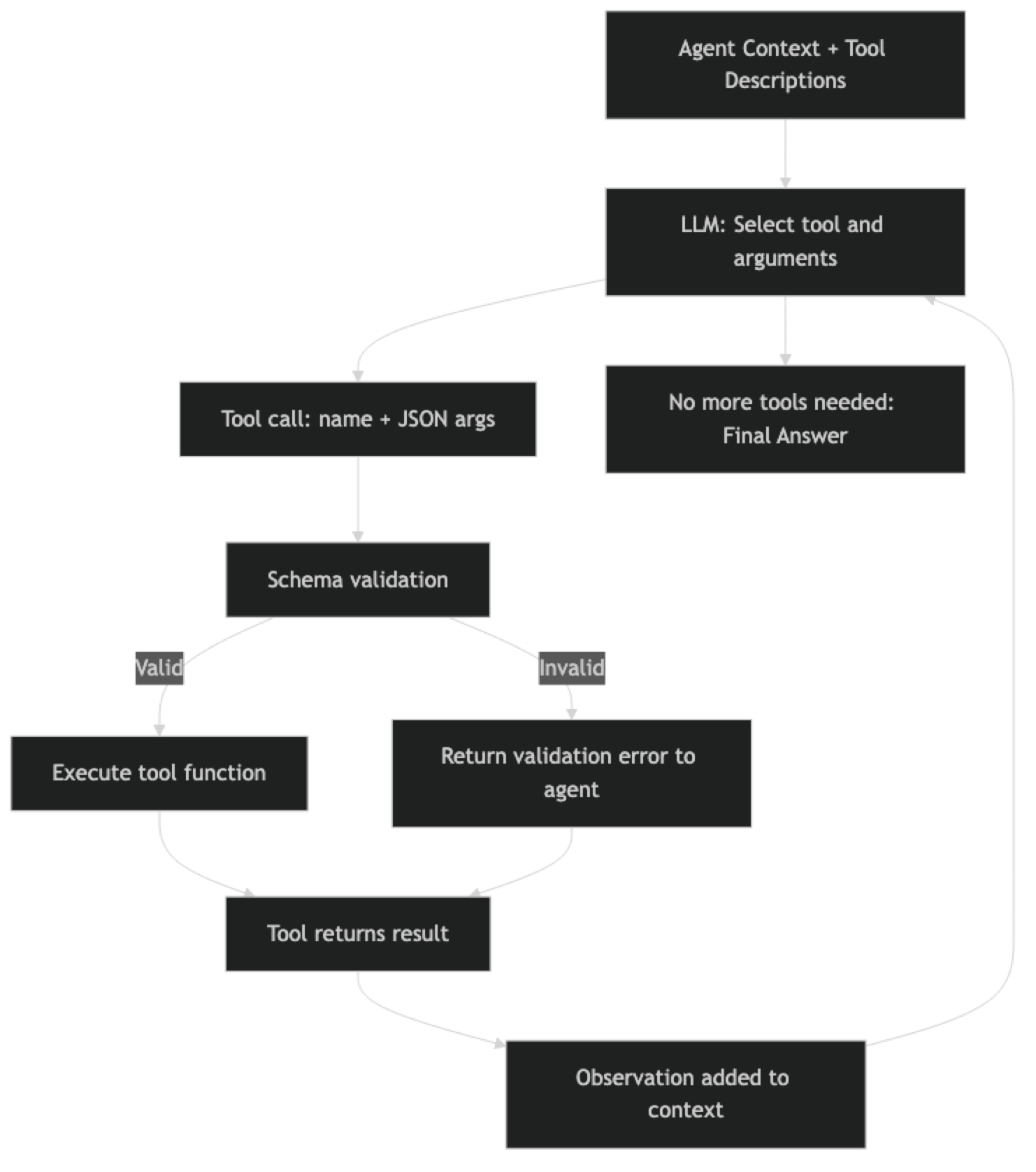
When the agent decides to call a tool, the flow is:
- Model reads all tool descriptions and schemas
- Model produces a tool call with name + arguments
- LangChain validates arguments against the Pydantic schema
- Tool function executes
- Return value becomes an observation in the context
- Agent continues reasoning
How It Works
Implementation Example
Building a Production-Quality Tool Suite
from langchain.tools import tool, StructuredTool
from pydantic import BaseModel, Field
from langchain_openai import ChatOpenAI
from langchain.agents import AgentExecutor, create_tool_calling_agent
from langchain_core.prompts import ChatPromptTemplate, MessagesPlaceholder
import subprocess
import json
import os
from pathlib import Path
from typing import Optional

# ===========================
# Tool 1: Web Search
# ===========================
from langchain_community.utilities import DuckDuckGoSearchAPIWrapper

class WebSearchInput(BaseModel):
    query: str = Field(
        description="The search query. Be specific. Include date ranges for time-sensitive topics (e.g., 'LangGraph changelog 2026')."
    )
    num_results: int = Field(
        default=5,
        ge=1,
        le=10,
        description="Number of search results to return. Use 3-5 for quick lookups, 8-10 for comprehensive research."
    )

def web_search_fn(query: str, num_results: int = 5) -> str:
    """Execute web search and return formatted results."""
    try:
        search = DuckDuckGoSearchAPIWrapper(max_results=num_results)
        results = search.results(query, num_results)

        if not results:
            return f"No results found for query: '{query}'. Try a different search term."

        formatted = []
        for i, r in enumerate(results, 1):
            formatted.append(
                f"[{i}] {r.get('title', 'No title')}\n"
                f"    URL: {r.get('link', 'No URL')}\n"
                f"    {r.get('snippet', 'No description')[:300]}"
            )

        return "\n\n".join(formatted)

    except Exception as e:
        return f"Search error: {str(e)}. Try a simpler query or check network connectivity."

web_search = StructuredTool.from_function(
    func=web_search_fn,
    name="web_search",
    description="""Search the web for current information. Use for:
    - Recent news and events (post training cutoff)
    - Current documentation and API changes
    - Pricing, availability, and specifications
    - Comparing options or finding alternatives
    Returns formatted search results with titles, URLs, and snippets.""",
    args_schema=WebSearchInput
)

# ===========================
# Tool 2: Python Code Executor
# ===========================
class CodeExecutorInput(BaseModel):
    code: str = Field(
        description="Python code to execute. Must be valid Python 3.11+. Code runs in an isolated subprocess."
    )
    timeout_seconds: int = Field(
        default=10,
        ge=1,
        le=60,
        description="Maximum execution time in seconds."
    )

@tool(args_schema=CodeExecutorInput)
def execute_python(code: str, timeout_seconds: int = 10) -> str:
    """
    Execute Python code in a sandboxed subprocess and return stdout + stderr.
    Use for: calculations, data analysis, JSON parsing, string processing, testing logic.
    Do NOT use for: file deletion, network requests, system commands, or anything that modifies production data.
    Returns stdout output or error message if execution fails.
    """
    # Safety check — block dangerous operations
    dangerous_patterns = [
        "import os", "import sys", "subprocess", "__import__",
        "eval(", "exec(", "open(", "rmdir", "remove("
    ]

    # Allow specific safe imports
    allowed_os_ops = code.count("os.path") + code.count("os.getcwd")

    for pattern in dangerous_patterns:
        if pattern in code and pattern != "import os":
            return f"Error: Pattern '{pattern}' is not allowed for security reasons. Use a different approach."

    try:
        result = subprocess.run(
            ["python3", "-c", code],
            capture_output=True,
            text=True,
            timeout=timeout_seconds
        )

        if result.returncode != 0:
            error = result.stderr.strip()
            return f"Code execution failed:\n{error}\n\nFix the error and try again."

        output = result.stdout.strip()
        if not output:
            return "Code executed successfully with no output."

        # Truncate very long outputs
        if len(output) > 3000:
            output = output[:3000] + "\n[... output truncated at 3000 chars]"

        return output

    except subprocess.TimeoutExpired:
        return f"Error: Code exceeded {timeout_seconds}s timeout. Optimize the code or increase timeout."
    except Exception as e:
        return f"Execution error: {str(e)}"

# ===========================
# Tool 3: File I/O
# ===========================
SAFE_DIRECTORY = Path("./agent_workspace")
SAFE_DIRECTORY.mkdir(exist_ok=True)

class FileReadInput(BaseModel):
    filepath: str = Field(
        description="Path to the file to read, relative to the agent workspace. Example: 'report.md' or 'data/results.json'"
    )
    max_chars: int = Field(
        default=5000,
        ge=100,
        le=50000,
        description="Maximum characters to return. Use lower values for large files."
    )

class FileWriteInput(BaseModel):
    filepath: str = Field(
        description="Path to write to, relative to the agent workspace. Directories are created automatically."
    )
    content: str = Field(
        description="Full content to write to the file. Overwrites existing content."
    )
    append: bool = Field(
        default=False,
        description="If True, append to existing file instead of overwriting."
    )

@tool(args_schema=FileReadInput)
def read_file(filepath: str, max_chars: int = 5000) -> str:
    """
    Read a file from the agent workspace directory.
    Use to: read previously written reports, check existing data, load configuration.
    Only files within the designated workspace are accessible.
    Returns file contents or an error message.
    """
    try:
        safe_path = SAFE_DIRECTORY / filepath
        # Prevent directory traversal
        safe_path.resolve().relative_to(SAFE_DIRECTORY.resolve())

        if not safe_path.exists():
            workspace_files = [f.name for f in SAFE_DIRECTORY.iterdir() if f.is_file()]
            return f"File not found: {filepath}. Available files: {workspace_files}"

        content = safe_path.read_text(encoding="utf-8")
        if len(content) > max_chars:
            return content[:max_chars] + f"\n[... truncated. Full file is {len(content)} chars]"

        return content

    except ValueError:
        return "Error: Path traversal not allowed. Use paths within the agent workspace."
    except Exception as e:
        return f"Error reading file: {str(e)}"

@tool(args_schema=FileWriteInput)
def write_file(filepath: str, content: str, append: bool = False) -> str:
    """
    Write content to a file in the agent workspace.
    Use to: save reports, store intermediate results, create output files.
    Creates directories as needed. Use append=True to add to existing files.
    Returns confirmation with file size.
    """
    try:
        safe_path = SAFE_DIRECTORY / filepath
        safe_path.resolve().relative_to(SAFE_DIRECTORY.resolve())

        safe_path.parent.mkdir(parents=True, exist_ok=True)

        mode = "a" if append else "w"
        with open(safe_path, mode, encoding="utf-8") as f:
            f.write(content)

        size = safe_path.stat().st_size
        action = "Appended to" if append else "Written"
        return f"{action} {filepath} ({size} bytes, {len(content.split())} words)"

    except ValueError:
        return "Error: Path traversal not allowed."
    except Exception as e:
        return f"Error writing file: {str(e)}"

# ===========================
# Assemble and Run
# ===========================
tools = [web_search, execute_python, read_file, write_file]

llm = ChatOpenAI(model="gpt-4o", temperature=0)

prompt = ChatPromptTemplate.from_messages([
    ("system", """You are a capable AI assistant with tools for web search, code execution, and file management.

Tool selection guidelines:
- Use web_search for current information (post-2024 events, documentation, prices)
- Use execute_python for calculations, data processing, or testing logic
- Use read_file/write_file to persist results or read prior work
- Combine tools in sequence when tasks require multiple steps

Always explain what you are doing before using a tool."""),
    ("human", "{input}"),
    MessagesPlaceholder("agent_scratchpad"),
])

agent = create_tool_calling_agent(llm=llm, tools=tools, prompt=prompt)
executor = AgentExecutor(
    agent=agent,
    tools=tools,
    verbose=True,
    max_iterations=12,
    handle_parsing_errors=True
)

result = executor.invoke({
    "input": "Search for the current Python 3.13 release notes, extract the top 5 new features, and write them to a markdown file."
})
print(result["output"])
Tool Chaining Pattern
Sometimes a task requires multiple tools in sequence where each tool's output feeds into the next. The agent handles this naturally through its loop, but you can make chaining more reliable by being explicit in tool descriptions about what the tool produces.
@tool
def parse_json_response(json_string: str, extract_key: str) -> str:
    """
    Parse a JSON string and extract a specific key's value.
    Use AFTER calling web_search or execute_python when the output is JSON.
    Returns the extracted value or an error if parsing fails.

    Args:
        json_string: The JSON string to parse (from a prior tool call)
        extract_key: The key to extract from the JSON object
    """
    try:
        data = json.loads(json_string)
        if extract_key in data:
            return json.dumps(data[extract_key], indent=2)
        return f"Key '{extract_key}' not found. Available keys: {list(data.keys())}"
    except json.JSONDecodeError as e:
        return f"Invalid JSON: {str(e)}. The input may not be JSON — check the source tool output."
The phrase "Use AFTER calling web_search or execute_python when the output is JSON" in the description is critical. It tells the model exactly when this tool is appropriate, preventing it from being called with non-JSON inputs.
Best Practices
Write tool descriptions for the model, not for humans. Developers read documentation to understand. Models read tool descriptions to decide. Every description should answer: what does this do, when should I use it, and what will it return?
Validate inputs strictly. Use Pydantic Field constraints (ge, le, min_length, regex) to reject invalid inputs before the tool executes. An informative validation error is more useful than a runtime exception with a stack trace.
Return structured, factual error messages. When a tool fails, return a message that tells the agent what went wrong and how to fix it. "Error: API rate limit exceeded, retry after 60 seconds" lets the agent recover. "Error: 429" does not.
Limit the number of tools per agent. More tools mean more tokens spent on descriptions and higher probability of wrong tool selection. Aim for 5-10 tools per agent. If you need more, consider routing between specialized sub-agents.
Common Mistakes
Naming tools as nouns instead of verb phrases.
searchertells the model what the tool is.web_searchtells the model what the tool does. Verb phrases produce more reliable tool selection.Omitting return value description. If the tool description says nothing about what it returns, the agent will not know what to do with the output. Always describe the format and content of the return value.
Not handling network failures gracefully. Tools that call external APIs will sometimes fail due to timeouts, rate limits, or service outages. Catch these exceptions and return informative error messages rather than letting the exception propagate.
Giving sensitive tools without access controls. A
database_querytool with no table allowlist lets the agent query any table. Afile_deletetool with no path restrictions lets the agent delete anything. Always implement access controls in the tool function itself.Not testing tools in isolation before adding to agents. Test each tool function directly before wiring it into an agent. If the tool does not work correctly in isolation, it will fail unpredictably in the agent.
Key Takeaways
- Use
create_tool_calling_agent(not deprecatedcreate_openai_functions_agent) for all new agent code - Tool descriptions are the most important part of the tool definition — the model reads them at every reasoning step to decide what to call
- Use verb phrase names (
web_search, notsearcher) — they tell the model what the tool does, not just what it is - Use Pydantic
Fieldconstraints (ge,le,min_length) for strict input validation that catches errors before the tool executes - Always describe the return value in the tool description — the agent needs to know what to do with the output
- Implement access controls inside the function body, not just in the description — the model will sometimes call tools in unexpected ways
- Return descriptive error strings from failed tools, never raise exceptions — exceptions crash the agent loop with no recovery
- Test every tool function in isolation before adding it to an agent — if it does not work alone, it will fail unpredictably in the agent
FAQ
How does the agent know which tool to call? The model reads the name and description of every available tool in the context. Based on the current task and reasoning step, it selects the most appropriate tool and generates arguments. Tool selection quality depends directly on how clear and specific the descriptions are. Ambiguous descriptions cause wrong selections; specific descriptions cause correct ones.
Can an agent call multiple tools in parallel?
Standard AgentExecutor calls tools sequentially. For parallel tool calls, LangGraph supports concurrent node execution by adding edges between nodes that can run in parallel. Some providers also support parallel function calls in a single LLM response. Parallel calls improve speed but require careful handling of concurrent writes to shared state.
What happens when a tool returns an error?
The error string becomes an observation in the agent's context. The agent can then decide to retry with different arguments, try an alternative tool, or report the failure to the user. handle_parsing_errors=True in AgentExecutor handles malformed JSON tool calls specifically — it returns the parse error as an observation rather than crashing.
Should I use the @tool decorator or StructuredTool.from_function()?
The @tool decorator is simpler for quick implementations. StructuredTool.from_function() gives you more control: you can define the tool name, description, and Pydantic schema separately from the function, making each independently readable. For production tools with complex inputs, StructuredTool with a named BaseModel schema is more explicit and easier to test.
How do I prevent an agent from calling a dangerous tool accidentally? Implement access controls inside the tool function (not in the description alone). The model cannot be relied upon to never call a tool — it will sometimes call tools unexpectedly. Use allowlists for sensitive resources (allowed table names, allowed paths), validate inputs against those allowlists before executing, and log every call for audit purposes.
What is the right number of tools for an agent? Aim for 5-10 tools per agent. More tools mean more tokens spent on descriptions (every tool schema is in every LLM call) and higher probability of the model selecting the wrong one. If you need more than 10 tools, consider a router pattern: a lightweight classifier routes the request to a specialized sub-agent with a focused 3-5 tool set.
How do I chain tools so one tool's output feeds into the next? The agent handles this naturally through its loop — the output of one tool becomes an observation, and the agent decides to call the next tool with that output. You can make chaining more reliable by being explicit in tool descriptions: "Use AFTER calling web_search when the output is JSON" signals the expected chain. For deterministic chains (always tool A then tool B), use a static LangChain pipeline rather than an agent.