AI Agent Planning: ReAct & Task Decomposition That Work (2026)
Last updated: March 2026
LLM Agent Planning: ReAct, Tree of Thought & Hierarchical Planning (2026)
When an agent fails on a complex task, the failure is almost never a tool problem. The tool called correctly, returned a valid result, and the agent still ended up somewhere wrong. The real problem is usually planning — or more precisely, the lack of it. The agent executed steps without a coherent strategy, each action locally reasonable but collectively not building toward the goal.
Planning is the part of agent design that gets the least attention in tutorials. Everyone shows you how to set up tools and run a loop. Fewer people explain how to get the agent to reason about which steps to take in which order before it starts executing. The difference between a brittle demo agent and a robust production agent is almost always the planning layer.
This post covers the four main planning patterns — ReAct, chain-of-thought, tree of thoughts, and plan-and-execute — with honest assessments of when each works and when it breaks. All code examples are runnable.
Concept Overview
Planning in AI agents means the agent reasoning about future steps before (and during) execution. Planning quality determines how well the agent handles multi-step tasks, recovers from failed actions, and stays on course when observations differ from expectations.
Four planning patterns dominate production systems:
ReAct (Reason + Act) — The model alternates between a reasoning step and an action step. Planning and execution are interleaved. Good for tasks where the next step depends on what the previous step returned.
Chain-of-Thought (CoT) — The model reasons through a problem completely before taking any action. Good for tasks where the full plan can be derived from the initial task description without intermediate observations.
Tree of Thoughts (ToT) — The model generates multiple potential next steps, evaluates them, and pursues the most promising branch. Good for tasks with many possible approaches where the best path is not obvious upfront.
Plan-and-Execute — A planning phase generates a complete step-by-step plan. A separate execution phase works through each step. Good for long-horizon tasks where a stable plan matters.
How It Works
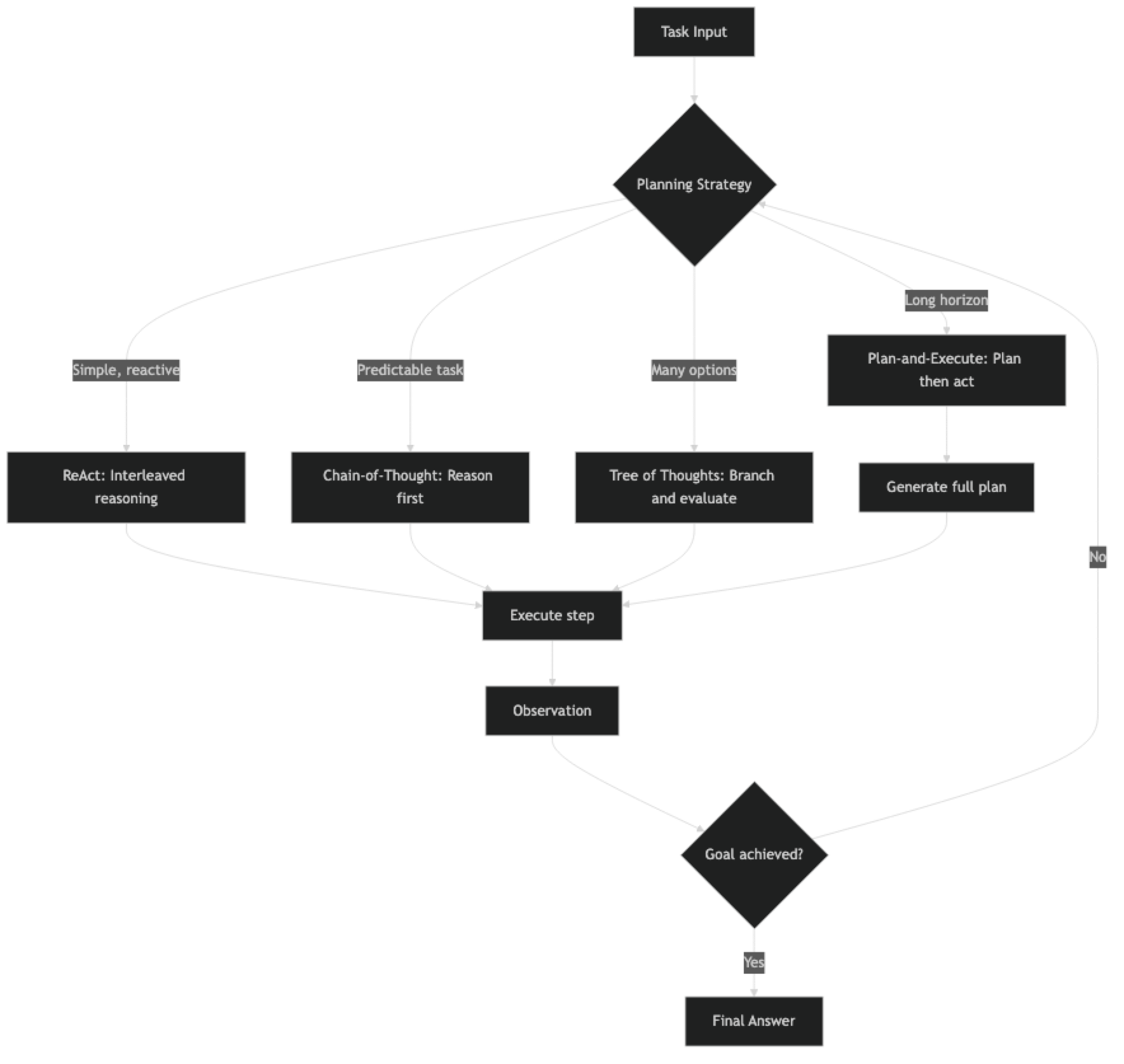
Implementation Example
Pattern 1: ReAct Agent
The ReAct pattern is the default for most LangChain agents. Each iteration produces a thought, an action, and observes the result before planning the next thought.
from langchain_openai import ChatOpenAI
from langchain.agents import AgentExecutor, create_react_agent
from langchain_community.tools import DuckDuckGoSearchRun
from langchain import hub

llm = ChatOpenAI(model="gpt-4o", temperature=0)
tools = [DuckDuckGoSearchRun(name="web_search")]

# ReAct prompt enforces the Thought/Action/Observation format
prompt = hub.pull("hwchase17/react")

agent = create_react_agent(llm=llm, tools=tools, prompt=prompt)
executor = AgentExecutor(
    agent=agent,
    tools=tools,
    verbose=True,
    max_iterations=10,
    handle_parsing_errors=True
)

result = executor.invoke({
    "input": "What are the top 3 AI agent frameworks in 2026 and what are their main differences?"
})
print(result["output"])
The ReAct trace looks like this at runtime:
Thought: I need to find current information about AI agent frameworks in 2026.
Action: web_search
Action Input: top AI agent frameworks 2026 comparison
Observation: [search results]
Thought: I have some results. Let me search for more specific comparison data.
Action: web_search
Action Input: LangGraph vs CrewAI vs AutoGen 2026 differences
Observation: [more results]
Thought: I now have enough information to answer the question.
Final Answer: ...
Pattern 2: Plan-and-Execute Agent
Plan-and-execute separates the planning step from execution. This is significantly more reliable for complex tasks because the model commits to a plan before it starts executing, reducing the chance of plan drift during execution.
from langchain_openai import ChatOpenAI
from langchain.tools import tool
from langchain_community.tools import DuckDuckGoSearchRun

llm = ChatOpenAI(model="gpt-4o", temperature=0)
search = DuckDuckGoSearchRun()

def create_plan(task: str) -> list[str]:
    """
    Phase 1: Generate a step-by-step execution plan.
    Uses a separate LLM call dedicated to planning only.
    """
    planning_prompt = f"""You are a planning assistant. Create a detailed, step-by-step plan to complete the following task.

Task: {task}

Requirements:
- Break the task into 3-7 specific, actionable steps
- Each step should be independent and verifiable
- Specify which tool (web_search, wikipedia, write_file) each step uses
- Steps should build logically toward the final goal

Return your plan as a numbered list. Be specific."""

    response = llm.invoke(planning_prompt)
    plan_text = response.content

    # Parse numbered steps
    steps = []
    for line in plan_text.split("\n"):
        line = line.strip()
        if line and (line[0].isdigit() and "." in line[:3]):
            step = line.split(".", 1)[1].strip()
            steps.append(step)

    return steps

def execute_step(step: str, context: str, tools: list) -> str:
    """
    Phase 2: Execute a single plan step with context from prior steps.
    """
    execution_prompt = f"""You are an execution agent. Complete the following step using the available tools.

Prior context:
{context if context else "No prior steps completed yet."}

Current step to complete:
{step}

Complete this step thoroughly. Return a clear, factual result."""

    from langchain.agents import AgentExecutor, create_tool_calling_agent
    from langchain_core.prompts import ChatPromptTemplate, MessagesPlaceholder

    exec_prompt = ChatPromptTemplate.from_messages([
        ("system", execution_prompt),
        ("human", "Complete the current step."),
        MessagesPlaceholder("agent_scratchpad"),
    ])

    exec_agent = create_tool_calling_agent(llm=llm, tools=tools, prompt=exec_prompt)
    executor = AgentExecutor(
        agent=exec_agent,
        tools=tools,
        max_iterations=5,
        handle_parsing_errors=True
    )

    result = executor.invoke({"input": step})
    return result["output"]

def run_plan_and_execute(task: str) -> str:
    """Main plan-and-execute orchestrator."""
    print(f"\n=== PLANNING PHASE ===")
    plan = create_plan(task)

    print(f"Generated {len(plan)} steps:")
    for i, step in enumerate(plan, 1):
        print(f"  {i}. {step}")

    print(f"\n=== EXECUTION PHASE ===")
    results = []
    accumulated_context = ""

    for i, step in enumerate(plan, 1):
        print(f"\nExecuting step {i}/{len(plan)}: {step[:60]}...")
        step_result = execute_step(step, accumulated_context, [search])
        results.append(f"Step {i}: {step}\nResult: {step_result}")
        accumulated_context += f"\nStep {i} result: {step_result[:500]}"

    # Final synthesis
    synthesis_prompt = f"""Synthesize these step results into a comprehensive final answer for the original task.

Task: {task}

Step Results:
{chr(10).join(results)}

Write a clear, structured final answer."""

    response = llm.invoke(synthesis_prompt)
    return response.content

# Run it
result = run_plan_and_execute(
    "Research and compare the performance benchmarks for GPT-4o vs Claude 3.5 Sonnet on coding tasks"
)
print(result)
Pattern 3: Chain-of-Thought Planning
For tasks where the full plan can be derived from the task description, chain-of-thought works by asking the model to reason completely before taking any tool actions.
from langchain_core.prompts import ChatPromptTemplate

def chain_of_thought_agent(task: str, tools: list) -> str:
    """
    CoT planning: reason completely, then execute.
    Best for: mathematical problems, logical deduction, structured analysis.
    """
    cot_prompt = f"""Think through this task step by step before taking any actions.

Task: {task}

First, write out your complete reasoning:
1. What information do I already know?
2. What information do I need to find?
3. In what order should I find it?
4. How will I synthesize the results?

After your reasoning, take the necessary actions.

Reasoning:"""

    from langchain.agents import AgentExecutor, create_tool_calling_agent

    prompt = ChatPromptTemplate.from_messages([
        ("system", "You are a careful, methodical assistant. Always reason before acting."),
        ("human", cot_prompt),
        MessagesPlaceholder("agent_scratchpad"),
    ])

    agent = create_tool_calling_agent(llm=llm, tools=tools, prompt=prompt)
    executor = AgentExecutor(
        agent=agent,
        tools=tools,
        max_iterations=8,
        handle_parsing_errors=True,
        verbose=True
    )

    result = executor.invoke({"input": task})
    return result["output"]
Best Practices
Match the planning pattern to the task structure. ReAct is best when the next step genuinely depends on what the previous step returned. Plan-and-execute is best when you can enumerate the steps upfront and the plan is unlikely to change mid-execution. Using the wrong pattern wastes tokens and reduces reliability.
Give the planning model more context than the execution model. The planner needs to understand the full task and all constraints. The executor only needs to complete one step. This separation lets you use a capable model for planning and a faster model for execution.
Build replanning into long-horizon agents. For tasks with more than 10 steps, the plan generated at the start may become invalid partway through. Build in a checkpoint every few steps where the agent evaluates whether the current plan still makes sense and adjusts if needed.
Log the plan before execution begins. In production, saving the generated plan to your observability platform lets you diagnose failures precisely — you know what the agent intended to do and you can compare it to what it actually did.
Common Mistakes
Applying ReAct to tasks where the full plan is known upfront. If you are building a report that always has the same five sections, the agent does not need to reactively decide its next step after each section. A static plan with execution agents is more reliable.
Not giving the planner access to tool descriptions. A planner that does not know what tools are available will generate steps that reference non-existent capabilities. Always include available tools in the planning prompt.
Conflating planning quality with model size. GPT-4o-mini can generate reasonable plans for simple tasks. Defaulting to GPT-4o for all planning steps wastes money. Profile your tasks and use smaller models where planning is straightforward.
Over-planning. A ten-step plan for a two-step task adds overhead without adding quality. The planner should generate the minimum number of steps needed to complete the task reliably.
Ignoring plan validity after failed steps. When a step fails, the remaining plan may be invalid. Build explicit replanning logic that triggers after step failures rather than blindly continuing with the original plan.
Key Takeaways
- Use
create_tool_calling_agent(not deprecatedcreate_openai_functions_agent) for all new agent code - ReAct is best when the next step genuinely depends on what the previous step returned; plan-and-execute is best when the steps are predictable upfront
- Separate the planning model from the execution model — a capable model for planning, a faster model for individual step execution reduces cost without sacrificing planning quality
- Log the generated plan before execution begins so you can compare intended vs. actual actions in post-mortem analysis
- Build replanning checkpoints every few steps for long-horizon tasks — early assumptions become invalid and a stale plan causes downstream failures
- Chain-of-thought planning works inside a tool-calling agent: prompt the model to "reason completely before taking actions"
- The planner must know what tools are available — include tool names and descriptions in the planning prompt
- Over-planning wastes tokens: generate the minimum number of steps needed, not a plan padded to look thorough
FAQ
What is the ReAct pattern in AI agents? ReAct (Reason + Act) is a planning loop where the model alternates between a reasoning step (thinking about what to do next) and an action step (calling a tool). The observation from the action feeds back into the next reasoning step. It is the most common planning pattern in production agents because it adapts naturally when search results differ from expectations.
When should I use plan-and-execute instead of ReAct? Use plan-and-execute when the task has a predictable structure (same steps every time), when you need human review of the plan before execution, or when the task has many steps and you want to avoid plan drift. Use ReAct when the next step genuinely depends on what the previous step returned.
Does chain-of-thought work with tool-calling agents? Yes. You can prompt the model to reason completely before emitting tool calls by including explicit instructions like "First, write out your full reasoning plan. Then take actions." This improves reliability for tasks where the execution path can be determined from the task description alone, without needing intermediate observations.
What is tree of thoughts and when is it practical? Tree of Thoughts generates multiple candidate next steps and evaluates each before committing to one. It is theoretically powerful but practically expensive — it requires multiple LLM calls per step. It is most useful for tasks where the search space is complex and small mistakes early have large downstream consequences, such as code generation or strategic planning.
How do I handle a plan that becomes invalid midway through execution? Build explicit replanning checkpoints. After every N steps, have the agent evaluate: "Does my original plan still make sense given what I have found so far?" If not, generate a revised plan. This adds overhead but significantly reduces failures on tasks where early assumptions turn out to be wrong.
Which planning pattern uses the most tokens? Tree of Thoughts is the most expensive — it generates and scores multiple branches at each step, multiplying LLM calls. Plan-and-execute uses two LLM phases (planning + execution) but the execution steps are focused. ReAct is the most token-efficient for short tasks. For long tasks, plan-and-execute is more efficient than ReAct because the plan prevents wasted exploration steps.
How do I add a human review step before the plan executes?
In the run_plan_and_execute function, print the generated plan steps and prompt for user confirmation before starting the execution loop. LangGraph handles this more elegantly with built-in interrupt points: compile the graph with interrupt_before=["execute"] and call graph.update_state() to resume after the human approves the plan.