AI Agent Memory: Build Agents That Do not Forget Context (2026)
Last updated: March 2026
Agent Memory Systems: Short-Term, Long-Term & Episodic Memory for LLM Agents
A stateless agent is like a developer who loses all their context every time they context-switch. They can follow instructions on the current task, but they have no idea what they decided yesterday, what approach they already tried, or why they made a particular architectural choice last week. Functional for isolated tasks. Frustrating for anything that spans multiple interactions.
Memory is what makes agents useful over time. An agent that remembers the user's preferences from the last session, recalls a relevant article it found three days ago, or knows that it already tried approach A and it failed — that agent compounds value across interactions instead of starting from zero every time.
The engineering challenge is that memory is not a single thing. It is at least four distinct systems with different access patterns, storage costs, and retrieval mechanisms. Getting the architecture wrong leads to agents that are either amnesiac (no persistent memory), expensive (storing everything in context), or retrieving irrelevant information (poor semantic search).
Concept Overview
AI agent memory breaks into four types:
Short-term (in-context) memory — The current conversation history in the context window. Fast, zero latency, immediately coherent. Hard limit: the model's context window size. Everything in short-term memory is gone at the end of the session unless explicitly persisted.
Long-term (external) memory — Information stored outside the model in a database or vector store. Persists across sessions. Requires retrieval (semantic search, exact lookup) to bring relevant information back into context. The most important memory type for production agents.
Episodic memory — A record of what the agent did in past sessions: which tools it called, what happened, what succeeded and what failed. Useful for self-improvement and for avoiding repeated mistakes.
Semantic memory — General knowledge and facts independent of specific sessions. In most implementations, this lives in a vector store containing documents, knowledge bases, or previously retrieved information.
How It Works
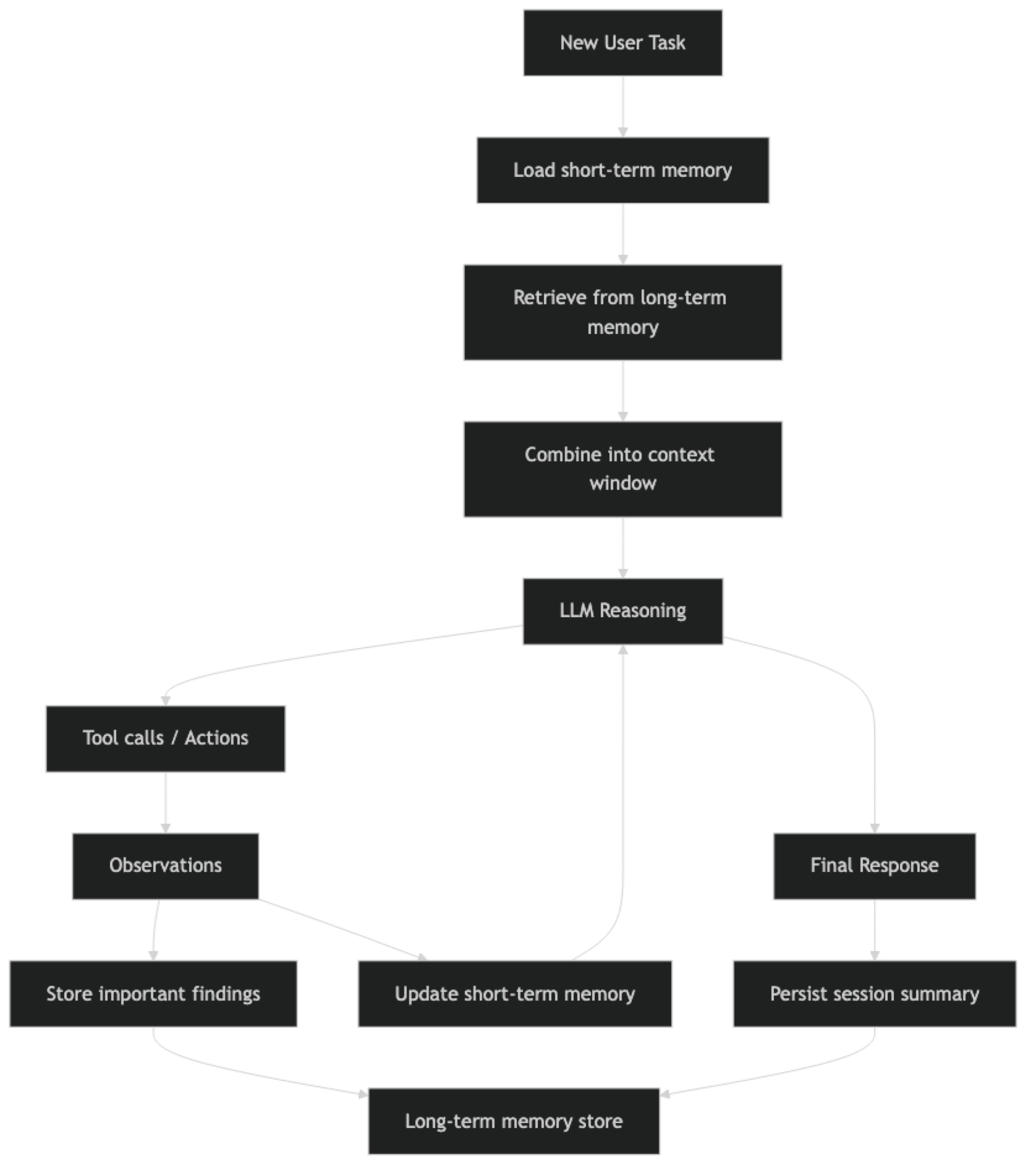
Short-term memory is active throughout the session. Long-term retrieval happens at the start of each session (and sometimes mid-session when the agent explicitly searches memory). Important findings are written to long-term storage throughout execution.
Implementation Example
Short-Term Memory: Conversation Buffer
The simplest memory implementation — just pass the full conversation history.
from langchain_openai import ChatOpenAI
from langchain.agents import AgentExecutor, create_tool_calling_agent
from langchain_core.prompts import ChatPromptTemplate, MessagesPlaceholder
from langchain_core.messages import HumanMessage, AIMessage
from langchain_community.tools import DuckDuckGoSearchRun

llm = ChatOpenAI(model="gpt-4o", temperature=0)
tools = [DuckDuckGoSearchRun()]

prompt = ChatPromptTemplate.from_messages([
    ("system", "You are a helpful research assistant with memory of our conversation."),
    MessagesPlaceholder("chat_history"),   # Short-term memory slot
    ("human", "{input}"),
    MessagesPlaceholder("agent_scratchpad"),
])

agent = create_tool_calling_agent(llm=llm, tools=tools, prompt=prompt)
executor = AgentExecutor(agent=agent, tools=tools, max_iterations=8)

# Maintain history between calls
chat_history = []

def chat(message: str) -> str:
    result = executor.invoke({
        "input": message,
        "chat_history": chat_history
    })

    # Update short-term memory
    chat_history.append(HumanMessage(content=message))
    chat_history.append(AIMessage(content=result["output"]))

    return result["output"]

# Conversation with memory
response1 = chat("Tell me about LangGraph's state management")
response2 = chat("How does that compare to what you just described?")  # Uses memory
Short-term memory is simple but has two problems at scale: it grows unbounded (eventually exceeds the context window), and it does not persist across sessions.
Conversation Summary Memory
For long conversations, summarize older exchanges rather than including them verbatim.
from langchain.memory import ConversationSummaryBufferMemory
from langchain_openai import ChatOpenAI

summary_llm = ChatOpenAI(model="gpt-4o-mini", temperature=0)

memory = ConversationSummaryBufferMemory(
    llm=summary_llm,
    max_token_limit=1000,        # When history exceeds 1000 tokens, summarize
    return_messages=True,        # Return as message objects
    memory_key="chat_history"
)

# The memory automatically summarizes when it gets too long
memory.save_context(
    {"input": "What is LangGraph?"},
    {"output": "LangGraph is a library for building stateful multi-agent systems..."}
)

# Retrieve current memory state
current_memory = memory.load_memory_variables({})
print(current_memory["chat_history"])
Long-Term Memory: Vector Store
This is the pattern that makes agents genuinely useful across sessions. Important information gets stored in a vector store and retrieved via semantic search at the start of new sessions.
from langchain_chroma import Chroma
from langchain_openai import OpenAIEmbeddings
from langchain.tools import tool
from datetime import datetime

# Initialize the long-term memory store
embeddings = OpenAIEmbeddings()
long_term_store = Chroma(
    collection_name="agent_long_term_memory",
    embedding_function=embeddings,
    persist_directory="./agent_memory"
)

class LongTermMemory:
    """Manages semantic long-term memory for an AI agent."""

    def __init__(self, store: Chroma, agent_id: str):
        self.store = store
        self.agent_id = agent_id

    def remember(self, content: str, memory_type: str = "general", importance: int = 5):
        """
        Store information in long-term memory.

        Args:
            content: The information to store
            memory_type: 'fact', 'preference', 'episode', 'insight'
            importance: 1-10 scale, used for relevance filtering
        """
        metadata = {
            "agent_id": self.agent_id,
            "memory_type": memory_type,
            "importance": importance,
            "timestamp": datetime.now().isoformat(),
        }
        self.store.add_texts(texts=[content], metadatas=[metadata])
        return f"Stored: {content[:100]}..."

    def recall(self, query: str, k: int = 5, min_importance: int = 3) -> list[str]:
        """
        Retrieve relevant memories via semantic search.

        Args:
            query: What to search for
            k: Number of memories to retrieve
            min_importance: Filter out low-importance memories
        """
        results = self.store.similarity_search_with_score(
            query=query,
            k=k * 2,  # Over-fetch to allow filtering
            filter={
                "agent_id": self.agent_id,
                "importance": {"$gte": min_importance}
            }
        )

        # Filter by similarity score (lower = more similar in Chroma)
        relevant = [(doc, score) for doc, score in results if score < 0.5]
        relevant.sort(key=lambda x: x[1])  # Sort by relevance

        return [doc.page_content for doc, _ in relevant[:k]]

    def get_session_context(self, current_task: str) -> str:
        """Build a context string from relevant memories for a new session."""
        memories = self.recall(current_task, k=5)

        if not memories:
            return ""

        context = "Relevant information from previous sessions:\n"
        for i, memory in enumerate(memories, 1):
            context += f"{i}. {memory}\n"

        return context

# Usage in an agent session
memory = LongTermMemory(long_term_store, agent_id="user_123")

# Store findings during a session
memory.remember(
    "User prefers code examples in Python 3.11 with type hints",
    memory_type="preference",
    importance=8
)
memory.remember(
    "LangGraph 0.2 introduced native streaming support for agent steps",
    memory_type="fact",
    importance=7
)

# At the start of a new session
task = "How do I implement streaming in my LangGraph agent?"
context = memory.get_session_context(task)
print(context)  # Retrieves the LangGraph streaming fact
Exposing Memory as Agent Tools
The most flexible approach is to give the agent tools to explicitly read and write its own memory.
from langchain.tools import tool

# Create a memory instance at module level
agent_memory = LongTermMemory(long_term_store, agent_id="agent_001")

@tool
def save_to_memory(content: str, importance: int = 5) -> str:
    """
    Save important information to long-term memory for future sessions.
    Use when you find information that will be useful in future conversations.

    Args:
        content: The important information to remember
        importance: How important is this (1-10, default 5)
    """
    return agent_memory.remember(content, importance=importance)

@tool
def search_memory(query: str) -> str:
    """
    Search long-term memory for information relevant to a query.
    Use at the start of a task to check if you have relevant prior knowledge.

    Args:
        query: What to search for in memory
    """
    memories = agent_memory.recall(query, k=3)
    if not memories:
        return "No relevant memories found."
    return "Relevant memories:\n" + "\n".join(f"- {m}" for m in memories)

# Add these tools to your agent's tool list
tools = [search_tool, save_to_memory, search_memory]
When the agent has memory as tools, it can decide when to save and when to retrieve. The system prompt should include explicit instructions about when to use memory tools: "At the start of each task, search your memory for relevant information. When you find important facts, save them for future reference."
Best Practices
Separate memory types by access pattern. Short-term memory (in-context history) handles the current session. Long-term memory (vector store) handles cross-session recall. Trying to use one system for both leads to either expensive context windows or poor retrieval latency.
Be selective about what you store. Not everything the agent encounters belongs in long-term memory. Store facts, insights, user preferences, and learned patterns. Do not store transient search results or intermediate reasoning steps unless they reveal something genuinely novel.
Add metadata to every memory record. Timestamp, memory type, importance score, and session ID are minimum metadata. This lets you filter, expire, and organize memories over time. Memories without metadata become an unsearchable blob.
Implement memory expiration. Stale memories mislead agents. Add a TTL (time-to-live) to episodic memories. Re-evaluate importance scores periodically. Archive rather than delete so you can inspect historical state.
Common Mistakes
Putting the entire conversation history in context for every request. This blows up the context window on long conversations and sends irrelevant early exchanges to the model. Use summary memory or sliding window approaches.
Storing tool observations as memories. Raw tool outputs are noisy and often irrelevant. Instead, have the agent extract key facts or insights from observations before storing them.
Using a single vector store for multiple users. Without proper filtering by user ID, memories from one user leak into another user's retrievals. Always scope memory by agent ID or user ID in the metadata filter.
Not testing retrieval quality. Semantic search is imperfect. Add evaluation for your memory retrieval: for a set of known queries, does the right memory surface in the top 3 results? Poor retrieval quality silently corrupts agent behavior.
Ignoring memory write latency. Writing to a vector store is not instant. If an agent writes many memories per session, the cumulative write time can be significant. Batch writes or write asynchronously where possible.
Key Takeaways
- Agent memory has four types: short-term (in-context), long-term (vector store), episodic (action history), and semantic (domain knowledge) — each solves a different problem
- Short-term memory is simple but limited to the context window and disappears at session end; add it via
MessagesPlaceholder("chat_history") - Use
create_tool_calling_agent(not deprecatedcreate_openai_functions_agent) for reliable tool-use with memory - Import
from langchain_chroma import Chroma(not deprecatedlangchain_community.vectorstores) - Long-term vector memory is the highest-value production upgrade — it lets agents compound knowledge across sessions
- Always add metadata to memory records (timestamp, type, importance, agent ID) — memories without metadata become an unsearchable blob
- Scope every memory record by agent ID or user ID to prevent cross-user leakage in multi-tenant systems
- Expose
save_to_memoryandsearch_memoryas agent tools with clear instructions in the system prompt about when to use each
FAQ
What is the difference between agent memory and RAG? RAG retrieves from a static knowledge base to answer questions. Agent memory retrieves from a dynamic store that the agent itself writes to during operation. Both use semantic search, but RAG knowledge bases are maintained by humans while agent memory evolves through the agent's own experience. A production agent often uses both: RAG for the domain knowledge base, agent memory for user preferences and learned patterns.
How do I prevent memory from growing indefinitely? Add a TTL to episodic memories and delete records older than a threshold. For fact-based memories, implement a review process where low-retrieval-frequency memories are archived. Use importance scores to prioritize which memories to keep when storage limits are reached. Archive rather than delete so you can inspect historical state.
Should I use Chroma, Pinecone, or another vector store for agent memory? For development and small-scale production, Chroma (local, no infrastructure required) is the fastest to set up. For production at scale, Pinecone or Weaviate offer better performance and managed infrastructure. The LangChain vector store interface is consistent across providers, so switching is straightforward once you outgrow Chroma.
How many memories should I retrieve per session? Retrieve 3-7 memories per session as a starting point. Too few misses relevant context. Too many dilutes the signal with noise. Monitor retrieval quality and adjust based on whether retrieved memories are actually useful to the agent — if it is ignoring them, you are fetching too many or the wrong ones.
Can the agent decide what to remember on its own?
Yes, by giving it save_to_memory and search_memory as tools with clear descriptions. The system prompt should instruct when to use them. The agent's judgment about what is worth remembering is imperfect, so combine agent-driven memory with explicit rules (always save user preferences, always save error patterns).
What is the difference between ConversationBufferMemory and ConversationSummaryBufferMemory?
ConversationBufferMemory stores every message verbatim — simple but grows without bound. ConversationSummaryBufferMemory keeps recent messages verbatim and summarizes older ones into a compact form once they exceed a token limit. Use the summary variant for any conversation that may run longer than 10-20 turns.
How do I handle memory for multi-user agents? Never share a single memory store across users. Scope every vector store query with a user ID or session ID filter in the metadata. For production, give each user their own collection or namespace in the vector store. Failing to isolate memory is a privacy leak — user A can inadvertently retrieve memories from user B's sessions.