Agent Frameworks: LangGraph vs AutoGen vs CrewAI Tested (2026)
Last updated: March 2026
LangGraph vs AutoGen vs CrewAI: AI Agent Framework Comparison (2026)
Every few months, a new agent framework launches with promises of making autonomous AI easy. Some of them are actually good. Most are wrappers around the same underlying patterns — ReAct loops, tool calling, multi-agent coordination — with different levels of abstraction and different opinions about what should be configurable.
Choosing the wrong framework early costs you in two ways: you rebuild things the framework handles poorly, and you fight the framework's abstractions when your requirements diverge from its assumptions. Neither problem is fatal, but both are time-consuming.
The frameworks that matter in 2026 for production systems are LangGraph, CrewAI, AutoGen, and (to a lesser extent) AutoGPT. Each has a genuine use case where it outperforms the others. This post gives you a realistic assessment of each, the practical trade-offs, and enough code to understand how each framework feels to work with.
Concept Overview
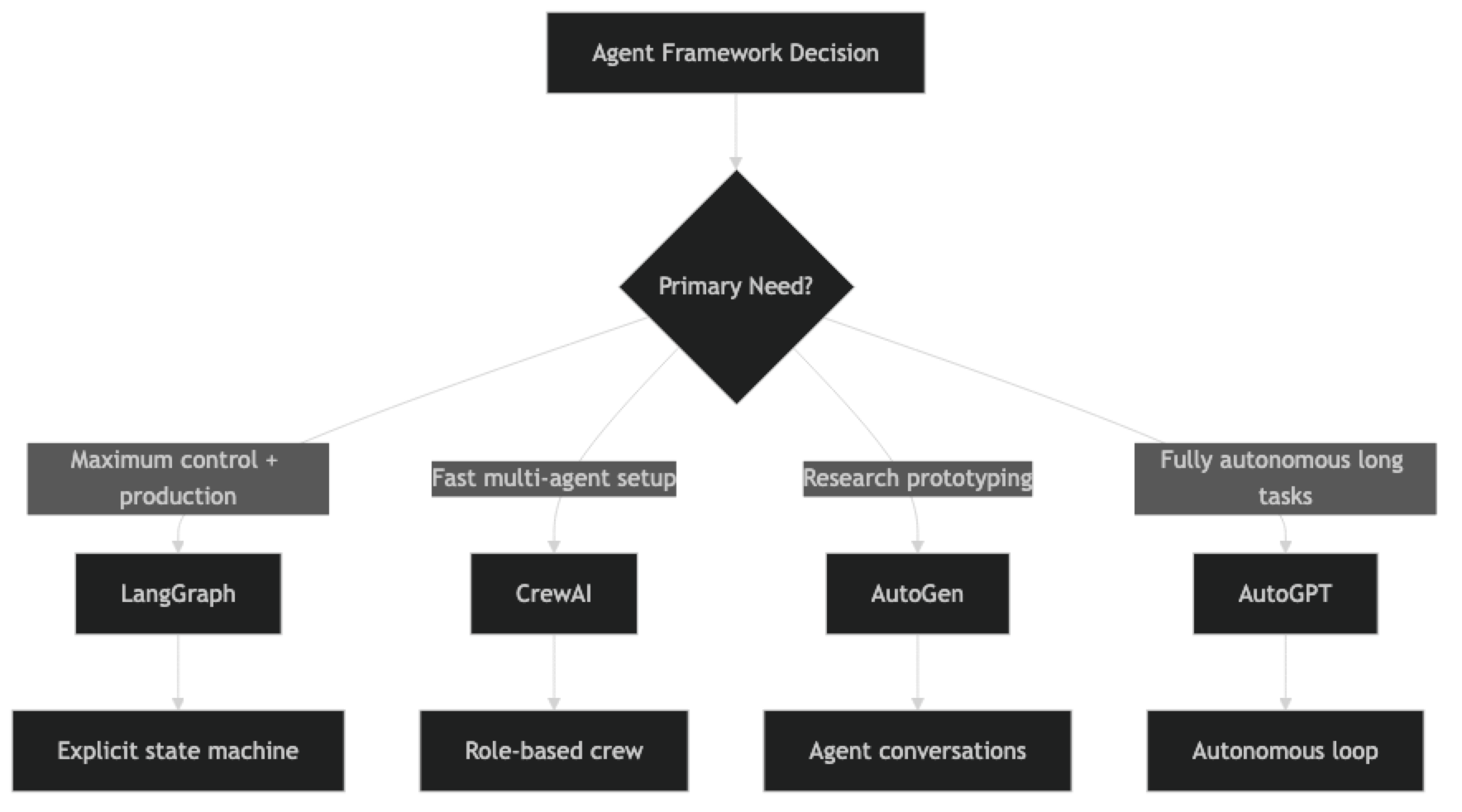
The four frameworks differ on a fundamental dimension: how much control they give you over the agent's behavior versus how much they abstract away.
LangGraph — Maximum control. You define a state machine explicitly. Every transition, every decision point, every piece of state is yours to define. Higher setup cost, lower debugging cost.
CrewAI — Role-based abstraction. Define agents as roles with goals and backstories. The framework handles coordination. Fast to get started with, less flexible when requirements get unusual.
AutoGen — Conversation-based. Agents communicate via structured message-passing. Strong for research prototyping and multi-agent conversations. Weaker production tooling than LangGraph or CrewAI.
AutoGPT — Fully autonomous, minimal human-in-the-loop. Designed for long-running autonomous tasks. The oldest framework but the least production-ready for most business applications.
How It Works
Implementation Example
Framework 1: LangGraph
LangGraph models agents as nodes in a directed graph with a shared typed state. You define the state transitions explicitly, which gives you complete control over the control flow.
from langgraph.graph import StateGraph, END
from langchain_openai import ChatOpenAI
from langchain_community.tools import DuckDuckGoSearchRun
from langchain.agents import AgentExecutor, create_tool_calling_agent
from langchain_core.prompts import ChatPromptTemplate, MessagesPlaceholder
from typing import TypedDict, List

llm = ChatOpenAI(model="gpt-4o", temperature=0)

class ResearchState(TypedDict):
    topic: str
    search_results: List[str]
    analysis: str
    report: str
    status: str  # "searching" | "analyzing" | "writing" | "done"

tools = [DuckDuckGoSearchRun()]

def search_node(state: ResearchState) -> ResearchState:
    """Search for information on the topic."""
    prompt = ChatPromptTemplate.from_messages([
        ("system", "You are a research specialist. Search for comprehensive information."),
        ("human", "Search for: {input}"),
        MessagesPlaceholder("agent_scratchpad"),
    ])
    agent = create_tool_calling_agent(llm, tools, prompt)
    executor = AgentExecutor(agent=agent, tools=tools, max_iterations=5)

    result = executor.invoke({"input": f"Find comprehensive information about: {state['topic']}"})
    return {
        **state,
        "search_results": [result["output"]],
        "status": "analyzing"
    }

def analysis_node(state: ResearchState) -> ResearchState:
    """Analyze search results."""
    context = "\n".join(state["search_results"])
    response = llm.invoke(f"Analyze these research findings and extract key insights:\n\n{context}")
    return {**state, "analysis": response.content, "status": "writing"}

def writing_node(state: ResearchState) -> ResearchState:
    """Write final report."""
    response = llm.invoke(
        f"Write a structured report based on:\n\nResearch: {state['search_results']}\nAnalysis: {state['analysis']}"
    )
    return {**state, "report": response.content, "status": "done"}

def should_continue(state: ResearchState) -> str:
    return state["status"]

# Build graph
builder = StateGraph(ResearchState)
builder.add_node("search", search_node)
builder.add_node("analysis", analysis_node)
builder.add_node("writing", writing_node)

builder.set_entry_point("search")
builder.add_conditional_edges("search", should_continue, {"analyzing": "analysis"})
builder.add_conditional_edges("analysis", should_continue, {"writing": "writing"})
builder.add_edge("writing", END)

graph = builder.compile()

result = graph.invoke({
    "topic": "AI agent frameworks 2026",
    "search_results": [],
    "analysis": "",
    "report": "",
    "status": "searching"
})
print(result["report"])
LangGraph's verbosity is a feature. Every transition is explicit in code, which makes it easy to understand exactly what the system will do.
Framework 2: CrewAI
CrewAI's abstraction level is higher — you define agents by role and intent, not by control flow.
from crewai import Agent, Task, Crew, Process
from langchain_openai import ChatOpenAI
from langchain_community.tools import DuckDuckGoSearchRun

llm = ChatOpenAI(model="gpt-4o", temperature=0)

# Define agents by role — CrewAI handles coordination
researcher = Agent(
    role="Research Analyst",
    goal="Find accurate, comprehensive information from multiple sources",
    backstory="Experienced researcher with strong analytical skills and attention to detail.",
    tools=[DuckDuckGoSearchRun()],
    llm=llm,
    verbose=True,
    max_iter=5
)

analyst = Agent(
    role="Strategic Analyst",
    goal="Extract key insights and patterns from research data",
    backstory="Senior analyst who transforms raw data into actionable insights.",
    tools=[],
    llm=llm,
    verbose=True,
    max_iter=3
)

# Define tasks — context links outputs between tasks
research_task = Task(
    description="Research {topic} thoroughly. Find current information, key statistics, and notable developments.",
    expected_output="Comprehensive research report with sources",
    agent=researcher
)

analysis_task = Task(
    description="Analyze the research findings. Identify patterns, insights, and recommendations.",
    expected_output="Structured analysis with key insights and recommendations",
    agent=analyst,
    context=[research_task]
)

crew = Crew(
    agents=[researcher, analyst],
    tasks=[research_task, analysis_task],
    process=Process.sequential,
    verbose=True
)

result = crew.kickoff(inputs={"topic": "AI agent frameworks comparison 2026"})
print(result)
CrewAI is significantly less code for the same multi-agent workflow. The trade-off is that when something goes wrong, you have less visibility into why.
Framework 3: AutoGen
AutoGen models agents as conversational participants that send messages to each other.
# Note: This uses autogen>=0.4.x API
import autogen

config_list = [{"model": "gpt-4o", "api_key": "your-api-key"}]

# Define agents that communicate through messages
assistant = autogen.AssistantAgent(
    name="ResearchAssistant",
    llm_config={"config_list": config_list},
    system_message="""You are a research assistant. When given a topic:
    1. Research it thoroughly using your knowledge
    2. Provide comprehensive findings
    3. Reply TERMINATE when the task is complete."""
)

critic = autogen.AssistantAgent(
    name="Critic",
    llm_config={"config_list": config_list},
    system_message="""You are a critical reviewer. Review research output and:
    1. Identify gaps or inaccuracies
    2. Request clarification if needed
    3. Reply APPROVED when satisfied with the research."""
)

user_proxy = autogen.UserProxyAgent(
    name="UserProxy",
    human_input_mode="NEVER",      # Fully automated
    max_consecutive_auto_reply=10,
    is_termination_msg=lambda msg: "TERMINATE" in msg.get("content", "") or "APPROVED" in msg.get("content", "")
)

# Start the conversation
user_proxy.initiate_chat(
    assistant,
    message="Research the top AI agent frameworks in 2026. Focus on LangGraph, CrewAI, and AutoGen."
)
AutoGen's message-passing model is intuitive for workflows that resemble back-and-forth conversations between experts. It is less suited to workflows with complex conditional branching.
Framework 4: AutoGPT (reference)
AutoGPT is the original autonomous agent framework. Its API is distinct from the others and better suited to long-running autonomous tasks than interactive business workflows.
# AutoGPT 0.5.x — simplified example showing the plugin architecture
# In practice, AutoGPT is typically run as a standalone application
# rather than embedded in Python code

# AutoGPT configuration (autogpt/config.yaml):
# ai_goals:
#   - Research AI agent frameworks released in 2026
#   - Compare LangGraph, CrewAI, and AutoGen
#   - Write a comprehensive comparison report to ai_frameworks_2026.md
#   - Verify accuracy by cross-referencing at least 3 sources

# AutoGPT runs autonomously, using plugins for web browsing,
# file writing, and code execution.
# It is best used via the Docker image or the official web interface.
print("AutoGPT is typically run as a standalone application.")
print("See: https://github.com/Significant-Gravitas/AutoGPT")
Framework Comparison Table
| Dimension | LangGraph | CrewAI | AutoGen | AutoGPT |
|---|---|---|---|---|
| Setup complexity | High | Low | Medium | Low (app) |
| Control over flow | Full | Limited | Moderate | Minimal |
| Multi-agent support | Yes | Yes (primary focus) | Yes | Limited |
| Production readiness | High | Medium-High | Medium | Low |
| Debugging ease | High | Medium | Medium | Low |
| Community size | Large | Large | Medium | Large |
| Streaming support | Yes | Partial | Partial | No |
| State persistence | Yes (Redis, etc.) | Limited | Limited | File-based |
| Best for | Production systems | Role-based workflows | Research prototypes | Autonomous tasks |
Best Practices
Use LangGraph when control flow complexity matters. If your agent has conditional branches, error recovery paths, human-in-the-loop steps, or complex state, LangGraph's explicit state machine will save you debugging time. The upfront cost is worth it.
Use CrewAI for role-based workflows you need to ship quickly. Market research, content pipelines, report generation — any workflow where agents have clear roles and a linear sequence works well in CrewAI. If your requirements are stable, CrewAI's abstractions accelerate delivery.
Choose AutoGen for conversational multi-agent research. If the workflow genuinely resembles experts collaborating through dialogue, AutoGen's message-passing model is natural. Avoid it for workflows that require precise control over execution order.
Prototype in any framework, but standardize on one for production. Mixing frameworks in production creates operational complexity. Pick the framework that fits your most common use case and standardize on it.
Common Mistakes
Choosing CrewAI for everything because it is the easiest to start with. CrewAI's abstractions hide important details. When you need to add a conditional branch, retry logic, or custom state management, you will fight the framework rather than building on it.
Underestimating LangGraph's setup cost. LangGraph requires you to define every node, edge, and state transition explicitly. This is a feature for production systems but a burden for prototypes. Match the tool to the stage of development.
Using AutoGPT for business-critical workflows. AutoGPT is designed for exploration, not production. Its error recovery and observability are insufficient for workflows where failures have real consequences.
Not accounting for framework-level token overhead. Each framework adds its own prompting overhead — system messages, coordination instructions, role descriptions. Benchmark actual token usage with your specific tasks before committing.
Ignoring the framework's update velocity. All four frameworks are actively developed and their APIs change frequently. Pin your versions, read changelogs before upgrading, and test after every version bump.
Key Takeaways
- LangGraph is the right choice for production systems that need fine-grained control, complex state management, and high debuggability — worth the higher setup cost
- CrewAI ships faster for role-based multi-agent workflows with stable requirements; trade-off is reduced visibility when things go wrong
- AutoGen fits conversational multi-agent research prototypes; not the right choice for production systems requiring precise execution order
- AutoGPT is designed for exploration, not production — insufficient error recovery and observability for business-critical workflows
- Use
create_tool_calling_agent(not deprecatedcreate_openai_functions_agent) in LangGraph node functions - Pin framework versions and read changelogs before upgrading — all four frameworks have active, breaking-change API updates
- Benchmark actual token overhead per framework for your specific task before committing — each framework adds its own prompting overhead
- Standardize on one framework for production; mixing frameworks in the same system creates operational complexity
FAQ
Which framework is best for production use in 2026? LangGraph is the most production-ready option for systems that require control, observability, and complex state management. CrewAI works well in production for straightforward role-based workflows where requirements are stable. AutoGen and AutoGPT require significantly more scaffolding to reach production quality and are better suited to research and prototyping.
Can I use LangGraph with CrewAI in the same project? Yes, but it adds complexity. A common pattern is to use LangGraph for the overall orchestration graph and CrewAI for specific crew-based sub-tasks within one node. Unless there is a clear reason to mix frameworks, standardizing on one is easier to maintain, test, and debug.
Is LangGraph harder to learn than CrewAI? Yes, significantly. CrewAI has a higher-level API that hides most of the agent machinery. LangGraph requires understanding state machines, node functions, and conditional routing. The payoff is proportionally higher control and debuggability — production teams consistently report that LangGraph's verbosity is a feature, not a bug, when debugging failures.
How does AutoGen compare to LangGraph for multi-agent systems? LangGraph gives you explicit control over how agents interact and what state they share. AutoGen is more conversational — agents exchange messages and respond to each other more naturally. LangGraph is better for production systems where execution order and state management matter. AutoGen is better for research prototypes and workflows that genuinely resemble expert dialogue.
What happened to BabyAGI and similar early frameworks? Early frameworks like BabyAGI proved the concept of autonomous agents but are not maintained at production quality. The ecosystem has consolidated around LangGraph, CrewAI, and AutoGen for serious work. Use those rather than abandoned experimental projects.
How do I choose between CrewAI and LangGraph for a new project? Start with CrewAI if: the workflow has clear roles, the sequence is linear, and you need to ship quickly. Start with LangGraph if: you need conditional branching, human-in-the-loop interrupts, custom state that persists across steps, or production-grade observability. If you are unsure, the question is "do I need to control the flow explicitly?" — yes means LangGraph, no means CrewAI.
Does framework choice affect cost? Yes. Each framework adds its own system prompts and coordination messages. CrewAI's role descriptions and inter-agent communication add tokens. LangGraph node prompts are fully in your control. Benchmark total token usage per task (not just the LLM calls you write) before committing to a framework at scale.